Trends & Insights
MMP Numbers Don't Match Your Ad Platform? Here's What It's Costing Your Subscription Funnel
2026
.
3
.
11
By
Team Airbridge


Meta reports 1,200 installs. Your MMP says 780. RevenueCat logs 95 paid subscribers. Three dashboards, three numbers, three versions of which channel is working — and none of them agree.
This is not a reporting inconvenience. It is a budget decision made on fiction. When your channel numbers don't match, every dollar you shift between Meta and Google is a guess. Growth teams scale the channel that looks cheapest while starving the one that actually drives paying subscribers.
Key Takeaways
If you run paid acquisition for a subscription app, you've seen this: three tabs open — Meta Ads Manager, your MMP dashboard, and RevenueCat — and the numbers don't match. By enough to change which channel you'd invest in next month.
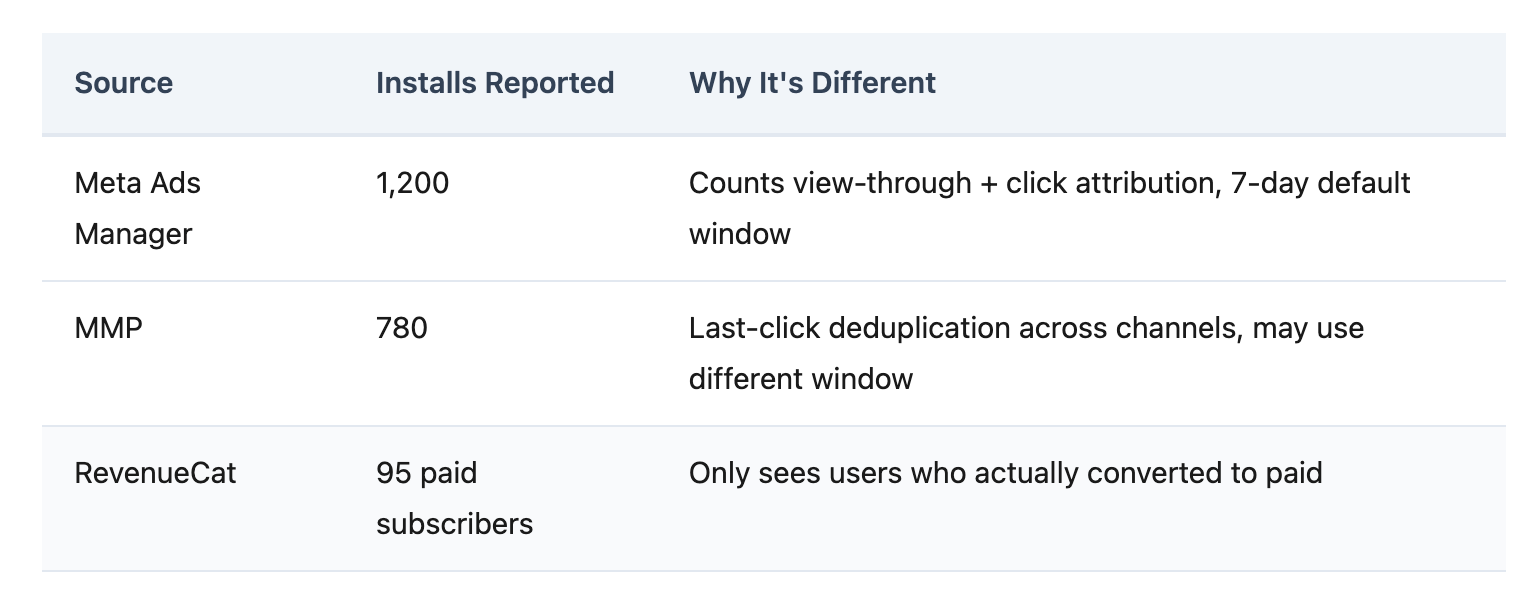
Some discrepancy is inevitable. Different systems define installs differently. Industry guidance suggests data gaps within 10% are tolerable (Growthpedia). But for subscription apps, the error compounds past install level — and that's where budget decisions break.
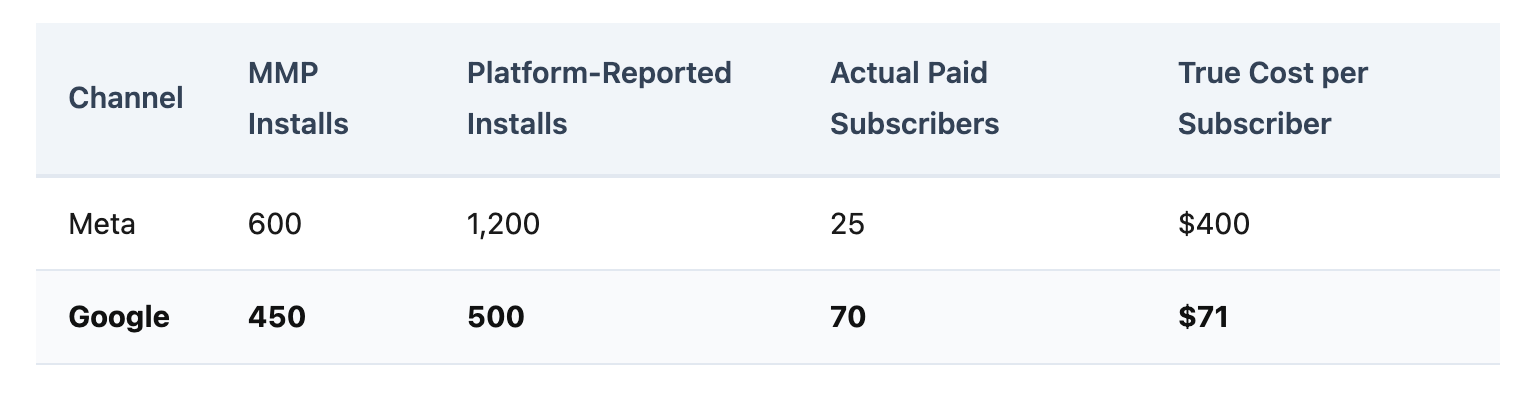
Consider what happens when a team uses platform-reported installs to allocate budget:
Meta looks like the clear winner — double the installs. But Google produces 2.8x more paying subscribers at one-fifth the cost. Without subscription-level attribution, budget flows to Meta for months before anyone catches the mistake. Three months of scaling the wrong channel at $10K/month = $30K misallocated.
Platform-reported conversions can be inflated by 40-60% compared to actual revenue data (EC Digital Strategy). When your ROAS looks like 5x on the Meta dashboard but the real number is 2.5x, every optimization decision is based on fiction.
The numbers mismatch is not a configuration error. It is built into how ad platforms, MMPs, and subscription billing systems work.
Self-Attributing Networks (SANs) — Meta, Google, TikTok — report their own conversion numbers, including view-through attribution. They cannot see other channels, so they cannot deduplicate. Your MMP applies last-click deduplication, which reduces the total. Both systems are technically correct within their own definitions — but only one can be used for budget decisions.
The discrepancy gets worse at every stage:
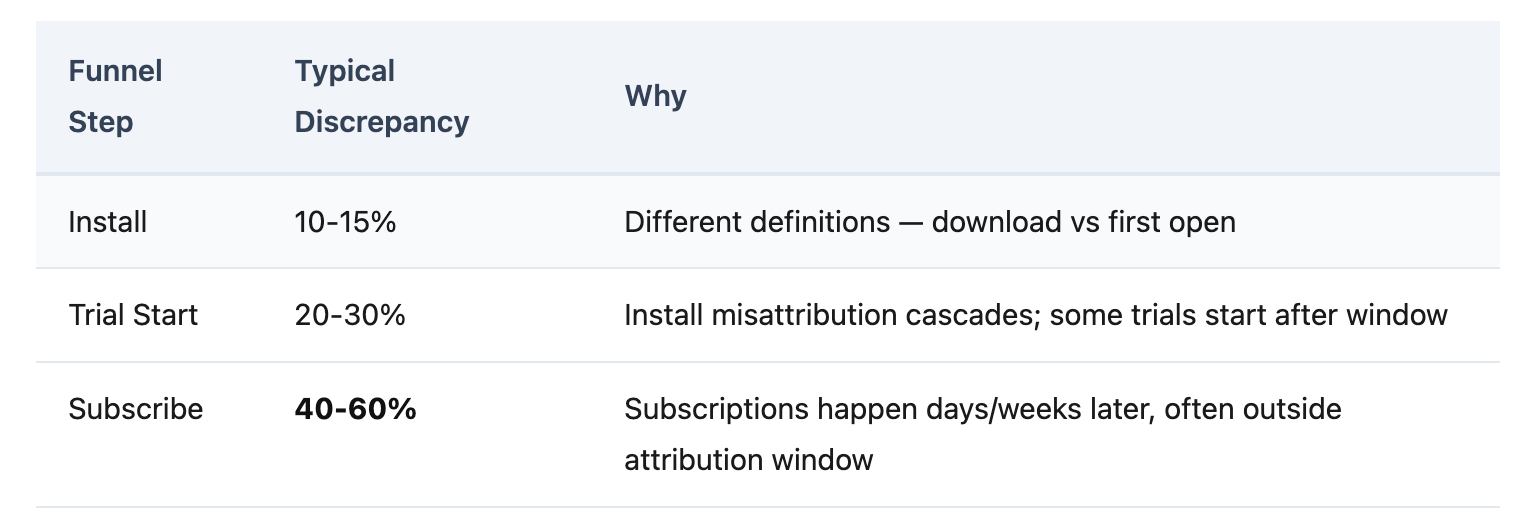
By the time you reach subscription events — which happen 7-14 days after install, often after the attribution window closes — channel-level subscription numbers carry the highest error margins in your entire measurement stack.
Your MMP tracks which ad drove the install. RevenueCat tracks who subscribed. These two systems don't talk to each other natively in most enterprise MMPs. Growth teams fill the gap with weekly spreadsheet exports — a manual process that costs 4-8 hours per week and still produces numbers they don't fully trust.
Fixing the mismatch requires four changes to your measurement stack. Each can be done manually — or accelerated with the right tool.
The problem: Each SAN uses its own attribution logic. Meta counts view-through. Google counts search clicks. Your MMP applies last-click. Different models per channel = incomparable numbers.
How to solve it: Standardize on one attribution model — typically last-click or last-touch — and apply it uniformly across all channels. Ensure your MMP configuration doesn't vary attribution rules by network.
With Core Plan: One consistent attribution model across all four GMAT channels — Google, Meta, Apple Search Ads, and TikTok. One model, one set of rules, one set of numbers.
The problem: Subscription revenue lives in RevenueCat or Adapty. Attribution data lives in your MMP. Without a connection, channel-level subscription revenue doesn't exist in any single dashboard.
How to solve it: Build a server-to-server integration that parses RevenueCat webhooks, matches user IDs to attributed installs, and forwards subscription events to your MMP API. Handle edge cases — billing retries, grace periods, family sharing. Budget at least a week of engineering time.
With Core Plan: Native RevenueCat and Adapty integration — subscription events flow automatically without building a custom backend. Core Plan supports a maximum of 2 third-party integrations by design, keeping setup focused.
The problem: A 7-day attribution window cannot capture subscriptions from a 7-14 day free trial. Every subscription that falls outside the window is counted as organic — hiding the true value of paid channels.
How to solve it: Set your attribution window to exceed your longest trial period. If your trial is 14 days, configure a 21-30 day click-through window. Verify that subscription events still link back to the original install source.
With Core Plan: Configurable Attribution Rules let teams set windows appropriate for subscription conversion cycles. Standard subscription events — Start Trial, Subscribe, Unsubscribe, Order Complete, Order Cancel — maintain linkage to the acquisition source through the full trial-to-paid journey.
The problem: Install deduplication alone doesn't solve the numbers mismatch. You need to see Install → Trial → Subscribe conversion rates by channel, with deduplicated attribution at every step — not just at install level.
How to solve it: If your MMP supports funnel reports, configure them to track the full subscription path. If not, export data weekly and build the view in a BI tool — adding manual work and data lag.
With Core Plan: Funnel Report shows conversion rates at each step — Install → Trial → Subscribe — broken down by channel and campaign. Revenue Report attributes actual subscription revenue to acquisition sources, enabling true ROAS at the subscription level. Both included at the base tier.
Before: Friday afternoon. You open Meta, your MMP, and RevenueCat in three tabs. Export CSVs. Match user IDs in Google Sheets. Two hours later, you have a number you still don't fully trust. Budget review is Monday.
After — with Core Plan: One dashboard. Funnel Report shows Install → Trial → Subscribe by channel, with RevenueCat subscription data connected automatically. The number matches your billing data. Budget review takes 10 minutes.
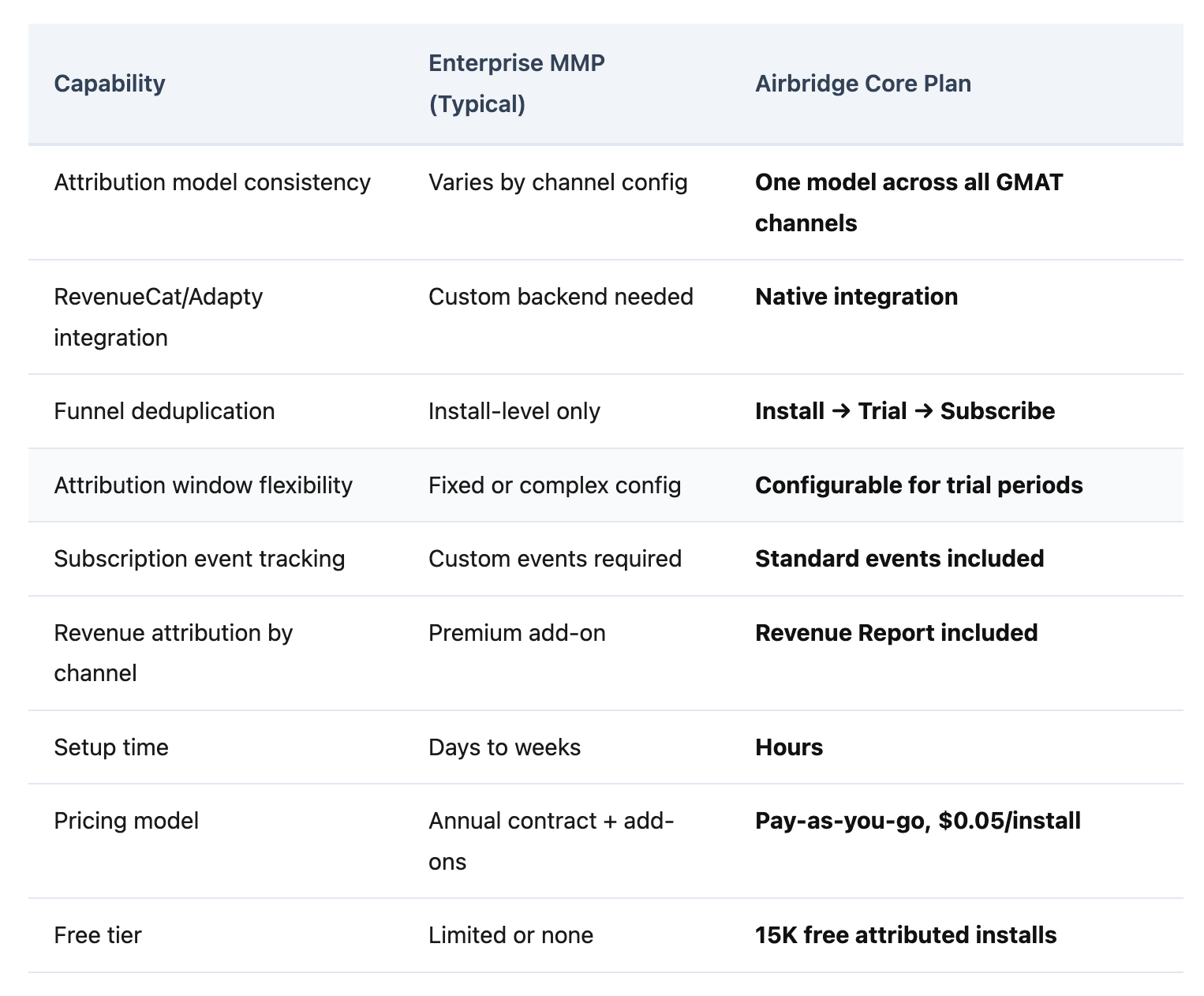
Pricing: 15K free attributed installs, $0.05 per install after. A team generating 30K attributed installs per month pays $750/month — with every feature included. No add-ons, no premium modules.
Meta is a Self-Attributing Network (SAN) — it reports its own conversion numbers, including view-through attribution. Your MMP applies last-click deduplication across channels, which removes duplicates and view-through claims. The numbers differ because each system defines "credit" differently. Neither is wrong within its own framework, but only the MMP provides a deduplicated cross-channel view.
Most enterprise MMPs require a custom server-to-server integration: parsing RevenueCat webhooks, matching user IDs, and forwarding events to the MMP API. Core Plan includes native RevenueCat integration — subscription events flow automatically without building a custom backend. Setup connects in hours, not weeks.
At install level, data gaps within 10% are generally tolerable. But for subscription apps, install-level tolerance doesn't apply to funnel data. The error compounds at each step — if your channel-level subscription numbers carry more than 15-20% discrepancy from your billing source of truth, your attribution data is not reliable enough for budget decisions.
Every dollar moved between channels based on wrong numbers is a dollar that could have driven a paying subscriber. Attribution discrepancy is not a data problem — it is a budget problem that compounds every month it goes unfixed.
Subscription apps need one system that connects ad attribution to subscription billing — not three dashboards and a spreadsheet.


.webp)