Trends & Insights
Which Ad Campaign Actually Drives Subscriptions? Why Your MMP Can't Answer
2026
.
3
.
11
By
Team Airbridge


A Meta campaign reports 2,000 installs. Google Ads claims 1,400. Your MMP attributes 900 to paid channels. RevenueCat logs 65 paid subscribers — but none of your dashboards can tell you which campaign actually produced those 65 subscribers.
That gap between install numbers and subscription revenue is the central measurement failure of subscription app marketing. When you cannot connect ad spend to paying subscribers, every budget decision is a guess.
If you run paid acquisition for a subscription app, you can answer "how many installs did my Meta campaign drive?" But you cannot answer "how many of those installs became paying subscribers?"
This creates a dangerous pattern in budget allocation:
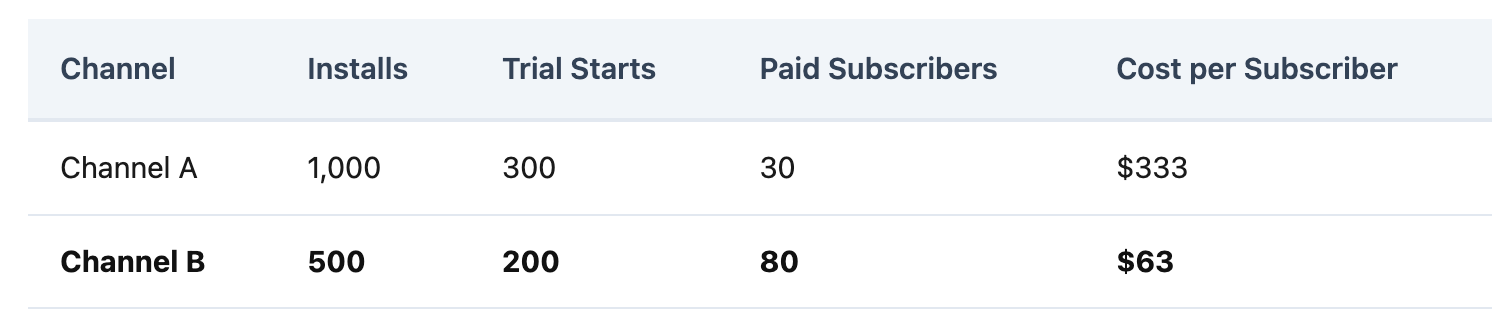
If your MMP only shows install data, Channel A looks like the winner — double the installs. But Channel B produces 2.7x more paying subscribers at one-fifth the cost. Without subscription-level attribution, budget flows to Channel A for months before anyone catches the mistake.
This is the blind spot: the data you have — installs — tells a different story than the data you need — subscriptions. And the mistake compounds. Every week without subscription-level attribution reinforces the wrong allocation — budget keeps flowing to the wrong channel while the right one gets cut.
The disconnect is structural, not a configuration problem.
Subscription apps typically offer a 7 to 14-day free trial. If the MMP's attribution window is shorter than the trial period, the connection between ad click and subscription is broken. For a 7-day free trial, 100% of subscription conversions happen at or after day 7. If attribution cannot span this window, every subscription is unattributed.
When a user subscribes, the payment is processed by Apple or Google — not by the app. Subscription state changes happen on Apple and Google servers while the app may not be running. Device-side attribution SDKs cannot capture these events. The MMP needs a server-to-server connection to receive subscription data — and most enterprise MMPs require developers to build this infrastructure manually.
Subscription platforms like RevenueCat and Adapty know exactly who subscribed, renewed, or churned. But most MMPs do not integrate with them natively. Without a direct connection, subscription revenue sits in one system and attribution data sits in another. Growth teams fill the gap with weekly spreadsheet exports — a manual data pipeline that costs 4-8 hours per week and still produces numbers they don't fully trust.
To make things worse, many enterprise MMPs gate subscription revenue attribution behind premium add-ons — meaning the measurement you need most costs extra on top of the base plan.
Fixing subscription attribution requires four changes to your measurement stack. Each one can be done manually — or accelerated with the right tool.
The problem: Subscription revenue lives in RevenueCat or Adapty. Attribution data lives in your MMP. Without a connection, channel-level subscription revenue doesn't exist.
How to solve it: Build a server-to-server integration that parses RevenueCat webhooks, matches user IDs to attributed installs, and forwards subscription events to your MMP API. You will need to handle edge cases — family sharing, billing retries, grace periods — that create mismatches between your MMP's install records and RevenueCat's subscriber records. Budget at least a week of engineering time.
With Core Plan: Native RevenueCat and Adapty integration — subscription events flow automatically without building a custom backend. Setup takes hours, not weeks.
The problem: Most MMPs require custom event schemas to track subscription actions. Designing schemas, coordinating with engineering, and testing takes weeks — and one misconfigured event breaks the entire funnel view.
How to solve it: Define a minimum event set — Start Trial, Subscribe, Unsubscribe, Order Complete — and build the SDK implementation. Test each event end-to-end before relying on the data.
With Core Plan: Standard subscription events are pre-defined with fixed schemas. Start Trial, Subscribe, Unsubscribe, Order Complete, Order Cancel — no custom event design, no schema planning. Core Plan does not support custom events by design: standard events cover the subscription funnel without the complexity.
The problem: A 7-day attribution window cannot capture subscriptions from a 7-14 day free trial. Every subscription that falls outside the window is counted as organic — hiding the true value of paid channels.
How to solve it: Configure your MMP's attribution window to exceed your longest trial period. If your trial is 14 days, set a 21-30 day click-through window. Verify that post-window subscription events still link back to the original install source.
With Core Plan: Configurable Attribution Rules let teams set windows appropriate for subscription conversion cycles. Standard subscription events maintain linkage to the acquisition source through the full trial-to-paid journey.
The problem: Install deduplication alone is not enough. You need to see Install → Trial → Subscribe conversion rates by channel — and revenue attributed to each acquisition source.
How to solve it: If your MMP supports it, configure funnel reports that track progression from install through trial to paid subscription. If not, export data and build the view in a BI tool — adding another layer of manual work and data lag.
With Core Plan: Funnel Report shows conversion rates at each step — Install → Trial → Subscribe — broken down by channel and campaign. Revenue Report attributes actual subscription revenue to acquisition sources, enabling true ROAS calculation at the subscription level. Both are included at the base tier, not behind a premium add-on.
Before: You export MMP install data and RevenueCat subscription data into Google Sheets every Friday. Match user IDs. Calculate CPS by channel manually. Two hours later, you have numbers you don't fully trust. Budget review is Monday.
After — with Core Plan: One dashboard. Funnel Report shows Install → Trial → Subscribe by channel. Revenue Report shows subscription revenue per acquisition source. Budget review takes 10 minutes — with numbers that match your billing data.
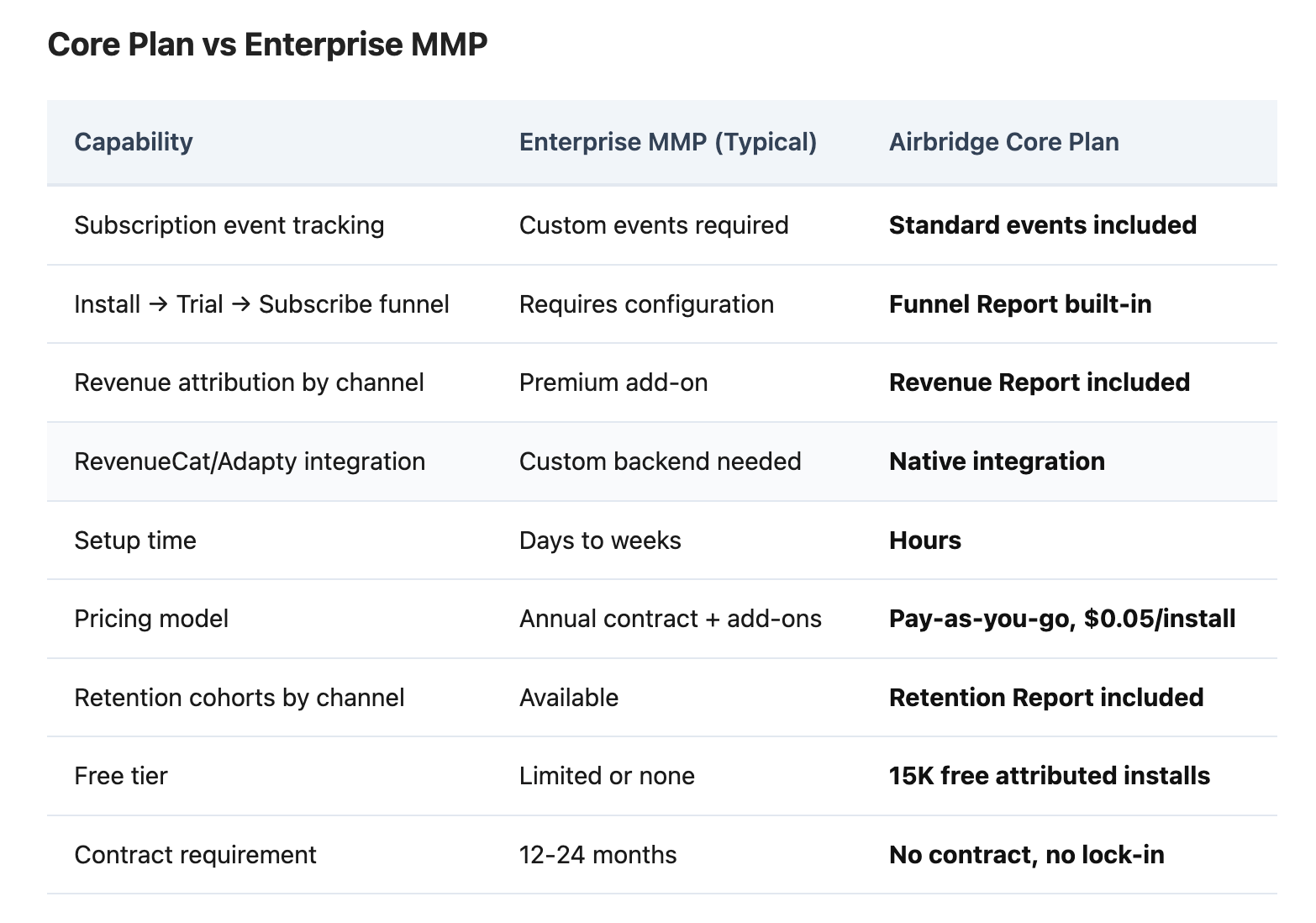
Pricing: 15K free attributed installs, $0.05 per install after. A team generating 30K attributed installs per month pays $750/month — with every feature included. No add-ons, no premium modules.
You need an MMP that tracks the full subscription funnel — install, trial start, and paid subscription — and attributes each step to the acquisition source. This requires standard subscription event tracking and integration with your billing platform. Without this connection, subscription revenue remains unattributed.
Three structural reasons: subscription conversions happen after the attribution window closes, subscription payments are processed server-side by Apple and Google, and many MMPs gate revenue attribution behind premium tiers. If your MMP requires a paid add-on for revenue attribution, the base plan only provides install-level data.
Core Plan covers the subscription attribution baseline: standard events, GMAT channels (Google, Meta, Apple Search Ads, TikTok), RevenueCat/Adapty integration, and 6 reports. Consider upgrading when you need custom event tracking, fraud detection, raw data export, or attribution for ad networks beyond GMAT. These are Growth Plan capabilities designed for teams at a different maturity stage.
The question your subscription business depends on is not "how many installs did we get." It is "which ads produce paying subscribers who renew." An MMP that cannot answer this question provides install deduplication — useful, but not worth enterprise pricing when ad platforms already report installs for free.
Subscription funnel attribution — install → trial → subscribe by channel, with billing data connected — should be the baseline, not a premium add-on.