Mobile Attribution Without an MMP: What the Free Stack Covers and When You Need More

On this page
Can you do mobile attribution without an MMP?
Yes. A subscription app running one or two paid channels can measure a lot for free: Apple Ads through Apple's AdServices framework, Google Ads through Firebase, Meta and TikTok through their own SDKs, and creators through campaign links. What the free stack doesn't give you is one answer per subscriber across all of those channels at once. That is the point where a mobile measurement partner (MMP) starts to pay for itself.
Tools that do this
-
Free stack: Apple AdServices, Firebase or Google Analytics linked to Google Ads, each ad platform's SDK, App Store Connect campaign links, the Google Play Install Referrer, and your subscription platform's ad integrations.
-
One view across channels: an MMP. Airbridge Core connects RevenueCat, Adapty or Superwall with Meta, Google, Apple Ads and TikTok, and syncs ad spend from each automatically. Try it free for 30 days, then from $40 per month.
The question comes up in almost every founder thread about attribution. In one recent Reddit thread, the advice for tracking a Google campaign was: "configure firebase and add the event in your app. Connect firebase to google ads ... Done!" For that one channel, that is good advice. The rest of this post looks at each channel the same way, then at what happens when you run three of them at once.
What does the free stack cover, channel by channel?
| Channel | Free tool | What it tells you |
|---|---|---|
| Apple Ads | AdServices framework + Apple's Attribution API | Campaign, ad group, ad and keyword for each download from an Apple Ads click (30 days) or view (24 hours). Your app requests a token on launch and sends it to Apple within 24 hours. With search match on, the keyword ID isn't returned. |
| Google Ads app campaigns | Firebase or Google Analytics linked to Google Ads | In-app events you choose, such as a trial start, imported as conversions so the campaign can optimize for them. |
| Meta, TikTok | Each platform's SDK, plus server-side events | Installs and in-app events for that platform's own campaigns. Subscription platforms can send trial and subscription events server-side: RevenueCat, for example, sends StartTrial and Subscribe events to Meta's Conversions API, next to the Meta SDK. |
| Creators and posts (iOS) | App Store Connect campaign links | Impressions, product page views, downloads, sales and subscriptions for each campaign token you create, in aggregate. |
| Creators and posts (Android) | Google Play Install Referrer | The referrer of each install (for example, the UTM tags you add to your Play link), read on the device. Play Console's Store performance report also shows store listing acquisitions by UTM campaign, in aggregate. |
| Revenue | Your subscription platform | Trials, conversions, renewals, refunds and MRR. The source of truth for what you earn. |
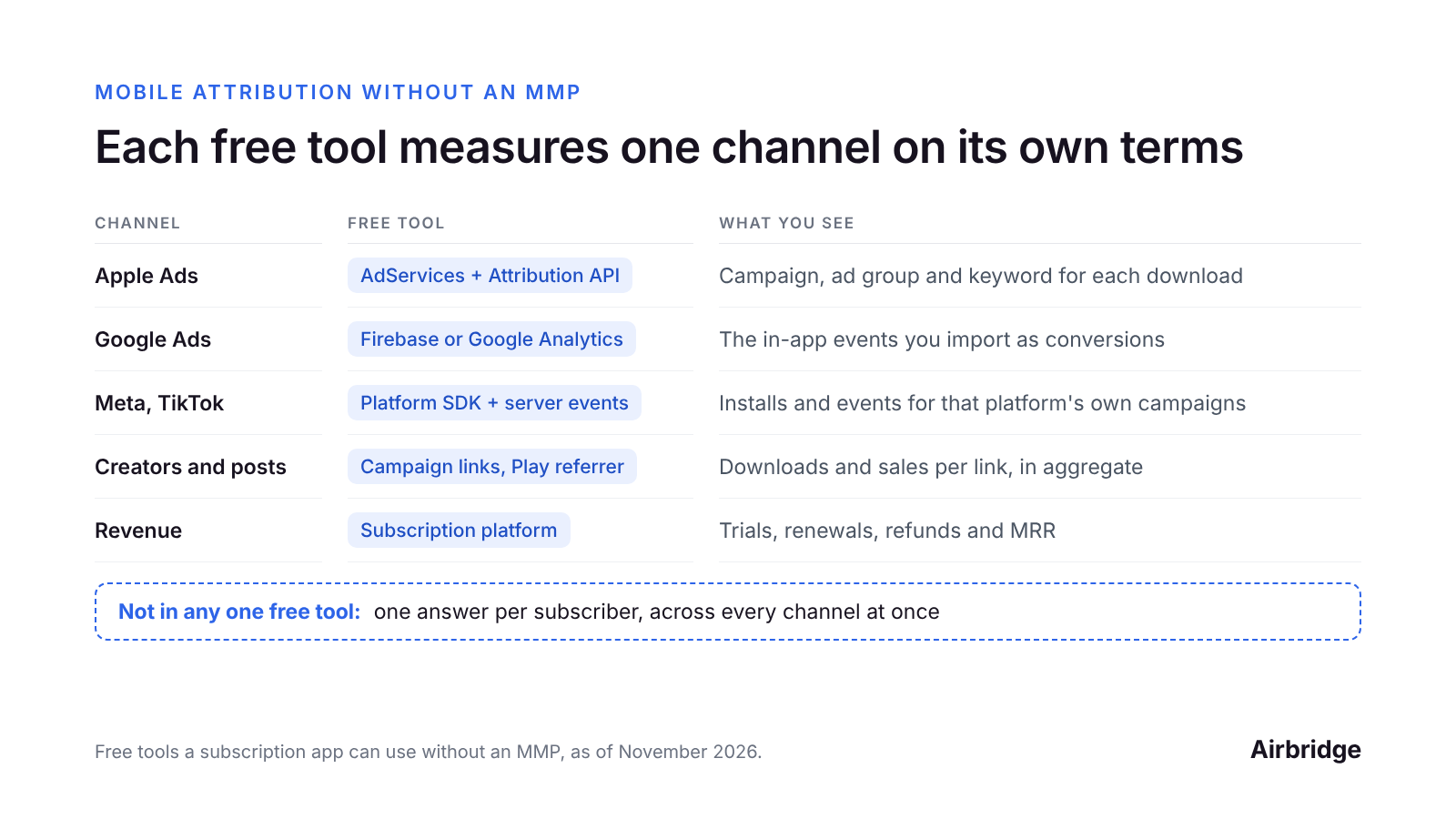
Each free tool measures one channel on its own terms; none of them gives one answer per subscriber across every channel.
If you only run Apple Ads, the first row plus your subscription platform answers most questions. If you only run Google, the second row does. The free stack is built for one channel at a time, and it does that job well.
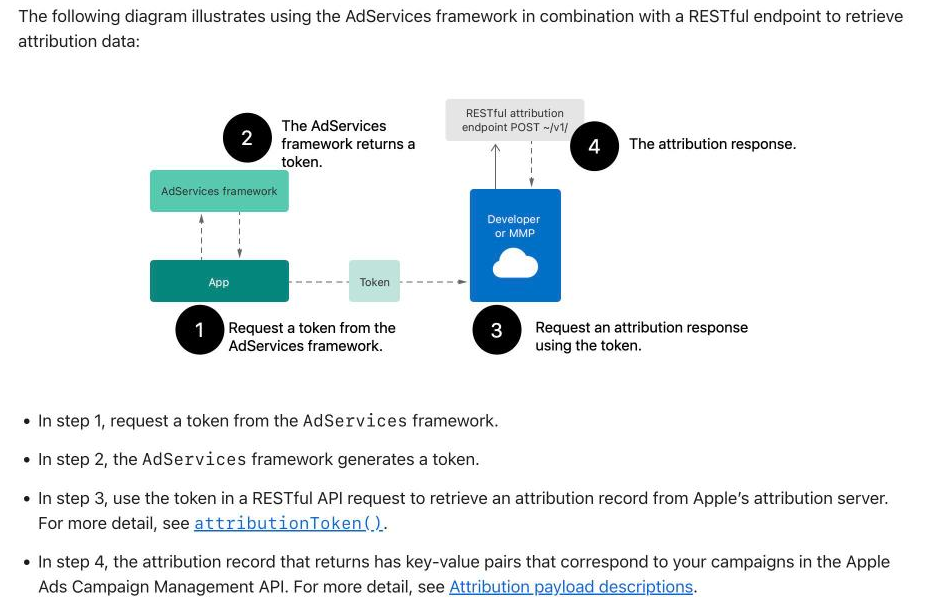
Apple Ads attribution without an MMP: your app requests a token from AdServices and sends it to Apple's Attribution API, which returns the campaign, ad group and keyword. Source: Apple Developer Documentation
Where does the free stack stop?
1. Every dashboard reports its own campaigns
Each ad platform credits installs with its own rules and its own click and view windows. When two platforms both reached the same person, both can count the install. A founder spending about $4,000 a month on two platforms put it this way: "Both dashboards claim more installs than App Store Connect and Play Console show combined." Neither dashboard is wrong by its own rules. There's just no referee.
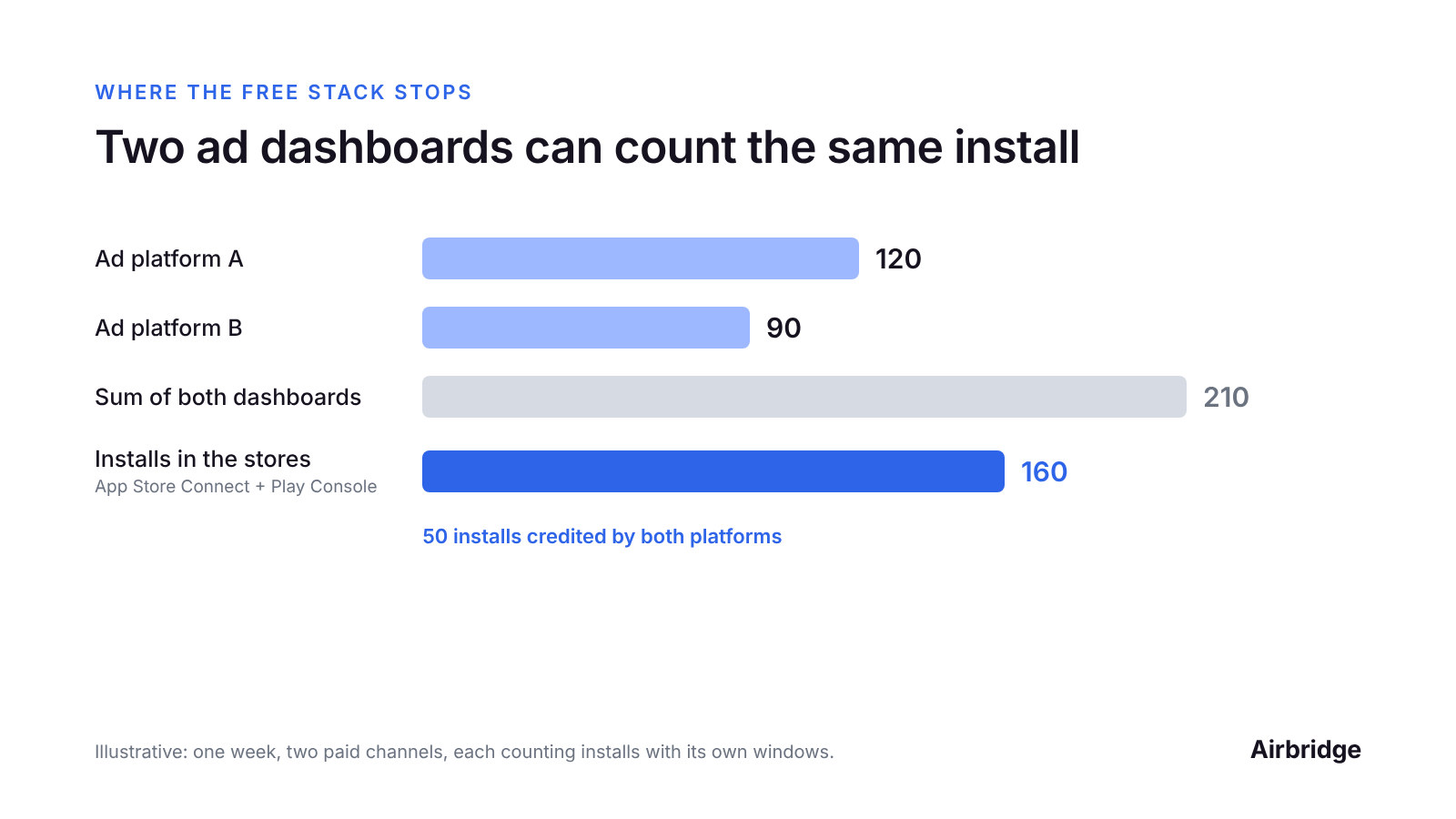
Illustrative example: when two platforms reach the same people, the sum of their dashboards can be higher than the installs the stores report.
2. Revenue and the channel live in different places
Your subscription platform knows who paid. Each ad dashboard knows who it reached. Unless a source is attached to each user at install, the two never meet. One founder who looked closely found that "382 of my 528 first purchases since July have no source attached, so I couldn't credit users to channels."
3. Campaign links count downloads, not subscribers per creator
App Store Connect campaign links are a great free signal, but they report in aggregate. A metric appears once it reaches a minimum of 5 in the date range, and small groups of users can be withheld or combined to protect privacy. You'll see that a creator's link brought downloads and sales. You won't follow those users from trial to their third renewal. Viewers who search the App Store instead of tapping the link aren't counted at all; we cover that case in creator attribution when viewers skip the link.
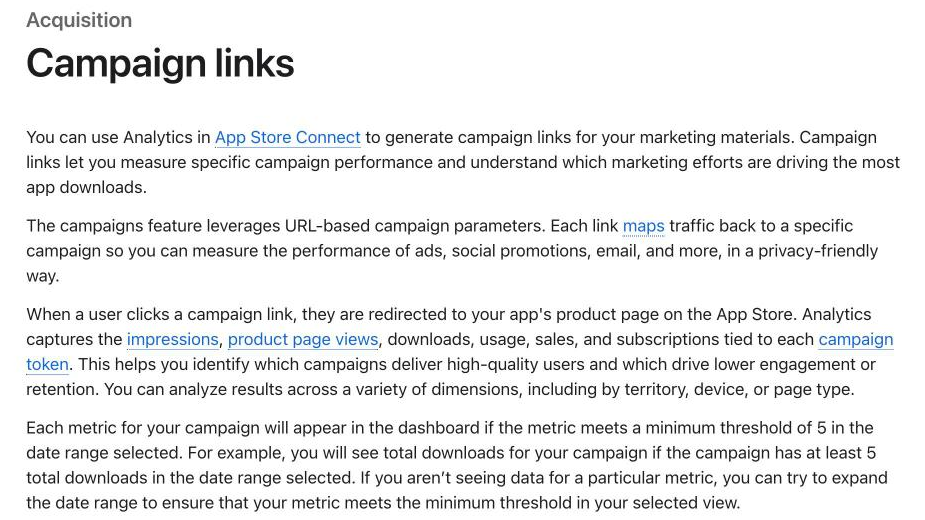
Campaign links report impressions, product page views, downloads, sales and subscriptions per campaign token, once each metric reaches 5 in the date range. Source: App Store Connect Help
4. On iOS, one app has one conversion value
On iOS, ad platforms measure many campaigns through SKAdNetwork, which reports a conversion value your app sets (Meta also uses Aggregated Event Measurement). The app has one value, so only one source should update it. RevenueCat's docs say it directly: "use one updater, such as your app, the Meta SDK, or a mobile measurement partner (MMP), so conversion values don't conflict." With one network, the network's SDK can own it. With three, someone has to design one scheme that works for all of them.
5. Spend lives in four tabs
Cost per trial by channel needs spend and trials side by side. With the free stack, that is a weekly spreadsheet: export spend from each platform, export trials from your subscription platform, and match them by hand. It works. It also gets skipped the week you are busiest.
Want to see how Mobile attribution without an MMP works with your data?
Get hands-on with Airbridge and see real results.
Try It Free →Is the free stack still enough for you?
Stay with the free stack if:
-
You run one paid channel, for example Apple Ads only, or Google only.
-
You work with one or two creators at a time and read store data weekly.
-
You sell only in the app, not on the web.
-
You can still answer "which channel brought last month's payers?" in a few minutes.
Add an MMP when:
-
You run two or more paid channels on iOS.
-
Your dashboards add up to more installs than the stores show.
-
You pay creators and want cost per subscriber, not cost per download, for each one.
-
You have a web paywall or web checkout next to in-app purchases (web-to-app attribution).
-
You want every network to optimize for the same trial event (trial starts, not installs).
A quick cost check: at $1,000 a month in ad spend, a $40 plan is 4% of the budget. The question is whether that 4% moves more than 4% of your spend to better channels.
How do you set up the free stack properly?
Even if you add an MMP later, these steps make your data cleaner from day one:
-
Request the AdServices token on first launch and send it to Apple within 24 hours, or turn on your subscription platform's Apple Ads integration. More in Apple Ads attribution vs organic.
-
Link Firebase or Google Analytics to Google Ads and import the trial start as a conversion.
-
Keep the Meta SDK and send trial and subscription events from your subscription platform. Turn off the SDK's purchase tracking for the same events so they aren't counted twice.
-
Make one campaign link per creator and per post: an App Store Connect campaign token on iOS, UTM tags on the Play link on Android.
-
Decide who owns the SKAdNetwork conversion value before you add a second iOS network.
-
Keep one weekly sheet: spend, trials and paying users per channel.
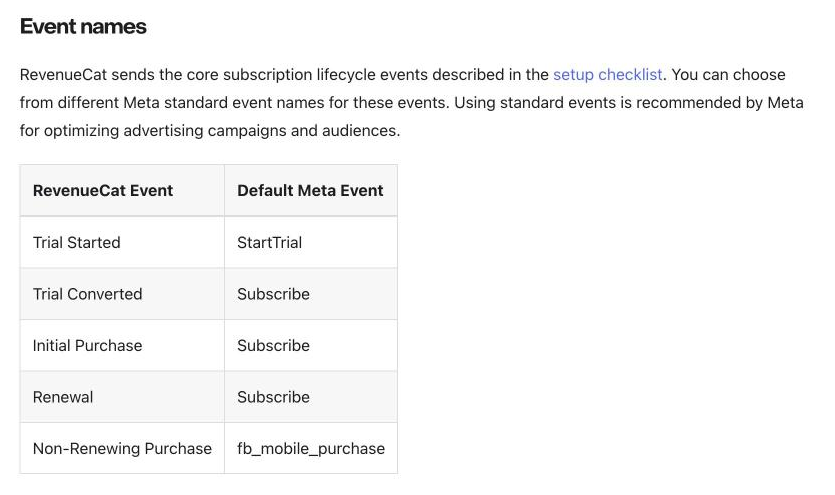
Subscription platforms can send trial and subscription events to Meta server-side. RevenueCat maps Trial Started to Meta's StartTrial event and paid events to Subscribe by default. Source: RevenueCat documentation
Common questions
Can I track app installs without an MMP?
Yes, channel by channel. AdServices covers Apple Ads, Firebase covers Google Ads, and each ad platform's SDK covers its own campaigns. Campaign links and the Play Install Referrer cover creators and posts. What you don't get is one deduplicated count across all of them.
Is Firebase enough for app attribution?
For Google Ads app campaigns, Firebase linked to Google Ads is the standard setup. For other networks, Firebase records what users do in the app, but each network still measures its own campaigns.
Why do my ad dashboards show more installs than the App Store?
Each platform counts installs with its own attribution windows, so one install can be credited by two platforms. Compare the sum of your dashboards with App Store Connect and Play Console downloads for the same days to see the overlap.
Can I see which creator brought paying subscribers without an MMP?
Partly. App Store Connect campaign links show downloads, sales and subscriptions per campaign token, in aggregate. To follow each creator's users through trial, conversion and renewals, you need a source attached to each user, which is what an MMP does.
How much does an MMP cost for a small app?
Pricing models vary: per attributed conversion, per install, or a flat monthly plan. Our guide to MMP pricing for freemium apps shows how each model grows with your volume. Airbridge Core is a flat plan: free for 30 days, then from $40 per month.
The bottom line
The free stack is a good place to start, and every tool in it does its own job well. It measures each channel on that channel's terms. Once you run several channels, pay creators or sell on the web, you need one answer per subscriber, and that is the job of an MMP. If you already use RevenueCat, see how the two fit together in Do you need an MMP if you use RevenueCat?
Airbridge connects with RevenueCat, Adapty and Superwall, syncs ad spend automatically from Meta, Google, Apple Ads and TikTok, and ties every trial, payment and renewal to the channel, campaign or creator that drove it. The Core Plan is built for subscription apps: try it free for 30 days, then from $40 per month.

Ready to transform your mobile growth?
Learn how Airbridge helps leading brands measure and optimize every touchpoint.
“While working with Airbridge, we have learned that MMM is a crucial attribution model for post-privacy era marketing to predict future performance and optimize the budget.”