Apple Retention Messages: Do Save Offers Keep Payers?

On this page
What are Apple's retention messages?
Since November 4, 2026, App Store subscription apps can show a message when someone starts to cancel: text, an image, or a special offer such as a discount or a free period (Apple Developer). You set it up in App Store Connect. Whether an offer actually keeps payers is a separate question: count how many people pay full price again after the offer ends, and compare them with people who saw no offer.
Tools that do this
-
Free: App Store Connect to set up messages and offers; Sales and Trends and StoreKit transactions to track each offer by its identifier; your subscription data to follow renewals.
-
Which acquisition channels bring subscribers who stay: an MMP. Airbridge Core ties trials, payments and renewals from RevenueCat, Adapty or Superwall to the campaign that brought each subscriber. Try it free for 30 days, then from $40 per month.
How do Apple's retention messages work?
A retention message has required text and two optional parts: an image and one or more retention offers. What a subscriber sees depends on what you set up and whether they qualify for an offer.
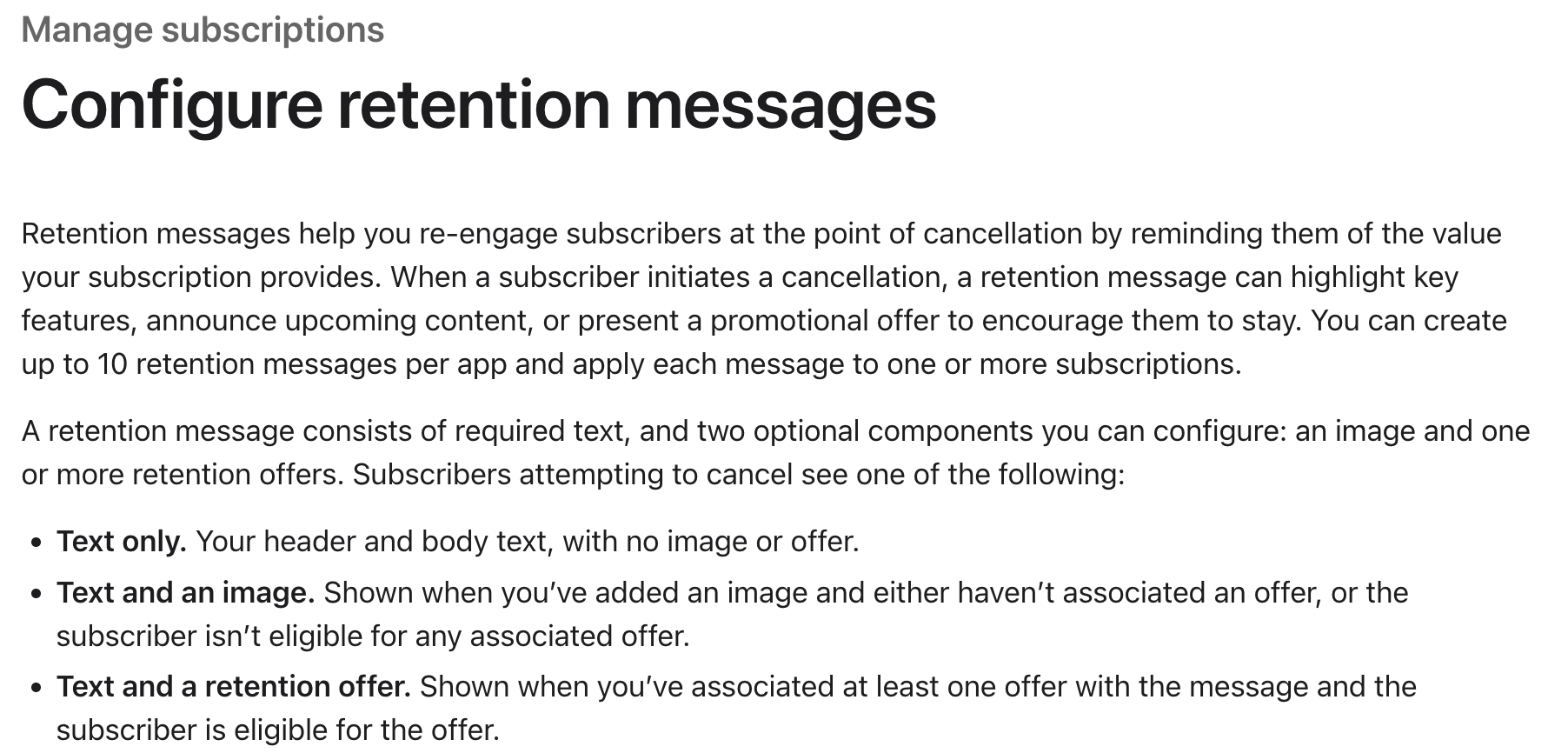
What subscribers see when they try to cancel. Source: App Store Connect Help.
The details worth knowing before you start:
-
Up to 10 messages per app. Each subscription can have one active message at a time.
-
Offers give eligible subscribers a discount or a free period: pay as you go, pay up front, or free.
-
Eligibility: you set a minimum paid subscription duration, and an optional wait between offers.
-
Offer identifier: each offer gets one, and Apple says you can use it "to track sales associated with the offer in Sales and Trends reports and in StoreKit transactions."
-
More control by API: with the Retention Messaging API, you can choose which message each subscriber sees. Apple says API access is available by request.
How do you write a message that passes review?
Apple's guidelines for the message text are specific:
-
No prices or offers in the text. Everyone sees the text, including people who don't qualify for the offer, so App Review rejects copy like "50% off" or "one month free."
-
Factual loss statements are fine, for example "After your subscription ends, you won't have access to premium features."
-
No pressure or unproven claims. Apple discourages scare tactics and unsupported statistics.
A good first message reminds people of something specific they'd lose or something coming soon. That alone may be enough for some subscribers, which is worth testing before you give away a discount.
Want to see how Apple retention messages works with your data?
Get hands-on with Airbridge and see real results.
Try It Free →Accepted isn't the same as saved
An offer can look great in week one: lots of people take it. The real question comes later.
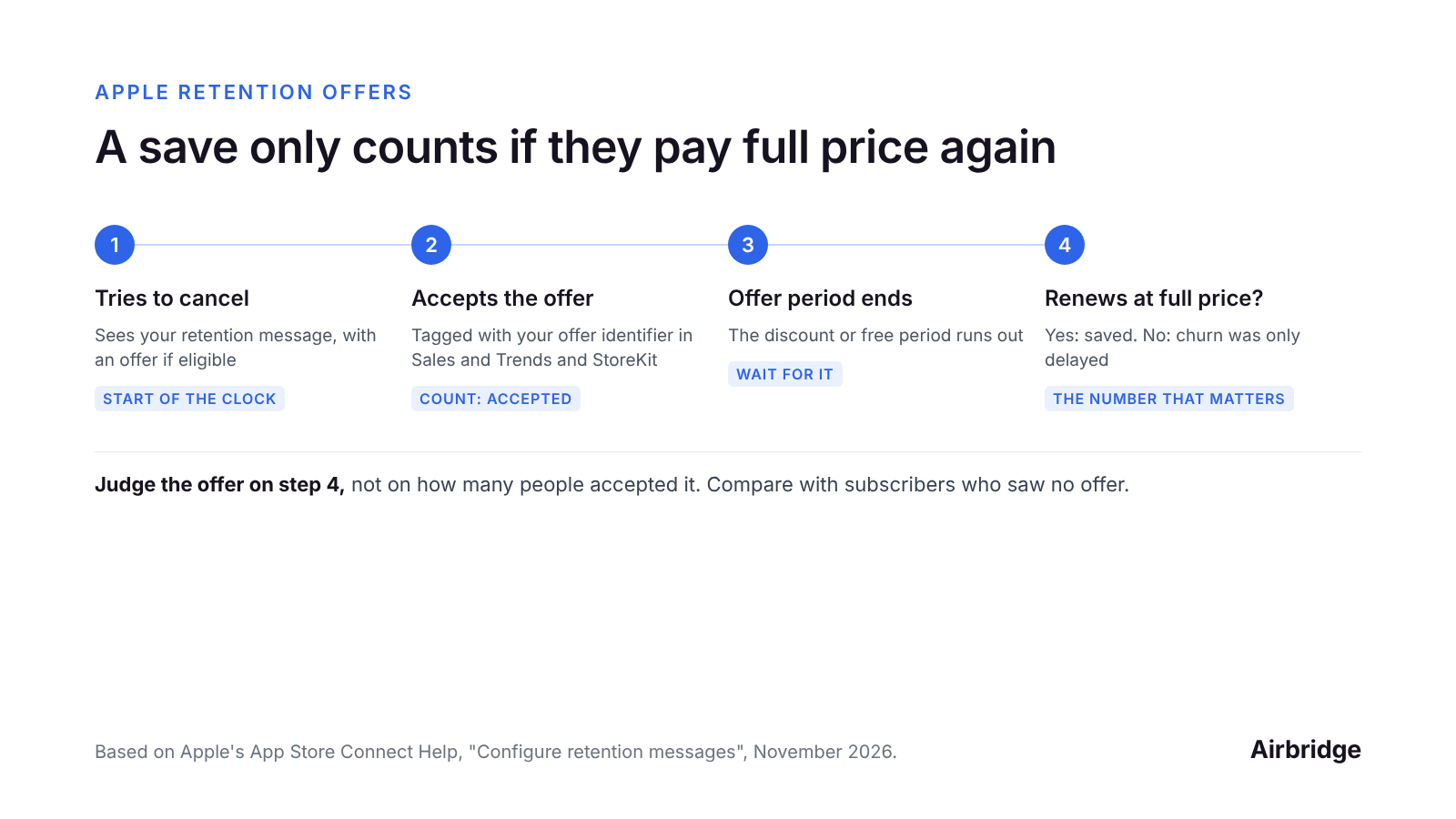
Judge the offer on step 4, not step 2. Source: based on App Store Connect Help.
Three outcomes are possible for someone who accepts:
-
Saved: they renew at full price after the offer ends.
-
Delayed: they cancel when the offer ends. You kept them for a discounted month or two.
-
Would have stayed anyway: they might not have canceled at all; the discount just lowered their price.
The third group is the hard one to see, and it's why you need a comparison group.
How do you measure whether a save offer works?
-
Start with a message, no offer. Run text (and an image) only for a few weeks. Note monthly churn for the subscriptions it covers.
-
Then add an offer and keep the same message. Track redemptions by the offer identifier.
-
Follow every subscriber who accepted until the first full-price renewal after the offer. That renewal rate is your number.
-
Compare with a group that saw no offer. The Retention Messaging API lets you choose which message each subscriber sees, which can make a comparison group possible; check Apple's API documentation for what it allows. Without API access, compare the weeks before and after you added the offer, and keep other changes out of that window.
-
Check revenue, not just churn. If 90-day revenue per subscriber went down because many people who would have stayed took the discount, the offer cost more than it saved.
Use the eligibility setting to aim the offer: a minimum paid duration means it goes to people who've already paid for a while, rather than to someone canceling in their first month.
Common questions
What is Apple's Retention Messaging API?
An API that lets you choose which retention message each subscriber sees, based on their subscription details. Apple says access is available by request.
Can I mention a discount in the retention message text?
No. Apple's guidelines say the header and body text can't reference offers, discounts or prices, because everyone sees the text. The offer itself is shown separately to eligible subscribers.
How many retention messages can I create?
Up to 10 per app, with one active message per subscription at a time.
How do I know if a retention offer worked?
Track the offer by its identifier, follow the people who accepted until their first full-price renewal, and compare with subscribers who saw no offer.
The bottom line
Retention messages are worth setting up: a clear reminder of value costs nothing. Before you add a discount, decide how you'll measure it, and judge it on full-price renewals after the offer ends, against a comparison group.
Retention starts before the cancel screen, with who you acquire. Airbridge ties trials, payments and renewals from RevenueCat, Adapty or Superwall to the campaign that brought each subscriber, so you can see which channels bring people who stay. The Core Plan is built for subscription apps: try it free for 30 days, then from $40 per month.
Ready to transform your mobile growth?
Learn how Airbridge helps leading brands measure and optimize every touchpoint.
“We went with them because their tech is better. It's best-in-class, for sure, but the real difference for us was the people.”