Creator Attribution for Apps: How to Credit Installs When Viewers Skip the Link

Creator attribution when viewers skip the link: the short answer
A creator posts a video about your app. It does well. Downloads go up that evening. But the creator's link shows only a handful of taps, and the promo code was used twice.
So who gets the credit?
This is the core problem of creator attribution (also called influencer attribution) for mobile apps. In October 2026, we asked more than 70 subscription apps that work with creators and UGC accounts how they measure them, and this was the question we heard most often. One founder put it simply: "A lot of people don't click the link and just sign up through the App Store, which would short the creator." Another told us: "You cannot tell. Try to match view spikes with download and trial started spikes."
TL;DR: No single signal catches every install that comes from a creator video. Many viewers, often most, never tap a link. They remember the app name and search the App Store or Google Play later. To credit creators fairly, use three signals together:
-
A unique link per creator to fully credit the people who do tap, all the way to trial and subscription.
-
A one-tap "Where did you hear about us?" question in onboarding to catch the people who searched.
-
Spaced posting and a 7-day read of trial starts to estimate the rest from the lift above your baseline.
The rest of this guide explains why the gap exists, what each signal can and can't see, and how to set this up for your next three to five creators.
Why most installs from a creator video never touch the link
Creator content is watched in a feed, not on a landing page. Tapping a link means leaving the video, opening a bio, and waiting for a store page to load. Most people don't. They keep scrolling, and later, when they want the app, they type its name into App Store search.
We call this the search gap: the installs a creator caused that arrive through store search, with no click attached. Three things make it bigger for subscription apps.
-
Short-form video keeps viewers in the feed. Links in TikTok and Instagram captions and comments aren't clickable, and YouTube, to protect viewers from spam, turned off clickable links in Shorts descriptions and comments in August 2023. So the link usually sits in the creator's bio, a few taps away from the video. As one founder told us, "There's a link in bio for most, but it doesn't drive traffic."
-
Many creators don't use a hard call to action. Creators usually keep the app mention natural rather than pitching it like an ad, so they often show the app without saying "tap the link in my bio." Viewers remember the name, not the link.
-
The paying moment comes days later. A viewer might install on Monday, start a free trial on Wednesday and convert to paid a week after that. A click count from Monday tells you nothing about who paid.
The result is a familiar pattern. Most teams that answered us judged creators by views, promo codes or the sales bump after a post. Teams can see that a video worked, but not how well, and not compared with the other creators posting the same week. One team summed it up: "We don't have a direct connection from the creators, but we can understand generally where it comes from."
If you judge creators on link clicks alone, you undercount the good ones. If you judge them on views alone, you can't tell who brings people who pay. You need something in between.
What links, promo codes and view spikes each see
Every common creator tracking method sees one slice of the audience. The mistake is treating any one slice as the whole picture.
| Method | What it sees well | What it misses | Best used for |
|---|---|---|---|
| Unique link per creator | People who tap, followed to install, trial and subscription | Everyone who searches the store instead of tapping | Exact, per-creator numbers for the tapping audience |
| Promo or discount code | People who remember the code and type it at checkout | People who forget the code; codes shared on coupon sites get credited to the wrong creator | Offers that need a code anyway |
| Onboarding survey ("Where did you hear about us?") | People who searched after seeing a video and remember where | People who skip the question or misremember | Sizing the search gap per creator or platform |
| View spike vs. trial spike | Total lift in a time window, including store search | Overlapping posts, long-tail videos, other campaigns running the same week | Estimating the share links and surveys can't see |
| Views and likes | How far the content traveled | Whether any viewer installed or paid | Judging content reach, not creator value |
Two lessons come out of this table.
First, links are not the problem; relying on them alone is. A link per creator gives you the only exact, end-to-end numbers you will have: installs, trial starts and subscriptions tied to a specific creator. That makes it your calibration point, even if only a minority of viewers tap.
Second, promo codes are weaker than they look. They depend on memory, they add friction at checkout, and they leak. As one founder noted in an Indie Hackers thread, codes "leak to deal sites so the creator who gets scraped hardest looks best."
The layered method: link, ask, then read the lift
The goal is not perfect attribution. It is a fair, repeatable way to compare creators on the outcome you pay for: subscribers. Think of every creator's impact as three layers.
Creator impact = people who tapped + people who searched and told you + the lift you can't explain otherwise
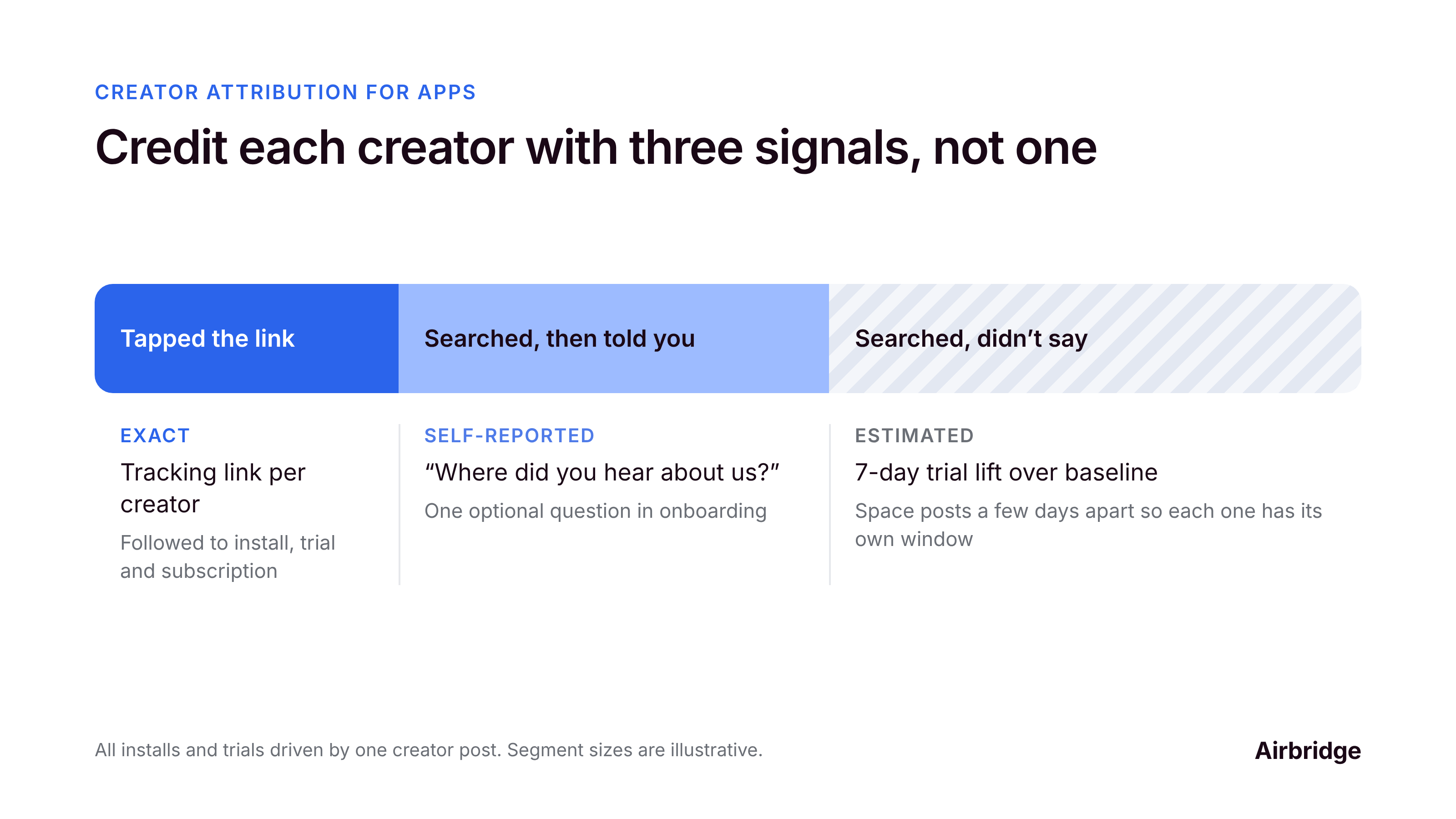
Layer 1: Tappers, measured exactly with a link per creator
Give every creator their own tracking link, placed in their bio or an Instagram Story link sticker. A mobile attribution link follows the person who taps through the store, into the app, and on to trial start and subscription, as long as they install within the attribution window.
This layer is usually the smallest, but it is the most accurate. It tells you each creator's tap-to-trial and trial-to-paid rates. Those rates often hold for the people who searched, too.
Layer 2: Searchers, captured with one onboarding question
Add a single, optional question to onboarding: "Where did you hear about us?" List your active platforms and creators by name, plus "Other." People who saw a video and then searched the store usually remember where they saw it.
Keep it to one tap. Put it after the first value moment, not before sign-up, so it doesn't hurt conversion.
Layer 3: The rest, estimated from the lift above baseline
Some installs will still go unclaimed. Estimate them from timing. Compare trial starts in the 7 days after a post with your normal weekly baseline, then subtract what layers 1 and 2 already explain.
This only works if posts don't pile on top of each other. When three creators post in the same week, the spikes blur together. Space creator posts at least a few days apart so each one gets a readable window.
Why the layers work together
Each layer checks the others. If a creator has few link taps but many survey mentions and a clear lift, their audience searches rather than taps. That creator is not underperforming. Your link was just the wrong tool to judge them. If a creator has strong views but no taps, no mentions and no lift, you have your answer too.
Want to see how Creator attribution for apps works with your data?
Get hands-on with Airbridge and see real results.
Try It Free →How to set this up for your next 3 to 5 creators
You don't need a big program to start. Pick your next three to five creator posts and run them this way.
-
Write down your baseline. Note your average daily installs, trial starts and new subscriptions over the last two to four weeks. This is what "no creator" looks like.
-
Create one tracking link per creator. Use a mobile measurement partner (MMP) link so taps are followed through install, trial start and subscription. If you have no MMP yet, use an App Store Connect campaign link on iOS and a UTM-tagged Google Play link on Android. Both are free and a good place to start. They are built for store-level reporting: App Store Connect credits a first-time download made within 24 hours of the tap, Google Play reports store visitors and first-time installers per link, and neither is designed to show trial starts per creator in one view across iOS and Android.
-
Brief the link placement, not a hard sell. Ask each creator to put their link in their bio or an Instagram Story link sticker, and to say the app's exact name once on camera. Links in captions and comments on TikTok, Instagram and YouTube Shorts aren't clickable, and a personal TikTok account needs 1,000 followers for a clickable bio link (business accounts don't). A clear name makes store search work in your favor.
-
Add the onboarding question. One optional, single-tap "Where did you hear about us?" screen with your creators and platforms as options.
-
Space the posts. Leave at least three to four days between creators, so each post has its own window.
-
Read each post at day 7. For each creator, record link installs, trials and subscriptions, survey mentions, and the trial-start lift over baseline.
-
Compare creators on cost per trial and cost per subscriber. Divide what you paid each creator by the trials and subscribers you can credit to them. Views tell you reach. These numbers tell you value.
A simple weekly sheet is enough, like this sample:
| Creator | Paid | Views | Link installs | Link trials | Survey mentions | Trial lift vs. baseline (7 days) | Est. cost per trial |
|---|---|---|---|---|---|---|---|
| Creator A | |||||||
| Creator B | |||||||
| Creator C |
After two or three rounds, patterns show up fast. Some creators have audiences that tap. Some have audiences that search. A few bring views and nothing else.
FAQ
Can you track app installs from a creator video if nobody clicks the link?
Not exactly, and not one by one. An install that comes from App Store search carries no click, so no tool can tie it to a specific video with certainty. You can estimate it with an onboarding survey and by comparing trial starts after the post with your baseline.
Are promo codes or tracking links better for influencer campaigns?
Tracking links are more accurate for the people who tap, because they follow each person through install, trial and subscription. Promo codes only count people who remember to type them, and codes posted on coupon sites can credit the wrong creator. Use links as your main signal, and codes only when the offer needs one.
What is the search gap in creator marketing?
The search gap is the share of installs a creator caused that arrive through App Store or Google Play search instead of their link. It is often the largest share for short-form video, where links can only sit in the bio.
How long should I wait before judging a creator post?
Read trial starts over the 7 days after the post, and subscriptions after your trial ends. Many videos keep bringing installs for days, so a same-day read undercounts them.
Do I need a mobile measurement partner (MMP) for creator tracking?
You can start with free App Store Connect campaign links and UTM-tagged Google Play links, which show downloads per link. An MMP adds what those miss: trial starts, subscriptions and revenue per creator in one view across iOS and Android, with attribution windows you can configure beyond the 24 hours App Store Connect uses.
Should I pay creators based on views?
Views measure reach, not value. Pay structures based on views are fine, but renew creators based on cost per trial and cost per subscriber.
Can I put a tracking link in a TikTok or Instagram caption?
No. Links in TikTok and Instagram captions and comments aren't clickable, and the same has been true for YouTube Shorts descriptions and comments since August 2023. Use the creator's bio link or an Instagram Story link sticker, and ask the creator to say your app's name on camera so viewers can find it in search.
The bottom line
Most people who install your app after a creator video never tap the link. That doesn't make creator marketing unmeasurable. It means you need more than one signal.
Use a link per creator to get exact numbers for the people who tap. Ask one onboarding question to catch the people who searched. Space your posts and read the 7-day lift to estimate the rest. Then compare creators on cost per trial and cost per subscriber, not views.
If you'd like the first layer done for you, Airbridge gives each creator their own tracking link and shows installs, trial starts, subscriptions and revenue per creator in one dashboard, across iOS and Android. The Core Plan is built for subscription apps, and you can try it free for 30 days, then from $40 per month.

Ready to transform your mobile growth?
Learn how Airbridge helps leading brands measure and optimize every touchpoint.