Web-to-App Attribution: Connect Web Checkout and In-App Subscriptions

On this page
What web-to-app attribution means
More subscription apps now sell on the web as well as in the app. Some send ad traffic to a web paywall, some offer web checkout to existing users, and in the US, Apple's rules on linking from an app to web purchases changed in 2025 and are still evolving, so always check the current App Review Guidelines.
The catch is data. One founder described his setup: "Web payments go through Stripe and the mobile ones through the stores, so the conversion data lives in different places and I haven't joined it into one view."
Quick answer
-
Give every person one user ID that follows them from the web to the app.
-
Capture the ad or link source on the web page and attach it to that ID at checkout.
-
Pass the same ID into the app when the person signs in.
-
Combine web and in-app payments by user and by channel, so you can see cost per subscriber across both.
The three web-to-app journeys
| Journey | What happens | Where data splits |
|---|---|---|
| Web paywall first | Ad → web landing page → web checkout → download app → sign in | The payment is on the web; app usage is in the app |
| App first, web checkout later | Ad → install → in-app prompt → web checkout | The install source is in the app; the payment is on the web |
| Web lead, app purchase | Ad → web quiz or waitlist → install → in-app purchase | The ad click is on the web; the purchase is in the app |
In every case, the person is the same. The goal is to make your data agree.
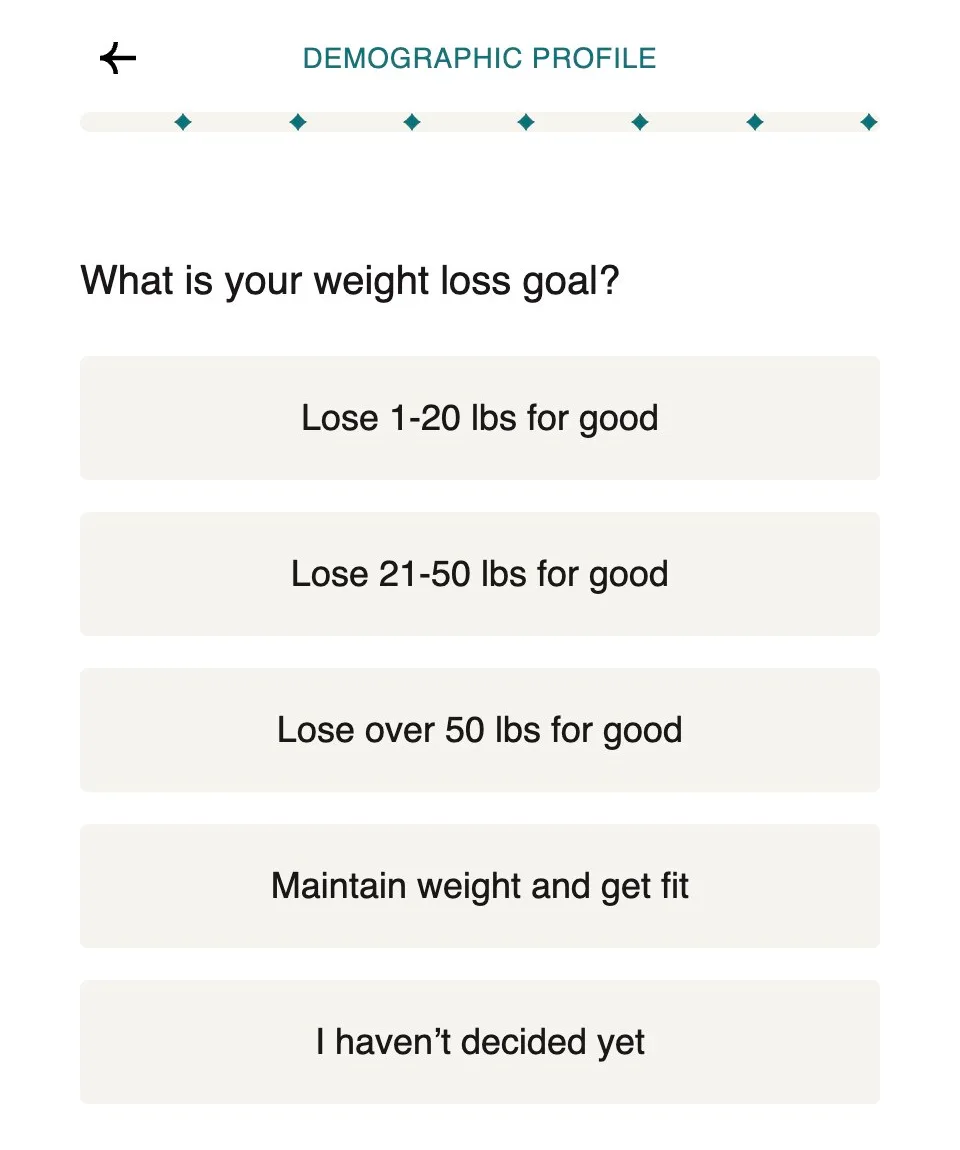
A web-first journey in practice: Noom starts its trial flow with a short quiz on its website, before anyone downloads the app. Source: Noom
Step 1: Capture the source on the web
Tag every link that sends people to your web pages with campaign parameters, such as UTMs or your attribution tool's link. On the landing page, store the source with the visitor's session. When the visitor signs up or pays, save that source with their account.
Step 2: Use one user ID everywhere
Create the account before or during checkout, so the payment belongs to a user ID, not just an email. When the person opens the app, have them sign in, or open the app with a deep link that carries a one-time sign-in token. Now your web payment and your in-app activity share one ID.
Step 3: Bring web and in-app payments together
You need one place where both kinds of payment sit on the same user:
-
Add the user ID to your web checkout records, for example as metadata on the payment.
-
Make sure your subscription platform or backend stores in-app purchases under the same user ID.
-
Combine them in your subscription platform, if it supports web payments, or in your own reporting.
One founder we talked with already writes web and store payments into one row per user. The missing piece, as he put it: the row "doesn't track where people came from yet, but it should." Add the source to that row and you have web-to-app attribution in its simplest form.
Want to see how Web to app attribution works with your data?
Get hands-on with Airbridge and see real results.
Try It Free →Step 4: Attribute app installs from web pages
When a web page sends people to the App Store or Google Play, use a tracking link on the download button rather than a plain store link. A web-to-app attribution link credits the install to the web page and campaign, and can open the right screen after install. If people click your ads but never reach checkout or sign-up, track every step between your ad and your app to see where they drop off.
Step 5: Report cost per subscriber across both
Once web and app payments share a user ID and a source, report:
| Channel | Spend | Web subscribers | In-app subscribers | Total subscribers | Cost per subscriber |
|---|---|---|---|---|---|
| Meta → web paywall | $1,000 | 32 | 6 | 38 | $26.32 |
| TikTok → app install | $800 | 4 | 21 | 25 | $32.00 |
| Creator links | $500 | 9 | 17 | 26 | $19.23 |
Numbers are illustrative.
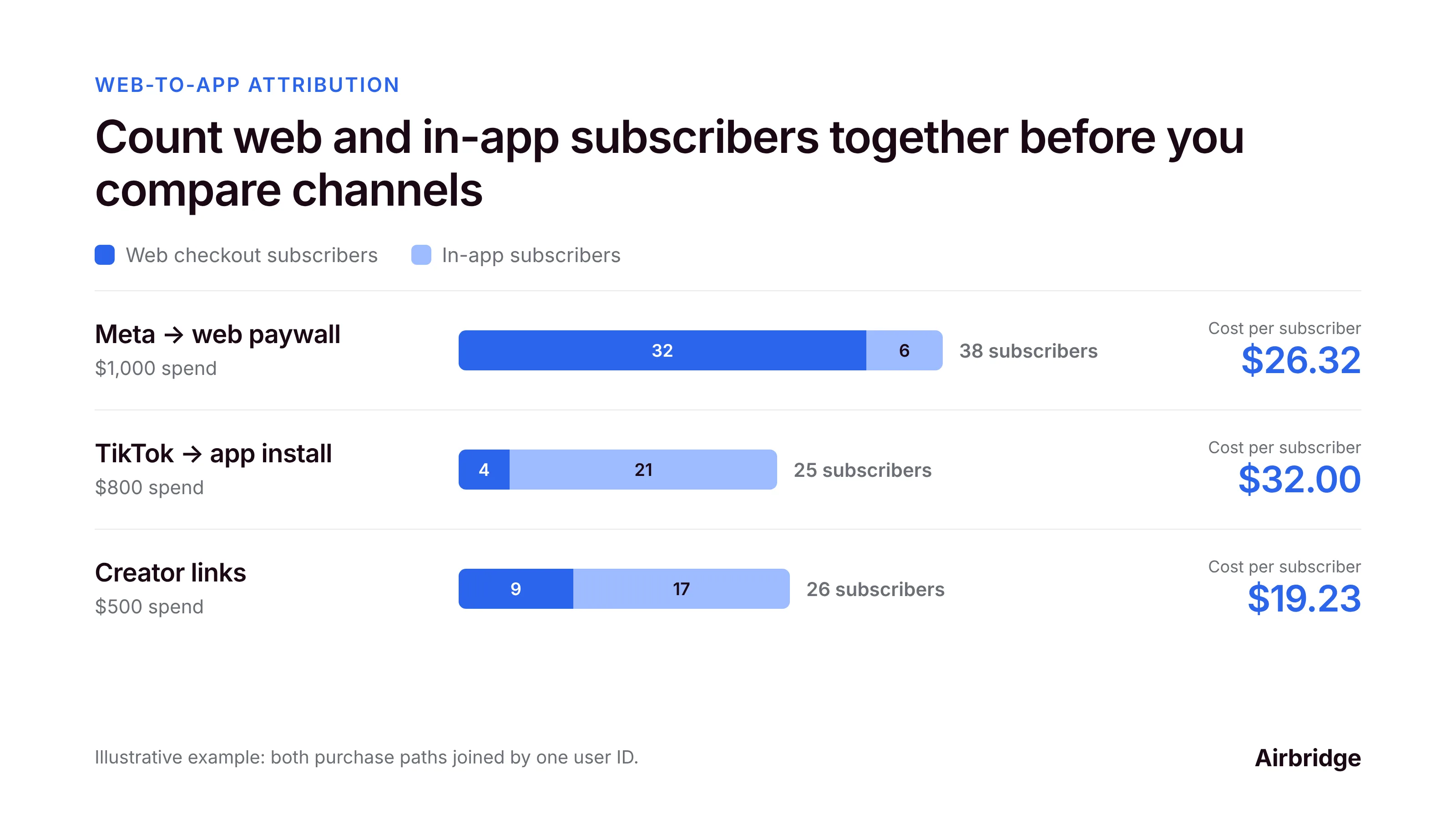
Without the join, the Meta campaign would look strong on the web and weak in the app, and the creator links would look weaker than they are.
A note on fees and rules
Web checkout and in-app purchases have different fees, refund flows and rules, and those rules differ by country and change over time. Compare channels on net revenue, and check the current App Store and Google Play policies for your markets before linking to web purchases from inside your app.
Web-to-app attribution FAQ
How do I track subscriptions bought on the web and in the app together?
Use one user ID across both. Capture the ad source on the web, save it with the account at checkout, have users sign in to the app with the same account, and combine web and in-app payments by user.
What is web-to-app attribution?
It connects a person's journey from a web page, such as a landing page or web paywall, to their install and activity in the app, so you can credit the right campaign for installs and purchases on both sides.
Can US iOS apps link to web checkout?
On the US storefront, Apple's guidelines have allowed links and buttons to external purchase options since May 2025, but the related rules are still being settled in court and may change. Rules differ in other countries, so check Apple's current guidelines for each market before adding links.
Should I send ad traffic to a web paywall or to the App Store?
Test both. Web paywalls give you more control over the offer and payment, while store installs are simpler for users. Compare them on cost per subscriber, not cost per click or install.
Why do my web and app subscriber numbers double-count?
Usually because the same person exists under two IDs, one from web checkout and one in the app. Link them with sign-in or a deep link token so each person counts once.
Before you launch a web paywall
Selling on the web and in the app is a growth opportunity, but only if your data follows the person, not the payment page. One user ID, a captured source and a combined report turn two half-funnels into one picture of which channels bring paying users.
Airbridge measures web and app together, so a person who starts on your web page and subscribes in the app is credited to the right campaign, with trials and revenue from RevenueCat, Adapty or Superwall on the same view. The Core Plan is built for subscription apps, and you can try it free for 30 days, then from $40 per month.



Ready to transform your mobile growth?
Learn how Airbridge helps leading brands measure and optimize every touchpoint.
“While working with Airbridge, we have learned that MMM is a crucial attribution model for post-privacy era marketing to predict future performance and optimize the budget.”