How to Track Creators Without an SDK: App Store Campaign Links and Play UTM Tags

On this page
Can you track which creator drives downloads without an SDK?
Yes. You can see which creator brings downloads, purchases and subscriptions without adding any SDK to your app. On iOS, give each creator an App Store campaign link with its own campaign token (ct), and App Store Connect reports results per creator. On Android, add UTM tags to each creator's Google Play link, and Play Console reports store listing acquisitions per campaign. Both are free and need no code. What they don't give you is a per-user view from free trial to paid subscriber, which is where an attribution SDK comes in later.
Tools that do this
-
Free, no code: App Store Connect campaign links (
pt+ct) and Google Play links with UTM tags in thereferrerparameter. -
When you want the full funnel per creator: a mobile measurement partner (MMP). Airbridge Core gives each creator a tracking link and follows each install through trial and paid, on iOS and Android. Try it free, then from $40 per month.
Founders who pay creators often start in the same place: the bonus is paid on views, and views don't say which creator brings people who pay. Some teams also keep their app free of third-party SDKs by design. One founder of a privacy-first app told us they'd "start using Apple's native ?pt=&ct= campaign links and Play UTM tags" for their next creator posts. This guide shows how to set that up properly.
What are the three levels of creator tracking?
| Level | What you set up | What you see per creator | Work on your side |
|---|---|---|---|
| 1. Taps | A short link per creator that redirects to your store page | How many people tapped through | None |
| 2. Taps + downloads + purchases | Campaign parameters on each store link (ct on iOS, UTM tags on Android) |
Product page views, first-time downloads, sales and subscriptions, in aggregate | Create one campaign per creator in App Store Connect |
| 3. Full funnel | An attribution SDK plus your subscription platform | Install → trial → paid → renewals per creator, on iOS and Android | Add the SDK |
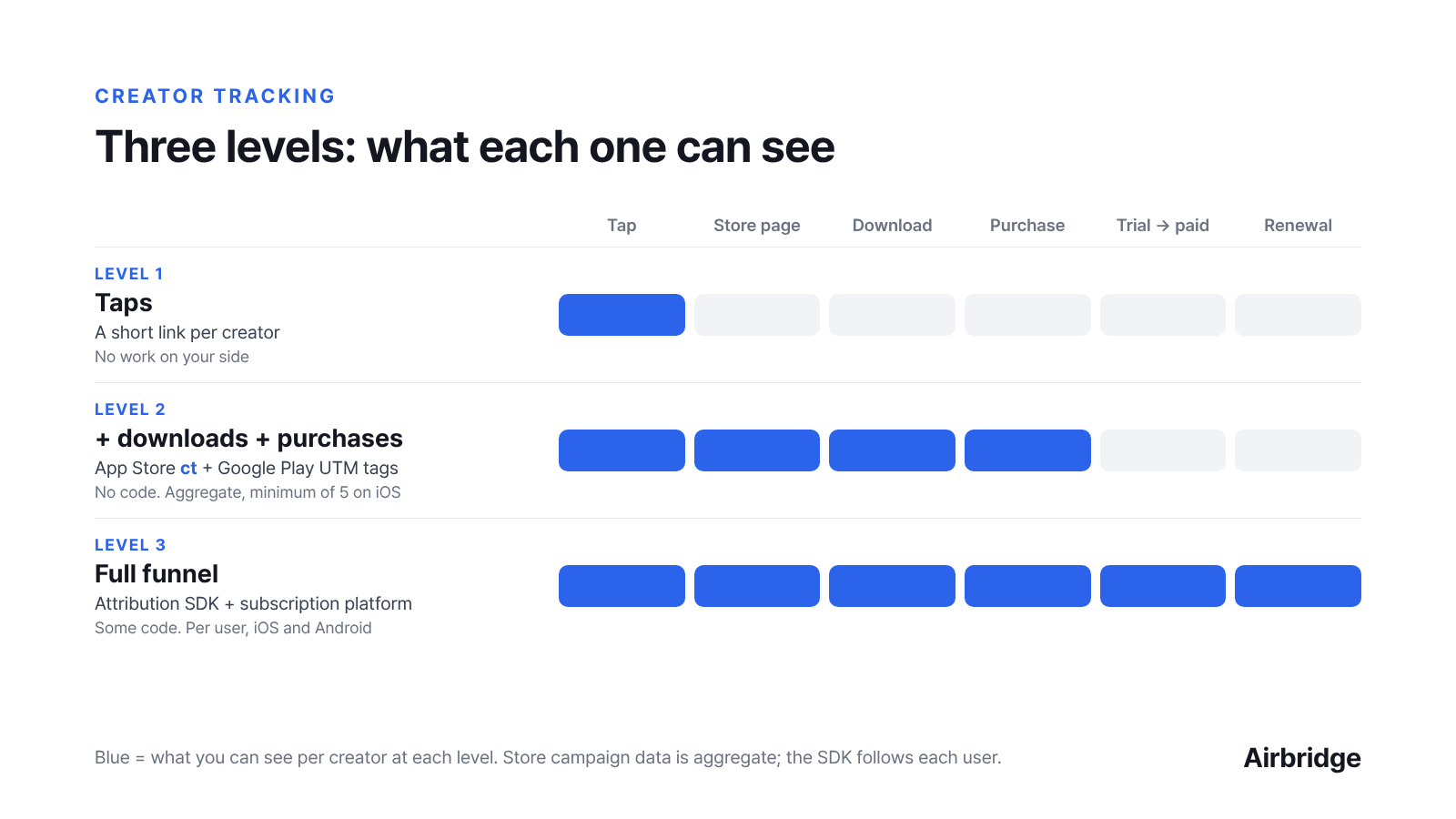
Each level adds detail and a little more work. Level 2 needs no code.
Level 2 is the sweet spot for most small teams that pay a handful of creators. It costs nothing and takes a few minutes per creator.
How do you set up App Store campaign links for creators?
App Store Connect has campaign links built in. Each link carries a provider token (pt), which stays the same across all your campaigns, and a campaign token (ct), which you change per creator.
-
Open Campaigns. In App Store Connect, go to Apps, select your app, click the Analytics tab, then click Campaigns in the Acquisition section. You need a role that can see App Analytics, such as Account Holder, Admin, Finance or Sales.
-
Add a campaign per creator. Click the add button (+) next to Campaigns. The campaign name you enter becomes the campaign token. Apple allows up to 30 characters; a short, lowercase name such as
maya-nov-tiktokkeeps reports readable. -
Copy the campaign link and give each creator their own, for their bio, pinned comment or video description.
-
Optional: put a short link in front of it. If you also want tap counts (level 1), use a redirect or tracking link that sends people to the campaign link.
-
Read the results in App Store Connect under Analytics, Acquisition, Campaigns. Campaigns appear only after at least 24 hours.
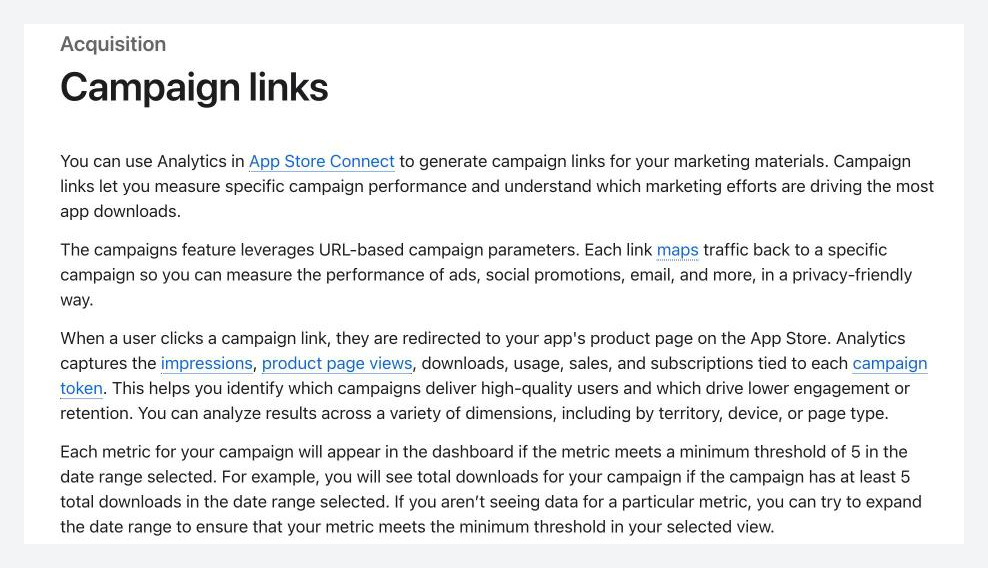
Campaign links report impressions, product page views, downloads, usage, sales and subscriptions per campaign token. Source: App Store Connect Analytics Help, Apple Developer
What does App Store Connect show per campaign, and what are the limits?
Per Apple's help page, Analytics captures impressions, product page views, downloads, usage, sales and subscriptions tied to each campaign token. Three limits matter for creator work:
- A minimum of 5. Each metric appears once it reaches 5 in the selected date range, and a campaign shows up once it has first-time downloads from at least five people. A creator who brought three downloads won't appear yet.
- A 24-hour window. A first download counts for the campaign when it happens within 24 hours of the person using the campaign link.
- Aggregate only. You see totals per token. Small groups can be withheld or combined to protect privacy, and you can't follow one person from download to their third renewal.
If you already use Airbridge tracking links, Airbridge's App Store Connect integration can add the channel and campaign name to ct for you, so the same names show up in App Store Connect.
Want to see how Track creators without SDK works with your data?
Get hands-on with Airbridge and see real results.
Try It Free →How do you set up Google Play UTM links for creators?
Google Play reads UTM tags passed in the referrer parameter of your store link:
https://play.google.com/store/apps/details?id=com.example.app&referrer=utm_source%3Dmaya%26utm_medium%3Dcreator%26utm_campaign%3Dnov-tiktok
The value of referrer is URL-encoded, so = becomes %3D and & becomes %26. In Play Console, the store performance reports let you filter store listing visitors and acquisitions by UTM source and campaign. Use the same names you used for ct on iOS, so the two stores line up in your sheet.
What won't store campaign links tell you?
- People who search instead of tapping. A viewer who types your app's name into the store isn't counted under the creator's link. We cover ways to estimate that group in creator attribution when viewers search the App Store.
- Trial to paid per creator, over time. Store reports give sales and subscriptions in aggregate. They don't follow a cohort from free trial to first renewal.
- One view across iOS, Android and paid ads. You read two consoles and join them in a sheet.
- Signals back to ad platforms. If you boost a creator's video as an ad, store links don't tell Meta or TikTok who paid.
When should you move to an SDK?
Move to level 3 when one of these becomes true:
- You pay creators a bonus per subscriber and need per-creator subscriber counts you can trust. See paying creators a revenue share.
- You run more than a few creators at once and the minimum of 5 hides most of them.
- You also run paid ads and want creators and ads ranked on the same metric, cost per paying subscriber. See paying creators on CPM.
At that point, an SDK-based setup follows each install through trial and paid. Airbridge Core does this with one tracking link per creator and connects your subscription platform, such as RevenueCat or Adapty.
FAQ
Can I track influencer app downloads without an SDK?
Yes. On iOS, App Store Connect campaign links report downloads, sales and subscriptions per campaign token. On Android, UTM tags in the Google Play referrer parameter let you see store listing acquisitions per campaign in Play Console. Neither needs code in your app.
Where do I create an App Store campaign link?
In App Store Connect, go to Apps, select your app, open the Analytics tab and click Campaigns under Acquisition. Click the add button (+), enter a campaign name (this becomes the campaign token, up to 30 characters) and copy the link.
Why doesn't my creator's campaign show up in App Store Connect?
Campaigns appear only after at least 24 hours, and data appears once the campaign has first-time downloads from at least five people. Each metric also needs to reach 5 in the date range you select, so try a wider date range.
Do campaign links count people who search the App Store after watching a video?
No. Only people who reach the App Store through the link with that campaign token, and download within 24 hours, are counted for the campaign. Viewers who search for your app by name show up under App Store search.
Is this enough to pay creators per subscriber?
It can work for a few creators with steady volume, because App Store Connect reports subscriptions per campaign. If you pay per subscriber across many creators, or need trial-to-paid per creator over time, use an SDK-based tool that follows each user.
The bottom line
You don't need an SDK to stop paying creators on views alone. Give each one an App Store campaign link and a Google Play link with UTM tags, use the same names on both, and read downloads and purchases per creator in the store consoles. When the minimum of 5 or the aggregate view starts hiding the answer, add an SDK.
If you'd like the full funnel per creator on iOS and Android, try the Airbridge Core Plan free, then from $40 per month.

Ready to transform your mobile growth?
Learn how Airbridge helps leading brands measure and optimize every touchpoint.
“We went with them because their tech is better. It's best-in-class, for sure, but the real difference for us was the people.”