Add Attribution to a Vibe-Coded App With One Agent Prompt (Claude Code, Codex, Cursor)

On this page
Can an AI coding agent set up app attribution for me?
Yes. If you built your app with an AI coding agent, the same agent can add the attribution SDK. Connect Airbridge MCP to Claude Code or Codex and give the agent one prompt. With your permission, it can register the app in Airbridge, follow Airbridge's SDK setup guides to install the SDK, add your key events and configure deep links in your code, create tracking links, and check in real time that test events arrive. You review every code change like a pull request and connect your subscription platform and ad accounts before you spend on ads.
Tools that do this
-
Airbridge MCP: connects your Airbridge account to AI clients such as Claude, Claude Code, ChatGPT and Codex: SDK setup guides, reports, real-time event checks and, with your permission, app and tracking link creation.
-
Airbridge Core: the attribution behind it, for Meta, Google, Apple Ads and TikTok, plus your subscription platform. Try it free, then from $40 per month.
Many founders we talk to shipped their first version with an agent, then stalled at "add the attribution SDK", because it touches the app, the ad accounts and the subscription platform at once. That's a good job for an agent with the right guides.
What do you need before you start?
- Your app's code open in Claude Code, Codex or another MCP-capable coding tool.
- An Airbridge account (the Core Plan starts with a free trial, no credit card needed). If your app isn't registered yet, the agent can create it for you.
- Your iOS bundle ID and Android package name.
- Access to your subscription platform, such as RevenueCat or Adapty.
Step 1: Connect Airbridge MCP to your agent
Per the Airbridge MCP guide:
- Claude Code: run
claude mcp add -t http -s user airbridge https://mcp.airbridge.io/mcp, then open/mcp, select Airbridge and choose Authenticate. - Codex (CLI or IDE extension): run
codex mcp add airbridge --url https://mcp.airbridge.io/mcp. - Cursor: add a custom MCP server with the URL
https://mcp.airbridge.io/mcp, as listed on the Airbridge MCP product page. - Claude or ChatGPT apps: add a custom connector or app with the server URL
https://mcp.airbridge.io/mcpand OAuth sign-in. Claude needs a Pro, Max, Team or Enterprise plan; ChatGPT needs Developer Mode on a Plus, Pro, Business, Enterprise or Edu plan.
When you connect, you sign in to Airbridge, review the tools and accept the MCP Token Activation Notice. Access follows your Airbridge dashboard permissions.
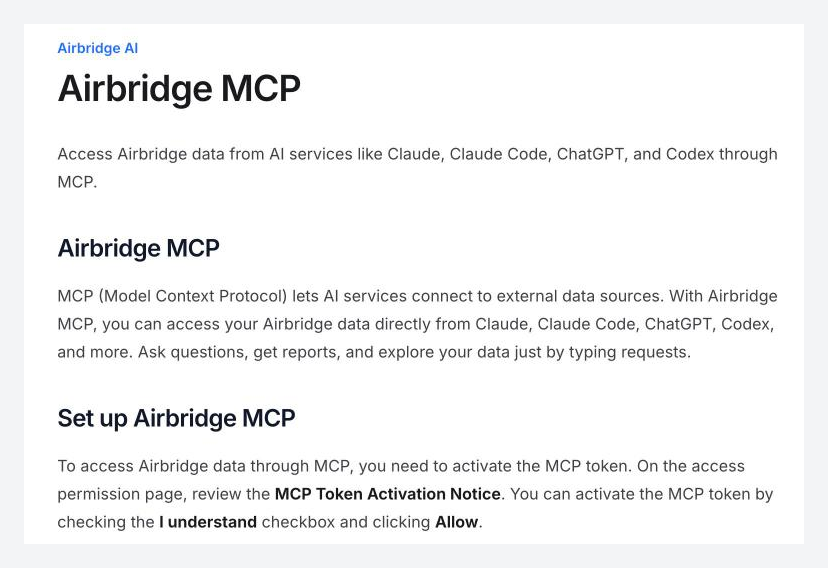
The Airbridge MCP guide covers Claude, Claude Code, ChatGPT and Codex. Source: Airbridge Help Center
Step 2: Give the agent one prompt
Copy this and adjust the parts in brackets:
Set up Airbridge attribution in this app using the Airbridge MCP setup guides.

0. If this app isn't in my Airbridge account yet, create it. Ask me to
   confirm the app name and timezone first, because they can't be changed later.
1. Detect this project's framework (Swift, Kotlin, React Native, Expo or Flutter)
   and follow the matching Airbridge SDK install guide. Use the app name and
   SDK token from my Airbridge dashboard: [app name], [SDK token].
   Show me the diff before committing.
2. On iOS, make sure the App Tracking Transparency prompt appears before
   the SDK sends the install event, as the Airbridge guide describes.
3. Track these events with Airbridge standard event names:
   sign_up, [onboarding or core action event].
   Trial starts and subscription payments will come from [RevenueCat/Adapty]
   through the Airbridge integration, so don't log them in the app.
4. Set up deep links for [URL scheme / domain] so tracking links open
   [screen], including deferred deep links, following the Airbridge deep link guide.
5. Create a tracking link for [channel or creator name] that opens [screen].
6. When I've installed a test build from that link, check the real-time
   events and tell me whether install, sign_up and the trial event arrived.
7. List anything I still need to do in the Airbridge dashboard.
The setup guide tools are always available. Tools that change your Airbridge dashboard, such as creating an app or a tracking link or updating deep link settings, run only if you allow them in your AI client, and only within your dashboard role. On the Core Plan, use Airbridge standard events; custom events are part of the Growth Plan.
Want to see how Vibe coding attribution works with your data?
Get hands-on with Airbridge and see real results.
Try It Free →Step 3: Connect your subscription platform
Trial starts and payments are best sent server-to-server from your subscription platform, not logged in the app, so refunds and renewals are counted too. Connect RevenueCat or Adapty in Airbridge's integrations (Core allows 2 active third-party integrations at a time), and make sure the same user ID is set in the app and in the subscription platform.
Step 4: Connect ad channels and create links
In the Airbridge dashboard, connect Meta, Google, Apple Ads and TikTok so spend is synced and results are sent back to each network. Then create a tracking link per creator or campaign, in the dashboard or by asking the agent. Once data flows, you can ask the agent things like "which campaign brought the most trials last week?"
Step 5: Check it end to end
Install a test build from a tracking link on a test device, open it, sign up and start a sandbox trial. Then ask the agent to check real-time events, or open the Real-time Log in the Airbridge dashboard, and look for the install, sign-up and trial events. If something is missing, ask the agent to run the SDK troubleshooting guide against your code.
What should you check by hand?
Agents are fast, not infallible. Review:
- The SDK token and app name match your Airbridge app.
- The ATT prompt appears before the install event is sent, at a sensible moment for the user.
- No sensitive data in event names or parameters, especially in health apps.
- Events aren't logged twice, once in the app and once server-to-server.
- Deep links open the right screen on a fresh install.
- Credentials: tools such as Get App Token are off by default and send credentials to your AI provider if you turn them on; allow them only if you're comfortable with that.
- App name and timezone: confirm them before the agent creates the app, because they can't be changed later.
FAQ
Can an AI agent install a mobile attribution SDK?
Yes. With Airbridge MCP connected, a coding agent such as Claude Code or Codex can follow Airbridge's SDK guides to install and initialize the SDK, add events and set up deep links in your code. You review the changes and test before shipping.
Does this work with Expo, React Native or Flutter?
Airbridge has SDKs for iOS, Android, React Native, Expo and Flutter, among others. Ask the agent to detect your framework and follow the matching guide. See also your first paid campaign on Flutter, FlutterFlow or Expo.
Which AI tools work with Airbridge MCP?
Airbridge's help center guide covers Claude, Claude Code, ChatGPT and Codex, and the Airbridge MCP product page also lists Cursor, using the same server URL. Tool lists can change, so check the Airbridge MCP guide for the latest.
What else can the agent do with Airbridge MCP?
It can read your reports and tracking links, check incoming events in real time, get SDK setup guides, and, with your permission, create apps and tracking links and update app and deep link settings, within your dashboard role. You can ask questions such as "which creator brought the most trials last week?" See Airbridge MCP for AI agents.
The bottom line
If an agent built your app, it can wire up attribution too. Connect Airbridge MCP, give the agent one clear prompt, send subscription events server-to-server, and have the agent check real-time events before you spend on ads.
Try the Airbridge Core Plan free, then from $40 per month, and connect Airbridge MCP to your agent.

Ready to transform your mobile growth?
Learn how Airbridge helps leading brands measure and optimize every touchpoint.
“Airbridge understands the essence of what it has to offer as an MMP. Its objective, transparent, and accurate performance analysis allows marketers to realize the true impact of their efforts.”