Airbridge Tracking Links: One Link per Creator, Post and Channel


On this page
How do I give each creator their own Airbridge tracking link?
In the Airbridge dashboard, go to Tracking Link → Link Generation → Custom Channels, pick a channel name, fill in Campaign, Ad Group and Ad Creative with your creator and post names, choose where the link sends people, and click Create tracking link. You get a full link, a short link, a QR code and a social share preview. Do the naming plan first; it decides what you can compare later.
Tools that do this
-
Free: UTM links and promo codes. They work on the web. For app installs, Apple's campaign links and Google Play's install referrer each report on their own terms, and neither ties a creator to a subscription on its own.
-
One tracking link per creator, with trials and revenue per link: Airbridge Core lets you "give each creator, video, or post its own tracking link" and compare them by subscribers and revenue. Clicks and impressions on tracking links are free. Try it free for 30 days, then from $40 per month.
Step 1: Decide the names before you make links
Every field you fill in becomes a parameter in the link, and every parameter becomes a column you can group by in reports. Pick a plan you can keep for months.
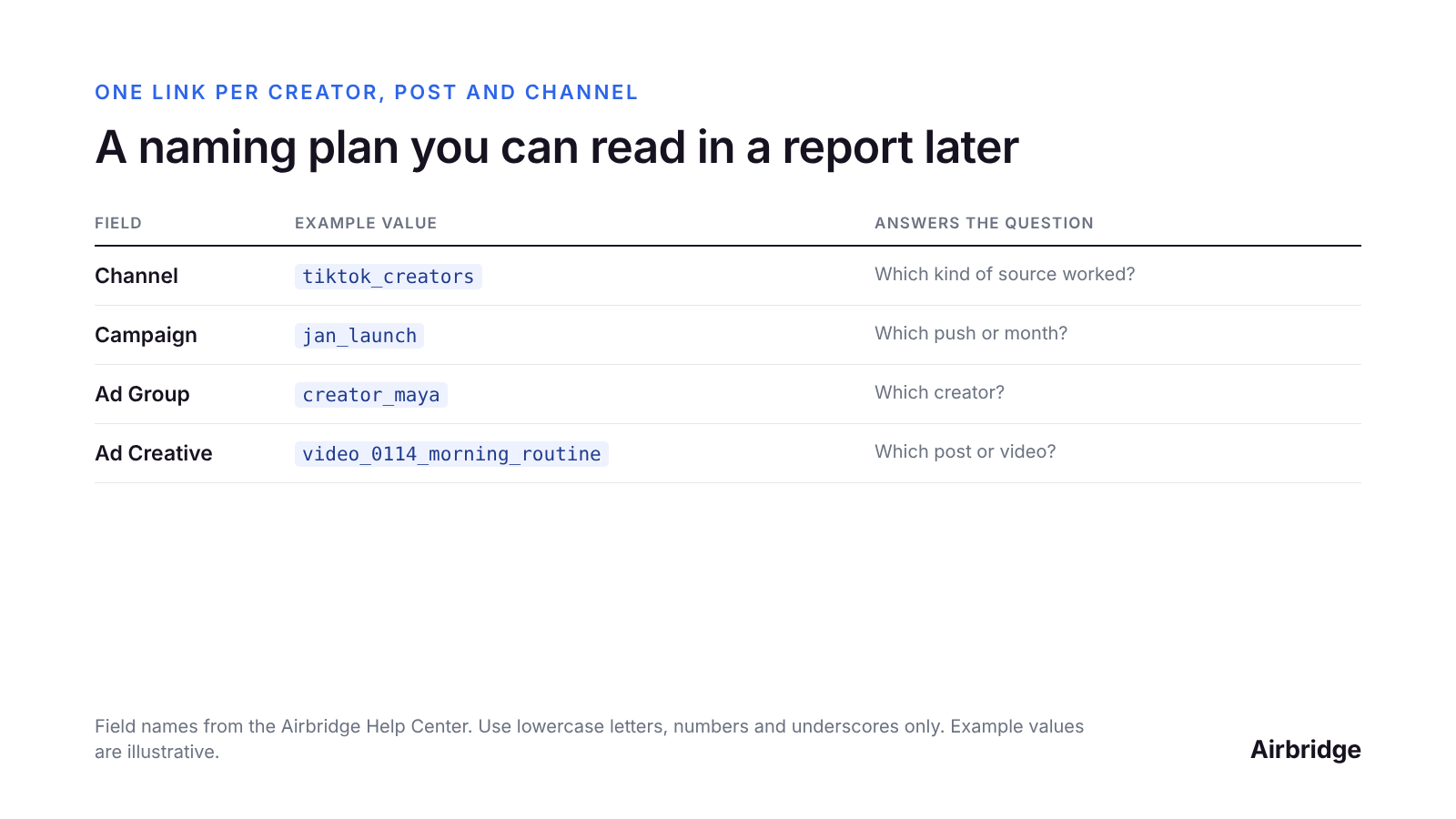
One way to name creator links so each report question has a column. Source: field names from the Airbridge Help Center; example values are illustrative.
A few rules that save pain later:
-
Channel = the kind of source, not the person: tiktok_creators, newsletter, reddit, podcast_ads. You'll want to compare these groups against each other.
-
One person or post = one link. Don't reuse a creator's link for a second video if you want to know which video worked.
-
Lowercase letters, numbers and underscores only. The dashboard also accepts . and - in channel names, but the bulk template for custom channels doesn't, so sticking to underscores keeps both working.
-
Write the plan down in the sheet where you track creator payments.
Step 2: Create the link in the dashboard
-
Go to Tracking Link → Link Generation → Custom Channels. Custom channels are for sources you define yourself, such as creators, newsletters, communities and your own social posts.
-
Under Campaign Optimization Parameters → Advertiser, type a Channel name. It's required, and a new name is added automatically.
-
Fill in Campaign, Ad Group and Ad Creative from your naming plan.
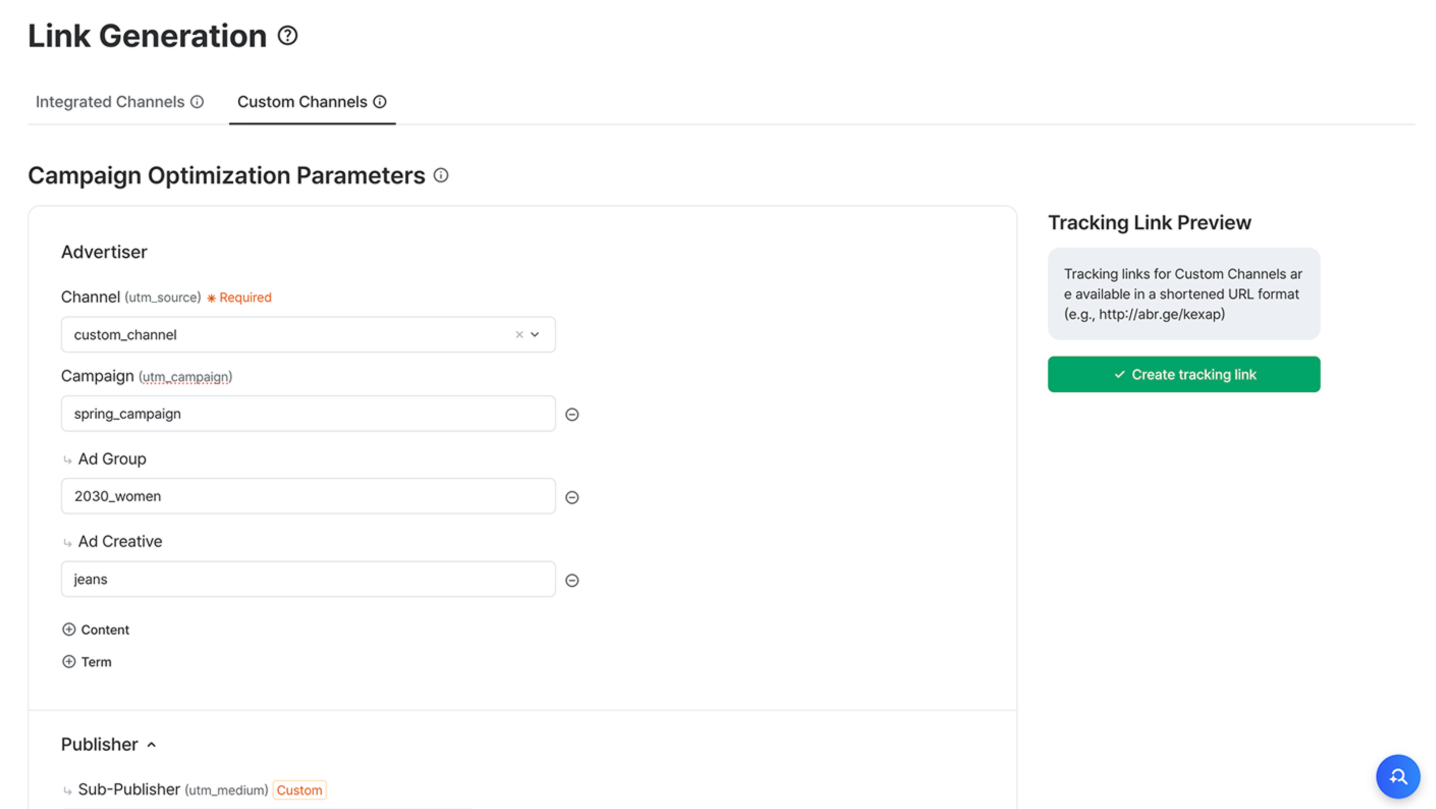
The Custom Channels form in the Airbridge dashboard. Source: Airbridge Help Center.
For paid channels that are integrated with Airbridge, such as Meta Ads or Google Ads, use the Integrated Channels tab instead. Those links come in the format the channel supports.
Step 3: Choose where the link sends people
Under Redirection, pick a destination:
-
App (Deep Link): people who have the app open a specific screen. Register your deep link details in Tracking Link → Deep Links first. People without the app go to the Fallback Path you set: the store, a custom store page, or a web URL.
-
App Store: people go to the right store for their device. On iOS you can pick a custom product page (up to 35); on Android, a custom store listing (up to 50).
-
Website: people go to a web page. If you don't add UTM parameters, Airbridge adds them during the redirect.
For creator content, a custom product page that matches the creator's angle is worth testing: the person who taps lands on a page that continues the story they just watched.
Want to see how Airbridge tracking link works with your data?
Get hands-on with Airbridge and see real results.
Try It Free →Step 4: Create, then share the short link
Click Create tracking link. For custom channels, Airbridge creates the full tracking link, a short link, a QR code and a social share preview. Send the creator the short link; use the QR code for podcasts, events or print.
Two optional touches:
-
Custom domain: replace the default abr.ge domain in short links with your own, so the link looks like it's yours.
-
Social share preview: set the image, title and description people see when the link is shared.
Leave Events for Attribution on All Events unless you have a reason to change it; that's the Help Center's recommendation too.
Making 30 links at once
If you work with many creators, use the Tracking Link Generator Template, a Google Sheets template from Airbridge:
-
Install the Airbridge Tracking Link Generator add-on from the Google Workspace Marketplace.
-
Copy the Generator Template for Custom Channels.
-
In the Required info tab, paste your App Name and Tracking Link API Token from Settings → Tokens in Airbridge.
-
Fill one row per creator or post in the Create tracking links tab.
-
Run Extensions → Airbridge Tracking Link Generator → Generate Tracking Links.
The links also appear under Tracking Link → Link Management in the dashboard. Full steps are in the Help Center.
Step 5: Read the results
Open the Actuals Report and group by Channel, then Ad Group (creator) and Ad Creative (post). Add the events that matter for a subscription app, such as trial starts and purchases, and the revenue column. Now you can sort creators by subscribers and revenue, not just clicks.
A creator with fewer clicks but more paying subscribers is usually the one to book again. For how to pay creators based on that, see creator revenue share for subscription apps.
Common questions
What's the difference between a tracking link and a deep link?
A tracking link records the click and ties later installs and events to it. A deep link sends someone who already has the app to a specific screen. An Airbridge tracking link can do both: track the click and deep link into the app.
Do Airbridge tracking links work if the person doesn't have the app?
Yes. You set a fallback path, such as the App Store, a custom product page, Google Play or a web page, for people who don't have the app yet.
Can I change a link's parameters after I share it?
In the bulk template, changes to a row don't update a link that's already been created; the Help Center suggests creating a new link instead. Plan names before you share links.
Do I need a separate link for each post?
Only if you want to compare posts. One link per creator tells you which creator worked; one link per post tells you which video worked.
The bottom line
Decide the names, then make the links: channel for the kind of source, ad group for the creator, ad creative for the post. Five minutes of planning is what lets you sort creators by revenue a month later.
The Core Plan includes tracking links and deep linking, ties trials and renewals from RevenueCat, Adapty or Superwall to each link, and counts clicks and impressions on tracking links for free. Try it free for 30 days, then from $40 per month.
Ready to transform your mobile growth?
Learn how Airbridge helps leading brands measure and optimize every touchpoint.
“Airbridge understands the essence of what it has to offer as an MMP. Its objective, transparent, and accurate performance analysis allows marketers to realize the true impact of their efforts.”