You can now measure app installs and purchases from ChatGPT Ads with Airbridge


On this page
On October 5, 2026, OpenAI announced new measurement capabilities and an expanded partner ecosystem for ChatGPT Ads. Airbridge is one of the attribution partners OpenAI named.
With Airbridge, you can measure whether users who came through ChatGPT Ads installed your app, signed up, or made a purchase. You can also send the app events you need to ChatGPT Ads via postback and use them for campaign optimization.
When you test a new ad channel, you need to compare its install and purchase performance with your existing channels, and also prepare the settings for sending conversion data to the channel. In this post, we’ll walk you through how measurement works between ChatGPT Ads and Airbridge, the integration steps, and what to check during setup.
📌 Key takeaways
- Measure installs, sign-ups, and purchases. Use Airbridge to measure traffic from ChatGPT Ads and in-app conversions. When you compare performance with your existing ad channels, check the attribution window of each channel.
- Send the conversion data you need to ChatGPT Ads. Send app events such as installs, sign-ups, and purchases via postback and use them for campaign optimization.
- Set up postbacks first, then use your tracking link. Data collected before postbacks are set up is not sent to ChatGPT Ads. In Ads Manager Beta, enter the part of the tracking link up to and including the ?, followed by tracking_template_id, in [Default Ad Destination URL], and the remaining parameters in [Tracking parameters].
How is ChatGPT Ads performance measured?
According to OpenAI, ads don’t influence ChatGPT’s answers and are displayed separately from them, and users’ conversations are kept private from advertisers.
To check whether users who came through ChatGPT Ads went on to install or purchase, you need to collect conversion data. When you send this data to ChatGPT Ads, you can use it for campaign optimization. When you compare performance with other ad channels, you also need to check the attribution criteria of each channel.
1. App events are sent via postback
In apps, the Airbridge SDK collects events such as installs, sign-ups, and purchases, and Airbridge sends the collected events to ChatGPT Ads through the Conversions API (CAPI). You don’t need to add a web pixel to your app. Here’s how a web pixel differs from the Conversions API, a server-to-server method.
- Web pixel: Code installed on a web page that sends visitors’ behavioral data to the ad channel.
- Conversions API: A method of sending conversion data from the advertiser’s server to the ad channel’s server.
OpenAI explains that advertisers can send conversion data through the pixel and the Conversions API and use it for campaign optimization.
2. To compare ad channels, you need a common attribution standard
Each channel’s report counts performance based on the attribution window and method set by that channel. So if you compare the numbers from ChatGPT Ads and your existing ad channels as they are, you may end up evaluating the same purchase journey by different standards.
For example, let’s say a user clicks a search ad, then clicks a ChatGPT ad and installs your app. If each channel credits the install based on its own attribution criteria, the same install can be included in both reports. To decide which channel should get more budget, you need to compare performance by a common attribution standard.
Based on the ad touchpoints and install data it collects, Airbridge determines which channel contributed to the install according to defined rules such as attribution windows and touchpoint priority. Instead of adding up the installs in each channel’s report, you can compare channel performance based on the attribution results determined by Airbridge. In addition, sending conversion data such as installs and purchases to the channels lets you use it for campaign optimization.
When you test a new channel, prepare these two things.
- Performance comparison standard: Attribution rules for comparing install and purchase performance across channels
- Conversion data delivery: Settings for sending measured app events to the ad channel
What changes when you connect with Airbridge?
With Airbridge, you can measure traffic from ChatGPT Ads with tracking links and send app conversion data to ChatGPT Ads via postback. In other words, you measure the behavior of users who came through your ads and use that data for campaign optimization as well.
1. Set the attribution windows to compare with your existing ad channels
To compare the installs and purchases attributed to ChatGPT Ads with your existing ad channels, you need to check which period of touchpoints and conversions each channel counts as performance.
In Airbridge, you can set the following two windows in the [Attribution Rule] tab under [Integrations] → [Ad Channel Integration] → [ChatGPT Ads].
- Lookback window: The period before a target event, such as an install, within which ad touchpoints are considered for attribution.
- Attribution window: The period after a target event within which subsequent events are linked to that attribution.
Performance numbers for each channel can vary depending on the windows applied. Check which windows are applied to ChatGPT Ads and your existing channels so you know why the numbers differ.
👉 Airbridge Lookback and Attribution Window Setup guide
If you work with an agency, also grant it access to this channel’s data in the [Agency Settings] tab.
2. Send install, sign-up, and purchase data to ChatGPT Ads
App events measured by Airbridge can be sent to ChatGPT Ads via postback and used for campaign optimization.
Select the events you need to check campaign performance, such as trial starts and subscriptions for subscription apps, or add-to-cart and order completion for commerce apps. Here are the 13 standard events you can send and their ChatGPT Ads event names.
| Airbridge event | ChatGPT Ads event |
|---|---|
| Install | app_installed |
| Open | app_opened |
| Sign-up | registration_completed |
| Schedule | appointment_scheduled |
| Order Complete | order_created |
| Initiate Checkout | checkout_started |
| Add To Cart | items_added |
| Product View | contents_viewed |
| Home Screen | page_viewed |
| Product Catalog | page_viewed |
| Search Results | page_viewed |
| Subscribe | subscription_created |
| Start Trial | trial_started |
Home Screen, Product Catalog, and Search Results are all mapped to page_viewed in ChatGPT Ads.
In addition to standard events, you can also send custom events. Event names sent to ChatGPT Ads can only contain letters, numbers, _, and -.
Want to see how ChatGPT Ads works with your data?
Get hands-on with Airbridge and see real results.
Try It Free →3 steps to integrate ChatGPT Ads with Airbridge
The integration between Airbridge and ChatGPT Ads proceeds in this order: register credentials and set up postbacks → create a tracking link → enter the link in Ads Manager Beta. To send collected data to ChatGPT Ads, you need to complete the postback setup before you use the tracking link.
Before you start, check the countries and conditions for running ads in Ads Manager Beta, OpenAI’s self-service advertising product. In the Airbridge dashboard, click ChatGPT Ads in [Integrations] → [Ad Channel Integration] to see the following four tabs.
| Tab | What it does |
|---|---|
| Tracking Link | Create tracking links to use in your ads or check existing links. |
| Postback | Register credentials and set the events to send to ChatGPT Ads. |
| Agency Settings | Grant agency users access to this channel’s data. |
| Attribution Rule | Set the lookback window and attribution window. |
Step 1: Register credentials and set up postbacks
First, prepare your Pixel ID and Conversion key in Ads Manager Beta.
- Pixel ID: You can find it under the pixel name in the [Data Source] tab of [Tools] → [Conversions]. If you don’t have a pixel, create a new one via ‘Create’ → ‘Data source’.
- Conversion key: In [Tools] → [Conversions], click the [Conversion keys] icon to the right of [Conversions] and select ‘Create new key’. The key can only be viewed right after it’s created, so copy it immediately and store it in a safe place.
Once you have both, set up postbacks in Airbridge.
- Select ChatGPT Ads in [Integrations] → [Ad Channel Integration].
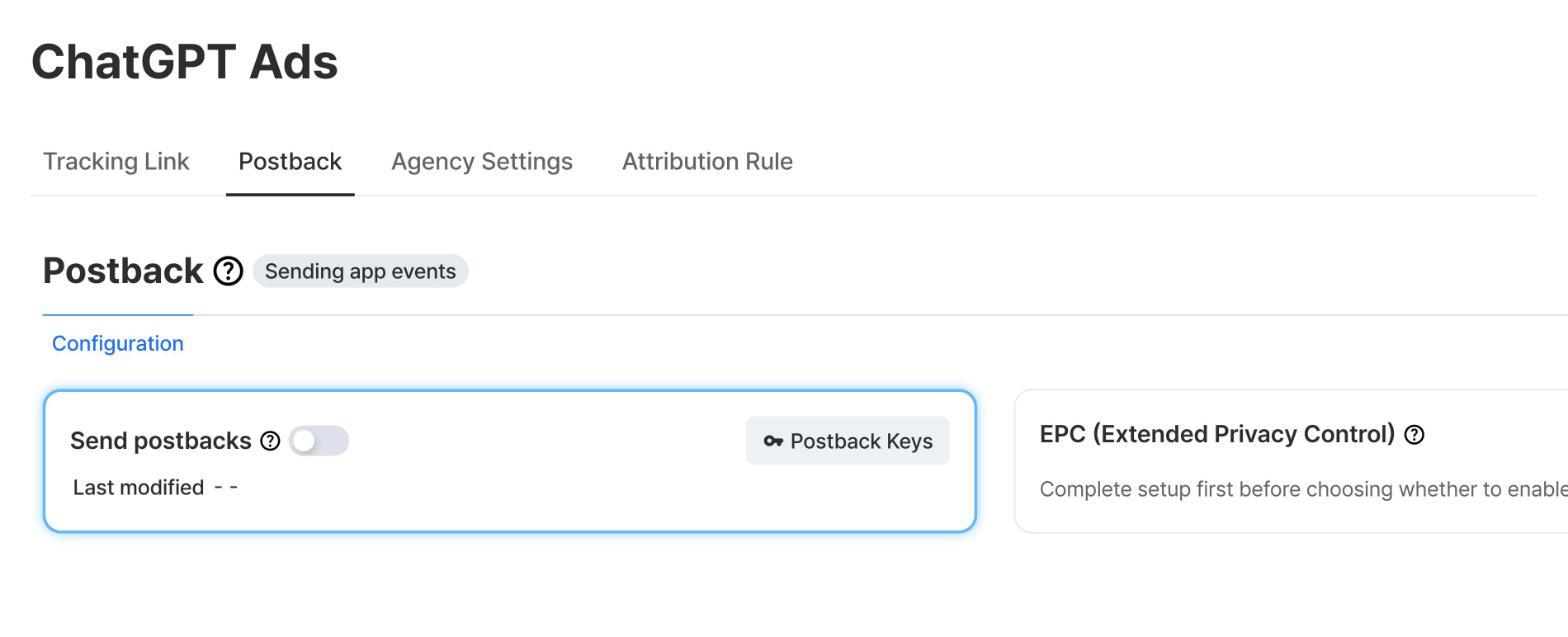
- In the [Postback] tab, click ‘Postback Keys’.
- Enter the Pixel ID and Conversion key you found in Ads Manager Beta.
- Set the events to send to ChatGPT Ads, referring to the event table above.
👉Airbridge Postback Settings guide
Below is the actual postback setup screen for ChatGPT Ads. You can register your Pixel ID and Conversion key in ‘Postback Keys’.
Step 2: Prepare your tracking link
Once you’ve finished setting up postbacks, go to the [Tracking Link] tab on the same screen. Create a new link to use in your ads, or check an existing one.
👉Create Airbridge tracking links
👉Manage Airbridge tracking links
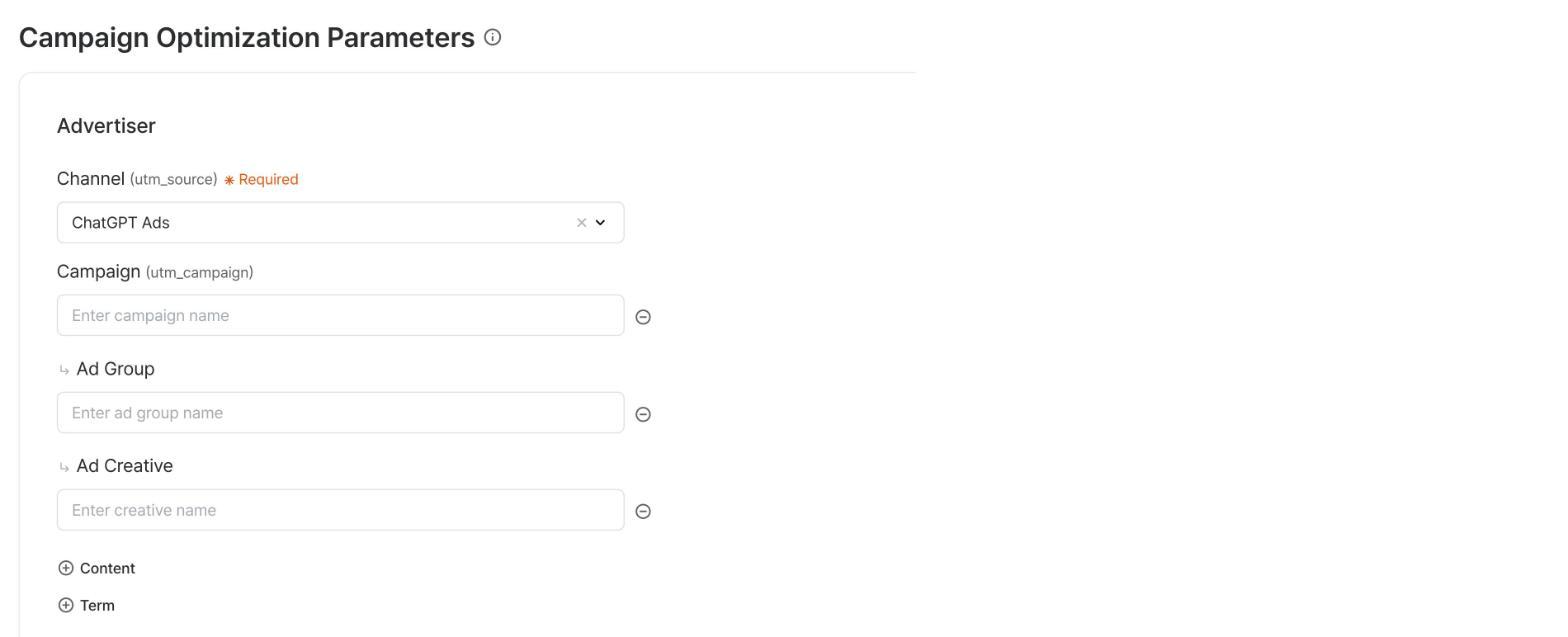
The actual Airbridge tracking link creation screen with ‘ChatGPT Ads’ selected.
Step 3: Split the link and enter it in Ads Manager Beta
Go back to Ads Manager Beta, create a campaign, and enter the tracking link you prepared.
- In [Campaigns], select ‘Create’ → ‘Create campaign’.
- Fill in all the required fields and move on to the [Create Ad Group & Ads] step.
- Enter the tracking link you created in Airbridge separately in the following two fields.
| Field | What to enter |
|---|---|
| [Default Ad Destination URL] | The part of the tracking link up to and including the ?, followed by the tracking_template_id parameter. If your tracking link includes routing_short_id, enter it here as well. |
| [Tracking parameters] | The remaining parameters |
For example, split a tracking link as follows.
| Example | |
|---|---|
| Tracking link | https://abr.ge/@{appname}/openai?ad_creative_id={ad_id}&ad_group_id={ad_group_id}&campaign_id={campaign_id}&click_id={oppref}&tracking_template_id={tracking_template_id}&ad_type=click |
| [Default Ad Destination URL] | https://abr.ge/@{appname}/openai?tracking_template_id={tracking_template_id} |
| [Tracking parameters] | ad_creative_id={ad_id}&ad_group_id={ad_group_id}&campaign_id={campaign_id}&click_id={oppref}&ad_type=click |
| [Default Ad Destination URL] with routing_short_id | https://abr.ge/@{appname}/openai?routing_short_id={routing_short_id}&tracking_template_id={tracking_template_id} |
Make sure to split the tracking link as shown in the examples above. Otherwise, your ad may be rejected during OpenAI’s ad review. Copy each part from the tracking link you created exactly as it is.
3 things that are easy to miss when integrating Airbridge with ChatGPT Ads
When you integrate Airbridge with ChatGPT Ads, be sure to check how you entered the tracking link, the order of the postback setup, and whether you saved the Conversion key. Here are the items that are easy to miss during setup.
1. Did you split the tracking link into the two fields?
If the tracking link isn’t split as shown in the guide, your ad may be rejected during OpenAI’s ad review. Check that [Default Ad Destination URL] contains the part of the link up to and including the ?, followed by tracking_template_id (and routing_short_id, if your link has one), and that the remaining parameters are in [Tracking parameters].
2. Did you set up postbacks before collecting data?
Even if data accumulates in Airbridge, it isn’t sent to ChatGPT Ads unless postbacks are set up. Data collected before postbacks are set up is not sent, so you need to set up your credentials and the events to send before you use the tracking link.
If you’ve already started a campaign, check the settings in the [Postback] tab. After completing the setup, check whether newly generated test events are delivered to ChatGPT Ads.
3. Did you save the Conversion key right after creating it?
The Conversion key can only be viewed right after it’s created. Since you can’t view it again in Ads Manager Beta, copy it as soon as you create it, store it in a safe place, and enter it in ‘Postback Keys’ in Airbridge.
Start measuring ChatGPT Ads in Airbridge
If you want to check the app install and purchase performance of ChatGPT Ads, start the integration based on whether you’re already using Airbridge.
- If you’re already using Airbridge: Set up postbacks and prepare your tracking link in [Integrations] → [Ad Channel Integration] → [ChatGPT Ads] in the dashboard. You can find the detailed steps in the ChatGPT Ads integration guide.
- If you’re considering Airbridge: Sign up for Airbridge Core to measure app conversions from ChatGPT Ads and compare performance with your existing ad channels. If you’d like a walkthrough first, request a demo.

Ready to transform your mobile growth?
Learn how Airbridge helps leading brands measure and optimize every touchpoint.
“Braze is a powerful tool on its own, but when paired with Airbridge, it creates synergies for retargeting campaigns, saving resources and enhancing performance.”