App Store Keyword Research for Subscription Apps
On this page
App Store keyword research looks like a data problem. In practice, most of the data is an estimate, and the people who use it most admit that. So you need a method that holds up when the numbers are soft.
This method comes from App Masters, the App Store Optimization (ASO) agency and YouTube channel founded by Steve P. Young, checked against Apple's documentation. App Masters sells ASO services, some of its videos are sponsored, and its results are its own reported wins. So we separate what Apple documents, what App Masters reports and what we think. Scores such as 30 are starting points. This guide covers iOS.
What Apple documents, and what it doesn't
Start with the facts, because they set the limits of everything else.
Apple says search results depend on text relevance and user behavior. Text relevance means matches in your app name, subtitle, keywords and primary category. User behavior includes downloads, ratings and reviews.
Apple also sets these rules:
- Your app name and subtitle can each run to 30 characters.
- The keyword field holds 100 characters, separated by commas with no spaces.
- Don't repeat words already in your name, subtitle or category. A plural of a word you already use counts as a duplicate.
- Don't use competing app names in keywords. Guideline 2.3.7 also warns against packing metadata with trademarked terms, popular app names or irrelevant phrases.
- Keywords should describe your app accurately.
- Promotional text does not affect search ranking.
Apple does not publish how much each field weighs, and it does not say that a keyword in the app name beats one in the keyword field. App Masters' view is that the app name carries the most weight, then the subtitle, then the keyword field.
Step 1: Build a candidate list from competitors
Don't start from a brainstorm. ASO tools can list the keywords a competitor is indexed for. Steve says keywords he got from ChatGPT turned out to have no search volume in the store. If you need a tool, AppTweak was his pick in 2026 if you buy only one, and FoxData's free plan shows which keywords an app ranks for.
Video: The Most Important Element of App Store Optimization (ASO Keyword Research), App Masters.
Pull keywords from two kinds of apps.
Large competitors give you the broadest list. Export everything.
Small apps that rank well tell you more. For a "calorie tracker" search, Steve looks past Cal AI (about 200,000 ratings in his example) and MyFitnessPal (about 2.1 million) to Calorie AI, with about 4,000. Those big counts have grown since: the search results in Step 3 show 374K and 2.4M. An app with few ratings that still ranks may be showing you a keyword you can reach too.
Then cut hard. One public audit went from about 600 candidates to 200, then to 11 focus keywords, crossing out terms on relevance and search score. Keep highly relevant terms even when the score is low.
For a subscription app, add one more filter here. Ask whether someone searching this phrase has a problem they would pay for every month. Steve argues that "deep breathing" or "anxiety relief" shows more intent than "meditation", even with fewer searches. A subscription needs a payer, and a keyword only delivers a visitor.
Step 2: Filter with tool scores, and don't trust them too far
Most ASO tools show two numbers: a search score and a difficulty score. App Masters uses both, and its advice has moved around.
| Video date | Search score App Masters suggests | Difficulty |
|---|---|---|
| Feb 2025 | 30 or more, 25 can work, avoid the low 20s | Low ASOMobile complexity |
| Apr 2025 | 25 to 39 | Complexity under 4 |
| Nov 2025 | Filter at 20 or more, start at 20 to 30, move up | Low |
| Feb 2026 | 30 or more, then 5 to 20 if that fails | As low as possible |
| Aug 2026 | About 30, 25 to 28 can work, 20 or less is poor | Complexity under 3 |
| Sep 2026 | 30 to 40 | AppRadar difficulty under 40 |
Read this table as a range. Scales differ between tools, so complexity under 3 and difficulty under 40 can't be compared directly. Steve also says he can't explain what the search score means in real searches, and that Apple doesn't define it. He treats daily search estimates as a barometer and calls tool difficulty a guess.
Tools also disagree. In App Masters' own 2026 comparison, one keyword got similar scores in three tools and a far lower one in a fourth. That covered one keyword on one app, so it says little about which tool is right. App Masters' working habit is more useful: check two tools and trust a score more when they agree.
Use scores only to drop obvious misses. A sensible start is a search score of 20 or more and the lower half of your tool's difficulty range. Treat that as a starting point and adjust it as you learn. Keep a lower-scoring term if relevance is very high, and cut terms that every tool rates as hard. Everything else goes to Step 3, where you look at the real results.
What if nothing clears the bar? Steve's advice in 2025 was that if you can't find keywords above 20, look at other channels. In 2026 he also described a fallback: many very low-score keywords. He reports one client ranking first on 92 keywords with a score of 5 and earning $2,000 to $3,000 a month. Be careful with that figure. His own videos say tools have shown 5 for keywords that were really higher, so those keywords may not have been as small as the score suggests.
Step 3: Check the real search results
We think this step matters most. It is the only one that uses what people actually see.
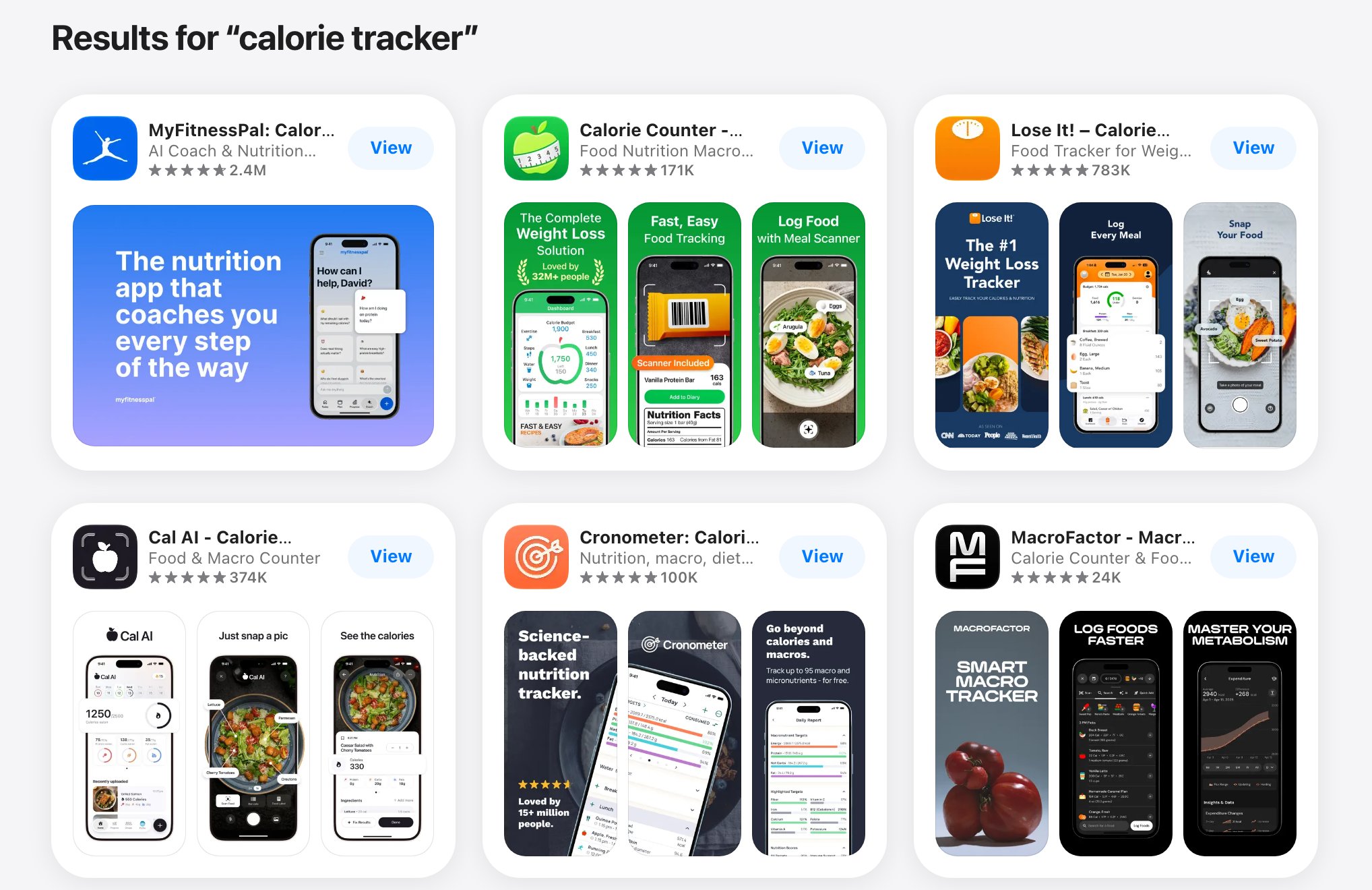
US App Store results for "calorie tracker", November 2026. Each card shows the name, subtitle and rating count.
Search each surviving keyword on an iPhone in your target store. Search cards cut off long names, so open each page to read the full name. Look at the top five to seven apps and note two things:
- How many ratings do they have?
- Is the keyword in their app name?
If the top apps have many ratings and use the keyword in their names, skip it. If the top apps have few ratings, or the exact phrase is missing from their names, you have a candidate. Steve describes a keyword that tools rated as competitive, but where no ranking app used it in the name. He reports that the app reached the top spot soon after launch.
Three traps to remove while you're there:
- Brand terms. Competitor keywords usually don't work, because people pick the brand they searched for. Apple's rules also bar competing app names from the keyword field.
- Misspellings. Type them on a real device. If the store corrects the word, the keyword is worthless.
- Apple's own product names. Skip terms like Voice Memos.
Also check whether brands own the term. In App Masters' examples, Otter ranks first for "AI notetaker" with a name that isn't tuned for it, and its brand name scores as high as the generic term. Steve says Calm and Headspace outscore "meditation" itself. His conclusion is that metadata is the main lever for apps without a known brand. Our read: if a known brand holds the top spots, your keyword work is unlikely to move it.
Want to see how App store keyword research works with your data?
Get hands-on with Airbridge and see real results.
Try It Free →Step 4: Choose a short list
Steve Young's rule of thumb is to find six to ten relevant keywords, then try to get two of them to number one. The number comes from what fits in the app name and subtitle of two localizations, which we cover below. The two are your real targets, and the rest are backups for later rounds. He says the rule comes from apps where he can see both rank and revenue, and he admits he doesn't know how other combinations perform.
We would record each one in a simple sheet:
| Keyword and role | Fit | Scores in two tools | Top 5 results |
|---|---|---|---|
| Your term: focus or backup | Relevance, and would a searcher pay? | Tool A, tool B | Rating range, how many use it in the name |
A written sheet matters more than its format. It records why you chose a term, so you can judge the decision later.
Step 5: Place keywords in the app name, subtitle and keyword field
Put your first focus keyword in the app name and your second in the subtitle. The name should still hint at what the app does, and the subtitle should explain its value. Guideline 2.3.7 bars subtitles that reference other apps or make claims you can't verify.
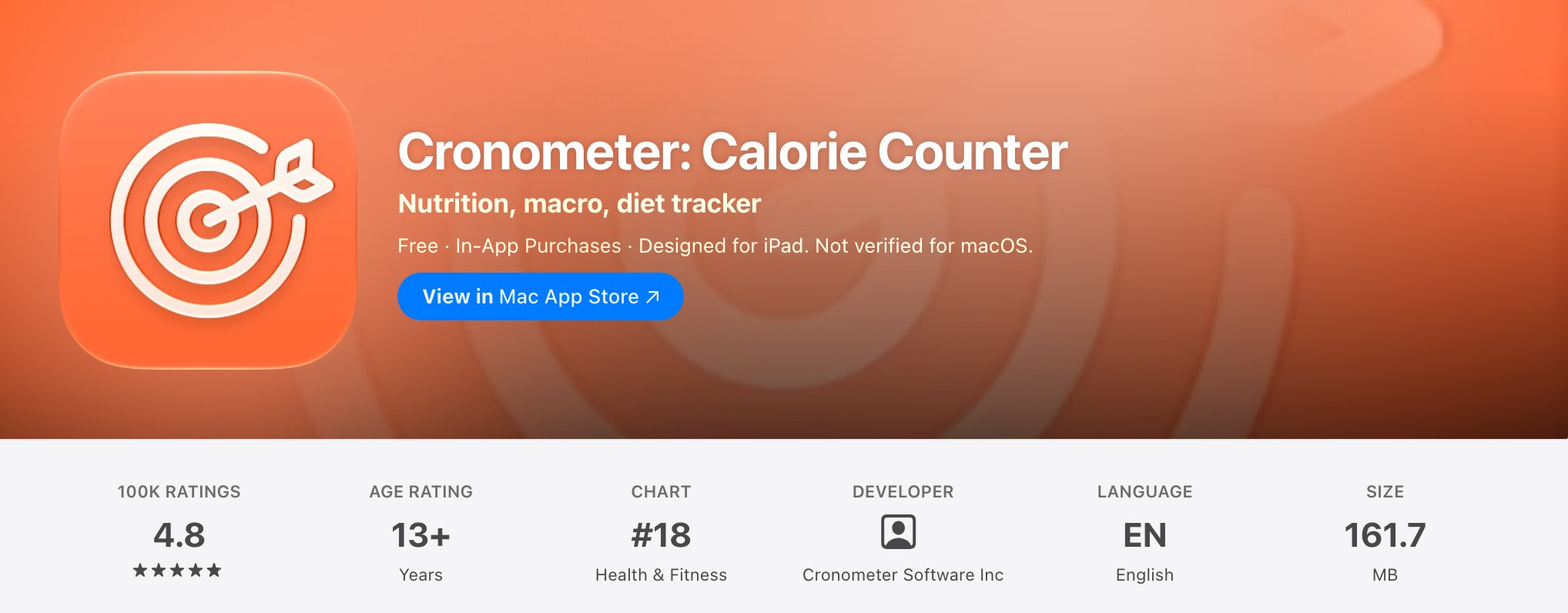
Cronometer uses its name for the brand and a keyword, and its subtitle for more terms. US App Store, November 2026.
Use the keyword field for the remaining relevant terms. Since Apple tells you not to repeat words from the name, subtitle or category, you lose nothing by removing them. That leaves more of the 100 characters for new words.
For long phrases, split them. App Masters' example puts parts of "chronic symptoms tracker" across the app name and subtitle, then moves the combination that shows movement into the app name in the next version.
The iOS description is not on Apple's list of text relevance fields, so write it for people. Apple notes that it is also used for web search results.
The Spanish (Mexico) tactic
App Masters reports that the US store also reads the Spanish (Mexico) localization. So, it says, English keywords placed in that localization can help US rankings and give you a second app name, subtitle and keyword field.
Here is what we could check. Apple's localization table lists Spanish (Mexico) among nine additional languages for the United States. Apple's help pages also say, using French as the example, that people can search with localized keywords in every country or region where the App Store supports that language. So the mechanism fits Apple's documentation.
Apple does not say that English words in a Spanish localization will rank in the US, or how they would be weighted. That part is App Masters' report only. In 2025 Steve said adding English to all nine languages expands indexing. In 2026 he said the others do less than Spanish (Mexico). Neither claim comes with public data.
If you try it, keep two limits in mind. Apple shows a localization to people whose language settings match it, so Spanish-speaking users may see that English text. In Mexico, Spanish (Mexico) is the default language. If you have a real audience there, this trade-off may not be worth it. Keep the terms accurate as well, because guideline 2.3.7 still applies.
Step 6: Work in rounds
We found no tested schedule for updates, so work in rounds: push two focus keywords, read the data, then swap in a backup if they stall. Test your highest-scoring keyword first, because you can't know in advance how the algorithm will treat your app.
For each round, record rank, product page views, downloads and trial starts before you change anything. Change one set of metadata at a time. Otherwise you can't tell which change did what.
Decide what success means before you start. In February 2025, Steve said the goal was number one. Later videos accept the top two or three, while keeping number one as the goal. His own project shows why this matters. In the first month of a public build, Thumsters moved from 48th to 7th for "chores tracker", and App Masters reports that downloads barely changed. He says he wouldn't expect a download jump from that move. It is one app and one month, without revenue figures, so it can't prove the rule. It does show that a better rank alone may not mean much.
Set your expectations for the channel too. Steve has said since 2025 that ASO is one slice of the pie, and that two keywords can stall at around $1,000 a month. He also launches new apps with ASO and Apple Ads together.
What to avoid
Some tactics promise faster rank: paid keyword installs, fake or paid reviews, and using another brand's name to catch its searches. Avoid them. App Review Guideline 5.6.3 says manipulating charts, search, reviews or referrals isn't permitted. Apple warns that manipulated reviews and inflated rankings can lead to removal from the Apple Developer Program. Guideline 2.3.7 covers trademarked terms and popular app names in metadata. App Masters has moved away from some of its own older growth advice as Apple's enforcement changed, so a tactic that worked last year is not safe by default.
Google Play
Evidence here is thin. App Masters says Play uses the title, short description and description, gives the description more weight, and cares more about retention. Don't assume iOS localization tactics carry over.
Rank doesn't show revenue
Everything above moves rank and, with luck, downloads. Neither tells you who pays. A subscription app earns from trials that convert and renew, and two keywords with the same rank can send very different users.
Paid search gives you the clearest read on that. If you run Apple Ads on your candidate keywords, you can compare what each one brings after the install. Airbridge Core Plan attributes trial starts and subscriptions to campaigns across Google, Meta, Apple and TikTok, and the Revenue report shows which ones earn money. With Apple Ads Advanced and the Campaign Management API integration, you can see this by keyword. This covers paid keywords, not the terms people type before an unpaid install, so use it as a signal for which organic keywords deserve the effort. Core Plan starts with a 30-day free trial, then $40+/mo.
To see these ideas on real apps, browse our ASO teardowns. Once a keyword brings people to your page, the listing has to convert them. Our guide to screenshots, icon tests and ratings covers that next step.
This guide is based on App Masters' YouTube channel, checked against Apple's documentation: Search optimization, Creating your product page and App Store localizations.
Ready to transform your mobile growth?
Learn how Airbridge helps leading brands measure and optimize every touchpoint.
“We went with them because their tech is better. It's best-in-class, for sure, but the real difference for us was the people.”