Best Meta Attribution for Productivity App
On this page
A productivity app needs a Meta attribution tool that follows a user from the ad to a paid plan that can start weeks after install. Look for app event postbacks to Meta, a report that still credits late upgrades, and pricing that fits an app people open all day. Airbridge makes one of the tools compared here, so read the tradeoffs with that in mind.
What productivity apps need from Meta
Most productivity apps do not earn on day one. A person installs a notes app or a task manager, tries it on one real job, and comes back only if it fits their routine. The upgrade often comes later, when they hit a free limit or need sync on a second device.
That delay shapes everything about your Meta setup. Meta learns from the events it receives. If it only sees installs, it finds more people who install. You want it to see people who sign up and start a trial, because those users are closer to paying.
Three more traits matter for this app type:
- Weekly rhythm. Usage often follows the work week. Someone can install on a Sunday and only test the app on Monday morning. A short reporting window hides that person.
- Second devices. A user may see the ad on a phone and do the real work on a laptop. Your attribution tool only sees what your app sends it.
- Team upgrades. One person may try the app, and a manager may pay for several seats later. That purchase can sit far from the original ad.
Meta also differs from search channels. People on Instagram are not looking for a to-do app. You interrupt them with a problem they recognize, so your creative carries more weight and your first session has to prove the promise fast.
What the data shows
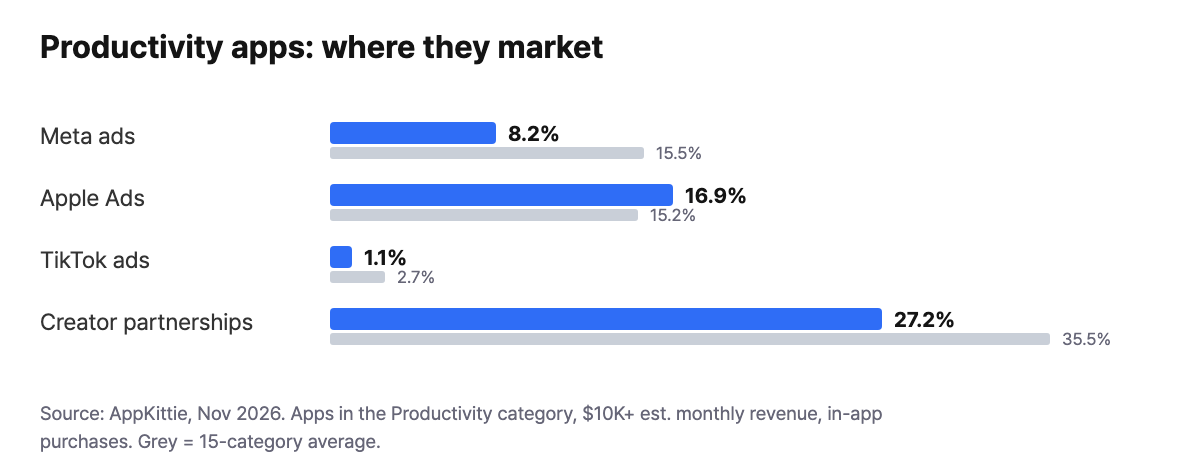
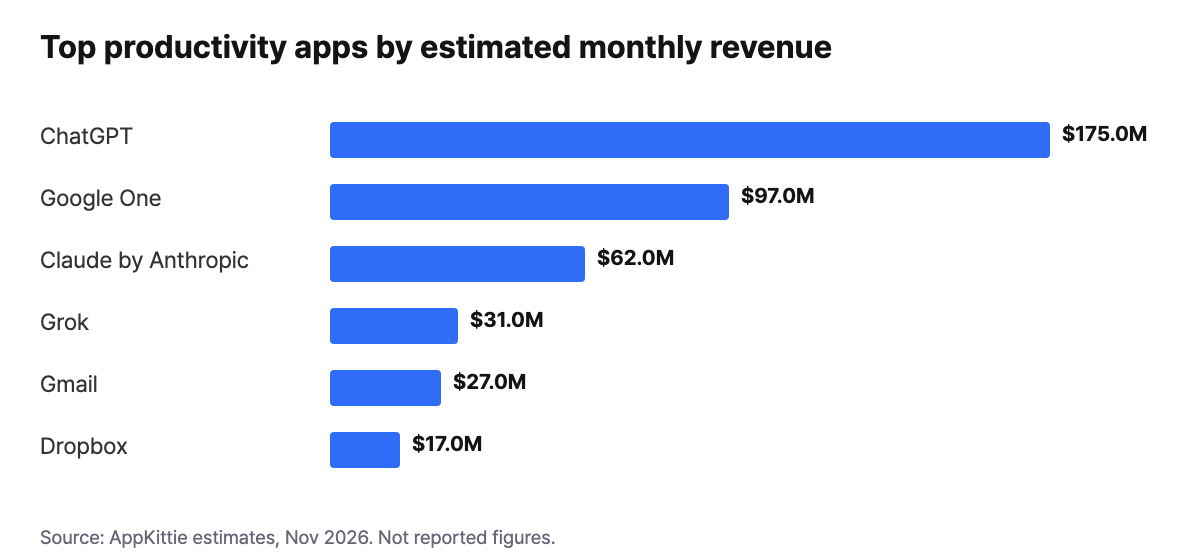
We looked at about 2,100 apps in the Productivity category with $10K+ estimated monthly revenue and in-app purchases, using AppKittie data from November 2026. Meta appears for 8.2% of them (172 apps), about half the 15.5% average across 15 categories, while Apple Ads reaches 16.9% and creator partnerships reach 27.2%. The revenue chart shows estimates, and names like ChatGPT at $175M come with brand reach a small team does not have, so treat Meta here as a channel to test, not a default.
How to choose
| Criterion | Why it matters for this app type | What to ask |
|---|---|---|
| Postbacks to Meta | Meta learns from what you send | Which app events can reach Meta on my plan? |
| Late upgrades | Paid plans can start long after the click | Does any report credit revenue outside the click window? |
| Billing unit | Daily opens add events, not conversions | Does my cost follow usage or conversions? |
| iOS reporting | Paid users on iPhone often sit behind privacy limits | What SKAN reporting is included? |
| Channel mix | Apple Ads and creator partnerships both show up on more apps than Meta in this data | Can I see all three in one report? |
| Cost detail | Creative tests need cost beside results | How deep does cost data go? |
The billing row is the real tradeoff here. Data point billing costs more as engagement grows. Per-conversion billing tracks acquisition instead. A heavy-use app should model both before it signs up.
Want to see how Best meta attribution for productivity apps works with your data?
Get hands-on with Airbridge and see real results.
Try It Free →Tools compared
| Airbridge Core | AppsFlyer | Adjust | Branch | Singular | Kochava | |
|---|---|---|---|---|---|---|
| Starting price | $40+/mo | Zero plan free (12,000 conversions in first 12 months); Growth $0.07 per conversion | Check vendor pricing page | Not listed on pricing page | Free plan (15,000 paid conversions); Growth $0.05 per conversion | Free App Analytics (10K conversions/month); Foundation from $500/mo |
| Self-serve signup | Yes | Yes | Check vendor pricing page | Yes on Basics | Yes on Free | Yes |
| Billing model | Data points | Per conversion | Check vendor pricing page | Not stated on pricing page | Per conversion | Conversions or MAU, by plan |
| Free trial | 30 days | Free Zero plan instead | Check vendor pricing page | Yes, on Basics | Free plan instead | Yes, on paid plans |
| RevenueCat integration | Yes | Yes | Yes | Yes | Yes | Yes |
Competitor details come from each vendor's public pages as of November 2026. AppsFlyer says its Zero plan is not suitable for apps with paid activities.
- Airbridge Core may suit a small team that wants a 30-day trial first and accepts a bill tied to data points.
- AppsFlyer may suit a team that wants its bill tied to conversions, at $0.07 each on Growth.
- Adjust may suit a team willing to get current plans from its pricing page before comparing.
- Branch may suit a team that wants to try Basics, though its pricing is not listed.
- Singular may suit a heavy-use app that prefers per-conversion billing, at $0.05 on Growth.
- Kochava may suit a team that wants free App Analytics first and can budget from $500/mo for Foundation.
How to set this up in Airbridge
- Start the 30-day trial. You need no card and no sales call. A basic SDK install takes about 5 minutes.
- Connect Meta Ads. Core also covers Google Ads, Apple Ads, and TikTok for Business, so you can compare them with Meta.
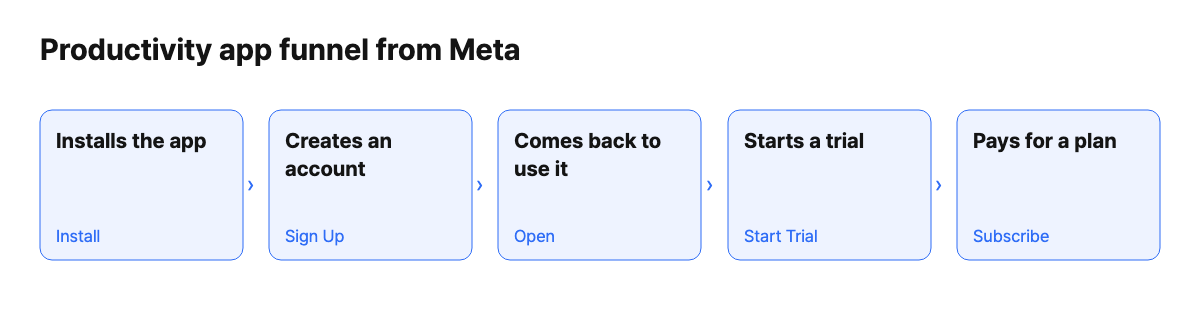
- Track standard events: Install, Sign Up, Start Trial, and Subscribe. Core has no custom events, so "created first project" cannot be its own step. Use Sign Up as your closest signal of intent.
- Connect RevenueCat, Adapty, or Superwall if you use one. Trial starts arrive as Start Trial, and first payments, trial conversions, and renewals all arrive as Subscribe.
- Set up the mobile app postback to Meta, then read the results in the Funnel Report. This funnel guide walks through each step.
What Airbridge Core does not do here
- No Conversions API. Core sends mobile app postbacks to Meta, but CAPI is on Growth only.
- No Meta web campaigns. Core covers Meta app campaigns. Web campaigns on Core are limited to Google Ads and TikTok for Business. If your Meta ads send people to a desktop signup page, pick Growth or another tool.
- No creative-level cost. Cost data reaches campaign or ad group level. A team that kills ads one creative at a time needs another view for that decision.
- Four ad channels only. Reddit, Snapchat, and X have no integrated channel on Core. A custom channel tracking link is the option, with no automatic cost sync or postbacks.
FAQ
Why do Meta's numbers differ from my attribution tool?
Each system applies its own rules and windows. In Airbridge, the default click lookback is 7 days for device ID matches and 1 day for probabilistic matches. You can adjust it from 0 minutes to 30 days. Expect a gap, and pick one source for your budget decisions.
Can Airbridge credit an upgrade that happens weeks after install?
Yes, in one report. The Revenue Report credits each revenue event to the most recent Start Event, with no attribution window. Actuals counts only events inside the window. So a late upgrade can show in one and not the other.
What will a heavy-use productivity app pay?
Core is $40+/mo with 500K data points included, then $0.0001 per extra data point. An install, an app open, and a purchase each count as one event. Tracking link clicks and impressions do not. Airbridge's pricing page estimates $40 covers about 35,000 monthly active users at typical usage, but heavy use will cost more, and there is no spending cap. See how to start without a sales call.


Ready to transform your mobile growth?
Learn how Airbridge helps leading brands measure and optimize every touchpoint.
“Airbridge understands the essence of what it has to offer as an MMP. Its objective, transparent, and accurate performance analysis allows marketers to realize the true impact of their efforts.”