Let an AI Agent Read Your Attribution Data, and Give It a Revenue Metric

On this page
Can an AI agent read my attribution data?
Yes. With Airbridge MCP (in beta), you connect Claude, Claude Code, ChatGPT or Codex to your Airbridge account and ask questions in plain English: which campaigns brought trials last week, what revenue came from each channel, how many users came back on day 7. Setup takes a few minutes. The more important decision is what you ask the agent to improve: point it at installs and it will chase cheap installs; point it at trials and revenue and it can find what pays.
Tools that do this
-
Free: paste exports from each ad dashboard into a chat. It works, but each platform counts on its own terms and nothing ties installs to revenue.
-
One source an agent can query, with installs, trials and revenue per campaign: Airbridge MCP connects an AI client to your Airbridge reports and is included in Airbridge Core, which ties trials and renewals from RevenueCat, Adapty or Superwall to each campaign, next to spend from Meta, Google, Apple Ads and TikTok. Try it free for 30 days, then from $40 per month.
What is MCP?
MCP (Model Context Protocol) is a standard way for an AI app to connect to an outside data source and use its tools. Airbridge's Help Center puts it simply: with Airbridge MCP, you can "ask questions, get reports, and explore your data just by typing requests" (Airbridge Help Center). The agent calls the same reports you'd open in the dashboard, with the same permissions your account has.
How do you set up Airbridge MCP?
The server address is the same for every client: https://mcp.airbridge.io/mcp.
-
Claude (web or desktop): Settings → Connectors → Add custom connector. Name it "Airbridge", paste the server URL, click Add, then Connect and sign in to Airbridge.
-
Claude Code: run claude mcp add -t http -s user airbridge https://mcp.airbridge.io/mcp, then /mcp, select Airbridge and authenticate.
-
ChatGPT: Settings → Apps → Advanced Settings, turn on Developer Mode, then Create App with the server URL and OAuth.
-
Codex: run codex mcp add airbridge --url https://mcp.airbridge.io/mcp and sign in.
Plan requirements differ by AI service; the Airbridge Help Center lists them for each one.
Which tools should the agent get?
When you sign in, Airbridge shows an access screen with three groups of tools, each with its own switch.
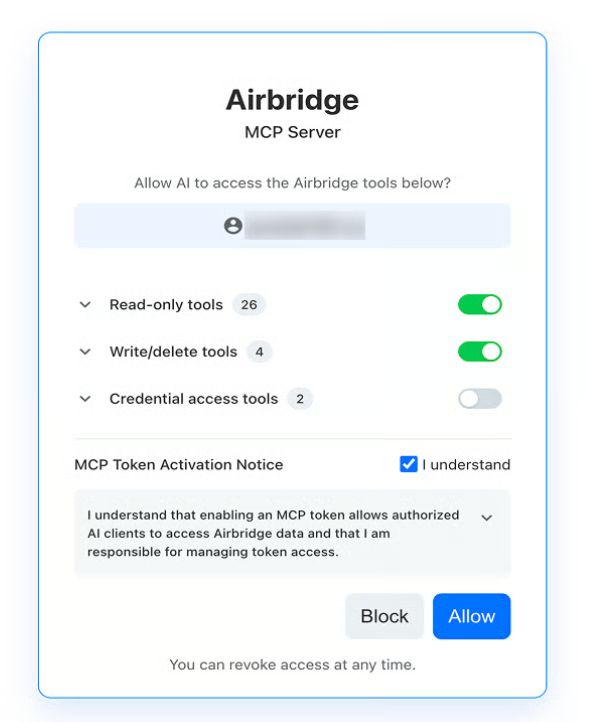
The access screen you see when you connect an AI client. Source: Airbridge Help Center.
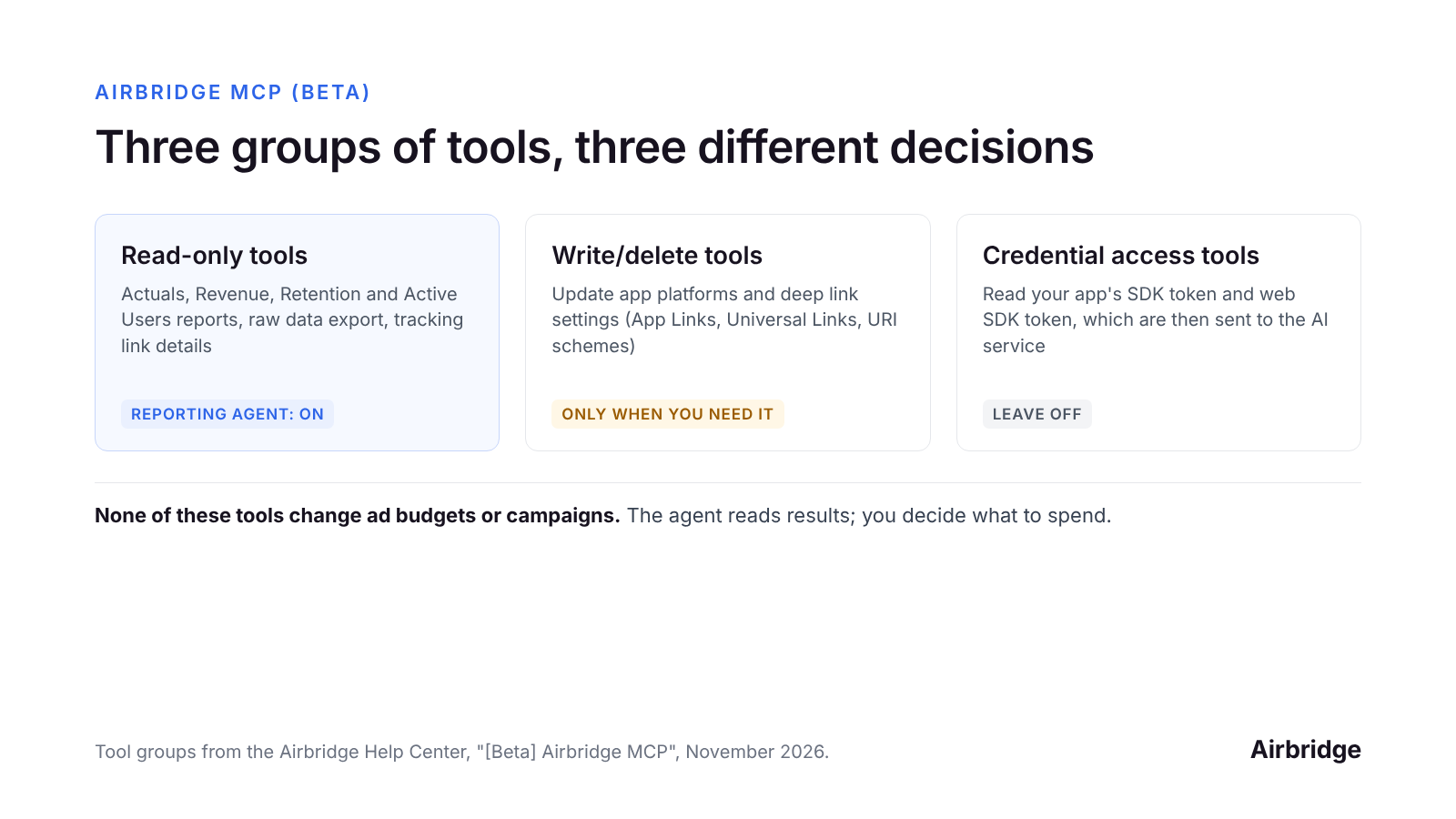
What each group does, and a sensible default for a reporting agent. Source: Airbridge Help Center.
-
Read-only tools pull reports such as Actuals, Revenue, Retention and Active Users, and read tracking links. This is all a reporting agent needs.
-
Write/delete tools change settings inside Airbridge, such as app platforms and deep links. Turn them on only for a session where you're setting those up.
-
Credential access tools read your SDK tokens. The Help Center warns that allowing them "sends your credentials to the AI service provider's server." Leave them off unless you have a specific reason.
You can revoke access at any time. If you think a token is being misused, the Help Center's advice is to disable it right away.
Want to see how Airbridge mcp works with your data?
Get hands-on with Airbridge and see real results.
Try It Free →What can you ask it?
Start with questions you'd otherwise answer by exporting three CSVs:
-
"For the last 14 days, show installs, trial starts and revenue by channel. Sort by cost per trial start."
-
"Which three campaigns had the lowest cost per install? How many trials and how much revenue did each bring?"
-
"Compare day-7 retention for users from paid social and from Apple Ads this month."
-
"Which countries brought installs but no trial starts in the last week?"
Ask the agent to show which report and date range it used. If a number looks off, open the same report in the dashboard and compare.
Why the agent needs a revenue metric
An agent optimizes for what you tell it to. Ask it to "lower CPI" and it will happily recommend the placement with the cheapest installs, even if none of them start a trial (why cheap installs often don't pay). Ask it to "lower cost per trial start" or "raise revenue per dollar of spend" and it has to look at what happens after the install.
That only works if the data it reads includes trials and revenue tied to campaigns. If your attribution data stops at installs, the agent can only reason about installs.
What guardrails does an agent need before it touches ad spend?
Airbridge MCP works with your data and settings inside Airbridge; none of its tools change ad budgets or campaigns on ad platforms. Ad platforms are also starting to publish their own MCP servers, some with tools that create or change things in your account. If you connect one of those, set the rules before the first session:
-
Read first, write later. Start every agent with read-only access. Add write tools one at a time, for a specific task.
-
A person approves every spend change. The agent can propose a budget move; someone with the context makes it.
-
Give it a revenue goal and a limit. For example: "Keep cost per trial start under $30; never suggest raising total daily spend by more than 20%."
-
Use one source of truth for results. If the agent reads each ad platform's numbers separately, it can't compare them on equal terms, because each platform counts conversions with its own rules. Give it one view where installs, trials and revenue are counted the same way for every channel.
-
Keep a log. Ask the agent to write down what it read, what it suggested and why. Review it weekly.
Common questions
Which AI apps work with Airbridge MCP?
The Airbridge Help Center has setup steps for Claude (web and desktop), Claude Code, ChatGPT and Codex. Any client that supports remote MCP servers with OAuth should be able to connect to https://mcp.airbridge.io/mcp.
Can Airbridge MCP change my ad budgets?
No. Its tools read reports and, if you allow it, help with app setup inside Airbridge, such as deep link settings. It doesn't change campaigns or budgets on ad platforms.
Is my data used to train AI models?
Airbridge's MCP activation notice says customer data is not stored by the MCP servers and not used to train AI models. Once data reaches the AI service you connect, that service's own policies apply, so check its settings too.
Is Airbridge MCP free?
It's in beta. The Core Plan lists the MCP server among its features, and what you can reach follows your account's permissions. Check the Help Center for the latest details.
The bottom line
Connecting an agent to your attribution data takes five minutes. Make two decisions before you start: give it read-only access, and ask it about trials and revenue, not installs.
If your data stops at installs today, Airbridge Core ties trials and renewals from RevenueCat, Adapty or Superwall to each campaign, next to its spend, so you and your agent read the same numbers. The Core Plan is built for subscription apps: try it free for 30 days, then from $40 per month.

Ready to transform your mobile growth?
Learn how Airbridge helps leading brands measure and optimize every touchpoint.
“Airbridge understands the essence of what it has to offer as an MMP. Its objective, transparent, and accurate performance analysis allows marketers to realize the true impact of their efforts.”