UGC Format Testing: How to Measure Formats Across Multiple Accounts


UGC format testing across several accounts
More and more subscription apps run their own short-form accounts instead of, or alongside, paid creators. One founder planning this told us: "8-10 with different formats," adding that "most important is to find viral format first." A marketer who studies these formats made the same point from another angle: "what's more important is which format converts rather than what creator."
When you control the accounts, the account itself matters less. What you're really testing is the format: the hook, the structure, the way the app appears on screen.
What this playbook sets up
-
Tag every post with its format, and give every account its own tracking link.
-
Judge formats on trials per 1,000 views and cost per trial, not views.
-
Kill a format after a fixed number of posts if it brings views but no trials.
-
Double down on the format, not the account that happened to post it.
Why views alone pick the wrong winners
Views tell you which format spreads. They don't tell you which format makes people install, start a trial and pay. Some formats are built to be shared: jokes, trends, reactions. Others are built to convert: a clear problem, the app solving it on screen, the app name said out loud.
One founder described how this played out in his own test: the format stayed constant and the conversion-rate" class="glossary-link" title="Conversion Rate">conversion rate per format was "same across different videos/accounts so it just depended on views." That's the useful case. You only know it if you measure conversion per format, not just views.
Step 1: Name your formats
Give each format a short, stable name and use it everywhere: in your post log, in link names and in reports. For example:
| Format | Description |
|---|---|
| problem-demo | States a problem in the first 2 seconds, shows the app fixing it |
| before-after | Shows the result first, then how the app got there |
| day-in-life | The app appears naturally in a routine |
| list-tips | "3 things I do every morning", with the app as one tip |
| reaction | Reacts to a trend or comment, app shown at the end |
Keep the number of formats small, three to five at a time, so each one gets enough posts to judge.
Step 2: One link per account, one tag per post
Give each account its own tracking link in the bio. Links in captions and comments aren't clickable on TikTok or Instagram, so the bio is where taps happen. Then log every post with its account, format, date and views.
If one account posts several formats, the link tells you which account a tap came from, and the post log tells you which format was live that day. Better still, dedicate each account to one format for a few weeks so link data maps straight to a format.
Step 3: Add the signals links miss
Most viewers search the store instead of tapping a bio link, so links alone undercount every format. Add:
-
A one-tap onboarding question listing your account names, so searchers can tell you where they saw you.
-
A trial-start read per day, so you can see lift on days a format took off.
We explain how links, the survey and lift fit together in Creator Attribution for Apps: How to Credit Installs When Viewers Skip the Link.
Want to see how UGC format testing works with your data?
Get hands-on with Airbridge and see real results.
Try It Free →Step 4: Judge formats with two numbers
-
Trials per 1,000 views = trials credited to the format ÷ views × 1,000. This tells you how well a format converts attention.
-
Cost per trial = what you spent producing and posting the format ÷ trials credited to it. This tells you whether it pays.
Here is an illustrative month:
| Format | Posts | Views | Trials credited | Trials per 1,000 views |
|---|---|---|---|---|
| reaction | 12 | 900,000 | 45 | 0.05 |
| problem-demo | 12 | 240,000 | 96 | 0.40 |
| before-after | 12 | 310,000 | 62 | 0.20 |
Numbers are illustrative.
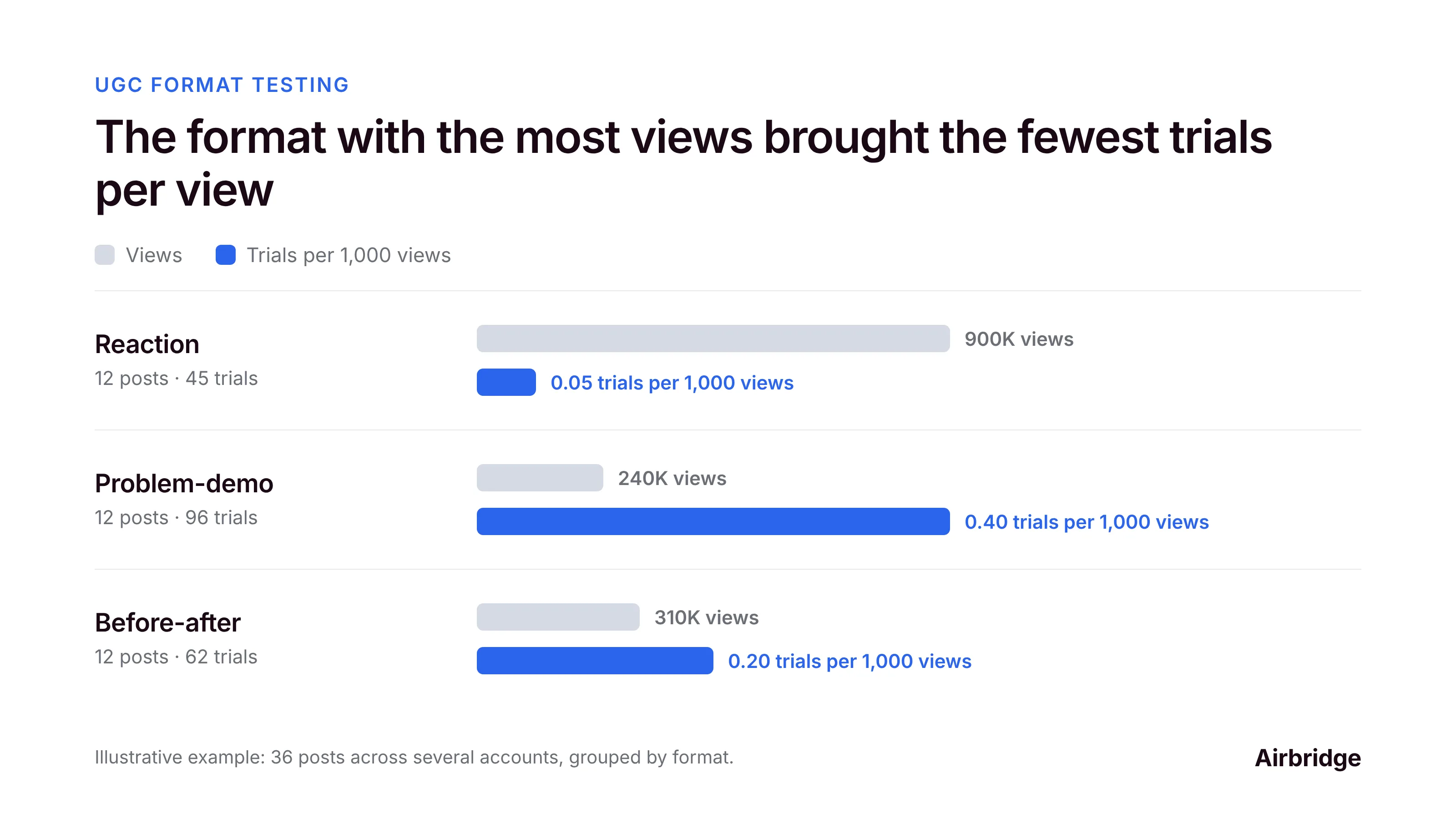
The reaction format won on views and lost on everything else. The problem-demo format brought eight times as many trials per 1,000 views.
Step 5: Set kill and scale rules before you start
Decide the rules up front, so you don't argue with yourself later:
-
Give each format at least 8 to 10 posts before judging it. One post can flop or go viral by chance.
-
Kill a format if trials per 1,000 views stay well below your average after that many posts.
-
Scale a format by posting it on more accounts, not by keeping it on the account that found it.
-
Retest winners every few weeks. Formats wear out as audiences see them repeatedly.
UGC format testing FAQ
How do I track which UGC format brings app installs?
Tag every post with a format name, give each account its own tracking link, add an onboarding question with your account names, and compare trials per 1,000 views by format.
Should I run one format per account or many?
One format per account for a few weeks makes the data much cleaner, because the account's link maps straight to the format. Rotate formats across accounts later.
How many posts do I need before judging a format?
Around 8 to 10 per format. Fewer than that and a single viral or failed post can swing the result.
Is views per post a good metric for UGC format testing?
Only for reach. To pick formats that grow revenue, use trials per 1,000 views and cost per trial.
Can I use paid ads to test formats faster?
Yes. Boosting a few posts per format with the same small budget gives you comparable reach quickly. Judge them on cost per trial, not cost per view.
Before your next batch of posts
When you run your own accounts, the format is your real experiment. Name your formats, tag every post, give each account its own link, and let trials per 1,000 views decide what stays.
Airbridge gives each account and post its own tracking link and shows installs, trial starts, subscriptions and revenue per link in one dashboard, across iOS and Android. The Core Plan is built for subscription apps, and you can try it free for 30 days, then from $40 per month.



Ready to transform your mobile growth?
Learn how Airbridge helps leading brands measure and optimize every touchpoint.