Best Revenue Attribution for Personal Finance App
On this page
Revenue attribution for a personal finance app should show what each channel earns over months, using subscription data from your paywall tool and a crediting rule you can explain. Check how each tool assigns late revenue, what it calls CAC, and how it treats refunds. Airbridge makes one of the tools compared, so test its rules against your own numbers.
What personal finance apps need from revenue attribution
Money apps ask for more trust than most apps. Before a budgeting tool proves anything, it often asks a person to link a bank account or log weeks of spending. Many people pause at that step. The decision to pay can take much longer than a typical app trial, and the value only shows after a full month of bills.
That shapes what revenue attribution has to do:
- Revenue is slow and lumpy. Yearly plans are common here. One payment lands early, and the next arrives a year later. A monthly dashboard can make a good channel look flat for eleven months.
- Renewal is the business. Budgeting works as a long habit. The value of a channel depends on who is still paying next year, not on who paid first.
- Money moves on a calendar. Interest rises around New Year, tax season, and paydays. A channel can look strong because of the date, so compare the same period when you can.
- Households complicate the math. Two partners may share one plan. One subscription can come from two installs, which makes cost per install look worse than it is.
- Not all income is a subscription. Some finance apps earn from partner offers or sell plans on their website to avoid store fees. That money sits outside app store data, so a store-based view can undercount it.
The trap is reading first-week revenue as channel value. For this app type, a low early number can still be a good channel.
What the data shows
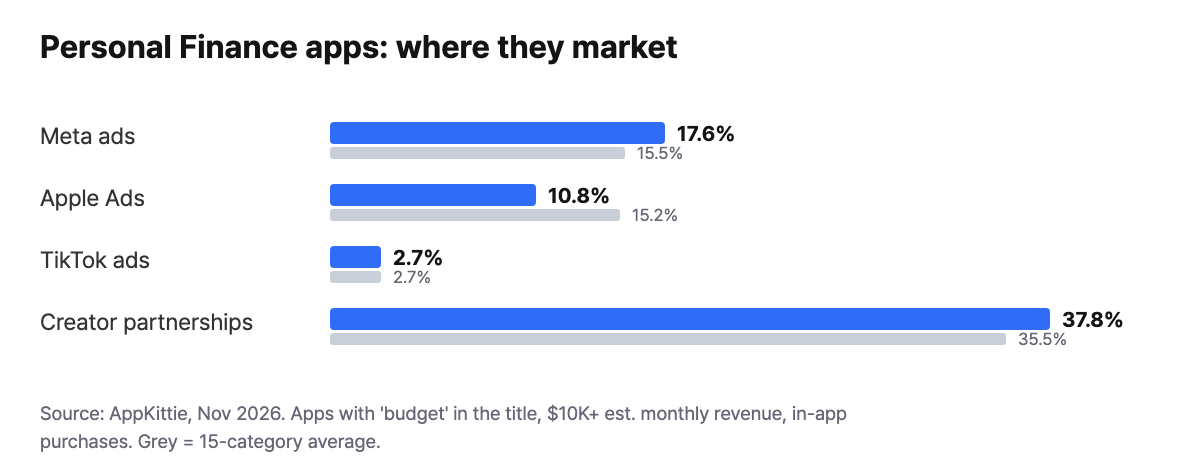
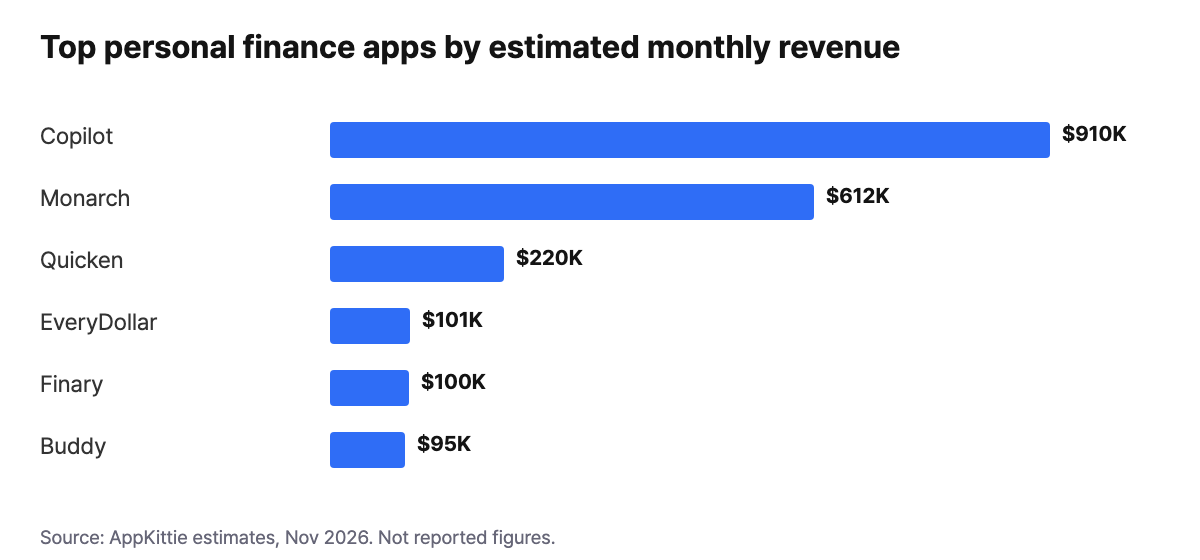
We matched 74 apps with "budget" in the title, $10K+ estimated monthly revenue, and in-app purchases, using AppKittie data from November 2026, so most investing and banking apps fall outside this view. Creator partnerships lead at 37.8%, Meta sits at 17.6%, and Apple Ads at 10.8% trails its 15.2% average across 15 categories. Revenue figures are estimates, and they concentrate fast: Copilot ($910K) and Monarch ($612K) stand well above Quicken ($220K) and everyone after it.
How to choose
- Crediting rule. Ask how the tool ties a payment to a source when the payment comes months later. Some reports use a window, and some do not. Neither is wrong. You just need to know which one you are reading.
- Revenue source. Check that revenue comes from the tool you already use, such as RevenueCat or Adapty, so you are not keeping two versions of the truth.
- What CAC means. Vendors define it differently. A figure based on installs looks far better than cost per paying customer. Ask for the formula.
- Refund handling. People do ask for their money back on a yearly plan. See if refunds reduce the revenue you see by channel.
- Export for your books. Investors and accountants will ask how you got a number. Decide if report exports are enough or if you need raw rows.
- Fees against depth. A plan with fewer data features costs less now but may force a move later. Weigh that against the size of your paid budget.
Want to see how Best revenue attribution for personal finance apps works with your data?
Get hands-on with Airbridge and see real results.
Try It Free →Tools compared
| Airbridge Core | AppsFlyer | Adjust | Branch | Singular | Kochava | |
|---|---|---|---|---|---|---|
| Starting price | $40+/mo | Zero plan free (12,000 conversions in first 12 months); Growth $0.07 per conversion | Check vendor pricing page | Not listed on pricing page | Free plan (15,000 paid conversions); Growth $0.05 per conversion | Free App Analytics (10K conversions/month); Foundation from $500/mo |
| Self-serve signup | Yes | Yes | Check vendor pricing page | Yes on Basics | Yes on Free | Yes |
| Billing model | Data points | Per conversion | Check vendor pricing page | Not stated on pricing page | Per conversion | Conversions or MAU, by plan |
| Free trial | 30 days | Free Zero plan instead | Check vendor pricing page | Yes, on Basics | Free plan instead | Yes, on paid plans |
| RevenueCat integration | Yes | Yes | Yes | Yes | Yes | Yes |
Competitor details come from each vendor's public pages as of November 2026. AppsFlyer says its Zero plan is not suitable for apps with paid activities.
- Airbridge Core may suit a small budgeting app with a modest ad budget, starting at $40+/mo after 30 days.
- AppsFlyer may suit a team with a high-value subscription, where $0.07 per conversion is a small share of each sale.
- Adjust may suit a team that wants a RevenueCat link and is ready to ask for current pricing.
- Branch may suit a team that signs up on Basics first and settles cost once it knows its needs.
- Singular may suit a team that values a lower per-conversion rate, at $0.05 on Growth.
- Kochava may suit an app unsure if conversions or MAU fits better, as billing varies by plan.
How to set this up in Airbridge
- Sign up for Core with no sales call, and follow the setup guide. The basic SDK install is about 5 minutes of work.
- Connect your ad channels and your subscription tool. Airbridge supports RevenueCat, Adapty, and Superwall. This guide covers RevenueCat.
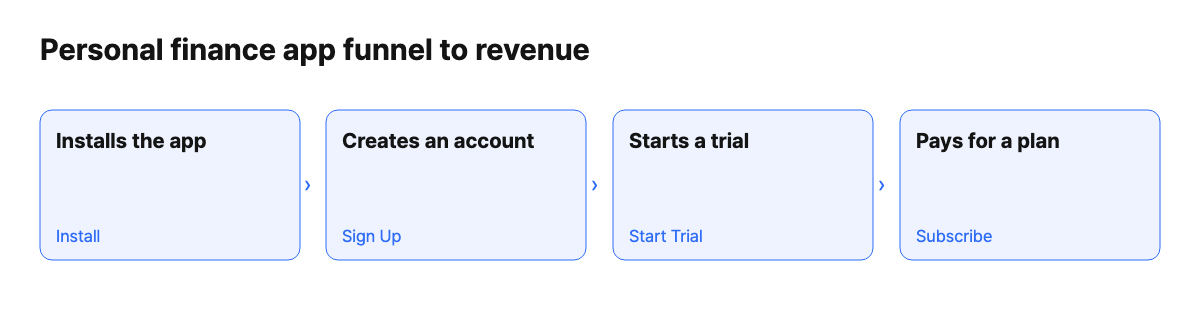
- Open the Revenue Report and pick your Start Event. With RevenueCat, pick Subscribe as the Revenue Event. With Adapty, the documented metric is Subscription Revenue (App).
- Compare the Revenue Report with Actuals. The first credits revenue to the latest Start Event and uses no attribution window. The second counts only what falls inside the window.
- Export reports to Sheets or CSV for your monthly review, and watch the same channel over several months.
What Airbridge Core does not do here
- CAC is not cost per payer. Revenue Report CAC equals total ad spend divided by Start Event users. Do not read it as cost per paying customer.
- No refund event. Core has no dedicated refund event. A refund-driven cancellation surfaces as Unsubscribe, so it will not read as a clean revenue reversal.
- Some purchases do not arrive. Non-renewing purchases, such as lifetime deals, come through these integrations as custom events, and Core cannot use custom events.
- No raw data export. Core exports reports, not raw rows. A team that needs event-level data for finance, or full web event measurement for website sales, should look at Growth or another tool.
FAQ
Why do the Revenue Report and Actuals show different numbers?
They use different rules. The Revenue Report has no attribution window, so a payment months later still gets credit. Actuals drops anything outside its window. For a yearly plan, the Revenue Report can show more.
Do RevenueCat and Adapty users set this up differently?
Slightly. Both connect as integrations, and both map lifecycle events to Start Trial, Subscribe, and Unsubscribe. The revenue setting differs. RevenueCat users pick Subscribe as the Revenue Event, while the Subscription Revenue (App) metric is documented for Adapty only.
Should I judge a finance channel on first-month revenue?
Not alone. Many users here pay once for a year, so the first month can look strong or weak for reasons that have nothing to do with lifetime value. Retention helps. Core lets you use Subscribe as the Return Event, so you can see which channels keep paying.


Ready to transform your mobile growth?
Learn how Airbridge helps leading brands measure and optimize every touchpoint.
“Braze is a powerful tool on its own, but when paired with Airbridge, it creates synergies for retargeting campaigns, saving resources and enhancing performance.”