UIPasteControl for Deferred Deep Links: A One-Tap Fallback on iOS

On this page
How can UIPasteControl help with deferred deep linking on iOS?
UIPasteControl is Apple's system paste button, available since iOS 16. Apple's documentation says that in iOS 16 and later, pasting programmatically asks the user for approval, and the paste button lets an app paste without that prompt. That makes it a clean fallback for deep linking">deferred deep linking: your web page copies a short token when someone taps "Get the app", and if your app can't match the install to the click on first open, it shows a paste button that brings the person to the screen they came for with one tap. Use it next to automatic matching, not instead of it.
Tools that do this
-
Free, build it yourself:
UIPasteControlfor a one-tap paste, App Store custom product pages with their own deep link (iOS 18 and later), and your own sign-in links. -
Automatic deferred deep linking plus attribution: an MMP or link provider. Airbridge Core includes deep linking, deferred deep linking and custom domains. Try it free, then from $40 per month.
A developer asked in an iOS community recently how to pass a link to someone who doesn't have the app yet. The options have changed: Firebase Dynamic Links shut down on August 25, 2025, and since iOS 16 an app that reads the clipboard on its own triggers a permission alert. For the full picture of deferred deep linking, see our deferred deep link implementation guide for iOS and Android. This post covers one piece: the paste button fallback.
Why do you need a fallback for deferred deep links on iOS?
A deferred deep link has to survive the App Store, which doesn't pass the link into your app. Link providers and MMPs match the click to the first app open using methods Apple allows, such as the advertising identifier (IDFA) when the user has allowed tracking. When matching isn't possible, the user lands on your home screen instead of the recipe, invite or offer they tapped. For links where that matters, such as referrals and paid creator links, a fallback the user controls is worth adding.
What are the fallback options on iOS?
| Method | How the app gets the destination | User effort | Good for |
|---|---|---|---|
Paste button (UIPasteControl) |
The web page copies a token; the app shows a system paste button | One tap | Any link, as a fallback |
| Custom product page deep link | The App Store page variant carries a deep link | None | Campaigns with their own store page |
| Sign-in link | The destination is saved to the account and read after sign-in | Sign in | Invites, referrals, web purchases |
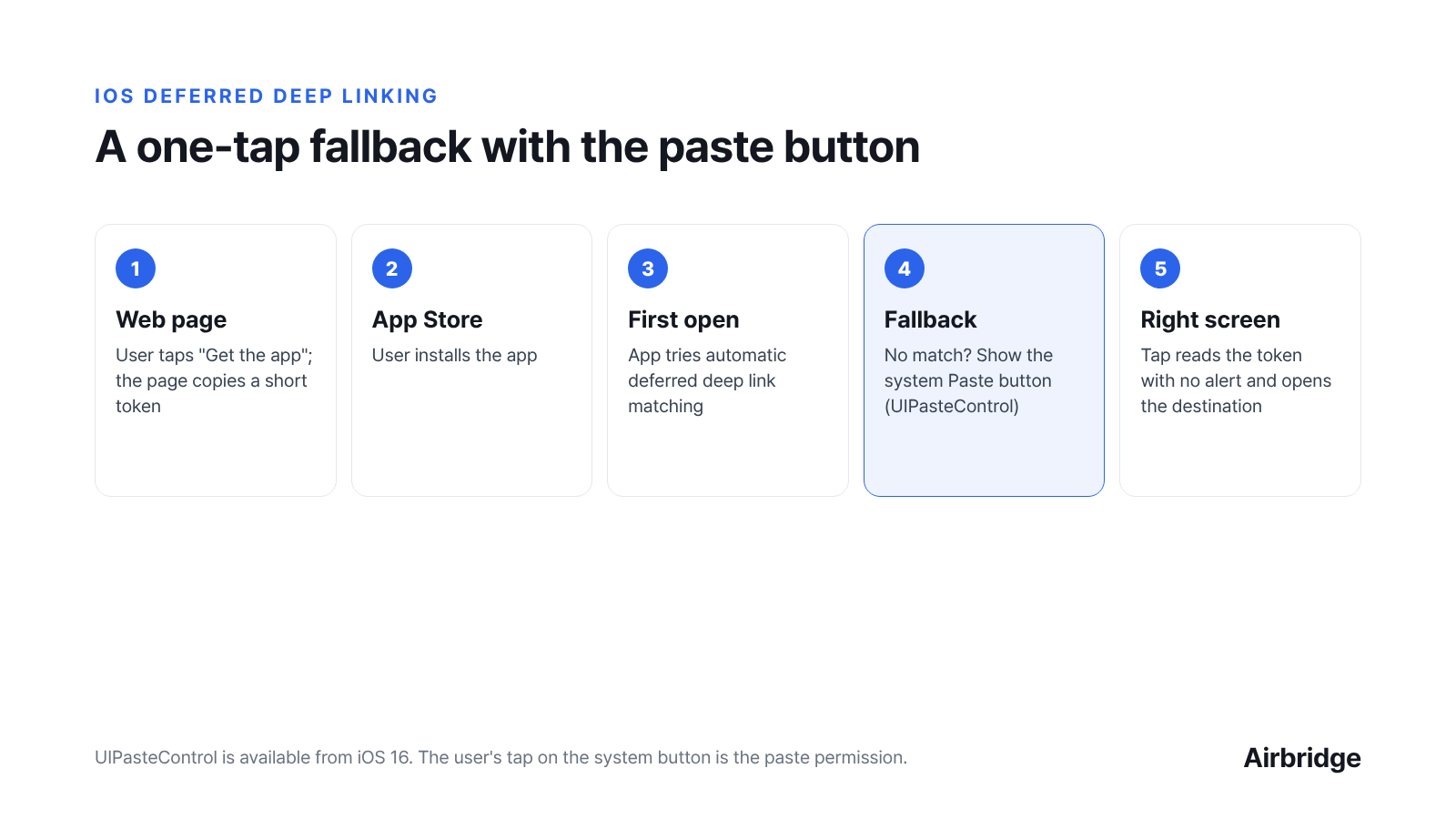
Automatic matching first, paste button second. The tap on the paste button is the user's permission.
Want to see how UIPasteControl works with your data?
Get hands-on with Airbridge and see real results.
Try It Free →How do you add a paste button fallback?
- On your web page, copy a short token (for example
myapp-invite-8F3K) to the clipboard when the person taps "Get the app", using the browser's Clipboard API inside the tap handler. Tell the person what you copied, for example "We copied your invite code". - In your app's first screen, if no deferred deep link was matched, show a short line such as "Opened a link? Tap Paste to continue" with a
UIPasteControl. The paste button sends the clipboard content to the view or view controller you set as its target. - When the person taps Paste, read the text, check that it's your token, look up the destination and open that screen.
- Ignore anything that isn't your token, and never store unrelated clipboard content.
Apple's UIPasteControl documentation includes sample code for adding a paste button and setting its target. It's the best starting point for your developer. A few design choices to make along the way:
- iOS version:
UIPasteControlis available from iOS 16. On older versions, skip the button and show your normal first screen. - Token format: use a fixed prefix such as
myapp-so the app can ignore anything else on the clipboard. - Token lifetime: treat the token as a lookup key only. Resolve it on your server, let it expire, and don't put personal data in it.
- Placement: show the button only on the first screen after install, and hide it once a deep link has been matched or used.
When should you use custom product page deep links instead?
App Store custom product pages can each have their own app deep link. When people on iOS 18 or iPadOS 18 or later tap Open on that page, the deep link takes them to specific content in your app. It needs no clipboard and no matching, so it's a good fit for paid campaigns where you control which store page people land on. The deep link can be a universal link or a custom URL, and it must be approved through App Review before it works.
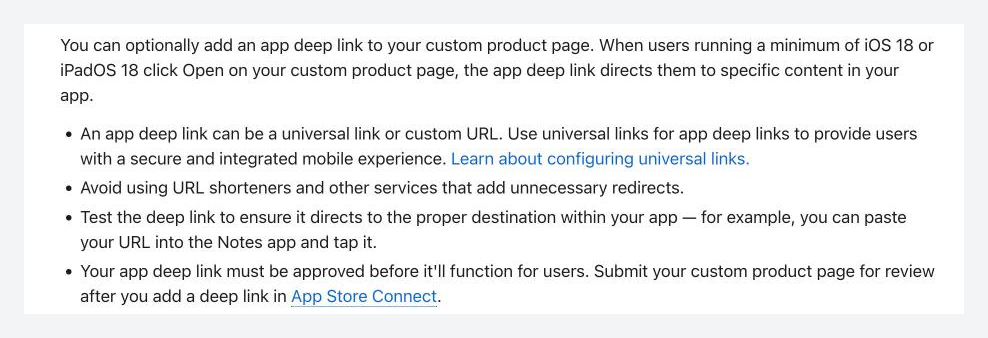
Custom product pages can carry their own app deep link for iOS 18 and later. Source: App Store Connect Help, Apple Developer
When should you use sign-in links?
If the person has to sign in anyway, save the destination to their account or put it in a sign-in link sent by email. After sign-in, open the saved screen. It's the most reliable option for invites, referrals and purchases made on the web. See web-to-app attribution with web checkout.
FAQ
What is UIPasteControl?
A system-drawn paste button in UIKit, available since iOS 16. When a person taps it, your app receives the clipboard content without showing a paste permission alert, because the tap counts as permission.
Why does my app show "Allow Paste" when it opens?
Since iOS 16, reading the clipboard without a user action triggers a permission alert. Use UIPasteControl instead, so the person pastes with one tap and no alert.
Does deferred deep linking still work on iOS?
Yes. Link providers and MMPs match the click to the first app open where Apple allows it, and you can add a paste button, custom product page deep links or sign-in links as fallbacks.
What replaced Firebase Dynamic Links?
Firebase Dynamic Links shut down on August 25, 2025. Teams moved to universal links and app links directly, or to link providers and MMPs that include deferred deep linking.
Can I do deferred deep linking without an SDK?
Partly. Custom product page deep links and sign-in links need no third-party SDK, and a paste button takes a few lines of your own code. Automatic matching of a click to the first app open usually needs a link provider's or MMP's SDK.
The bottom line
On iOS, plan deferred deep linking as layers: automatic matching for most links, then a paste button, custom product page deep links or sign-in links where landing on the right screen matters. UIPasteControl gives people a one-tap way to finish the journey without a permission alert.
If you'd like deep links, deferred deep links and attribution in one place, try the Airbridge Core Plan free, then from $40 per month.


Ready to transform your mobile growth?
Learn how Airbridge helps leading brands measure and optimize every touchpoint.
“We went with them because their tech is better. It's best-in-class, for sure, but the real difference for us was the people.”