Subscription App Event Tracking: A 5-Step Guide

Subscription app event tracking is the process of defining and recording the specific in-app actions - from Install to Subscribe - that connect ad spend to subscription revenue. A fitness app tracks dozens of in-app events. Amplitude warns that too many events "actually obscures insights." The growth team exports a funnel report to find which Meta ad set drives paid subscribers. The report is empty - none of those events map to the subscription funnel.
The cost of event sprawl is invisible revenue. Without a clean Install-to-Subscribe funnel, every dollar spent on paid UA goes unattributed.
Key Takeaways
-
Five events cover the subscription funnel. Install, Onboarding Complete, First Workout (activation), Start Trial, and Subscribe - each answers a distinct business question.
-
Naming consistency matters more than event volume. Inconsistent event names across teams fracture funnel reports and make attribution data unreliable.
-
Predefined standard events eliminate naming decisions. Small teams without a data engineer can skip taxonomy design entirely.
-
Airbridge Core Plan offers 25 subscription-optimized standard events with GMAT attribution and RevenueCat integration - 15K free attributed installs.
Why Most Small Teams Get App Event Tracking Wrong
If you have run paid UA for a subscription app, you have seen funnel reports that do not match ad platform numbers. The root cause is usually how events were set up.
1. The Event Sprawl Problem
Product teams add events for features, engineering for debugging, growth for campaigns. Within months, the catalog has hundreds of entries. No single funnel connects Install to Subscribe. As Amplitude's taxonomy guide warns, "distrust in the data and incorrect conclusions" follow when event names are unclear.
2. The Fitness App Tracking Gap
Generic schemas track Install, Sign-up, and Purchase. But for fitness apps, the gap between onboarding and trial contains the most important signal: did the user complete their first workout? Without this activation event, growth teams cannot tell if poor subscription rates come from bad targeting or bad activation.
The 5 Events That Map Your Subscription Funnel
Start with five events that map directly to business decisions.
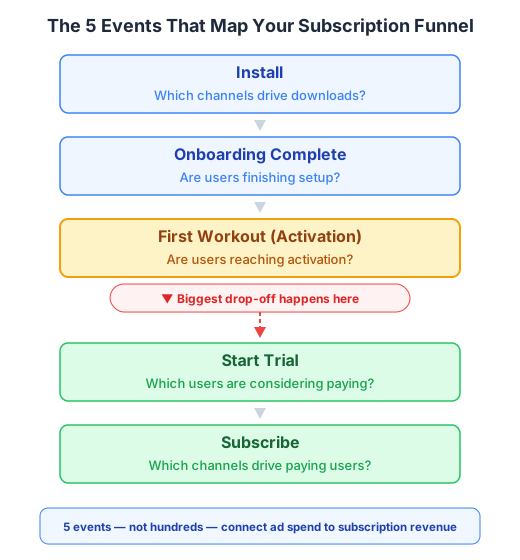
| Funnel Event | Question It Answers | Business Decision It Enables |
|---|---|---|
| Install | Which channels drive downloads? | Allocate top-of-funnel budget |
| Onboarding Complete | Are users finishing setup? | Fix onboarding friction or shorten flow |
| First Workout | Are users reaching activation? | Optimize in-app nudges; identify best creative-to-activation paths |
| Start Trial | Which users are considering paying? | Measure cost per trial by channel; refine targeting |
| Subscribe | Which channels drive paying users? | Calculate true ROAS and reallocate spend |
1. Install - The Attribution Anchor
The install event ties every downstream action to its source channel. Without an MMP to deduplicate, Self-Attributing Networks each claim credit for the same install.
2. Onboarding Complete - The Engagement Gate
Fires when a user finishes initial setup. A sharp drop between Install and Onboarding Complete from one channel signals audience mismatch.
3. First Workout (Activation) - The Conversion Predictor
For fitness apps, this is the most diagnostic event. Users who complete their first workout within the first few sessions convert to trial at significantly higher rates than those who do not. Standard events like "Complete Tutorial" or "Achieve Level" can map to this activation moment.
When this event is attributed to a channel, it reveals something installs alone cannot: which ad creatives drive users who actually engage with the product, not just download it. A channel with 1,000 installs and 50 first workouts tells a different story than one with 400 installs and 200 first workouts.
4. Start Trial - The Revenue Signal
Start Trial marks the transition from free user to revenue candidate. Attributed to a channel, it becomes cost per trial - the metric that separates productive ad spend from wasted budget.
If your Meta campaign drives 500 trials at $4 each and your TikTok campaign drives 200 trials at $12 each, the budget decision is clear - but only if Start Trial is tracked and attributed per channel.
5. Subscribe - The Payback Moment
With Subscribe attributed, you can calculate LTV by channel and determine which ad sets pay back within your target window.
25 subscription-optimized standard events. Skip taxonomy design. Start Free.
Start measuring what matters — for free
Airbridge Core Plan gives growing teams real attribution, deep linking, and audience tools at no cost.
Start Free for 30 Days →How to Name and Organize Events Without a Data Engineer
Event tracking fails because naming conventions break down. When one team calls it "sign_up" and another calls it "SignUpEvent," you get what Woopra calls "errors, duplicate events, and messy data."
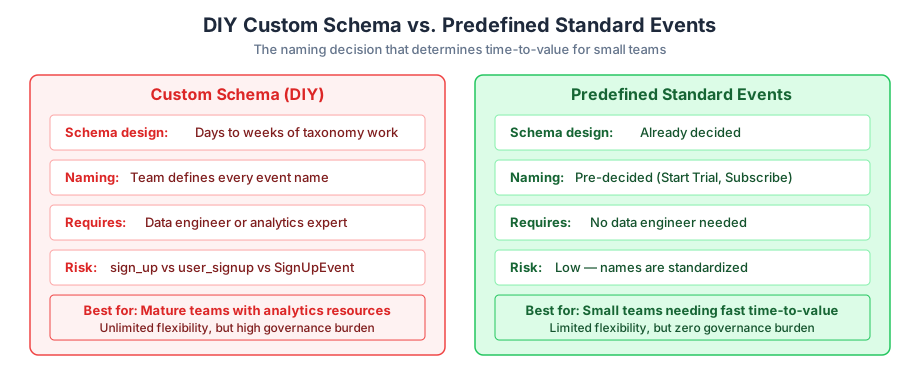
1. Predefined vs. Custom Event Schemas: What Startups Actually Need
Most MMPs offer both predefined standard events and custom events. The question for small teams: which approach ships this week?
| Factor | Custom Schema (DIY) | Predefined Standard Events |
|---|---|---|
| Schema design time | Days to weeks of taxonomy work | Already decided |
| Naming decisions | Team must define every name | Pre-decided (Start Trial, Subscribe) |
| Data engineer needed? | Strongly recommended | Not required |
| Flexibility | Unlimited custom events | Limited to predefined set |
| Risk of inconsistency | High without governance | Low - standardized |
| Best for | Mature teams with analytics resources | Small teams needing fast time-to-value |
Custom schemas require a data engineer to maintain naming governance. Experienced practitioners estimate schema design takes a week or two - time a small growth team cannot spare.
2. The Naming Convention Trap (and How to Avoid It)
Common mistakes: mixing camelCase with snake_case, ambiguous names like event_1, and duplicates across platforms. Predefined events solve this by removing the decision. The event name is Start Trial, not whatever your team decided last Tuesday.
How Airbridge Core Plan Connects Events to Attribution
For small teams needing attribution data this week, the setup path matters as much as the feature set.
Airbridge Core Plan provides 25 standard events with predefined names - Install, Complete Tutorial, Achieve Level, Start Trial, Subscribe, Unsubscribe, and more. Customers log these events in their app code, but schema design is already done. Core Plan does not support custom events. For teams whose priority is tracking Install to Subscribe by channel, 25 standard events cover the funnel without taxonomy overhead.
Attribution runs across GMAT channels - Google, Meta, Apple Search Ads, and TikTok. RevenueCat and Adapty S2S integrations capture subscription events like renewals and billing failures regardless of app state - closing the gap that SDK-only tracking leaves when the user is not in the app.
Core Plan supports up to 2 third-party integrations (e.g., RevenueCat + Amplitude). Pricing: 15K free attributed installs, then $0.05/install - pay-as-you-go, no annual contract.
Your Funnel Is Only as Good as the Events That Define It
Which channels drive users who actually pay? The answer lives in five events - not hundreds. Get those right, and every growth decision has data behind it.
Ready to see what Core Plan can do?
Free attribution, deep linking, and audience tools — built for teams that are ready to grow.