

For subscription apps

Measure the real results of YouTube influencer links.

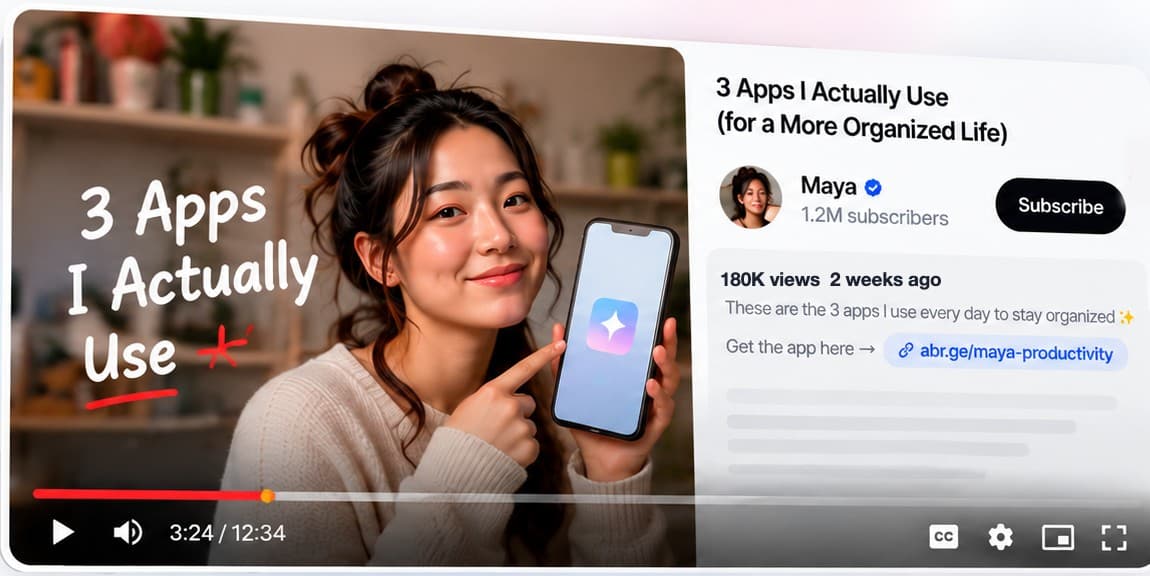
Put a Tracking Link in each video's description,
then see the installs, trials, subscriptions, and revenue it brings in.

Start Free30 days free · Then from $40/mo · No sales call
Illustrative data
Why it matters

Views and clicks don't show how many became your app users.

YouTube shows you views, watch time, and engagement.

But you still can't see which creator drove installs, trials, subscriptions, and revenue.

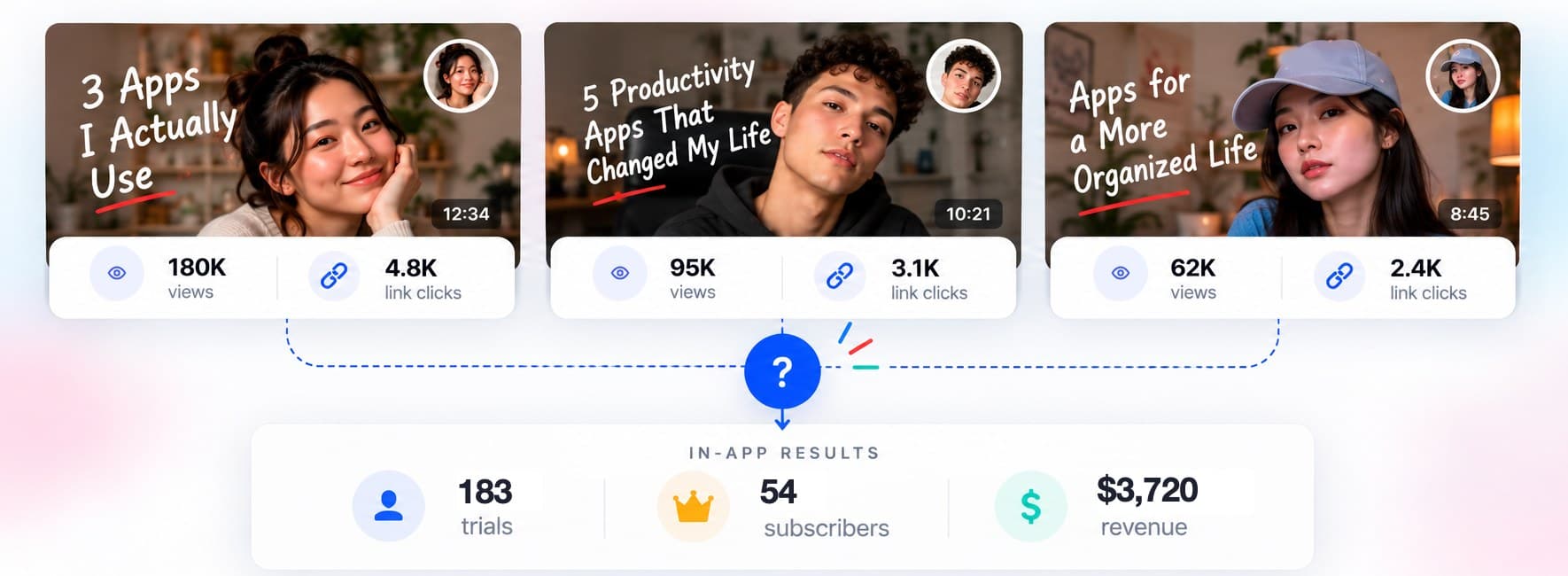
Illustrative data: Maya (180K views, 4.8K clicks), Leo (95K views, 3.1K clicks), and Erin (62K views, 2.4K clicks) all feed one in-app total of 183 trials, 54 subscribers, and $3,720 revenue, with no way to tell which creator drove what.
Illustrative data
Illustrative data
How it works

See what each YouTube video's link drives.

Illustrative data

  1. 01Create a Tracking Link for each video

    Go to Airbridge › Tracking Link › Link Generation.

  2. 02Share it with the creator

    The creator puts it in the video description, and in a pinned comment if they like.

    abr.ge/maya-productivity
  3. 03See the results in Airbridge
    Airbridge MCP

    Or ask your AI tool. Add Airbridge MCP to Claude, Codex, or another MCP tool, then ask: “Which YouTube creator drove the most subscribers this month?”

    See Airbridge AI

Ready to track your next YouTube creator campaign?

See installs, trials, subscriptions, and revenue by creator or sponsored video.

Start Free30 days free · From $40/mo · No sales call
Where to use it

Where to use Tracking Links
on YouTube

Description link

Put the creator's Tracking Link in the video description. Viewers who tap it are credited to that creator and that video.

The link is clickable once the creator's channel has YouTube's advanced features turned on.

  1. Video
  2. Description link
  3. Install
  4. Trial
  5. Subscription

Pinned comment

Ask the creator to pin a comment with the same Tracking Link, so viewers who scroll to the comments can tap it too.

YouTube can hold comments with links for review, so check it's visible after posting.

  1. Video
  2. Pinned comment
  3. Tracking Link
  4. App

Shorts

Shorts can't hold clickable links. Link the Short to a related video with the Tracking Link in its description, or put the link in the creator's channel links.

  1. Short
  2. Related video or channel link
  3. Tracking Link
  4. App

Integrated sponsorship

Give each sponsored video its own Tracking Link, so you can see what each sponsorship drove on its own.

  1. Sponsored video
  2. Its own Tracking Link
  3. Install
  4. Subscription
Find what works

See which creators and videos bring in subscribers.

Use this to decide which creators to sponsor again and which videos to boost.

1Set up your Tracking Links

In Airbridge, go to Tracking Link › Link Generation › Custom Channels and fill in:

FieldExampleWhat to type
Channelyoutube_creatorsWhere the traffic comes from. Use the same name for every creator.
CampaignOctober YouTube CreatorsThe campaign or month
Ad GroupMayaThe creator's name
Ad Creative3 Apps I Actually UseThe video's name

2Check the results

Go to Reports › Actuals Report.

To compare results between creators

Group by Ad Group.

CreatorInstallsTrialsSubscribersRevenue
Maya5707421$1,440
Leo5104311$760
ErinTop subscribers2806622$1,520

To compare one creator's videos

Group by Ad Creative.

Maya's videos

VideoInstallsTrialsSubscribersRevenue
3 Apps I Actually UseBest video3605417$1,180
My 2026 Workflow120123$190
Apps I Actually Pay For9081$70

Illustrative data

LINER × Airbridge

+350% app installs with influencer marketing

Airbridge customer
Challenge
Creator traffic looked like organic traffic.
What they measured
Each creator and content piece got its own Tracking Link.
What they learned
Subscriptions were more likely after the second or third content piece.
+350% app installs+155% influencer-driven subscriptions
Read the case study

Common questions

How do you track YouTube influencer marketing for an app?

Give each creator or sponsored video its own Tracking Link in the video description. Airbridge then credits the installs, trials, subscriptions, and revenue from people who tap it.

Can I track individual sponsored videos separately?

Yes. Create a Tracking Link for each sponsored video and put the video's name in the Ad Creative field. In the Actuals Report, group by Ad Creative to compare videos.

Can I use Tracking Links in descriptions and pinned comments?

Yes. Put the video's Tracking Link in the description and the pinned comment. Shorts can't hold clickable links, so use the creator's channel links or a related video instead.

See what your YouTube creators' links bring in.

From creator links to installs, trials, subscriptions, and revenue.

Start Free30 days free · Then from $40/mo · No sales call