How to Track Where Your Paying App Users Actually Come From
You're spending money on Meta, Google, and TikTok. Users are installing. Some start free trials. But when a subscriber shows up in your billing dashboard, you have no idea which campaign sent them — or why.
For most early-stage subscription apps, this question about user tracking goes unanswered. And that gap between "someone installed" and "someone actually paid" is where budgets get wasted.
Key Takeaways
-
The channel with the most installs is rarely the channel with the most subscribers. Only subscriber-level tracking reveals which channel drives revenue — not just downloads.
-
Cost per Paying User (CPPU) is the metric that actually tells you where to spend. It runs 4–5x your Cost per Install on average, so optimizing for CPI alone points you in the wrong direction.
-
Three things must connect to track subscribers by source: your ad channels, an attribution SDK in your app, and your subscription platform.
-
Only 1.9% of downloads convert to a paying subscriber within 35 days at the median — knowing which channel sends those rare subscribers is what separates informed budget decisions from guesses.
-
Setting up subscriber-level tracking takes less than a day with the right stack.
Installs Tell You Clicks, Not Conversions
Every ad channel reports how many users it sent. Meta reports installs. Google reports installs. TikTok reports installs.
None of them tell you how many of those users subscribed.
1. The CPI trap
Cost per Install (CPI) is a top-of-funnel metric. It measures what it costs to get a user onto your app — not what it costs to get a user who pays.
The gap is wider than most founders expect. Analysis across thousands of subscription apps shows that Cost per Paying User (CPPU) runs 4–5x higher than CPI. If your Meta CPI is $4, your actual cost per subscriber from Meta is likely $16–$20 — assuming that channel even converts to paid users at all.
CPI is "very top funnel" — it doesn't tell you much about who actually subscribes.
2. The subscriber blind spot
Your ad channels only see the install. Your billing platform — RevenueCat, Adapty, or your own backend — sees the subscription. Neither system, by default, knows about the other.
The result: you can tell which channel sent users, and you can tell who subscribed, but you cannot connect those two facts. You are flying with two half-instruments.
Among subscription apps analyzed, just 1.9% of downloads convert to a paying subscriber within 35 days at the median. Top-performing apps (P90) reach 8.5% — a 4.5x gap driven by knowing which channels send high-intent users and which ones don't.
What App Attribution Actually Is
App attribution is the system that connects the click on an ad to the moment a user subscribes. It closes the gap between your ad channels and your billing platform.
1. How attribution connects the click to the subscription
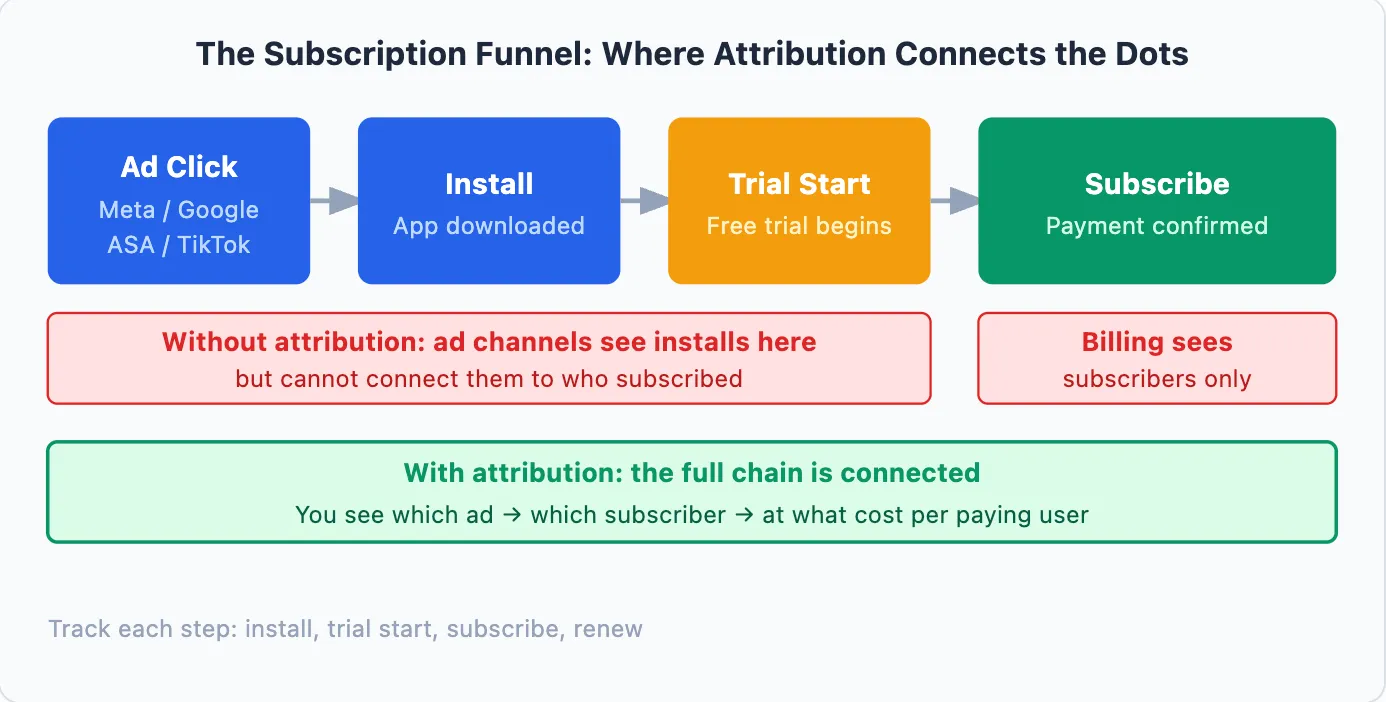
Every subscriber follows some version of this path:
-
They see your ad on Meta, Google, TikTok, or Apple Search Ads
-
They click and install your app
-
They start a free trial
-
They subscribe
Without attribution, you can see steps 1 and 4 separately — but not together. Attribution adds the thread that connects them: it records which ad your subscriber clicked before they installed, then follows their journey through to the subscription event.
2. Why the trial period creates a tracking gap
For subscription apps, attribution has one extra complication. 82% of free trials start on Day 0 — the same day a user installs. But the subscription payment comes days or weeks later.
If your attribution window is shorter than your trial length, the system loses the connection between the ad click and the eventual subscription. That subscriber shows up as "organic" in your reports, even though a paid ad drove them. This is a structural gap — not an app problem.
Want to see how Paying User works with your data?
Get hands-on with Airbridge and see real results.
Try It Free →The Three Parts of Subscriber Tracking
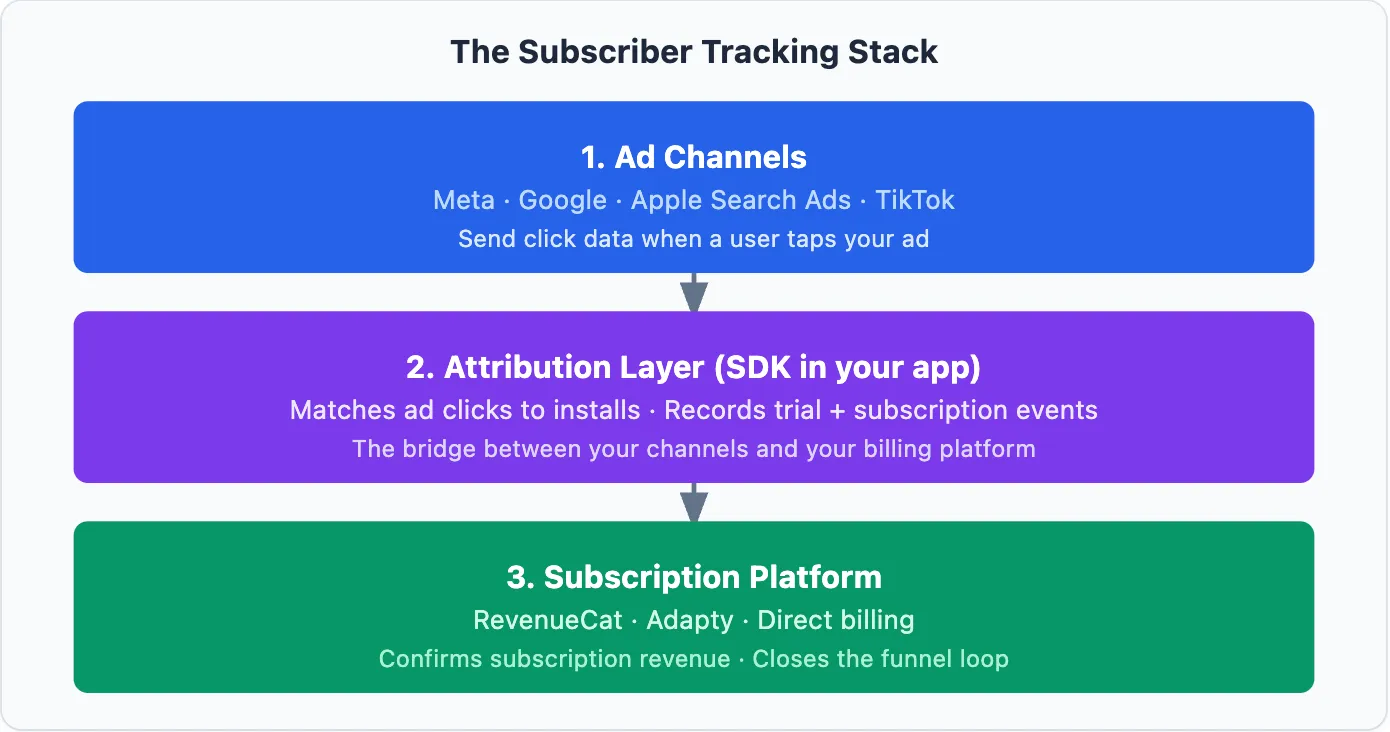
Closing the subscriber blind spot requires three components working together.
1. Ad channels
Meta, Google, Apple Search Ads, and TikTok each record the clicks that lead to installs. They are known as Self-Attributing Networks (SANs) — they determine attribution using their own internal user data rather than external tracking links.
The challenge: each channel only sees its own traffic. They do not communicate with each other, and they cannot see what happens inside your app after the install.
2. Attribution layer (SDK in your app)
This is the missing piece for most early-stage apps. An attribution SDK sits inside your app and performs two jobs.
First, it matches incoming installs to the ad clicks that drove them — using device identifiers and click timestamps. Second, it records the subscription events (trial start, subscribe, renew) and links them back to the original ad.
3. Subscription platform
Your subscription platform — RevenueCat, Adapty, or your own backend — is the record of truth for revenue. It knows the amount paid, the plan type, and the timing of each subscription.
What it does not know by default is which ad drove that subscriber. The attribution SDK sends it that context, closing the loop — so you can see LTV broken down by channel.
Set Up Subscriber Tracking in 4 Steps
Once you understand what must connect, implementation is straightforward.
1. Install the attribution SDK
Choose a tool that supports your four main ad channels: Meta, Google, Apple Search Ads, and TikTok. Add the SDK to your iOS and Android app. This typically requires a few hours of developer time.
2. Connect your ad channels
In your attribution dashboard, authenticate each ad channel. This gives the tool access to the click data it needs to match ad clicks to app installs.
3. Configure your subscription events
Set up the funnel events that matter: trial start, subscribe (or purchase), and renewal. These are the signals that tell you whether a channel sends users who pay — not just users who explore.
4. Connect your subscription platform
Link your attribution tool to RevenueCat, Adapty, or your billing system. This sends revenue confirmation back to the attribution layer so you can see cost per subscriber broken down by channel — not just installs.
What to Look at Once Your Data Flows
Once tracking is live, the metrics that matter look different from what your ad dashboards show.
| Metric | What it measures | Why it matters |
|---|---|---|
| Cost per Subscriber (CPS) | Ad spend ÷ paying subscribers from that channel | Replaces CPI as your decision metric |
| Trial-to-Paid Rate by Channel | % of trialists who subscribe, per channel | Reveals which channels send high-intent users |
| LTV by Channel (D30/D60) | Revenue per subscriber per channel over time | Shows long-term value, not just upfront conversion |
| Attribution Rate | % of subscribers with a known channel source | Tells you how complete your tracking setup is |
The trial-to-paid rate is the most revealing early signal. The median trial-to-paid conversion is 34.8% across subscription apps — but this varies by channel quality, not just app quality. A channel converting at 45% is worth roughly twice as much as one converting at 20%, even if CPI looks the same.
For a deeper look at how channel-level tracking affects budget decisions, see Which Ad Channel Drives Subscriptions?
FAQs
Do I need subscriber tracking before I start running paid ads?
Yes — and the setup should happen before your first paid campaign, not after. If you launch paid UA without attribution in place, your first weeks of data will be unattributed. You will not be able to connect early spend to the subscribers acquired during that period. Setup takes less than a day; there is no reason to delay.
I'm already using RevenueCat — doesn't that handle this?
RevenueCat tracks payments, renewals, and churn — it does not know which ad sent that user. An attribution layer connects those two datasets. Most attribution tools have native integrations with RevenueCat and Adapty that take minutes to configure.
Stop Guessing. Start Measuring.
Budget allocation without subscriber-level data is guessing at scale. Every dollar you put into a channel you cannot measure is a dollar that could be better placed somewhere that converts.
The setup cost is low. The return — knowing which channels send subscribers and which ones send churn — compounds with every dollar you spend afterward.
If you're ready to see which channels drive subscriptions — not just installs — Airbridge Core Plan connects your Meta, Google, Apple Search Ads, and TikTok ad spend to subscription revenue. It includes 15K free attributed installs, subscription events pre-configured, and native integrations with RevenueCat and Adapty — built for early-stage subscription apps, with 4 ad channels and up to 2 third-party integrations on the base plan.

Ready to transform your mobile growth?
Learn how Airbridge helps leading brands measure and optimize every touchpoint.