App Onboarding Before the Paywall: 5 Steps That Convert

Most subscription apps that struggle at the paywall don't have a paywall problem. They have an onboarding problem. By the time the paywall appears, users haven't been given a compelling reason to pay. The screen becomes a wall, not an offer.
The data is unambiguous: 82% of trial starts happen on Day 0 (State of Subscription Apps 2025). Your onboarding sequence (every screen, every question, every small action you ask users to take) sets the ceiling for your trial Conversion - Rate before users ever reach the pricing screen. Most apps waste this window by either rushing to the paywall before motivation peaks or burying value so far into the flow that the opening excitement is already gone.
This guide walks through how to design app onboarding for conversion: specifically the sequence that builds motivation, earns trust, and delivers users to the paywall at exactly the right moment.
Key Takeaways
-
Timing beats design. The biggest paywall conversion killer is not copy or layout. It is showing the paywall before user motivation peaks. A simple paywall shown at the right moment outperforms a polished one shown too early.
-
82% of trials start on Day 0. Your onboarding and first paywall exposure determine most of your trial conversion. There is no recovery mechanism once that session ends without a start.
-
Onboarding + trial is the highest-converting setup. Apps pairing a structured onboarding flow with a free trial paywall reach 1.78% install-to-conversion, the top-performing configuration across subscription app categories (State of In-App Subscriptions 2026).
-
Micro-commitments before the paywall increase conversion. Small interactive steps (goal picks, sliders, short quizzes) build emotional investment and reduce drop-off before the paywall appears.
-
Personalization closes. Capturing user goals during onboarding and surfacing them on the paywall, even a single string match, outperforms most layout experiments.
-
The paywall should feel inevitable. When users reach it and think "okay, that makes sense," the flow is working.
Why Timing Beats Paywall Design
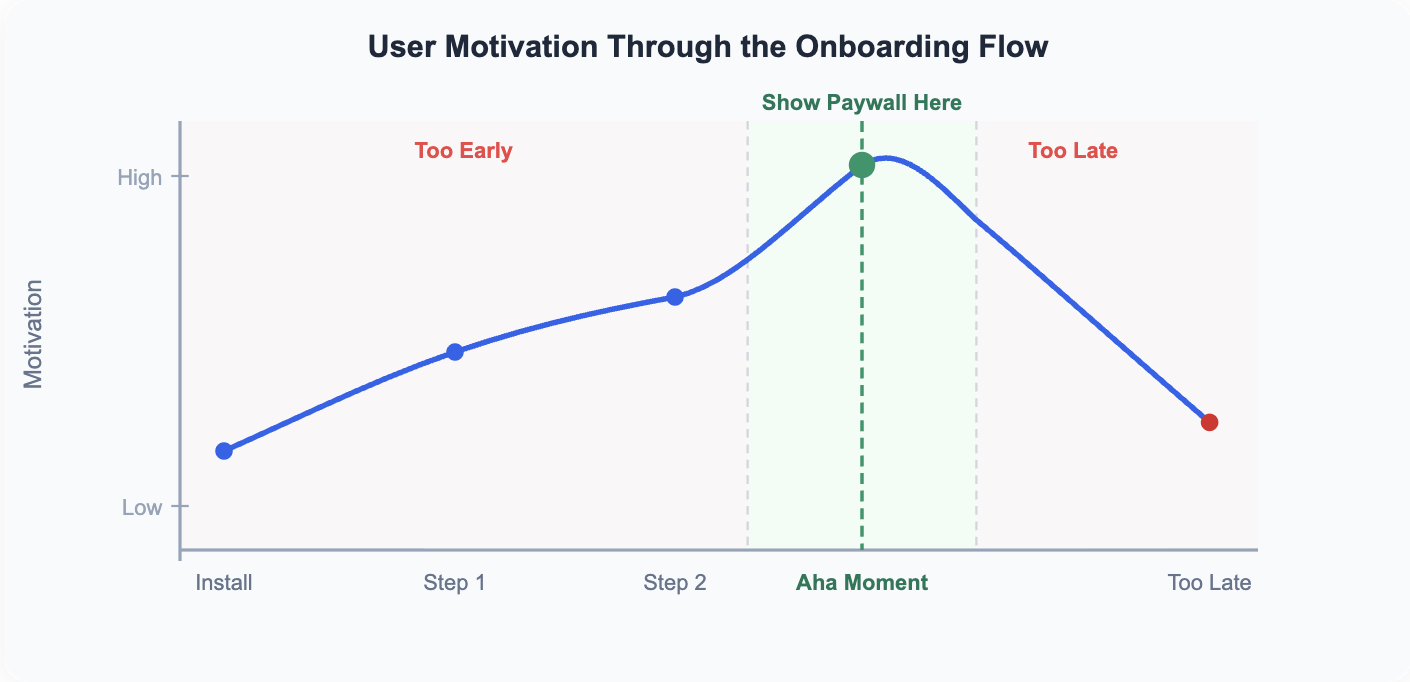
The moment your paywall appears matters more than how it looks. This is the most underrated principle in subscription app conversion.
Every user who sees your paywall is shaped by three forces: motivation, friction, and trust. Conversion happens when all three align. Motivation is why users want to act. Friction is what makes acting feel effortful. Trust is whether users believe the product will actually deliver what it promises.
1. The motivation curve
Users enter your app at their highest motivation. They just installed it. They believe it might solve something for them. But motivation is not static. It rises when users feel progress and drops when friction accumulates.
Show the paywall before users feel progress, and they are still in evaluation mode. Show it after motivation has faded. Too many setup screens or a slow reveal of value close the window.
2. The three forces behind every conversion
The framework is: conversion = motivation multiplied by trust, divided by friction. Raising motivation by delivering value, building trust by reducing skepticism, and lowering friction by removing unnecessary steps are the three levers.
The most common mistake is treating paywall underperformance as a copy or design problem. Most of the time, it is a sequencing problem. The right message at the wrong moment does not convert. The fix is upstream.
The 5-Step Onboarding-to-Paywall Flow
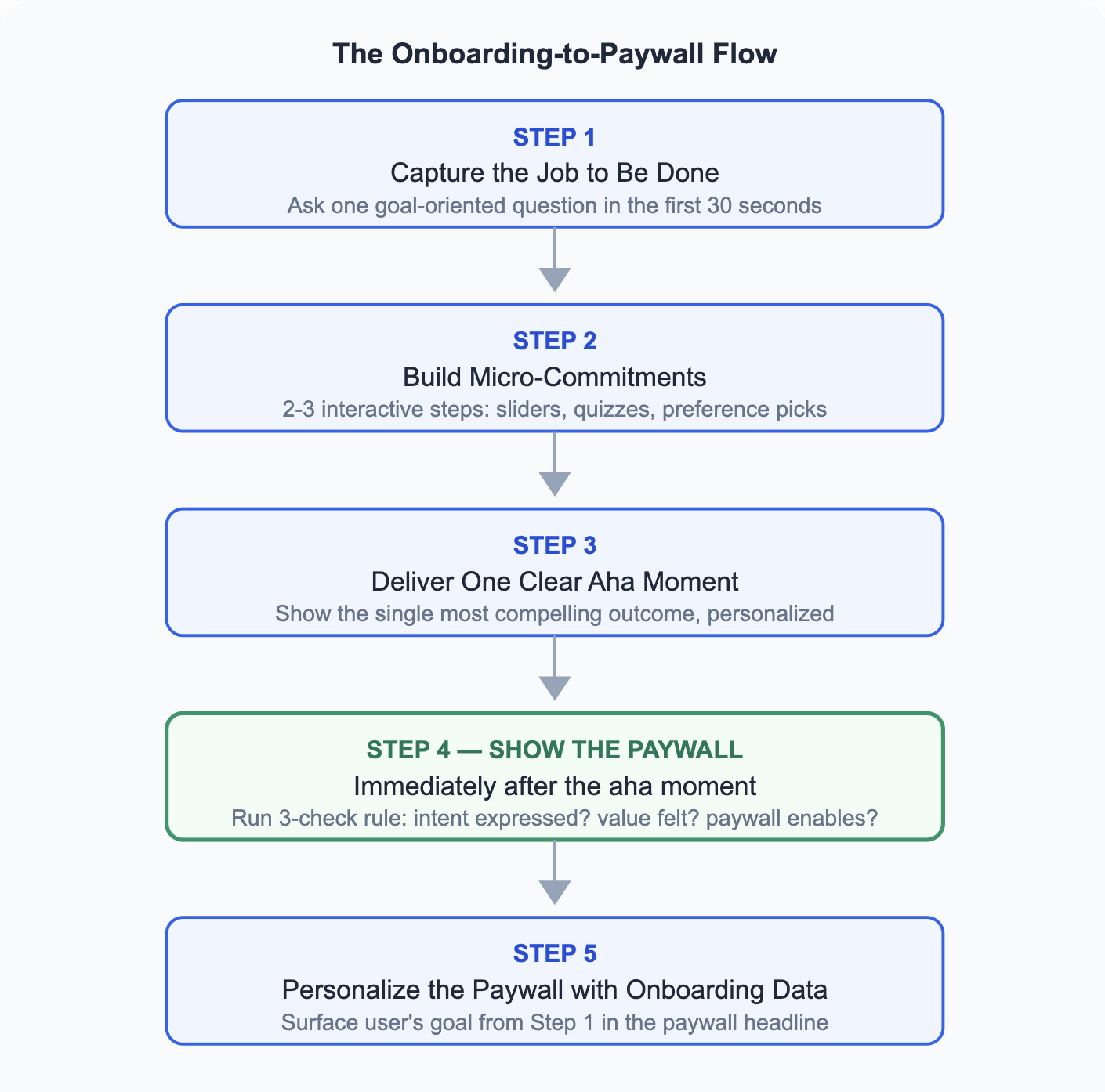
There is no single right onboarding flow, but there is a right sequence. What users experience before the paywall determines how they feel when they see it. These five steps create the conditions for conversion.
1. Capture the job to be done (first 30 seconds)
The first screen should accomplish one thing: understand why the user is here. Ask one goal-oriented question. Not "what features do you want?" but "what are you trying to achieve?"
This matters for two reasons. It personalizes every subsequent screen, which makes the experience feel built for this specific user. It also creates the emotional frame the paywall will reference later: users who have stated a goal are more motivated to take the next step toward achieving it.
Specific question formats that work: "What's your main goal with [app]?" or "What brings you here today?" Keep it to one question per screen. The goal is activation, not qualification.
Duolingo applies this before anything else: within the first three screens, users pick why they are learning a language (travel, work, culture) and set a daily time commitment. These two answers shape the entire onboarding that follows, and appear again in the paywall copy.
By putting the user's stated goal first, Duolingo grew its MAU-to-paid rate from roughly 4% to over 9% between 2020 and 2025 (Duolingo Investor Relations).
2. Build micro-commitments before showing value
After capturing the job to be done, do not jump immediately to the aha moment. Add 2-3 small interactive steps that increase emotional investment: a slider to set a specific target, a short quiz to shape the experience, or a preference screen to customize their plan.
Small interactive steps before the paywall increase emotional investment and reduce drop-off. The user is no longer a passive observer. Leaving now feels like abandoning work they have already started.
Noom takes this further than almost any subscription app: its pre-paywall onboarding runs to 100+ screens, covering health history, behavioral patterns, and emotional relationship with food. By the time the paywall appears, users have invested 10-15 minutes of real effort.
The drop-off cost has become real. Noom explicitly built this commitment architecture before introducing pricing (RevenueCat, 2024).
The 48 Laws of Subscription App Success documents this effect directly (Law 02): small interactive steps before the paywall increase emotional investment and reduce drop-off. The principle holds whether the quiz has 5 questions or 100.
3. Deliver one clear aha moment before the paywall
Every subscription app has one moment where the user thinks "I need this." Your job is to identify it and guarantee it happens before the paywall. This is not about showing all your features. It is about showing the single most compelling outcome for this specific user.
For a fitness app, this might be a personalized 8-week plan preview. For a language app, it might be a quick competency assessment result. For a budgeting app, it might be a projection of how much they could save.
The aha moment must feel personal. Because you captured the user's goal in Step 1 and built toward it in Step 2, this preview should reflect their specific situation, not a generic benefit statement.
The aha moment is not a single screen. The 48 Laws of Subscription App Success maps it as a three-part sequence (Law 41): a setup moment where users contribute their data (Steps 1-2), a revelation moment where the app delivers something meaningful (Step 3), and a habit moment where the behavior starts to stick (Step 5). Design for the full sequence, not just the peak.
Headspace anchors its aha moment in a 3-minute guided breathing session delivered during onboarding itself. At the end, the instructor asks users to notice how their internal state has shifted, turning an abstract claim ("meditation helps") into a felt, personal result. The paywall appears immediately after that noticing, not before it (Behind Login, 2024).
4. Time the paywall to the motivation peak
The paywall should appear immediately after the aha moment. Not three screens later. Not after account creation. Right after the moment that makes users think "this works."
Before showing any paywall, run a three-check test:
-
Has the user expressed intent? (Step 1 completed)
-
Has the user experienced or seen value? (Step 3 delivered)
-
Does the paywall help them move forward, rather than blocking progress?
If any answer is no, the paywall is appearing too early. The best paywall moments feel inevitable, not surprising. "Users should think: okay, that makes sense."
Duolingo places its paywall after users complete a first lesson, letting them experience value before asking for payment. This post-value sequencing is a core part of its conversion strategy, consistent with StartApp School's paywall placement framework (Paywall Optimization Lesson 05).
5. Personalize the paywall with onboarding data
Surface the user's goal from Step 1 directly in the paywall headline. This is a single string replacement. "Get fit in 30 days" from the goal screen becomes "Start your 30-day fitness plan" on the paywall.
The paywall is no longer a generic pricing screen. It is the logical next step in the user's own stated journey. Users who see their words and their goal reflected back in the paywall copy convert at meaningfully higher rates than those facing a generic benefits list.
Noom is the clearest example: after 100+ onboarding screens worth of questions, the paywall headline reads "Your personalized health plan is ready", referencing the specific goal weight the user typed earlier in the flow. It is not a generic trial prompt; it is the delivery of something the user already asked for.
The 48 Laws of Subscription App Success calls this the one-question rule (Law 29): capture the user's goal in onboarding, then echo it in the paywall headline. The transfer requires no complex logic. One string replacement is enough.
Want to see how App onboarding before paywall works with your data?
Get hands-on with Airbridge and see real results.
Try It Free →Onboarding Paywall vs. Contextual Paywall
Two paywall types serve different parts of the subscription funnel. Understanding which to use, and when, prevents an onboarding flow from undercutting its own conversion.
1. The onboarding paywall
StartApp School's lifecycle research (Lesson 04) adds precision to the Day 0 data: the vast majority of initial subscriptions happen within the first 24-48 hours after download. Act on that window with a strong onboarding flow and the numbers follow.
An onboarding paywall appears at the end of the first-run experience, before the user enters the core product. It works because motivation is highest right after install. In well-optimized apps, onboarding accounts for roughly 50% of trial starts (RevenueCat, 2024). This is the paywall type this entire framework is designed to support.
2. The contextual paywall
A contextual paywall triggers when a user reaches a gated feature or hits a limit in the free version. It appears after the user has already spent time in the product and is actively trying to accomplish something the free tier does not allow.
The dynamics here are different. The user has already invested time and effort. Now the paywall is not blocking them; it is enabling completion. Blocking feels aggressive; enabling feels fair. Contextual paywalls require a free experience strong enough to generate that investment in the first place.
3. Which to use
The same Lesson 04 research provides an important counterpoint: late converters retain better than Day 0 converters. Users who needed more time to decide before subscribing are often more committed once they do. This is part of why contextual paywalls generate lower conversion volume but higher-quality subscribers.
Use the onboarding paywall if your value proposition can be demonstrated compellingly in the first session. Use the contextual paywall if your product needs more time in the user's hands before asking for payment.
Most high-performing subscription apps run both. The onboarding paywall captures users who are ready to convert in the first session, which is the majority. The contextual paywall captures users who needed more time.
What Your Paywall Screen Must Do
Once users reach the paywall, at the right moment and after the right onboarding, the screen needs to confirm value, reduce risk, and present price clearly. Most paywalls that underperform fail at step one: confirming value.
1. Get the information order right
Outcome first. Value explanation second. Reassurance third. Price fourth. CTA last.
Paywalls that lead with price create a friction spike before the user has finished evaluating the offer. A paywall headline that surfaces the user's goal (from Step 5 personalization) serves as the outcome statement. A value block showing what they specifically get (not a generic feature list) serves as the explanation. Reassurance comes last: social proof, trial terms, and cancellation clarity.
2. Use trust signals that match the user
Trust answers one question: "Will this actually work for me?" Generic testimonials and superlative claims reduce trust. What builds it: social proof that matches user goals specifically, clear trial terms that spell out the length and billing date, and an honest risk reversal such as "cancel anytime, no charge until Day X."
Personalized testimonials matched to onboarding segments (for example, a muscle-gain result shown to users who selected muscle gain as their goal) outperform generic five-star quotes because they answer the user's specific question, not the general one.
3. Use a loading screen before the paywall
A pre-paywall loading screen ("Building your 12-week plan..." or "Analyzing your goals...") creates anticipation and signals that the app has done work based on the user's input. When the paywall appears after this, it feels like the delivery of something personalized, not an interruption.
The transition from "loading your results" to "here is your plan, unlock it with a free trial" is a paywall moment that earns conversion rather than demanding it.
Noom executes this with a personalized weight-projection graph that animates while the app "builds your program." The user watches their projected progress curve render in real time before the paywall appears. The loading screen is not filler. It is the paywall's opening argument.
Conversion Benchmarks by Paywall Setup
| Paywall Setup | Key Metric | Notes |
|---|---|---|
| Onboarding + Trial | 1.78% install-to-conversion | Highest-performing setup overall |
| Hard paywall (no trial) | 12.1% download-to-paid (D35) | Higher LTV per user, lower volume |
| Freemium + contextual | 2.2% download-to-paid (D35) | Higher top-of-funnel volume |
| Trial length 17-32 days | 45.7% trial-to-paid | Highest trial conversion rate |
| Trial length 3-7 days | 26.8% trial-to-paid | Common default; significantly underperforms |
Trial length is a conversion lever that most apps overlook. Trials lasting 17 to 32 days convert at 45.7%, nearly double the 26.8% rate of the most common 3-7 day trial (State of Subscription Apps 2025). The trial experience also compounds: users who go through a structured trial boost first renewal rates by up to 60% (State of In-App Subscriptions 2026) compared to direct purchasers in categories where trials outperform upfront payment. Understanding your lifetime value (LTV) by trial cohort helps you choose the right trial length for your app.
One caveat worth noting: a free trial is not the right choice for every user. StartApp School (Paywall Optimization Lesson 08) notes that no-trial paywalls can outperform trial paywalls when motivation is already high. For users who arrived from a strong ad with a clear value proposition, adding a trial can introduce friction rather than reduce it. The default should be trial-first, but segment by intent before applying it universally.
3 Mistakes That Hurt Paywall Conversion
1. Showing the paywall before intent is established
The most common mistake: moving to the paywall before the user has stated a goal or experienced any value. The screen asks users to pay for a promise they have not yet evaluated. They don't convert. They leave.
The fix is the three-check rule from Step 4. Do not render the paywall until the user has expressed intent, felt value, and reached a natural stopping point. If any check fails, add one more onboarding step before proceeding.
2. Ignoring onboarding data on the paywall
Most apps run personalized onboarding (goal collection, quiz flows, persona selection) and then show the same generic paywall to every user. This wastes the emotional investment built during the first session.
The fix is one mapping rule: take the user's primary goal from onboarding and use it as the paywall headline variable. This single change tends to outperform most layout experiments. The paywall already has the user's attention. Make it feel like it was made for them.
3. Stopping user guidance after conversion
Conversion is not the end of the job. Users who subscribe still need guidance into their first premium action. The period immediately after upgrade, where many apps go silent, is where early churn begins.
A new subscriber who does not reach a meaningful premium aha moment in their first session is a churn risk before the first renewal. After the paywall converts, run a brief premium onboarding: show where premium features live, guide the user to their first premium action, and set the expectation for what they just unlocked. Treat a new subscriber like a new user entering a new product.
Headspace structures this deliberately: new subscribers enter a 10-day "Basics" course immediately after the paywall converts: a guided sequence that walks them through their first premium sessions one at a time. The course exists specifically to prevent the post-subscription drop-off that kills early renewals (Built for Mars, 2024).
The 48 Laws of Subscription App Success states this directly (Law 04): onboarding should not stop once someone converts or hits the paywall. Conversion is the beginning of the subscriber relationship, not the end of the growth team's job.
Build the Flow First, Test the Paywall Second
The sequence matters more than any individual element. An onboarding flow that captures intent, builds commitment, delivers value, and times the paywall correctly will outperform a polished paywall shown at the wrong moment every time.
Start with the foundation: define your one aha moment, map a 3-5 step flow to build toward it, set the paywall to appear immediately after. Once the sequence is live, measure step-level funnel drop-off rather than conversion rate in isolation. Paywall conversion problems almost always trace back to a broken step upstream, not the paywall screen itself.
Test timing before testing design. When the timing is right, the design matters much less than most teams assume.


Ready to transform your mobile growth?
Learn how Airbridge helps leading brands measure and optimize every touchpoint.