How to Set Up a Simple Paywall Flow Before You Scale
How to Set Up a Simple Paywall Flow Before You Scale
You're about to spend your first real money on Meta or Google ads. The creatives are ready. The targeting is set. But before you launch, one question should stop you:
If 100 users download your app today, how many will hit your paywall — and how many of those will actually convert?
Hard paywalls convert at 12.1% on average. That is more than 5 times the freemium median of 2.2%, and generates nearly double the first-year LTV: $49.30 vs. $24.24 (SOSA 2025). Among apps that run trials, those offering 17 to 32 days convert at 45.7% — nearly double the rate of short 3 to 7 day trials. These gaps are not marginal. The paywall decisions you make before your first ad campaign determine the ceiling on every dollar you spend after it.
Key Takeaways
-
Paywall timing matters more than paywall design. When you show the paywall — after users feel value, not at an arbitrary screen — determines conversion more than copy or color scheme.
-
82% of trial starts happen on Day 0. The window between install and first paywall impression is your highest-intent moment.
-
Hard and soft paywalls solve different problems. Hard paywalls filter for intent and produce 5.5x higher conversion than freemium; soft paywalls maximize volume.
-
More than 85% of users skip the first paywall. A structured second-chance recovery flow is where a meaningful share of revenue gets captured.
-
Establish baseline metrics before scaling ads. Know your trial start rate, trial-to-paid conversion, and Day 0 conversion before spending.
At the median, subscription apps convert 1.9% of downloads to paying subscribers within 35 days. Upper-quartile apps hit 4.3%. Same 1,000 installs. Roughly 2x the subscribers at half the cost per subscriber, without changing a single ad.
The common failure modes are predictable:
-
The paywall appears before users feel any value
-
There is no second-chance offer for users who skip
-
The pricing structure asks for a decision the user is not ready to make
Each of these is fixable before you spend a dollar on acquisition.
Step 1 — Choose the Right Paywall Type
Before designing a single screen, decide what model you are running. The three types perform very differently:
| Paywall Type | D35 Conversion | Y1 LTV | Best For |
|---|---|---|---|
| Hard Paywall (subscribe or trial before using) | 12.1% | $49.30 | Apps where value is obvious in the first session |
| Soft Paywall (free tier + upgrade prompt) | ~3–5% (estimated) | Not benchmarked | Apps with mixed-intent audiences |
| Pure Freemium (free forever, optional upgrade) | 2.2% | $24.24 | Apps where value needs weeks to show |
Hard paywall — when to use it
Best for apps that solve a clear, immediate problem. Examples:
-
Meditation or sleep apps
-
Workout and fitness trackers
-
Meal planners and nutrition tools
A hard paywall with a free trial filters out users who were never going to pay. Every conversion signal becomes meaningful: if users are not subscribing, you have a value problem, not a distribution problem.
Soft paywall — when to use it
Best for apps where users need to experience the product before they understand why they would pay for it. Let users complete one meaningful interaction first, then present the upgrade. At that point, subscribing feels like continuing something, not starting something cold.
Freemium — the trade-off to know
Freemium requires maintaining two product experiences indefinitely. For most early-stage apps, a trial-based model is simpler to test and faster to optimize. Unless your market clearly demands a free tier, default to a trial-first approach.
When a free trial actually hurts LTV
Trials are not universally better. In Productivity apps, users who buy directly are worth $55.45 vs. $40.13 for trial users. In Lifestyle apps, trial users are 27% less valuable than direct buyers (Adapty 2026).
A free trial addresses one specific user fear: "Will this work for me?" When users already believe the product works, a trial adds friction and delay without benefit. Consider skipping the trial if your onboarding already demonstrates clear value before the paywall.
Step 2 — Build the Onboarding That Earns the Paywall
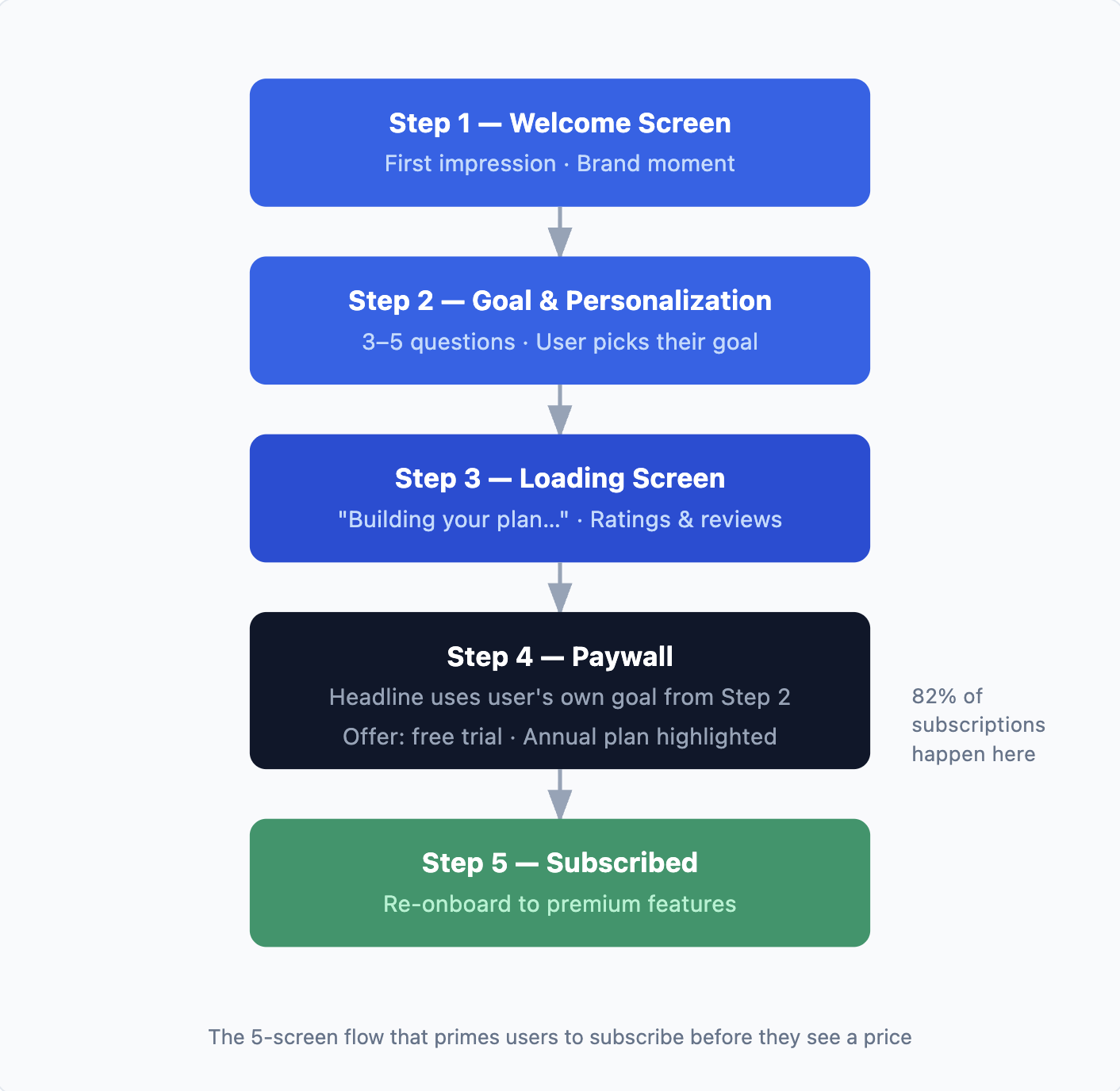
82% of trial starts happen on Day 0. What happens in the five screens before your paywall determines conversion more than the paywall design itself. Good onboarding does not just explain the product. It builds the emotional case for paying before the user ever sees a price.
1. Add micro-commitments before the price
Micro-commitments are small interactive steps: picking a goal, answering a quick question, selecting a starting point. They build investment before the user sees a price. The most important rule: surface the user's own answers on the paywall itself.
Example — Tiimo: Tiimo asked one question during onboarding and used the user's answer as the paywall headline. Simple string replacement. No complex personalization engine. The paywall felt personal because it reflected something the user had just said about themselves.
"Your 90-day strength plan is ready" converts better than "Start your free trial" because the first line refers to something the user built, not something being sold to them.
2. Use the loading screen as a trust moment
The 2 to 3 seconds between the last onboarding question and the paywall is high-leverage real estate. Use it to show:
-
App store rating and review count
-
A personalized message: "We've created your plan based on your answers"
-
A subscriber count or a single compelling stat
Example — OMENA: OMENA built a long, scrollable paywall with real user photos, testimonials, a FAQ section, and a founder story. It felt like a landing page, not a gate. That format doubled their trial start rate compared to their previous static paywall.
3. Time the paywall to a value moment
Two common timing mistakes:
-
Too early: Paywall appears right after sign-up, before the user has done anything
-
Too late: Paywall is buried so deep that initial motivation has already faded
The right trigger: show the paywall after the user completes one meaningful action. Setting a goal, seeing a personalized result, or finishing a first micro-task. At that point, paying feels like continuing something, not starting something.
Want to see how Paywall setup guide works with your data?
Get hands-on with Airbridge and see real results.
Try It Free →Step 3 — Build Your Minimum Viable Paywall
A minimum viable paywall is not a placeholder. It is the leanest version of your best hypothesis about what converts, built to be tested, not finalized.
What every paywall screen needs
-
Outcome headline tied to the user's stated goal from onboarding
-
3 to 5 benefit points framed as outcomes, not feature descriptions
-
Social proof: a star rating, subscriber count, or one real short testimonial
-
Plan options: max 2 plans, with one clearly recommended ("Best Value")
-
Trial length displayed prominently so users see the risk is low
-
One clear CTA button with no secondary links competing for attention
Pricing: two plans, one recommendation, one trial length
Two plans max. Annual plus weekly, or annual plus monthly. More options create decision paralysis. Three principles from behavioral psychology explain why the defaults you set matter as much as the prices themselves:
-
Default Bias: The pre-selected plan outsells better-priced alternatives simply because it is selected. Pre-select annual.
-
Anchoring: The first price the user sees sets their reference point. Show the higher price first so annual feels like a discount.
-
Plan count: Two plans often outperform three. Sometimes one outperforms two. More options increase abandonment, not conversion.> Example — Nebula: Nebula uses a three-option structure with a deliberate decoy: weekly with trial / 3-month at full price (no trial) / annual with trial. The 3-month option exists to make the annual plan look like the obvious value choice. It is not intended to sell.
On trial length:
| Trial Length | Median Trial-to-Paid Conversion |
|---|---|
| 3–7 days (short) | 26.8% |
| 17–32 days (optimal) | 45.7% |
Annual subscribers retain at roughly 2.5x the rate of monthly subscribers at 12 months (44.1% vs. 17.5%). That retention gap, compounded over the subscriber base, is the real reason to push toward annual.
One more data point worth knowing before you finalize pricing: high-priced apps earn a median $55.21 Y1 LTV vs. $8.09 for low-priced apps — a 6.8x gap. In Health and Fitness specifically, high-priced annual plans produce 4.5x more revenue per user than low-priced ones.
One objective per paywall
Choose one metric to optimize for:
-
Trial starts: extend trial length, lower the visible commitment barrier
-
Subscription rate: tighten onboarding-to-paywall flow, sharpen the value message
-
ARPU: emphasize annual plan, experiment with price anchoring> On experimenting: Teams that run structured paywall experiments earn up to 40x more revenue than those that don't. The average among experimenting teams: 14.7 experiments. Experiments that change plan or trial structure outperform visual and copy changes for LTV improvement. Your first paywall is not the destination. It is the starting point.
Step 4 — Capture Users Who Skip the Paywall
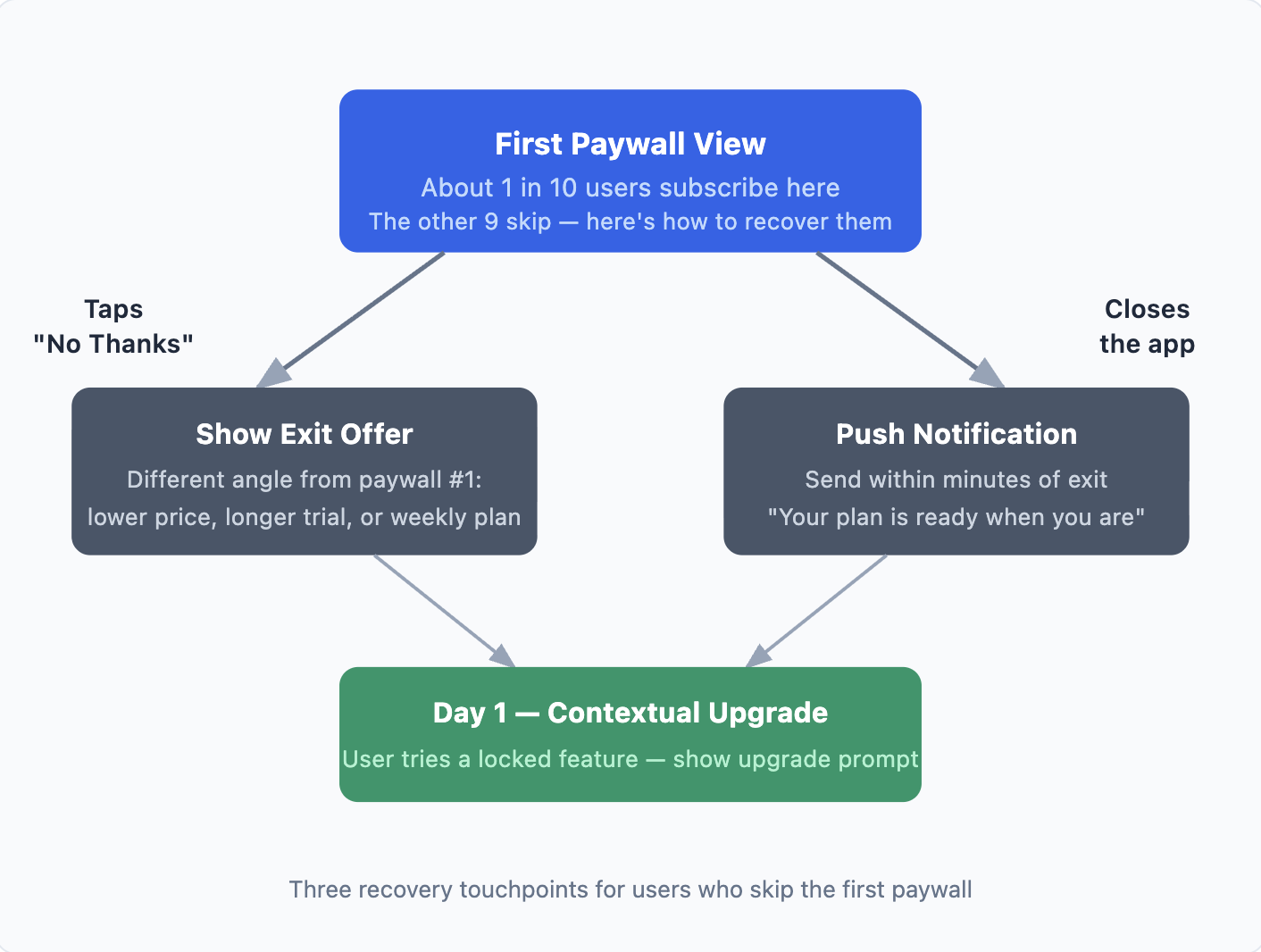
More than 85% of users skip the first paywall view. That is not failure. It is the normal distribution. The question is whether you have a recovery system for those users.
1. Exit offer — address a different objection, not the same one
When a user taps "No thanks," show a second offer immediately. The rule: the second offer should address a different objection, not just restate the same ask at a lower price.
-
First paywall led with annual pricing: second offer introduces the weekly plan as a lower-commitment entry
-
First paywall was trial-focused: second offer uses a limited-time promotional rate
-
User seems price-sensitive: second offer extends the trial length with the same plan
Some apps offer a lifetime subscription as a second offer for users who resist recurring billing entirely. It can convert a segment that would otherwise never subscribe. Be aware of cannibalization risk if your price is too low relative to annual.
2. Push notification — send within minutes, not hours
A user who just closed your app is still on their phone. Send a push within minutes of exit. Waiting 24 hours loses most of the recovery window. Keep the message specific and low-pressure: "Your fitness plan is ready when you are. Start free, no card needed."
3. Day 1 contextual upgrade — meet them at the feature they want
Users who didn't subscribe on Day 0 but returned on Day 1 are still interested. Do not show them the full paywall again. Show an upgrade prompt at the moment they try to use a locked feature:
-
A lock icon on premium content they are trying to access
-
A "You've reached your daily limit" message with a one-tap upgrade option
-
A contextual banner tied to the specific feature: "Unlock [feature] — start your free trial"
Example — Mojo: Mojo placed lock icons not just on the paywall, but throughout the app on individual features and templates. The constant visual reminder of what users couldn't access increased free-to-paid conversion — without changing the paywall itself.
A note on first renewal: Nearly 30% of annual subscribers cancel in Month 1. First renewal survival rates: Weekly 51.8%, Monthly 55.5%, Yearly 66.3% (SOSA 2025). Conversion is not the end of the funnel. The 30-day experience after subscribing determines whether you keep the user long enough to recover your acquisition cost.
Step 5 — Know When You're Ready to Scale
Diagnostic: why is your paywall underperforming?
Before running tests, diagnose the root cause. Three variables drive every paywall conversion:
Motivation: Did the user arrive at the paywall with a reason to subscribe? (Onboarding quality, timing)> > - Trust: Does the user believe the product will deliver on the promise? (Social proof, testimonials, clarity)> > - Friction: Is there anything in the paywall flow that makes subscribing feel harder than it should? (Too many plans, confusing copy, no trial)
Low motivation is an onboarding problem. Low trust is a paywall design problem. High friction is a UX problem. Each requires a different fix.
You do not need a perfect paywall to start scaling. You need to be past the point of obvious waste. These three numbers tell you where you stand:
| Metric | Below Median — Fix First | Upper Quartile — Ready to Scale |
|---|---|---|
| Trial Start Rate | Below 6.2% | 12.4%+ |
| Trial to Paid Conversion | Below 34.8% | 51.5%+ |
| D35 Download to Paid | Below 1.9% | 4.3%+ |
Two different problems — don't confuse them:
-
Below median on all three: product problem. Fix onboarding clarity, paywall timing, and offer structure before running A/B tests.
-
At or above median: testing problem. Iterate on trial length, pricing, and copy to reach the upper quartile.
Once your funnel hits these baselines, the next unlock is knowing which ad channels send users who actually convert through your paywall. The cost per subscriber by channel is what drives efficient scaling, not CPI.
To see which channels send users who actually convert through your paywall, you need to connect ad spend to subscription events. Airbridge Core Plan does this for free up to 15K installs — covering trial starts, conversions, and renewals across Meta, Google, and Apple Search Ads.
The Paywall Runs Before the Ads Do
A paywall that converts 4.3% of downloads at $1,000/month in ad spend becomes a real business at $5,000/month. A paywall at 1.9% at $5,000/month is just burning money faster.
The sequence that works:
-
Pick the right paywall type for your app's value model
-
Build onboarding that earns the paywall with micro-commitments and personalization
-
Design a minimum viable paywall around one clear outcome and one offer
-
Add a recovery flow for the users who skip the first view
-
Hit your baseline metrics, then scale


Ready to transform your mobile growth?
Learn how Airbridge helps leading brands measure and optimize every touchpoint.