Deep Linking for Subscription Apps: Fitness, Health, Edtech

Your Meta ad shows a specific HIIT workout. A user taps it, installs your fitness app, and opens it for the first time. They land on the home screen. They scroll around, don't see the workout, and leave. No trial started.
This is a deeplink routing problem. 82% of free trial starts happen on Day 0, making the first session the most critical moment in your subscription funnel. Apps that route new users to the exact screen the ad promised convert measurably better than apps that drop everyone on the home screen. This guide covers how to fix that, with specific patterns for fitness, health, and edtech.
Key Takeaways
-
Day 0 decides whether the trial starts. 82% of trial starts happen on first open. Context mismatch between the ad and the landing screen kills conversion before the user ever sees a paywall.
-
App links preserve the promise. A deferred deeplink carries the intended destination across the install step, so the first app open routes a new user to the exact screen they clicked in the ad.
-
Fitness and health apps have a tight conversion window. Health and fitness purchases cluster on Day 0 and Day 4-7 with limited activity in between. Getting routing right in the first session is essential.
-
Edtech apps lose subscribers at the content handoff. A user who lands on the course they saw in the ad converts better than a user who must navigate to find it.
-
The right routing patterns differ by vertical. Fitness needs workout routing. Edtech needs lesson and course routing. Both need deferred deeplinks for paid acquisition campaigns.
Why the First Screen After Install Decides Your Trial Conversion Rate
1. The Day 0 Conversion Window
The data on this is consistent across two large datasets.
From RevenueCat's analysis of75,000+ subscription apps:
-
82% of free trial starts happen on Day 0.
-
Health and Fitness apps reach a trial-to-paid median of 39.9%, compared to the all-category median of 34.8%.
-
The install-to-paid conversion rate for Health and Fitness sits at a median of 2.7%. That rate is largely determined by the first session.
From Adapty's analysis of16,000+ apps:
-
90% of trial starts happen on Day 0.
-
Health and Fitness purchases follow a bimodal pattern: conversions cluster on Day 0 or Day 4-7, with limited activity in the days between.
Two large datasets reach the same directional conclusion. RevenueCat reports 82% of trial starts on Day 0 across 75,000+ apps, while Adapty reports 90% across 16,000+ apps. The 8-point spread likely reflects different sample compositions — Adapty's dataset skews more toward subscription-focused apps — but both confirm that the majority of trial decisions happen on first open.
If a user does not engage on the first open, they rarely return to encounter a paywall again before churning.
2. What Happens When the Landing Screen Does Not Match the Ad
When a user taps an ad for a specific yoga flow and opens to a home screen with six categories and no clear starting point, trust breaks at the moment it should be confirmed. The practical consequences:
-
The user must spend effort finding what they came for.
-
That effort creates doubt about whether the app is what they expected.
-
Most users close the app rather than browse.
-
The trial start rate from that campaign drops below its potential.
Apps that route new users to the correct content on first open remove this effort entirely. The user's first in-app experience directly confirms the ad's promise.
3. What Deeplink Routing Means for Your App
Deeplink routing is the mapping between an external click (from an ad, email, push notification, or QR code) and a specific in-app destination. Three outcomes depending on your setup:
| Setup | What new users see on first open |
|---|---|
| No deeplinks | Home screen, regardless of which ad they clicked |
| Universal or App Links only | Correct screen for existing users; home screen for new installs |
| Deferred deeplinks | Correct screen for all users, including brand new installs |
The deferred deeplink is the pattern that solves the new user problem specifically.
Three Types of Deeplinks Every Subscription App Team Should Know
Not every deeplink type works for every situation. Using the wrong type for a campaign targeting new users will either fail silently or show an error.
| Link type | App installed | App not installed | Primary use |
|---|---|---|---|
| URI scheme (myapp://) | Opens correctly | Fails silently or shows error | Internal app-to-app routing only |
| Universal Link / App Link | Opens correctly | Falls back to web | Emails, push, social, returning users |
| Deferred deeplink | Opens correctly | Stores context, routes after install | Paid UA campaigns, influencer links |
1. URI Schemes: Internal Navigation Only
A URI scheme like myapp://workout/hiit-30 is a custom protocol that works only if the app is already installed.
-
When the app is not installed: The link fails silently on iOS or shows an error dialog on Android.
-
Never use URI schemes in paid campaigns or any marketing link where new users may be clicking.
-
When to use it: Internal app-to-app navigation only, like opening a specific screen from an in-app browser.
2. Universal Links and App Links: The Standard for Marketing Links
Universal Links (iOS) and App Links (Android) are verified links. The operating system checks that you own both the domain and the app before allowing the seamless handoff.
How it works:
-
A URL like
https://myapp.com/workout/hiit-30opens in your app if installed. -
If the app is not installed, the URL falls back to the web version of that page.
What you need to set up:
-
iOS: host
/.well-known/apple-app-site-associationon your domain (Apple documentation) -
Android: host
/.well-known/assetlinks.jsonon your domain (Android documentation) -
Allow 24-48 hours for OS verification to propagate after updating these files.
When to use it: Emails, push notifications, social links, and in-app sharing where users are existing customers or a web fallback is acceptable.
3. Deferred Deeplinks: The Key Tool for New User Campaigns
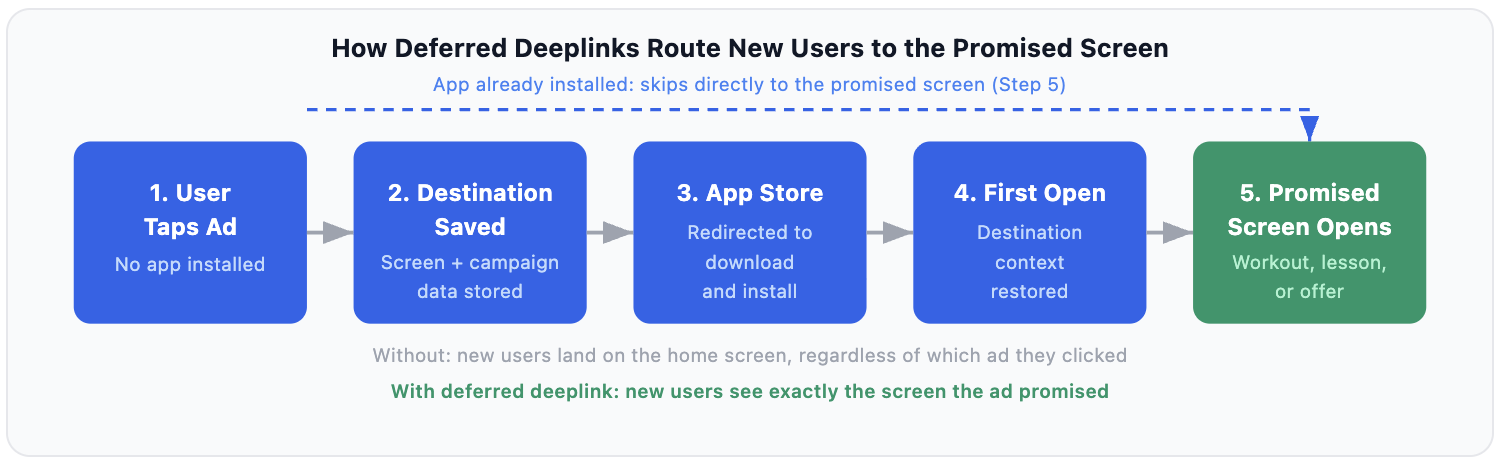
A deferred deeplink is a link that stores the intended in-app destination and campaign metadata across the app store install step, so the first app open routes the new user to the correct screen.
Without deferred deeplinks, every new user from a paid campaign lands on the home screen regardless of the ad they clicked. With deferred deeplinks, new users land on the exact screen the ad promised. The diagram below shows the full flow.
Want to see how Deep linking for subscription apps works with your data?
Get hands-on with Airbridge and see real results.
Try It Free →Deeplink Patterns for Fitness and Health Apps
A solid deeplink strategy for fitness subscription app onboarding begins with one principle: every ad creative should map to a specific in-app screen before the campaign goes live.
1. Ad-to-Content Routing: Match Every Creative to a Specific Screen
How it works: A Meta, TikTok, or YouTube ad features a specific workout, program, or fitness challenge. The deeplink carries that content ID through the install, so the user's first screen is the exact workout from the ad.
Example deeplink payload:
https://myapp.com/content?screen=workout&id=hiit-30&campaign=meta_lookalike&trial=true
What happens on first open:
-
App reads the
screenandidparameters. -
Navigates directly to the workout.
-
Optionally triggers a trial prompt in context: "Start your free 7-day trial to unlock all 120 workouts."
Before your campaign launches, map every creative to a route:
| Ad creative | Target screen | Required payload |
|---|---|---|
| "30-Day HIIT Challenge" | Program intro | screen=program&id=hiit-30day |
| "Morning Yoga Flow" | Specific workout | screen=workout&id=yoga-morning |
| "Free Trial: All Programs" | Trial paywall | screen=paywall&offer=7day |
2. Trial Onboarding: The Step-by-Step Deferred Deeplink Flow
For paid acquisition, a deferred deeplink automates the meaningful first-task delivery: instead of dropping the user on a blank dashboard, they land directly on the specific workout, lesson, or offer the ad promised.
The complete onboarding trial flow:
-
User sees an ad for a specific workout or program.
-
User taps the link. The deeplink service stores the destination and campaign metadata.
-
User is redirected to the App Store.
-
User downloads and installs.
-
First app open triggers context restoration from the deeplink service.
-
User lands directly on the workout or program intro screen.
-
Trial prompt appears in context, tied to the content they were shown.
This flow consistently outperforms routing to a generic onboarding questionnaire first, because the trial prompt appears after the user has already seen what they are paying for.
Optional enhancement: Some fitness apps pass the user's stated goal from the ad's UTM parameters into the onboarding form. This pre-fills "Your goal: Lose weight" without the user having to select it again, reducing friction before the paywall.
3. Re-engagement via Push and Email: Routing Table
Lapsed trial users and inactive subscribers need links that go somewhere specific. A push notification saying "Your streak is waiting" must open the streak screen or the last workout, not the app root.
| Campaign type | Target screen | Payload example |
|---|---|---|
| Trial expiry (Day 6 nudge) | Trial paywall with offer | screen=paywall&offer=7day&plan=annual |
| Streak recovery | Last completed workout | screen=workout&id={last_workout_id} |
| New program launch | Program intro | screen=program&id={program_id}&source=email |
| Win-back (30+ days lapsed) | Personalized content feed | screen=feed&segment=lapsed&source=push |
| Renewal reminder | Subscription management | screen=account&tab=subscription |
The principle throughout: match the behavioral message in the notification to the behavioral destination in the app.
Deeplink Patterns for Edtech Apps
Edtech subscription apps have a different routing challenge. The content is a structured curriculum, not a standalone workout. Routing needs to preserve both the content context (which course) and the progression context (how far the user has gotten).
1. Course and Lesson Routing from Paid Campaigns
The problem: An ad promising "Learn Python in 30 days" routes to the home screen. The user opens a course catalog, does not immediately see the Python course, and closes the app.
The fix: Include the course ID in the deeplink payload. Optionally include the first lesson ID so users can preview content before seeing the paywall.
Example deeplink payload:
https://myapp.com/course?id=python-30&lesson=1&campaign=google_search_01
For professional certifications and skills-based learning, include the credential or track ID. The landing screen should display the certification name and outcome, reinforcing the ad's promise.
2. Live Classes and Cohorts: Time-Sensitive Routing
Live classes, cohort programs, and scheduled sessions need temporal context in the deeplink. A "Join live class at 7pm" email must route to the class entry screen, not the class catalog.
Example deeplink payload with fallback:
https://myapp.com/class?id=python-live-06&fallback=recording
If the session has ended, the app reads the fallback parameter and routes to the recording. Without this, users see an error screen or the home page.
Build fallback states for every time-sensitive content type:
-
Live class ended: show recording
-
Cohort enrollment closed: show waitlist or next cohort date
-
Promotional offer expired: show standard paywall, not a broken screen
3. Trial Expiry: Route Back to Progress, Not a Paywall
When a trial ends, the re-engagement email should not route to a generic paywall. It should route to where the user left off.
The high-converting flow for edtech trial expiry:
-
User receives "Your trial is ending" email.
-
Link opens the app at lesson 4 (the next step in their course).
-
A paywall overlay appears, anchored to the course the user was engaged with.
-
The annual plan is pre-selected with a message tied to the course: "Complete your Python certification."
Routing to the progression screen before the price appears works because the user sees their incomplete progress before making the payment decision. The decision shifts from "Do I want to subscribe?" to "Do I want to finish what I started?"
For certificate-track courses, pre-select the plan duration that matches the course length. A 6-month Python curriculum should default to the annual plan, not monthly.
How to Build Your Deeplink Map Before Running Paid UA
Step 1: Map Every Target Screen and Its URL Parameters
Before any paid campaign, create a complete routing table. Every ad creative needs to map to a row in this table. If it does not, the campaign defaults to the home screen.
| Screen | Route | Required parameters | Optional parameters |
|---|---|---|---|
| Specific workout | /workout | id | source, trial |
| Program intro | /program | id | discount_code, trial_days |
| Trial paywall | /paywall | none | offer, plan, source |
| Personalized feed | /feed | none | segment, goal |
| Streak tracker | /streak | none | days |
| Subscription management | /account | none | tab=subscription |
| Course intro | /course | id | lesson, campaign |
| Live class entry | /class | id | fallback |
Step 2: Set Up Deferred Deeplinks (6-Step Checklist)
-
Configure verified domain files. Add
apple-app-site-association(iOS) andassetlinks.json(Android) to your/.well-known/path. The Universal Links and App Links cross-platform guide covers this in detail. -
Integrate a deeplink management service. This service handles deferred context storage and retrieves it on the user's first open after install.
-
Add deeplink handling code in your launch lifecycle. On first open, your app reads the context parameters and navigates to the correct screen before showing any generic onboarding.
-
Map incoming parameters to navigation actions. Each parameter combination corresponds to a specific screen. Build this as a routing config your team can update without shipping a new build.
-
Define fallback behavior. Every route needs a fallback for: expired content, missing IDs, unauthenticated users, and deleted content.
-
Read the deferred deeplink onboarding guide for step-by-step implementation detail.
Step 3: Test Your Deeplink Flow Before Launching Any Campaign
-
Fresh device with no app installed: click the campaign link, install from the App Store, verify the first screen is correct.
-
Device with the app already installed: click the same link, verify it opens the correct screen directly.
-
After an app update: re-verify both paths. Parameter handling frequently breaks between versions.
-
From the ad platform's click tracker, not just a browser. The platform may add tracking parameters that affect your routing logic.
-
With expired content IDs: verify the fallback screen appears correctly and not a blank or error screen.
Step 4: Five Routing Mistakes That Kill Trial Starts
-
URI schemes in new user campaigns.
myapp://workout/hiit-30shows an error on any device without the app installed. Replace with Universal Links or a deeplink management service. -
Routing to authenticated screens without a gate. A deeplink pointing to a user's personal workout log fails for unauthenticated new users. Add a sign-up or trial-start gate before the routing destination fires.
-
Expired offer parameters without a fallback. A deeplink carrying
offer=50offafter the promo ends either shows a broken screen or opens the app root. Add expiry handling in your routing logic. -
Email platform parameter encoding. Marketing email platforms (Klaviyo, Braze, Iterable) rewrite URLs for click tracking and often encode parameters incorrectly. Always test deeplinks from an actual email send, not a browser. Encoded characters like
%3Dbreak routing logic in apps that do not decode parameters before parsing. -
Missing fallback for deleted or expired content. A deleted workout or an ended cohort creates a broken destination. Add a default fallback route for any content
idyour server cannot resolve.
Start Deep Linking Before Your Next Campaign
Trial conversion does not happen at the paywall. It happens in the moment when a new user's first in-app experience confirms what the ad promised. If that first screen is right, the trial starts. If it is the home screen, the moment is gone.
Onboarding setups that combine a trial with a structured onboarding flow achieve a 1.78% median install-to-paid conversion rate in Adapty's analysis of 16,000+ apps, the highest of any onboarding format. Context-appropriate deeplink routing is one component of this pattern: it ensures the trial prompt and the user's actual intent converge on first open.


Ready to transform your mobile growth?
Learn how Airbridge helps leading brands measure and optimize every touchpoint.