Updated ASO teardown, US App Store
Stardust Period Tracker App Store optimization
A Health & Fitness app's App Store page, taken apart: the screenshots and why each one helps people decide to download, the icon and design system, and an ASO score out of 100.
- Est. monthly downloads
- 101K−52.8% vs previous month
- Est. monthly revenue
- $403K−5.8% vs previous month
- Est. revenue ÷ downloads
- $3.99
- Rating
- 4.8★120.4K ratings
Downloads and revenue are third-party est. for the US App Store, latest month vs the month before. Revenue includes renewals, so revenue ÷ downloads is a rough ratio, not what a new user pays. Estimates as of ; rating and dates from the App Store, .
Screenshots and why they convert
10 screenshots of up to 10, the first 6 shown here. The first 3 show in search results when there's no preview video.

#1In search results
Your Hormonal Health Universe Awaits
- What it shows
- A planet scene with the headline, a “2 million monthly users” badge, and the logos of ELLE, GLAMOUR, Bustle, The Cut and The New York Times under “Featured in”.
- Why it converts
- Puts the app's own proof first: a user count and press names. It does not show a feature, so a visitor still has to guess what the app does from the name.

#2In search results
Predict your next period
- next periodnot in name
- What it shows
- A ring of moon-phase dots reading “Period in 11 Days”, with a hormone curve chart and a “Cycle day 16 of 28” line below.
- Why it converts
- Shows the core job of a period tracker with a clear number. “Next period” is also a phrase people look for.

#3In search results
Track all the fun symptoms
- symptomsnot in name
- What it shows
- Symptom pickers for flow (light, medium, heavy), feelings (moody, tears, anxiety) and cravings, drawn as glowing icons.
- Why it converts
- One idea in one frame: logging is quick and easy to scan. The word “fun” sets a light tone for a topic that can feel clinical.
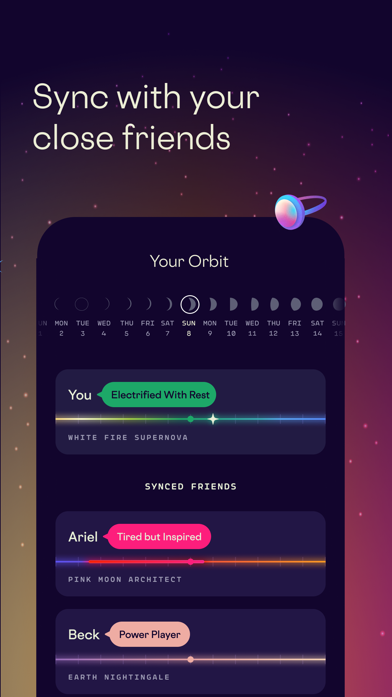
#4
Sync with your close friends
- What it shows
- A screen called “Your Orbit” with a week of moon phases and three cards, one for you and two for synced friends, each with a mood tag.
- Why it converts
- Shows a social feature. It gives a reason to install beyond logging, and the mood tags make the idea clear at a glance.

#5
See how hormones affect your mood
- hormonesnot in name
- moodnot in name
- What it shows
- A “Current phase” screen with a droplet, the word “Period”, and a short line of guidance text.
- Why it converts
- Frames the data as an answer to a question people have.

#6
Align your cycle with the moon
- moonnot in name
- What it shows
- A May calendar where each day is a moon-phase icon and the period days are marked in red.
- Why it converts
- Shows the calendar view and the app's moon-phase idea in one image. The calendar is easy to read at a glance.
Icon and design system
What makes the page read as one brand at a glance.

- One idea, a ring of moon phases, with no text.
- The dark blue background and bright gradient shapes match the screenshots, so icon and gallery read as one brand.
- The shapes are simple and high in contrast, so they stay clear at small sizes.
- 01
Proof in the first frame
The opening image shows “2 million monthly users” and five press logos. Printed claims like these are the app's own, and the image does not show the product in use.
- 02
One screen, one idea
Each later image has one short caption and one screen: prediction, symptoms, friends, mood, calendar.
- 03
A moon-phase visual language
The icon, the cycle ring and the calendar all use moon-phase shapes, so the app has a look of its own.
- 04
Dark phone cards on a gradient
Most images use a dark device card on a starry gradient, with the background color shifting between images. The set feels like one system with variety.
- 05
Playful tone
Captions such as “Track all the fun symptoms” and the floating objects (a pizza slice, a ring, a rainbow) keep the tone light.
ASO score breakdown
75 of 100 points. The full rule is under “How the ASO score works” below.
- App name8 / 25
- Uses 23 of 30 characters7.7/10
- Brand + keyword phrase0/10
- Keywords fill half the name or more0/5
- Screenshots27 / 35
- Caption on every screenshot5/5
- Each caption names a feature people search for6.7/10
- First screenshot shows the main use0/5
- One consistent design system5/5
- Readable at search-result size5/5
- Trust signal5/5
- Ratings25 / 25
- 4.8 average (full marks at 4.8)15/15
- 120,350 ratings (full marks at 100,000)10/10
- Freshness15 / 15
- Last update 9 days ago (full marks within 30)15/15
Where the points are
- Use the rest of the app name+17 pts
7 characters are free. Add the next most important search term.
- Check caption terms against your subtitle and keywords
5 caption terms aren't in the app name: next period, symptoms, hormones, mood, moon. Captions don't count for search; the subtitle and the 100-character keyword field do.
Apply it to your app
A checklist for your next product page update.
- Show what the app does in the first frame, then add proof next to it.
- Use a user count or press logos only when they are real and specific.
- Give each screenshot one idea and one short caption.
- Use the words your users use, such as “next period”, in large caption text.
- Reuse one visual motif in the icon and the screenshots.
- Change the background color between images, but keep layout and type the same.
How the ASO score works
- 01
App name, 25 points
Up to 10 for how much of Apple's 30 characters it uses, 10 for a brand + keyword structure, 5 when keywords fill half the name or more.
- 02
Screenshots, 35 points
Captions on every image, captions that name searched features, a first screenshot that shows the main use, one design system, readability at search size, and a trust signal.
- 03
Ratings, 25 points
Up to 15 for the average (from 4.0, full marks at 4.8) and 10 for the count (from 1,000, full marks at 100,000 ratings).
- 04
Freshness, 15 points
Full marks for an update in the last 30 days, falling to zero at 180 days. 85+ is excellent, 70+ strong, 50+ fair.
Common questions
What is an ASO score?
A 100-point check of the parts of an App Store page you control: the app name, screenshots, ratings and how recently the app was updated. It's our own scoring rule, shown in full on this page, not a number from Apple. Use it to compare your page with apps that already sell well in your category.
How long can an app name be on the App Store?
30 characters. Apple also gives you a 30-character subtitle and a 100-character keyword field for more terms.
Which screenshots show up in App Store search results?
The first one to three, when the app has no preview video. That's why the first three should cover the main reasons people download. Stardust Period Tracker uses them for next period and symptoms.
How many screenshots can an iPhone app have?
Up to 10 per device size. Apple recommends focusing each screenshot after the first on one main benefit or feature. Stardust Period Tracker uses 10.
Where do the download and revenue numbers come from?
They're third-party estimates for the US App Store, not figures reported by the developer. Treat them as a sense of scale. Growth compares the latest month with the month before.
Do screenshot captions help an app rank in search?
Apple says search results use text matches in the app name, subtitle, keywords and primary category, plus user behavior such as downloads, ratings and reviews. Captions aren't on that list: they help people who already see the app decide to download. When a caption names something people search for, put that term in the keyword field too.
Where the numbers come from
- Apple: Creating your product page
- App name limit (30 characters), up to 10 screenshots, the first one to three shown in search results, keyword field.
- Apple: App Store search
- Search results use text relevance (name, subtitle, keywords, primary category) and user behavior (downloads, ratings, reviews).
- Apple: Ratings, reviews and responses
- The in-app rating prompt can be shown up to three times in a 365-day period.
- Stardust Period Tracker on the App Store
- Name, developer, category, icon, screenshots, rating, release and update dates (US storefront), checked Nov 4, 2026.
- Downloads and revenue
- Third-party est. for the US App Store, latest month, pulled Oct 29, 2026. Not reported by the developer.
Related
Your product page wins the install.Know which campaign sent it.
Airbridge Core shows which Meta, TikTok, Google and Apple Ads campaign brought each user and what they paid. Trusted by 1,000+ brands processing 100B+ events a month. $40+/mo after a 30-day free trial, no annual contract.