Updated ASO teardown, US App Store
Sintra: AI Employees App Store optimization
A Productivity app's App Store page, taken apart: the screenshots and why each one helps people decide to download, the icon and design system, and an ASO score out of 100.
- Est. monthly downloads
- 12K−14.9% vs previous month
- Est. monthly revenue
- $100K+11.1% vs previous month
- Est. revenue ÷ downloads
- $8.33
- Rating
- 4.6★2.7K ratings
Downloads and revenue are third-party est. for the US App Store, latest month vs the month before. Revenue includes renewals, so revenue ÷ downloads is a rough ratio, not what a new user pays. Estimates as of ; rating and dates from the App Store, .
Screenshots and why they convert
10 screenshots of up to 10, the first 6 shown here. The first 3 show in search results when there's no preview video.

#1In search results
Your new team, that’s now on AI.
- aiin name
- What it shows
- A blue background with a Trustpilot “Excellent” rating row, a Business Insider quote in a laurel badge, and a large illustrated astronaut-helmet character.
- Why it converts
- States the idea in plain words, a team made of AI, in the first frame. Two printed trust signals sit above the character, though the frame shows no product screen yet.

#2In search results
Get instant help from your AI employees.
- ai employeesin name
- What it shows
- A chat with a customer support helper named Cassie drafting a customer email reply, with a Gmail “Customer email draft” card marked “Needs action”.
- Why it converts
- Shows a concrete job the app does, in a real chat. The “employees” idea becomes a named helper with a task.

#3In search results
Automate work even while you sleep.
- automatenot in name
- What it shows
- Stacked Facebook, Instagram and LinkedIn post cards (scheduled, published), then a social media manager screen with “5,649 People reached” and “7 posts to review”.
- Why it converts
- Names the benefit, work done while you are away, and backs it with scheduled and published posts. The large number cards stay readable when small.

#4
Train employees to use your knowledge.
- trainnot in name
- What it shows
- A chat where the helper saves a service update, with cards for a website page, a pricing PDF and a company values note.
- Why it converts
- Answers the question of how the helpers know your business. The cards show what you can feed them: pages, files and notes.

#5
Connect helpers with all your platforms.
- platformsnot in name
- What it shows
- An Integrations screen with Facebook + Instagram, Gmail, LinkedIn and Google Calendar cards, some marked Connected and some Not connected.
- Why it converts
- Shows that the helpers work with tools people already use. Names the platforms so a visitor can check theirs.
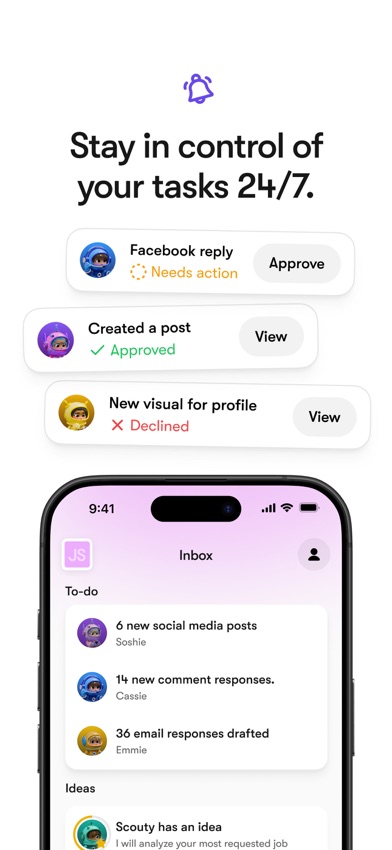
#6
Stay in control of your tasks 24/7.
- tasksnot in name
- What it shows
- Cards for a Facebook reply (Needs action, Approve), a created post (Approved) and a declined visual, above an Inbox with a to-do list.
- Why it converts
- Speaks to the worry that AI acts alone. Approve and Decline buttons show that the person has the last word.
Icon and design system
What makes the page read as one brand at a glance.

- One 3D character fills the frame, so there is a single focus. It is the same helmet character that opens the first screenshot.
- No text and no UI in the icon, which suits small sizes.
- The icon shows a character but does not say “AI” or “assistant”. The name and subtitle carry that meaning.
- 01
One idea in a large two-line headline
Most images have a short headline of about two lines in big type, with a small line icon above it. The headline reads even when the image is shrunk.
- 02
A colored phrase picks out the key words
In most headlines, one phrase is colored: “instant help”, “Automate work”, “use your knowledge”. The color changes per image and matches the background tint.
- 03
Character helpers appear in most images
Named 3D astronaut helpers show up in the chats and cards. They make “AI employees” feel like a team and tie the set to the icon.
- 04
Cards pop out of the phone
Notification-style cards sit above and across the device frame. The key states, such as Needs action, Approved and Published, are readable without studying the phone.
- 05
Trust signals open the set
The first image prints a Trustpilot rating and a Business Insider quote. These are the app’s own claims, shown before any product screen.
ASO score breakdown
85 of 100 points. The full rule is under “How the ASO score works” below.
- App name22 / 25
- Uses 20 of 30 characters6.7/10
- Brand + keyword phrase10/10
- Keywords fill half the name or more5/5
- Screenshots35 / 35
- Caption on every screenshot5/5
- Each caption names a feature people search for10/10
- First screenshot shows the main use5/5
- One consistent design system5/5
- Readable at search-result size5/5
- Trust signal5/5
- Ratings13 / 25
- 4.6 average (full marks at 4.8)11.2/15
- 2,653 ratings (full marks at 100,000)2.1/10
- Freshness15 / 15
- Last update 8 days ago (full marks within 30)15/15
Where the points are
- Ask happy users for a rating+12 pts
4.6 stars from 2,653 ratings. Apple's in-app rating prompt can be shown up to 3 times a year; show it right after a user finishes something in the app.
- Use the rest of the app name+3 pts
10 characters are free. Add the next most important search term.
- Check caption terms against your subtitle and keywords
4 caption terms aren't in the app name: automate, train, platforms, tasks. Captions don't count for search; the subtitle and the 100-character keyword field do.
- Win back installs
Downloads fell 14.9% while revenue rose 11.1%. A product page that converts more of its visitors wins installs back without more ad spend.
Apply it to your app
A checklist for your next product page update.
- Say what your app is in plain words in screenshot 1, as a headline a stranger understands.
- Show a real task being done in an early screenshot, not only a slogan.
- Write each headline as one benefit and use one color to mark its key words.
- Pull the key cards out of the phone frame so they stay readable at thumbnail size.
- If you print a rating or press quote, name the source and put it where people look first.
- Answer the worry people have about your category, such as control or setup, in its own screenshot.
How the ASO score works
- 01
App name, 25 points
Up to 10 for how much of Apple's 30 characters it uses, 10 for a brand + keyword structure, 5 when keywords fill half the name or more.
- 02
Screenshots, 35 points
Captions on every image, captions that name searched features, a first screenshot that shows the main use, one design system, readability at search size, and a trust signal.
- 03
Ratings, 25 points
Up to 15 for the average (from 4.0, full marks at 4.8) and 10 for the count (from 1,000, full marks at 100,000 ratings).
- 04
Freshness, 15 points
Full marks for an update in the last 30 days, falling to zero at 180 days. 85+ is excellent, 70+ strong, 50+ fair.
Common questions
What is an ASO score?
A 100-point check of the parts of an App Store page you control: the app name, screenshots, ratings and how recently the app was updated. It's our own scoring rule, shown in full on this page, not a number from Apple. Use it to compare your page with apps that already sell well in your category.
How long can an app name be on the App Store?
30 characters. A common pattern is a short brand followed by the main thing people search for, like “Sintra: AI Employees”, which uses 20. Apple also gives you a 30-character subtitle and a 100-character keyword field for more terms.
Which screenshots show up in App Store search results?
The first one to three, when the app has no preview video. That's why the first three should cover the main reasons people download. Sintra uses them for ai, ai employees and automate.
How many screenshots can an iPhone app have?
Up to 10 per device size. Apple recommends focusing each screenshot after the first on one main benefit or feature. Sintra uses 10.
Where do the download and revenue numbers come from?
They're third-party estimates for the US App Store, not figures reported by the developer. Treat them as a sense of scale. Growth compares the latest month with the month before.
Do screenshot captions help an app rank in search?
Apple says search results use text matches in the app name, subtitle, keywords and primary category, plus user behavior such as downloads, ratings and reviews. Captions aren't on that list: they help people who already see the app decide to download. When a caption names something people search for, put that term in the keyword field too.
Where the numbers come from
- Apple: Creating your product page
- App name limit (30 characters), up to 10 screenshots, the first one to three shown in search results, keyword field.
- Apple: App Store search
- Search results use text relevance (name, subtitle, keywords, primary category) and user behavior (downloads, ratings, reviews).
- Apple: Ratings, reviews and responses
- The in-app rating prompt can be shown up to three times in a 365-day period.
- Sintra: AI Employees on the App Store
- Name, developer, category, icon, screenshots, rating, release and update dates (US storefront), checked Nov 4, 2026.
- Downloads and revenue
- Third-party est. for the US App Store, latest month, pulled Oct 29, 2026. Not reported by the developer.
Related
Your product page wins the install.Know which campaign sent it.
Airbridge Core shows which Meta, TikTok, Google and Apple Ads campaign brought each user and what they paid. Trusted by 1,000+ brands processing 100B+ events a month. $40+/mo after a 30-day free trial, no annual contract.