Updated ASO teardown, US App Store
Meta AI App Store optimization
A Productivity app's App Store page, taken apart: the screenshots and why each one helps people decide to download, the icon and design system, and an ASO score out of 100.
- Est. monthly downloads
- 6M+56.4% vs previous month
- Est. monthly revenue
- $42K+0% vs previous month
- Est. revenue ÷ downloads
- $0.01
- Rating
- 4.7★290.9K ratings
Downloads and revenue are third-party est. for the US App Store, latest month vs the month before. Revenue includes renewals, so revenue ÷ downloads is a rough ratio, not what a new user pays. Estimates as of ; rating and dates from the App Store, .
Screenshots and why they convert
8 screenshots of up to 10, the first 6 shown here. The first 3 show in search results when there's no preview video.

#1In search results
Get daily briefings, research topics, and more.
- daily briefingsnot in name
- researchnot in name
- What it shows
- A chat titled “Daily briefing” with a day summary, a schedule list and inbox highlights, above an “Ask Meta AI…” bar.
- Why it converts
- Opens with a concrete job the assistant does for you, not a vague “AI chat” line. The real answer on screen makes the caption easy to believe.

#2In search results
Find the best local spots around you.
- local spotsnot in name
- What it shows
- A “Denver coffee shops” chat with a short summary, a map with pins, and a place card showing a 4.4 rating and “Open”.
- Why it converts
- Shows a second everyday use, a search for places. The map is a visual break from text answers and makes the result easy to read at a glance.

#3In search results
Discover and shop products that match your style.
- shop productsnot in name
- What it shows
- A “Best coffee mugs” chat with product cards that show photos, brand names and prices.
- Why it converts
- Names shopping as a use case.

#4
Go hands-free with AI glasses.
- ai glassesnot in name
- What it shows
- A glasses control screen named “Wayfarer” with battery levels, toggles for Translate and Do not disturb, and a photo gallery.
- Why it converts
- Tells visitors who own the glasses that this app is the companion for them. It is a different audience from the chat screens, and the caption names the product they are looking for.
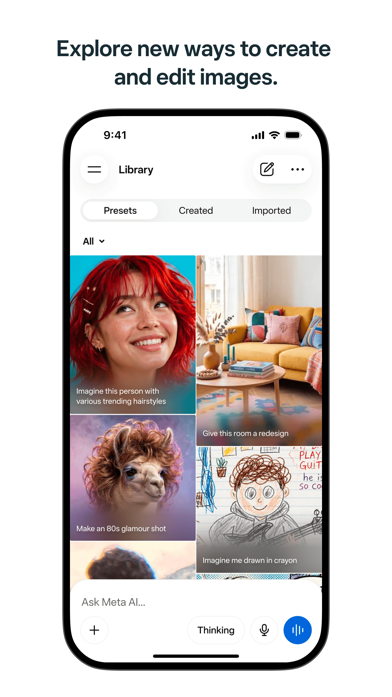
#5
Explore new ways to create and edit images.
- edit imagesnot in name
- What it shows
- A Library screen with preset image ideas such as new hairstyles, a room redesign and a crayon drawing.
- Why it converts
- Preset prompts show what to try, which lowers the effort of starting.

#6
Answer complex questions with advanced reasoning.
- reasoningnot in name
- What it shows
- A Denver and Atlanta comparison chat, with a menu to pick “Instant” or “Thinking” and the keyboard open.
- Why it converts
- Speaks to people who want deeper answers. The Instant and Thinking choice shows a control.
Icon and design system
What makes the page read as one brand at a glance.

- One abstract shape, a ring of petal-like ovals, with no text.
- Purple gradient on white is simple and stays clear at small sizes.
- The shape does not say what the app does, so the name and first caption have to explain it.
- The purple matches the small “thinking” star inside the screenshots.
- 01
One use case per screenshot
Briefings, local search, shopping, glasses, images and reasoning each get their own image. A visitor can find the use that fits them.
- 02
Two-line verb captions
Each caption starts with a verb such as get, find, discover, go, explore or answer. The text is dark, bold and centered above the phone.
- 03
Same frame on most images
White background, dark caption, one phone frame, often the often the same “Ask Meta AI…” bar at the bottom. The set reads as one system.
- 04
Real example prompts
Screens show real-looking requests such as coffee mugs and a city comparison. They show what to type, not only what the UI looks like.
- 05
No ratings or press on the images
No rating, user count, award or press mention is printed on the screenshots. The set relies on the use cases alone.
ASO score breakdown
70 of 100 points. The full rule is under “How the ASO score works” below.
- App name2 / 25
- Uses 7 of 30 characters2.3/10
- Brand + keyword phrase0/10
- Keywords fill half the name or more0/5
- Screenshots30 / 35
- Caption on every screenshot5/5
- Each caption names a feature people search for10/10
- First screenshot shows the main use5/5
- One consistent design system5/5
- Readable at search-result size5/5
- Trust signal0/5
- Ratings23 / 25
- 4.7 average (full marks at 4.8)13.1/15
- 290,933 ratings (full marks at 100,000)10/10
- Freshness15 / 15
- Last update 5 days ago (full marks within 30)15/15
Where the points are
- Use the rest of the app name+23 pts
23 characters are free. Add the next most important search term.
- Ask happy users for a rating+2 pts
4.7 stars from 290,933 ratings. Apple's in-app rating prompt can be shown up to 3 times a year; show it right after a user finishes something in the app.
- Check caption terms against your subtitle and keywords
7 caption terms aren't in the app name: daily briefings, research, local spots, shop products, ai glasses, edit images, reasoning. Captions don't count for search; the subtitle and the 100-character keyword field do.
Apply it to your app
A checklist for your next product page update.
- Start with a task your user does, not with a category label like “AI assistant”.
- Give each screenshot one use case and one caption.
- Start captions with a verb so the benefit is clear.
- Show a real example input and output on screen.
- Mix visual screens, such as maps, photos and image grids, between text-heavy ones.
- Keep the frame, caption style and background the same across the set.
How the ASO score works
- 01
App name, 25 points
Up to 10 for how much of Apple's 30 characters it uses, 10 for a brand + keyword structure, 5 when keywords fill half the name or more.
- 02
Screenshots, 35 points
Captions on every image, captions that name searched features, a first screenshot that shows the main use, one design system, readability at search size, and a trust signal.
- 03
Ratings, 25 points
Up to 15 for the average (from 4.0, full marks at 4.8) and 10 for the count (from 1,000, full marks at 100,000 ratings).
- 04
Freshness, 15 points
Full marks for an update in the last 30 days, falling to zero at 180 days. 85+ is excellent, 70+ strong, 50+ fair.
Common questions
What is an ASO score?
A 100-point check of the parts of an App Store page you control: the app name, screenshots, ratings and how recently the app was updated. It's our own scoring rule, shown in full on this page, not a number from Apple. Use it to compare your page with apps that already sell well in your category.
How long can an app name be on the App Store?
30 characters. Apple also gives you a 30-character subtitle and a 100-character keyword field for more terms.
Which screenshots show up in App Store search results?
The first one to three, when the app has no preview video. That's why the first three should cover the main reasons people download. Meta AI uses them for daily briefings, local spots and shop products.
How many screenshots can an iPhone app have?
Up to 10 per device size. Apple recommends focusing each screenshot after the first on one main benefit or feature. Meta AI uses 8.
Where do the download and revenue numbers come from?
They're third-party estimates for the US App Store, not figures reported by the developer. Treat them as a sense of scale. Growth compares the latest month with the month before.
Do screenshot captions help an app rank in search?
Apple says search results use text matches in the app name, subtitle, keywords and primary category, plus user behavior such as downloads, ratings and reviews. Captions aren't on that list: they help people who already see the app decide to download. When a caption names something people search for, put that term in the keyword field too.
Where the numbers come from
- Apple: Creating your product page
- App name limit (30 characters), up to 10 screenshots, the first one to three shown in search results, keyword field.
- Apple: App Store search
- Search results use text relevance (name, subtitle, keywords, primary category) and user behavior (downloads, ratings, reviews).
- Apple: Ratings, reviews and responses
- The in-app rating prompt can be shown up to three times in a 365-day period.
- Meta AI on the App Store
- Name, developer, category, icon, screenshots, rating, release and update dates (US storefront), checked Nov 4, 2026.
- Downloads and revenue
- Third-party est. for the US App Store, latest month, pulled Oct 29, 2026. Not reported by the developer.
Related
Your product page wins the install.Know which campaign sent it.
Airbridge Core shows which Meta, TikTok, Google and Apple Ads campaign brought each user and what they paid. Trusted by 1,000+ brands processing 100B+ events a month. $40+/mo after a 30-day free trial, no annual contract.