Updated ASO teardown, US App Store
Loóna: Sleep, reduce anxiety App Store optimization
A Health & Fitness app's App Store page, taken apart: the screenshots and why each one helps people decide to download, the icon and design system, and an ASO score out of 100.
- Est. monthly downloads
- 10K−12.6% vs previous month
- Est. monthly revenue
- $60K+566.7% vs previous month
- Est. revenue ÷ downloads
- $6.00
- Rating
- 4.6★26.8K ratings
Downloads and revenue are third-party est. for the US App Store, latest month vs the month before. Revenue includes renewals, so revenue ÷ downloads is a rough ratio, not what a new user pays. Estimates as of ; rating and dates from the App Store, .
Screenshots and why they convert
9 screenshots of up to 10, the first 6 shown here. The first 3 show in search results when there's no preview video.

#1In search results
#1 Sleep App Relax & fall in love with sleep
- sleep appnot in name
- What it shows
- Large white “#1 Sleep App” over a dark purple night scene, with “Relax & fall in love with sleep” below and a lantern-lit gate illustration at the bottom.
- Why it converts
- Puts “#1 Sleep App” in large type. “#1” is the app's own claim. No product screen appears yet, so how it works is left to later images.

#2In search results
Feel less stressed at night
- stressednot in name
- What it shows
- Caption “Feel less stressed at night” with “Immersive stories with sound effects”, then laurel badges for “5 Million+ Happy Users” and “4.5 Average Rating”, and a counter reading “147,674,059 hours of restful sleep”.
- Why it converts
- Puts proof right behind the opening claim: a user count, a rating and a running total, all printed large. The benefit line and the proof share one frame.

#3In search results
15-min Sleep Games Feel less stressed at night
- sleep gamesnot in name
- What it shows
- Caption “15-min Sleep Games” over a dim house illustration, with three purple speech bubbles. Each bubble has a small portrait photo and a short quote, such as “It helps soothe my mind & my body”.
- Why it converts
- Names a specific feature with a time length. The quotes add social proof in the users' own words. One quote makes a comparison to melatonin, which is the quoted user's claim.

#4
Sleep Stories
- sleep storiesnot in name
- What it shows
- Caption “Sleep Stories” with “Immersive stories with sound effects”, above a phone showing a story called “Heartwarming Brooklyn” with a Restart now button.
- Why it converts
- Shows a real app screen with a title card that explains the format at a glance. The phone frame keeps the focus on one feature.

#5
Music & Nature Sounds Reduce anxiety to sleep faster
- nature soundsnot in name
- anxietyin name
- What it shows
- Caption “Music & Nature Sounds” with “Reduce anxiety to sleep faster”, above a player screen for an immersive story called “Paper Cranes” with a progress bar from 02:31 to 35:00.
- Why it converts
- The caption names a feature people look for, and the second line states the benefit it is meant to give. This matches the “reduce anxiety” wording in the app name, so name and gallery make the same promise.

#6
Breathing Exercises
- breathing exercisesnot in name
- What it shows
- Caption “Breathing Exercises” with “Inhale calm & exhale worry!”, above a 3D scene of a lantern gate and a white dragon, with a “Sleepscape 48%” progress bar.
- Why it converts
- Names another feature people look for and gives it a short, easy-to-repeat line. The rich 3D scene shows the app's art style.
Icon and design system
What makes the page read as one brand at a glance.
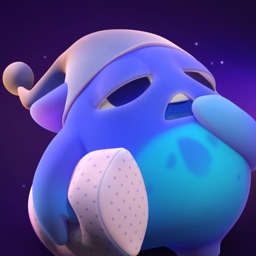
- One character is the single focus. A sleepy face with a nightcap and a pillow says “sleep” without any text.
- Purple night background matches the dark purple of the screenshots, so icon and gallery read as one brand.
- The face is detailed, with shading and glow. It is a 3D illustration, not a photo or a copy of the app's UI, but fine detail may blur at the smallest sizes.
- 01
Big claim first, product later
The opening image is a printed “#1” claim and a mood line over artwork. Product screens start in the fourth image, after the proof.
- 02
Proof sits next to the benefit
A user count, a star rating and an hours total sit under “Feel less stressed at night”. A row of user quotes follows.
- 03
Bold white caption, lilac accent
Most images use heavy white type for the feature name. Only the first image has a lilac second line, and the second uses lilac for part of its headline; the rest stay white.
- 04
Features named in plain words
Captions use terms such as sleep stories, nature sounds and breathing exercises. These are words people already use.
- 05
Phone frames in the brand color
Later images place the app screen in a purple-edged frame on the same dark background. The look stays the same while the content changes.
ASO score breakdown
72 of 100 points. The full rule is under “How the ASO score works” below.
- App name24 / 25
- Uses 28 of 30 characters9.3/10
- Brand + keyword phrase10/10
- Keywords fill half the name or more5/5
- Screenshots30 / 35
- Caption on every screenshot5/5
- Each caption names a feature people search for10/10
- First screenshot shows the main use0/5
- One consistent design system5/5
- Readable at search-result size5/5
- Trust signal5/5
- Ratings18 / 25
- 4.6 average (full marks at 4.8)11.2/15
- 26,797 ratings (full marks at 100,000)7.1/10
- Freshness0 / 15
- Last update 593 days ago (full marks within 30)0/15
Where the points are
- Ship an update+15 pts
The last update was 593 days ago. A new version also refreshes the "What's New" notes people read before they download.
- Ask happy users for a rating+7 pts
4.6 stars from 26,797 ratings. Apple's in-app rating prompt can be shown up to 3 times a year; show it right after a user finishes something in the app.
- Check caption terms against your subtitle and keywords
6 caption terms aren't in the app name: sleep app, stressed, sleep games, sleep stories, nature sounds, breathing exercises. Captions don't count for search; the subtitle and the 100-character keyword field do.
- Win back installs
Downloads fell 12.6% while revenue rose 566.7%. A product page that converts more of its visitors wins installs back without more ad spend.
Apply it to your app
A checklist for your next product page update.
- Say what the app is for in the first image, in large type.
- Put a rating or user count next to the benefit it supports.
- Keep proof real and checkable. Quote printed claims as your own app's, and keep them current.
- Name each feature with the words your users use, then add one line on the benefit.
- Use one caption style on every image: heavy line on top, second line below.
- Show the app screen early enough that a visitor sees what they get, not just the mood.
How the ASO score works
- 01
App name, 25 points
Up to 10 for how much of Apple's 30 characters it uses, 10 for a brand + keyword structure, 5 when keywords fill half the name or more.
- 02
Screenshots, 35 points
Captions on every image, captions that name searched features, a first screenshot that shows the main use, one design system, readability at search size, and a trust signal.
- 03
Ratings, 25 points
Up to 15 for the average (from 4.0, full marks at 4.8) and 10 for the count (from 1,000, full marks at 100,000 ratings).
- 04
Freshness, 15 points
Full marks for an update in the last 30 days, falling to zero at 180 days. 85+ is excellent, 70+ strong, 50+ fair.
Common questions
What is an ASO score?
A 100-point check of the parts of an App Store page you control: the app name, screenshots, ratings and how recently the app was updated. It's our own scoring rule, shown in full on this page, not a number from Apple. Use it to compare your page with apps that already sell well in your category.
How long can an app name be on the App Store?
30 characters. A common pattern is a short brand followed by the main thing people search for, like “Loóna: Sleep, reduce anxiety”, which uses 28. Apple also gives you a 30-character subtitle and a 100-character keyword field for more terms.
Which screenshots show up in App Store search results?
The first one to three, when the app has no preview video. That's why the first three should cover the main reasons people download. Loóna uses them for sleep app, stressed and sleep games.
How many screenshots can an iPhone app have?
Up to 10 per device size. Apple recommends focusing each screenshot after the first on one main benefit or feature. Loóna uses 9.
Where do the download and revenue numbers come from?
They're third-party estimates for the US App Store, not figures reported by the developer. Treat them as a sense of scale. Growth compares the latest month with the month before.
Do screenshot captions help an app rank in search?
Apple says search results use text matches in the app name, subtitle, keywords and primary category, plus user behavior such as downloads, ratings and reviews. Captions aren't on that list: they help people who already see the app decide to download. When a caption names something people search for, put that term in the keyword field too.
Where the numbers come from
- Apple: Creating your product page
- App name limit (30 characters), up to 10 screenshots, the first one to three shown in search results, keyword field.
- Apple: App Store search
- Search results use text relevance (name, subtitle, keywords, primary category) and user behavior (downloads, ratings, reviews).
- Apple: Ratings, reviews and responses
- The in-app rating prompt can be shown up to three times in a 365-day period.
- Loóna: Sleep, reduce anxiety on the App Store
- Name, developer, category, icon, screenshots, rating, release and update dates (US storefront), checked Nov 4, 2026.
- Downloads and revenue
- Third-party est. for the US App Store, latest month, pulled Oct 29, 2026. Not reported by the developer.
Related
Your product page wins the install.Know which campaign sent it.
Airbridge Core shows which Meta, TikTok, Google and Apple Ads campaign brought each user and what they paid. Trusted by 1,000+ brands processing 100B+ events a month. $40+/mo after a 30-day free trial, no annual contract.