Updated ASO teardown, US App Store
Livity: Sleep & Health Tracker App Store optimization
A Health & Fitness app's App Store page, taken apart: the screenshots and why each one helps people decide to download, the icon and design system, and an ASO score out of 100.
- Est. monthly downloads
- 6K−40.1% vs previous month
- Est. monthly revenue
- $62K−14.5% vs previous month
- Est. revenue ÷ downloads
- $10.33
- Rating
- 4.7★1.3K ratings
Downloads and revenue are third-party est. for the US App Store, latest month vs the month before. Revenue includes renewals, so revenue ÷ downloads is a rough ratio, not what a new user pays. Estimates as of ; rating and dates from the App Store, .
Screenshots and why they convert
6 screenshots of up to 10. The first 3 show in search results when there's no preview video.

#1In search results
Get The Most Out Of Your Apple Watch
- apple watchnot in name
- What it shows
- A phone showing an Overview screen: body battery 18%, today's stress, strain 44% and a night overview with sleep.
- Why it converts
- Names the device it works with and shows several daily numbers at once. A visitor with an Apple Watch can see what they would get. The caption says what to use it with, not yet what the result is.

#2In search results
Improve Your BODY RECOVERY
- body recoverynot in name
- What it shows
- An Apple Watch showing an Overview with battery 18, stress 15 and strain 44%, under an Apple “Health App of the Day” laurel badge.
- Why it converts
- Puts the app on the watch itself, which backs up the first image. The badge is a printed claim from the app.

#3In search results
Lower your FITNESS AGE
- fitness agenot in name
- What it shows
- A Fitness Age screen: 20 against a target of 17 and an actual age of 27, with a list of contributing factors such as resting heart rate and sleep duration.
- Why it converts
- A single number a person can relate to, which gives a clear reason to open the app. Color-coded rows show what moves it.

#4
Personalized workout suggestions
- workout suggestionsnot in name
- What it shows
- A Strain screen with a virtual coach message, today's target of 24-41% and workout suggestion cards for volleyball, walking and running.
- Why it converts
- Moves from tracking to advice: the app tells you what to do next. The caption names a feature people look for.
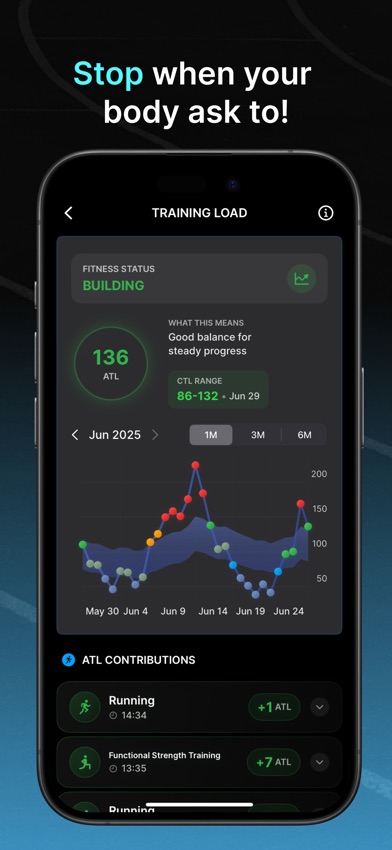
#5
Stop when your body ask to!
- What it shows
- A Training Load screen with a “Building” fitness status, a 136 ATL value, a one-month chart and a list of activity contributions.
- Why it converts
- Speaks to a benefit, listening to your body, instead of naming a feature. The chart is detailed, so the caption has to carry the message at small size.

#6
Track your monthly progress
- monthly progressnot in name
- What it shows
- A month calendar of workout bubbles with 18 activities, plus a calories total of 25 345 kcal and a breakdown by workout.
- Why it converts
- Shows a long-term view, a reason to keep the app after the first week. The colored bubbles read quickly even though the lower part of the screen is dense.
Icon and design system
What makes the page read as one brand at a glance.

- One shape, the first letter of the name, with no extra text or fine detail.
- Cyan and magenta on near-black match the cyan highlights and dark backgrounds in the screenshots, so icon and gallery look like one brand.
- The letter does not say sleep or health on its own, so the name and subtitle carry the meaning.
- The thin lines may lose weight at the smallest sizes. Worth checking on a home screen.
- 01
Cyan highlight on key words
Most captions are white with the key phrase in cyan. The eye goes to the cyan words, such as the device or the benefit.
- 02
One screen, one idea
Each image shows one screen: overview, recovery, fitness age, workouts, training load, monthly progress. The caption names that one idea.
- 03
Apple recognition near the top
The second image prints an Apple “Health App of the Day” badge above an Apple Watch. It is the app's own claim, placed early.
- 04
Phone and watch shown together
The first image shows the phone and the second shows the watch. A visitor sees both devices the app works with.
- 05
Dense UI, large captions
The app screens are full of small numbers. Large two-line captions at the top keep the message readable when the image is small.
ASO score breakdown
87 of 100 points. The full rule is under “How the ASO score works” below.
- App name25 / 25
- Uses 30 of 30 characters10/10
- Brand + keyword phrase10/10
- Keywords fill half the name or more5/5
- Screenshots33 / 35
- Caption on every screenshot5/5
- Each caption names a feature people search for8.3/10
- First screenshot shows the main use5/5
- One consistent design system5/5
- Readable at search-result size5/5
- Trust signal5/5
- Ratings14 / 25
- 4.7 average (full marks at 4.8)13.1/15
- 1,332 ratings (full marks at 100,000)0.6/10
- Freshness15 / 15
- Last update 16 days ago (full marks within 30)15/15
Where the points are
- Ask happy users for a rating+11 pts
4.7 stars from 1,332 ratings. Apple's in-app rating prompt can be shown up to 3 times a year; show it right after a user finishes something in the app.
- Check caption terms against your subtitle and keywords
5 caption terms aren't in the app name: apple watch, body recovery, fitness age, workout suggestions, monthly progress. Captions don't count for search; the subtitle and the 100-character keyword field do.
Apply it to your app
A checklist for your next product page update.
- Name the device or setup your app needs in an early caption, so the right visitor knows it is for them.
- Give each screenshot one idea, and say that idea in the caption.
- Pick one highlight color for key words and use it on every caption.
- Place a real award or feature badge near the top, and keep the wording exact.
- Use big captions when the app screen has small, dense numbers.
- Lead with the result a person gets, such as a recovery or age score, then show the features behind it.
How the ASO score works
- 01
App name, 25 points
Up to 10 for how much of Apple's 30 characters it uses, 10 for a brand + keyword structure, 5 when keywords fill half the name or more.
- 02
Screenshots, 35 points
Captions on every image, captions that name searched features, a first screenshot that shows the main use, one design system, readability at search size, and a trust signal.
- 03
Ratings, 25 points
Up to 15 for the average (from 4.0, full marks at 4.8) and 10 for the count (from 1,000, full marks at 100,000 ratings).
- 04
Freshness, 15 points
Full marks for an update in the last 30 days, falling to zero at 180 days. 85+ is excellent, 70+ strong, 50+ fair.
Common questions
What is an ASO score?
A 100-point check of the parts of an App Store page you control: the app name, screenshots, ratings and how recently the app was updated. It's our own scoring rule, shown in full on this page, not a number from Apple. Use it to compare your page with apps that already sell well in your category.
How long can an app name be on the App Store?
30 characters. A common pattern is a short brand followed by the main thing people search for, like “Livity: Sleep & Health Tracker”, which uses 30. Apple also gives you a 30-character subtitle and a 100-character keyword field for more terms.
Which screenshots show up in App Store search results?
The first one to three, when the app has no preview video. That's why the first three should cover the main reasons people download. Livity uses them for apple watch, body recovery and fitness age.
How many screenshots can an iPhone app have?
Up to 10 per device size. Apple recommends focusing each screenshot after the first on one main benefit or feature. Livity uses 6.
Where do the download and revenue numbers come from?
They're third-party estimates for the US App Store, not figures reported by the developer. Treat them as a sense of scale. Growth compares the latest month with the month before.
Do screenshot captions help an app rank in search?
Apple says search results use text matches in the app name, subtitle, keywords and primary category, plus user behavior such as downloads, ratings and reviews. Captions aren't on that list: they help people who already see the app decide to download. When a caption names something people search for, put that term in the keyword field too.
Where the numbers come from
- Apple: Creating your product page
- App name limit (30 characters), up to 10 screenshots, the first one to three shown in search results, keyword field.
- Apple: App Store search
- Search results use text relevance (name, subtitle, keywords, primary category) and user behavior (downloads, ratings, reviews).
- Apple: Ratings, reviews and responses
- The in-app rating prompt can be shown up to three times in a 365-day period.
- Livity: Sleep & Health Tracker on the App Store
- Name, developer, category, icon, screenshots, rating, release and update dates (US storefront), checked Nov 4, 2026.
- Downloads and revenue
- Third-party est. for the US App Store, latest month, pulled Oct 29, 2026. Not reported by the developer.
Related
Your product page wins the install.Know which campaign sent it.
Airbridge Core shows which Meta, TikTok, Google and Apple Ads campaign brought each user and what they paid. Trusted by 1,000+ brands processing 100B+ events a month. $40+/mo after a 30-day free trial, no annual contract.