Updated ASO teardown, US App Store
CDL Prep Test 2026: Drivers ed App Store optimization
A Education app's App Store page, taken apart: the screenshots and why each one helps people decide to download, the icon and design system, and an ASO score out of 100.
- Est. monthly downloads
- 21K+3.1% vs previous month
- Est. monthly revenue
- $74K+3.2% vs previous month
- Est. revenue ÷ downloads
- $3.52
- Rating
- 4.7★7.9K ratings
Downloads and revenue are third-party est. for the US App Store, latest month vs the month before. Revenue includes renewals, so revenue ÷ downloads is a rough ratio, not what a new user pays. Estimates as of ; rating and dates from the App Store, .
Screenshots and why they convert
6 screenshots of up to 10. The first 3 show in search results when there's no preview video.

#1In search results
99% MORE EFFECTIVE than Textbook
- What it shows
- A phone showing an Arizona home screen with a 60% progress ring, exam countdown and course cards with truck photos. A badge reads “600+ exam-like question”.
- Why it converts
- Opens with a bold claim and a count of practice questions, and the phone shows what the app is. The “99%” is the app's own claim, with no source on the image, so a visitor can't check it. The name already says CDL, so the first frame leans on proof more than on explaining the job.

#2In search results
Specific for your STATE
- What it shows
- A map of the United States with truck pins in several states, above a General Knowledge 1 card at 100%.
- Why it converts
- Answers a question every test taker has: does this match my state's test? The map is a simple visual for the idea.

#3In search results
Prepare for all CDL License Types & Endorsement
- cdl licensenot in name
- endorsementnot in name
- What it shows
- A list of pill buttons: General Knowledge, Pre-Trip Inspection, Hazmat, School Bus and Passenger Vehicles, with A and B badges and confetti.
- Why it converts
- Lists the topics the app covers in large, readable type. The caption names terms drivers use. No phone is shown, so this image says what is covered, not how it works.

#4
KEEP TRACK your progress & passing probability
- passing probabilitynot in name
- What it shows
- A Home screen with a 60% ring, an exam date countdown, and practice counts and average scores for General Knowledge, Hazmat and Pre-Trip Inspection.
- Why it converts
- Shows a way to measure readiness, which is the thing a test taker worries about. The progress rows are small and hard to read at thumbnail size.

#5
Detail EXPLANATION for every question
- explanationnot in name
- What it shows
- A practice question with a road diagram, three answer choices, the correct one in green, and an explanation below. A counter reads 1/400.
- Why it converts
- Shows the core study loop: question, answer, reason. The explanation is the part that helps a learner improve, and it sits in the caption. The phone is cropped at the top and the question text is small.
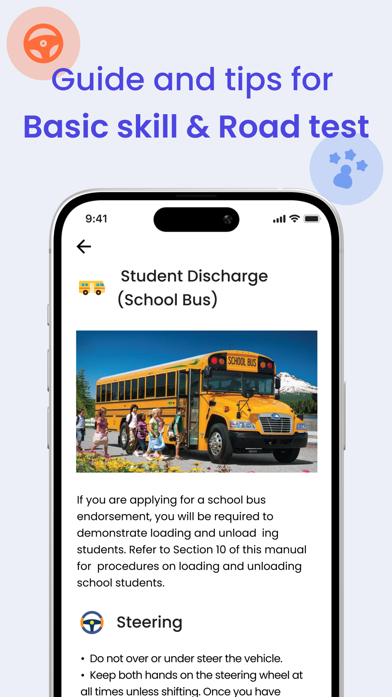
#6
Guide and tips for Basic skill & Road test
- basic skillnot in name
- road testnot in name
- What it shows
- A study guide page about school bus student discharge, with a bus photo, a steering heading and bullet points.
- Why it converts
- Shows that the app also has reading material, not only quizzes, and names the skills and road test parts. The page is mostly body text.
Icon and design system
What makes the page read as one brand at a glance.

- One symbol, a truck seen from the front, tells the subject without reading the name.
- Purple gradient with a single white shape matches the purple captions and light backgrounds in the screenshots.
- No text and little detail, so it should stay recognizable at small sizes. The grille lines are the finest detail.
- 01
Blue captions on a pale background
Most images use large indigo type on a light lavender background. Bold words mark the key idea.
- 02
Proof and fit before features
The first two images give a claim, a question count and a state map. The feature screens come after.
- 03
Phones cropped and mixed with cards
Some images show a full phone, one shows only a card and a map, one shows pill buttons. The layouts vary but the colors tie them together.
- 04
Captions that name test topics
CDL license types, endorsement, hazmat, pre-trip inspection, school bus, basic skill and road test all appear as words on the images.
- 05
Progress as a selling point
A percent ring, an exam countdown and a passing probability line show readiness, not only content.
ASO score breakdown
65 of 100 points. The full rule is under “How the ASO score works” below.
- App name20 / 25
- Uses 30 of 30 characters10/10
- Brand + keyword phrase10/10
- Keywords fill half the name or more0/5
- Screenshots27 / 35
- Caption on every screenshot5/5
- Each caption names a feature people search for6.7/10
- First screenshot shows the main use5/5
- One consistent design system5/5
- Readable at search-result size5/5
- Trust signal0/5
- Ratings18 / 25
- 4.7 average (full marks at 4.8)13.1/15
- 7,851 ratings (full marks at 100,000)4.5/10
- Freshness0 / 15
- Last update 180 days ago (full marks within 30)0/15
Where the points are
- Ship an update+15 pts
The last update was 180 days ago. A new version also refreshes the "What's New" notes people read before they download.
- Ask happy users for a rating+7 pts
4.7 stars from 7,851 ratings. Apple's in-app rating prompt can be shown up to 3 times a year; show it right after a user finishes something in the app.
- Check caption terms against your subtitle and keywords
6 caption terms aren't in the app name: cdl license, endorsement, passing probability, explanation, basic skill, road test. Captions don't count for search; the subtitle and the 100-character keyword field do.
Apply it to your app
A checklist for your next product page update.
- Say what the app is for in the first image, even if the name already hints at it.
- Back a bold claim with a source on the image, or leave it out.
- Tell visitors what you tailor to them, such as their state, and make that word easy to see.
- Name the topics your users look for in plain words on the images.
- Keep captions short. Split long phrases.
- Enlarge the key screen area so it reads at search-result size.
How the ASO score works
- 01
App name, 25 points
Up to 10 for how much of Apple's 30 characters it uses, 10 for a brand + keyword structure, 5 when keywords fill half the name or more.
- 02
Screenshots, 35 points
Captions on every image, captions that name searched features, a first screenshot that shows the main use, one design system, readability at search size, and a trust signal.
- 03
Ratings, 25 points
Up to 15 for the average (from 4.0, full marks at 4.8) and 10 for the count (from 1,000, full marks at 100,000 ratings).
- 04
Freshness, 15 points
Full marks for an update in the last 30 days, falling to zero at 180 days. 85+ is excellent, 70+ strong, 50+ fair.
Common questions
What is an ASO score?
A 100-point check of the parts of an App Store page you control: the app name, screenshots, ratings and how recently the app was updated. It's our own scoring rule, shown in full on this page, not a number from Apple. Use it to compare your page with apps that already sell well in your category.
How long can an app name be on the App Store?
30 characters. A common pattern is a short brand followed by the main thing people search for, like “CDL Prep Test 2026: Drivers ed”, which uses 30. Apple also gives you a 30-character subtitle and a 100-character keyword field for more terms.
Which screenshots show up in App Store search results?
The first one to three, when the app has no preview video. That's why the first three should cover the main reasons people download. CDL Prep Test 2026 uses them for cdl license.
How many screenshots can an iPhone app have?
Up to 10 per device size. Apple recommends focusing each screenshot after the first on one main benefit or feature. CDL Prep Test 2026 uses 6.
Where do the download and revenue numbers come from?
They're third-party estimates for the US App Store, not figures reported by the developer. Treat them as a sense of scale. Growth compares the latest month with the month before.
Do screenshot captions help an app rank in search?
Apple says search results use text matches in the app name, subtitle, keywords and primary category, plus user behavior such as downloads, ratings and reviews. Captions aren't on that list: they help people who already see the app decide to download. When a caption names something people search for, put that term in the keyword field too.
Where the numbers come from
- Apple: Creating your product page
- App name limit (30 characters), up to 10 screenshots, the first one to three shown in search results, keyword field.
- Apple: App Store search
- Search results use text relevance (name, subtitle, keywords, primary category) and user behavior (downloads, ratings, reviews).
- Apple: Ratings, reviews and responses
- The in-app rating prompt can be shown up to three times in a 365-day period.
- CDL Prep Test 2026: Drivers ed on the App Store
- Name, developer, category, icon, screenshots, rating, release and update dates (US storefront), checked Nov 4, 2026.
- Downloads and revenue
- Third-party est. for the US App Store, latest month, pulled Oct 29, 2026. Not reported by the developer.
Related
Your product page wins the install.Know which campaign sent it.
Airbridge Core shows which Meta, TikTok, Google and Apple Ads campaign brought each user and what they paid. Trusted by 1,000+ brands processing 100B+ events a month. $40+/mo after a 30-day free trial, no annual contract.