Updated ASO teardown, US App Store
Bluejacketeer App Store optimization
A Education app's App Store page, taken apart: the screenshots and why each one helps people decide to download, the icon and design system, and an ASO score out of 100.
- Est. monthly downloads
- 1K+0% vs previous month
- Est. monthly revenue
- $50K+66.7% vs previous month
- Est. revenue ÷ downloads
- $50.00
- Rating
- 3.9★389 ratings
Downloads and revenue are third-party est. for the US App Store, latest month vs the month before. Revenue includes renewals, so revenue ÷ downloads is a rough ratio, not what a new user pays. Estimates as of ; rating and dates from the App Store, .
Screenshots and why they convert
7 screenshots of up to 10, the first 6 shown here. The first 3 show in search results when there's no preview video.
#1In search results
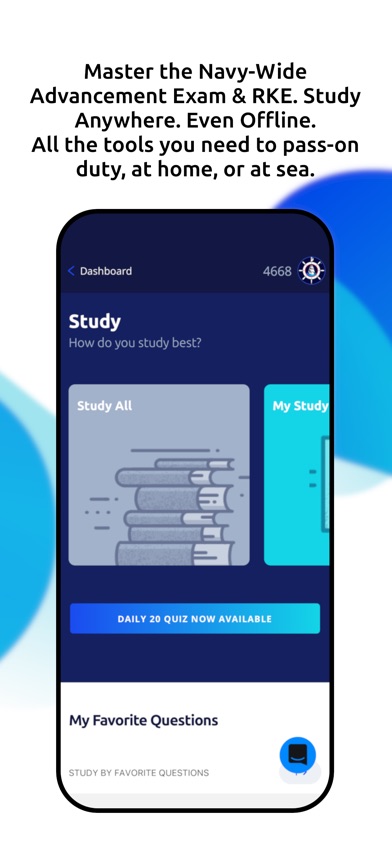
Master the Navy-Wide Advancement Exam & RKE. Study Anywhere. Even Offline. All the tools you need to pass-on duty, at home, or at sea.
- navy advancement examnot in name
- rkenot in name
- What it shows
- A Study screen with a Study All card, a My Study card, a Daily 20 Quiz button and a My Favorite Questions list.
- Why it converts
- Names the exam and the audience in the first line. The caption is long, and the screen behind it is a menu rather than a result.

#2In search results
Study Anytime. Even Without Internet. Go offline for up to 30 days and automatically sync your progress with the website.
- offlinenot in name
- What it shows
- A dark loading screen with a progress ring and the text “Synchronizing with website” and “Getting questions 18/22”.
- Why it converts
- Offline use is a real reason to pick a study app, and the caption says it plainly. The image is a loading screen, so it shows a wait instead of the benefit.

#3In search results
367,000+ Bib-Verified Questions. The largest Navy Qbank available.
- navy qbanknot in name
- What it shows
- A list of source documents, such as MCM (2024) and JAGINST 5800.7G, each with a question count and red, blue and green dots.
- Why it converts
- A big number is easy to read and gives a concrete reason to trust the depth. “Largest” is the app's own claim.

#4
More Than 3× the Questions Anywhere Else. Unmatched coverage across all ratings and bibliography sources.
- What it shows
- A chapter list for MCM (2024) with a “Download all playlists” link and icon buttons beside each part.
- Why it converts
- Repeats the question-count message from the previous image as a comparison. “3×” and “Unmatched” are the app's own claims, and the screen does not back them up.

#5
Train Smarter. Master Every Subject. Each question is mapped to the official Navy Advancement Center bibliography - so you prepare for exactly what matters.
- bibliographynot in name
- What it shows
- A multiple-choice question about an Antiterrorism Plan with four answers, plus Learning 9, Review 128 and New 10490 counters.
- Why it converts
- This is the first image that shows the core action, answering a practice question. Tying questions to the official bibliography is a specific, relevant source that a test taker cares about.
#6
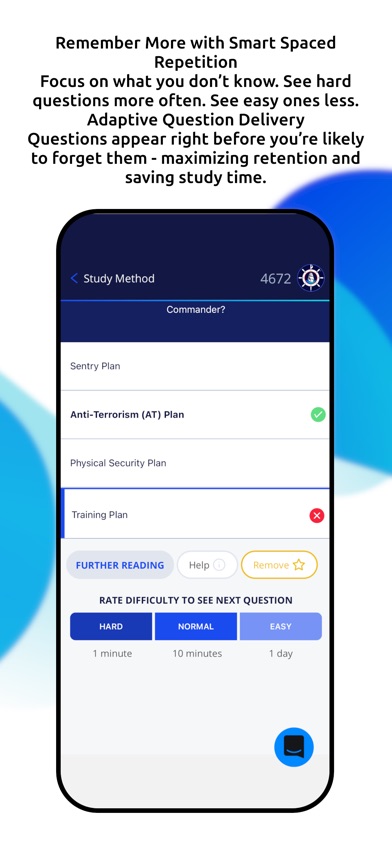
Remember More with Smart Spaced Repetition Focus on what you don't know. See hard questions more often. See easy ones less. Adaptive Question Delivery Questions appear right before you're likely to forget them - maximizing retention and saving study time.
- spaced repetitionnot in name
- What it shows
- An answered question with a green check on the correct answer, a red cross on a wrong one, and Hard, Normal and Easy buttons showing 1 minute, 10 minutes and 1 day.
- Why it converts
- Names a study method people look for and shows how it works with the difficulty buttons.
Icon and design system
What makes the page read as one brand at a glance.

- One symbol, a ship inside a ship's wheel, says “Navy” and “sea” before the name is read.
- The ship, wheel, waves and red ring have fine detail that may blur at the smallest sizes.
- A small “TM” mark sits near the top right, which is extra text on the icon.
- 01
Name the exam and the audience
Image 1 names the Navy-Wide Advancement Exam and RKE in its first line. A visitor who takes that exam knows the app is for them.
- 02
Big numbers and source names
The captions use “367,000+” questions and the “official Navy Advancement Center bibliography”. These are concrete, checkable-sounding facts for a test taker.
- 03
Most images share one template
Most images have black centered text on top, one phone below, and blue shapes on a white background. The gallery reads as one set.
- 04
Long paragraph captions
Most captions run two to four lines.
- 05
Features named in users' words
Captions use words like offline, Qbank and spaced repetition. These are terms a test taker may look for.
ASO score breakdown
37 of 100 points. The full rule is under “How the ASO score works” below.
- App name4 / 25
- Uses 13 of 30 characters4.3/10
- Brand + keyword phrase0/10
- Keywords fill half the name or more0/5
- Screenshots18 / 35
- Caption on every screenshot5/5
- Each caption names a feature people search for8.3/10
- First screenshot shows the main use0/5
- One consistent design system5/5
- Readable at search-result size0/5
- Trust signal0/5
- Ratings0 / 25
- 3.9 average (full marks at 4.8)0/15
- 389 ratings (full marks at 100,000)0/10
- Freshness15 / 15
- Last update 13 days ago (full marks within 30)15/15
Where the points are
- Ask happy users for a rating+25 pts
3.9 stars from 389 ratings. Apple's in-app rating prompt can be shown up to 3 times a year; show it right after a user finishes something in the app.
- Use the rest of the app name+21 pts
17 characters are free. Add the next most important search term.
- Check caption terms against your subtitle and keywords
6 caption terms aren't in the app name: navy advancement exam, rke, offline, navy qbank, bibliography, spaced repetition. Captions don't count for search; the subtitle and the 100-character keyword field do.
Apply it to your app
A checklist for your next product page update.
- Name your audience and the exact exam or task in the first line of screenshot 1.
- Show the main action, such as answering a question, in the first image instead of a menu or loading screen.
- Cut each caption to one short line and make its key phrase stand out.
- Use a specific number or named source, and make sure the screen behind it supports the claim.
- Pick screens that stay readable when shrunk. Avoid long lists of small text.
- Keep one template across images, and add one bold accent so the eye has a place to start.
How the ASO score works
- 01
App name, 25 points
Up to 10 for how much of Apple's 30 characters it uses, 10 for a brand + keyword structure, 5 when keywords fill half the name or more.
- 02
Screenshots, 35 points
Captions on every image, captions that name searched features, a first screenshot that shows the main use, one design system, readability at search size, and a trust signal.
- 03
Ratings, 25 points
Up to 15 for the average (from 4.0, full marks at 4.8) and 10 for the count (from 1,000, full marks at 100,000 ratings).
- 04
Freshness, 15 points
Full marks for an update in the last 30 days, falling to zero at 180 days. 85+ is excellent, 70+ strong, 50+ fair.
Common questions
What is an ASO score?
A 100-point check of the parts of an App Store page you control: the app name, screenshots, ratings and how recently the app was updated. It's our own scoring rule, shown in full on this page, not a number from Apple. Use it to compare your page with apps that already sell well in your category.
How long can an app name be on the App Store?
30 characters. Apple also gives you a 30-character subtitle and a 100-character keyword field for more terms.
Which screenshots show up in App Store search results?
The first one to three, when the app has no preview video. That's why the first three should cover the main reasons people download. Bluejacketeer uses them for navy advancement exam, offline and navy qbank.
How many screenshots can an iPhone app have?
Up to 10 per device size. Apple recommends focusing each screenshot after the first on one main benefit or feature. Bluejacketeer uses 7.
Where do the download and revenue numbers come from?
They're third-party estimates for the US App Store, not figures reported by the developer. Treat them as a sense of scale. Growth compares the latest month with the month before.
Do screenshot captions help an app rank in search?
Apple says search results use text matches in the app name, subtitle, keywords and primary category, plus user behavior such as downloads, ratings and reviews. Captions aren't on that list: they help people who already see the app decide to download. When a caption names something people search for, put that term in the keyword field too.
Where the numbers come from
- Apple: Creating your product page
- App name limit (30 characters), up to 10 screenshots, the first one to three shown in search results, keyword field.
- Apple: App Store search
- Search results use text relevance (name, subtitle, keywords, primary category) and user behavior (downloads, ratings, reviews).
- Apple: Ratings, reviews and responses
- The in-app rating prompt can be shown up to three times in a 365-day period.
- Bluejacketeer on the App Store
- Name, developer, category, icon, screenshots, rating, release and update dates (US storefront), checked Nov 4, 2026.
- Downloads and revenue
- Third-party est. for the US App Store, latest month, pulled Oct 29, 2026. Not reported by the developer.
Related
Your product page wins the install.Know which campaign sent it.
Airbridge Core shows which Meta, TikTok, Google and Apple Ads campaign brought each user and what they paid. Trusted by 1,000+ brands processing 100B+ events a month. $40+/mo after a 30-day free trial, no annual contract.