Universal Links vs URI Schemes: When to Use Each for iOS Deep Linking

If you are building deep linking for the first time, the first decision is also the most confusing: should a tapped link use a Universal Link (https://myapp.com/product/123) or a custom URI scheme (myapp://product/123)? Both can open your app and route the user to a specific screen, so they look like they do the same job.
They do not. The two mechanisms work differently under the hood, fail differently when the app is missing, and carry very different security properties. Pick the wrong one for a given flow and you get broken links, a confusing "open in app?" prompt, or, in the worst case, another app intercepting data meant for yours. This guide breaks down how each works, what Apple recommends today, and exactly when to reach for each one.
Key Takeaways
-
Universal Links are Apple's recommended default. They use ordinary HTTPS URLs tied to a domain you own, so they open your app when it is installed and your website when it is not, with no broken-link dialog.
-
URI schemes cannot prove ownership. Any app can register
myapp://, which makes custom schemes hijackable and unsafe for sensitive data like login tokens. -
Universal Links rely on an AASA file. A small JSON file hosted on your domain (
apple-app-site-association) tells iOS which app is authorized to open which paths. -
URI schemes are not dead. They remain the right tool for OAuth callbacks, app-to-app communication, and hybrid webview navigation where no public web URL exists.
-
Most apps use both. Universal Links for user-facing links from email, ads, and the web; URI schemes for internal and inter-app plumbing.
-
The hard part is operating, not choosing. AASA hosting, edge caching, fallbacks, and deferred routing across the install gap are where first implementations break.
What Is a URI Scheme?
A URI scheme (also called a custom URL scheme) is the original way iOS apps registered themselves to be opened by a link. You declare a scheme such as myapp in your app's Info.plist, and from then on the system knows that a link like myapp://product/123 should launch your app and hand it that URL to parse.
How a URI Scheme Works
The flow is simple, which is part of its appeal:
-
Your app registers the scheme
myappinInfo.plistunderCFBundleURLTypes. -
iOS records that
myapp://belongs to your app. -
When any link, button, or other app opens
myapp://product/123, iOS launches your app. -
Your app reads the URL and routes the user to the right screen.
There is no server involved and no domain to configure. That makes custom schemes fast to set up and useful for private communication between apps you control, or as a lightweight callback during a login flow when you do not have a backend in place.
The Catch: No Ownership Verification
Here is the problem that shaped everything Apple did next. iOS does not verify that you own a URI scheme. Nothing stops a second app from also registering myapp://. When two apps claim the same scheme, the system resolves the conflict by install order rather than by verifying identity, so the behavior becomes unpredictable.
That ambiguity is a real security surface, not a theoretical one. A malicious app can register a scheme already used by a legitimate app and intercept whatever data gets sent to it, which can include login authorization codes or access tokens. Security researchers, including FireEye in 2015, documented this as URL scheme hijacking, and it is the main reason custom schemes are unsafe for anything sensitive.
Two more practical drawbacks:
-
No graceful fallback. If the app is not installed, tapping
myapp://product/123does nothing useful. The user sees an error or a dead link, because the scheme is meaningless to a browser. -
Not a real web link. A custom scheme URL cannot be opened as a normal web page, shared cleanly, or indexed, because it only means something on a device where the app is installed.
What Are Universal Links?
Universal Links, introduced by Apple in iOS 9 at WWDC 2015, solve the ownership problem by building deep linking on top of standard HTTPS URLs. Instead of inventing a private scheme, you use a real web address you already control, such as https://myapp.com/product/123, and prove to Apple that your app is allowed to handle links for that domain.
How a Universal Link Works
The verification happens through a file called the Apple App Site Association, or AASA. Per Apple's setup documentation, the steps are:
-
Host a JSON file named
apple-app-site-associationathttps://yourdomain.com/.well-known/apple-app-site-association, served over HTTPS with a valid JSON body and no file extension (Apple recommends theapplication/jsonMIME type). -
List your app's identifier (Team ID plus bundle ID) and the URL paths your app should handle inside that file.
-
Add the Associated Domains capability in Xcode and list your domain with the
applinks:prefix, following Apple's associated domains guide. -
When the app is installed, iOS fetches and caches the AASA file, confirming that your app is authorized for that domain.
-
When a user taps
https://myapp.com/product/123, iOS checks the cached file. If the path matches, it opens your app. If not, or if the app is not installed, the same link opens in Safari and the user lands on your website.
Why Apple Built Them
Because the link is an HTTPS URL bound to a domain you control, another app cannot claim it. Apple verifies the relationship between domain and app through the AASA file, which closes the hijacking hole that custom schemes leave open. Universal Links also degrade gracefully: the same URL works as a normal web link, so a user without the app still reaches your content instead of hitting a dead end. That single property, one link that works whether or not the app is installed, is why Universal Links are Apple's recommended choice for any link a user might tap from email, an ad, a message, or a web page.
Want to see how Universal links vs uri schemes works with your data?
Get hands-on with Airbridge and see real results.
Try It Free →Universal Links vs URI Schemes: Side by Side
| Property | URI Scheme (myapp://) | Universal Link (https://...) |
|---|---|---|
| Link format | Custom scheme | Standard HTTPS URL |
| Ownership verification | None: any app can register it | Verified via AASA file on your domain |
| Hijackable by other apps | Yes | No |
| Fallback when app not installed | Fails or dead link | Opens your website in Safari |
| Server setup required | No | Yes (host AASA file) |
| Works as a normal web link | No | Yes |
| Introduced | Early iOS | iOS 9 (2015) |
| Best for | Internal flows, OAuth callbacks, app-to-app | User-facing links from web, ads, email |
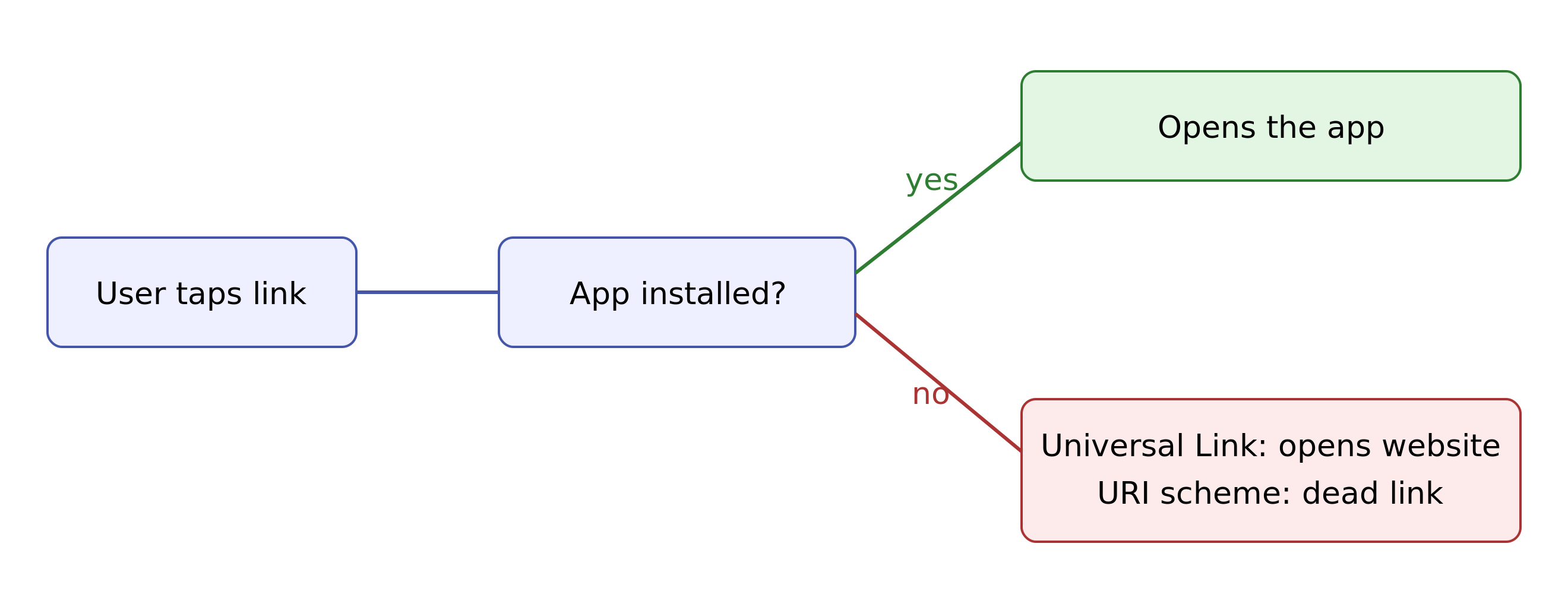
The pattern is clear: Universal Links win on security and user experience, while URI schemes win on simplicity for cases where there is no web URL and no untrusted party involved. The diagram below shows why the install-state fallback is the deciding factor.
When to Use Each
You do not have to pick one mechanism for the whole app. You pick per flow. Here is the decision framework.
Use Universal Links When the Link Is User-Facing
If a human will tap the link from outside your app, default to a Universal Link. That covers the large majority of deep linking:
-
Links in marketing emails, push notifications, and SMS
-
Links in paid ads and social posts
-
"Open in app" links from your own website
-
Shared links between users, such as referrals, invites, and shared content
In all of these cases you need the link to work whether or not the app is installed, and you need it safe from interception. Universal Links deliver both.
Use a URI Scheme When There Is No Web URL
Custom schemes are still the right tool for specific, lower-risk plumbing where a public HTTPS URL would be awkward or unnecessary:
-
OAuth and OIDC callbacks. Native apps commonly register a custom scheme as the redirect target so the authorization server can hand control back to the app after login. This is a long-standing, accepted pattern documented in OAuth 2.0 for Native Apps (RFC 8252), which also requires PKCE to close the same interception risk schemes carry.
-
App-to-app communication. When your own suite of apps needs to pass data or context to each other, a custom scheme (often following the
x-callback-urlconvention) is a lightweight way to do it without a backend. -
Hybrid and webview navigation. Moving between native screens and embedded webviews inside your own app, where the routing never leaves the device.
-
Legacy support. Older integrations and OS versions that were built around a scheme and have not been migrated yet.
The common thread: the link stays inside a trusted boundary (your own apps, or an auth flow you started), and there is no expectation that a browser should ever open it.
Why Most Apps Need Both
In practice, a mature app ships both. Universal Links handle everything a user taps from the outside world. A custom scheme quietly handles OAuth redirects and internal routing. The mistake first-time implementers make is treating it as an either-or decision. It is not. It is a question of matching each mechanism to the job it does best.
Common Mistakes That Break Deep Linking
Choosing the right mechanism is only half the work. Most broken first implementations fail in operation, not in design. Watch for these:
-
AASA edge caching surprises. From iOS 14 onward, Apple routes AASA requests through its own CDN rather than fetching directly from each device, so your file can be cached at Apple's edge and lag your latest changes by hours. Do not expect instant updates after you edit the file. During development, append
?mode=developerto yourapplinks:entry to bypass the CDN cache and fetch the file directly. -
Wrong file delivery. The AASA file must be a valid JSON body served over HTTPS, with no extension and no redirects (Apple recommends the
application/jsonMIME type, and keeping the file under 128 KB). A 200 response with HTML, or any redirect, silently breaks verification. -
No fallback page. A Universal Link that lands a no-app user on a 404 wastes the whole point. The web URL should serve a real page, ideally one that nudges an install.
-
Forgetting deferred deep linking. A standard Universal Link cannot, on its own, route a brand-new user to the right screen after they install from the App Store. Routing across the install gap is a separate problem that needs a deep linking layer to solve.
-
Testing only the happy path. Always test app-installed and app-not-installed, plus cold start versus already-running, on a real device. A good link testing and debugging routine catches most of these before launch.
Choosing Your Approach
If you are wiring up your first deep links, the rule of thumb is short: Universal Links for anything a user taps, URI schemes for internal and inter-app plumbing. That single sentence is the right call for the vast majority of your links, and it lines up with how Apple wants modern apps built.
The deeper challenge shows up once links start driving real growth. As soon as you are sending links from ads, emails, and referral flows, you have to host and maintain AASA files, handle the no-app fallback, route new users correctly after install, and know which of those links and channels actually drive sign-ups and subscriptions. Doing all of that by hand is where small teams lose weeks.
This is the point where a deep linking platform earns its place. Airbridge provides app links that handle the Universal Link and URI scheme setup, the website fallback, and deferred routing across the install gap, while also showing you which links and channels turn into paying users. Deep linking is included in both the Core Plan and the Growth Plan, so the linking layer comes built in alongside measurement rather than as a separate tool to wire up.
If you want app links that route users correctly and show you which channels drive subscriptions, start free with Airbridge Core Plan: 15K installs included.



Ready to transform your mobile growth?
Learn how Airbridge helps leading brands measure and optimize every touchpoint.