How to Set Up Universal Links on iOS (2026 Guide)

You added the apple-app-site-association file, toggled on the entitlement, and built to your phone. You tapped the link. Safari opened anyway, and your app sat there untouched while the web page loaded behind it.
This is the most common way iOS app linking goes wrong, and the cause is almost never your app code.
Quick answer: Universal Links are HTTPS URLs that open your app directly to specific content when it is installed, and fall back to the web when it is not. They break when one of two pieces is misconfigured: the JSON file on your domain, or the Associated Domains entitlement in your project. Get both exactly right and links route to your app in milliseconds. Get one character wrong and iOS silently ignores the whole thing.
Key Takeaways
-
Two pieces must agree, byte for byte. The apple-app-site-association file on your server and the
applinks:entitlement in Xcode have to reference the same domain and the same App ID, or iOS treats the link as a normal web URL. -
The file format is strict. No
.jsonextension,Content-Type: application/json, served over HTTPS with no redirects, and under 128 KB uncompressed, per Apple's associated domains documentation. -
The App ID format trips up most teams. The
appIDvalue is your Team ID followed by your bundle identifier, with nohttps://and no trailing slash anywhere in the file. -
iOS fetches the file through an Apple CDN, not your server. Since iOS 14, validation runs through Apple's content delivery network, so a freshly edited file can take time to propagate, per Apple's Technical Note 3155 (TN3155) on debugging.
-
Test on a real device with a real tap. Pasting the URL into Safari's address bar will never open the app. The link has to be tapped from another app like Notes or Messages.
What Are Universal Links, and Why Do They Fail?
A Universal Link is a standard HTTPS web address that iOS routes to your installed app instead of Safari. The same URL still works as a web page for anyone without the app, so you ship one link that serves both audiences.
The guidance below reflects the file format introduced in iOS 13 and the validation flow that has been stable since iOS 14. As of iOS 26, the current release in 2026 after Apple moved to year-based version names, no breaking changes affect this setup.
When a link does not open your app, it is tempting to start debugging your AppDelegate. That is the wrong place to look. iOS decides whether to hand a URL to your app long before your code runs, during a verification handshake between two declarations:
-
Your entitlement declares which domains your app claims.
-
The apple-app-site-association file on each of those domains declares which apps may open its links.
Both halves have to match. If the App ID in the file does not match the App ID that Apple computes from your signed build, the claim is rejected and nothing happens.
The Two Mistakes Behind Most Failures
-
The protocol is in the domain string. The entitlement value is
applinks:www.example.com, neverapplinks:https://www.example.com. Adding the scheme breaks the match, and iOS gives you no error message when it does. -
The App ID is incomplete. The
appIDis your Team ID and your bundle identifier joined by a dot, for exampleABCDE12345.com.example.myapp. Teams often paste the bundle identifier alone, or copy a Team ID from the wrong membership when they belong to more than one Apple Developer account.
One subtle variant catches teams with more than one provisioning profile. The App ID prefix is usually your Team ID, but apps using a custom App ID prefix can have a different value. If a link works on one build and not another, check for an identifier mismatch between your development and distribution provisioning first.
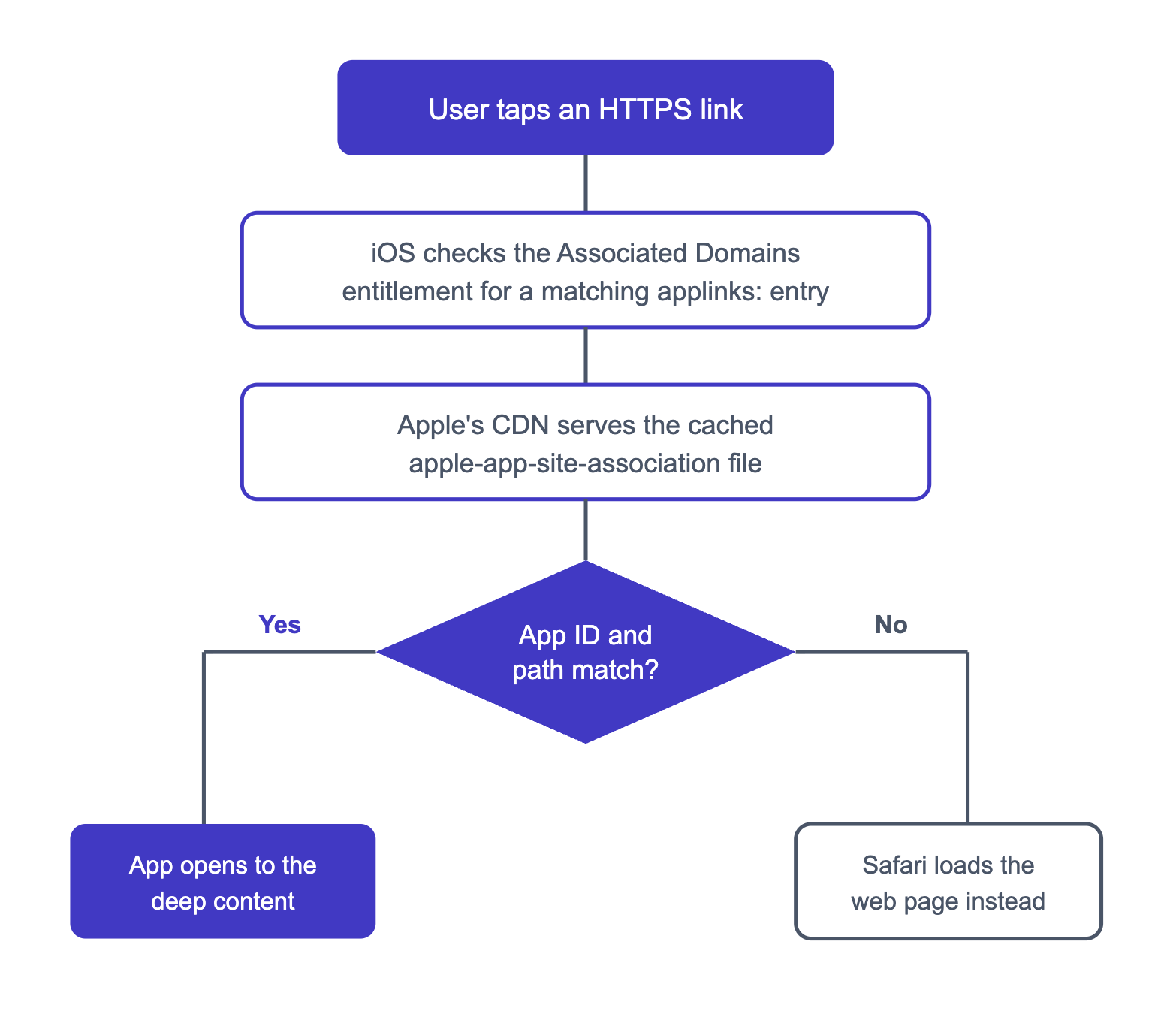
Here is how iOS resolves a tapped link:
Want to see how Universal links iOS setup works with your data?
Get hands-on with Airbridge and see real results.
Try It Free →How to Set Up Universal Links on iOS in 4 Steps
If you have searched for how to set up universal links on iOS and found conflicting answers, the reason is that the file format changed across iOS versions. The four steps below cover the current approach.
Step 1: Create the apple-app-site-association File
Create a file named exactly apple-app-site-association, with no .json extension even though the contents are JSON. The modern format introduced in iOS 13 uses a components array, which matches on paths, query items, and URL fragments:
{
  "applinks": {
    "details": [
      {
        "appIDs": ["ABCDE12345.com.example.myapp"],
        "components": [
          {
            "/": "/products/*",
            "comment": "Opens any product detail page"
          }
        ]
      }
    ]
  }
}
Two rules govern this file:
-
The
appIDsvalue is your Team ID (the 10-character prefix from your Apple Developer account), a dot, then your bundle identifier. -
componentsoverridespaths. On iOS 13 and later, ifcomponentsis present the olderpathskey is ignored, so do not mix the two formats expecting both to apply. -
The
commentfield is documentation only. Apple's parser preserves it but ignores it for routing, so use it to explain a rule to the next engineer, not to change behavior.
If you still support iOS 12 or earlier, keep a paths key alongside components as a fallback. Modern versions read components, older ones read paths, and including both is safe as long as the entries stay consistent. By 2026 iOS 12 is at roughly zero percent share, so most teams can drop it.
The components array also gives you finer control, as described in Apple's guide to configuring an associated domain. Each entry can match the path (/), the query (?), and the fragment (#), and an entry flagged "exclude": true routes matching URLs to the browser instead of the app. Order matters: iOS uses the first matching entry, so list exclusions and specific rules before broad ones.
For example, to open /products/123 in the app but keep /products/preview on the web, place an excluded "/products/preview" rule above your broad "/products/*" rule. The preview URL is matched first and falls through to Safari, while every other product path opens the app.
Step 2: Host the File Over HTTPS
Upload the file so it is reachable over HTTPS at one of these paths:
-
https://yourdomain.com/.well-known/apple-app-site-association(current recommendation) -
https://yourdomain.com/apple-app-site-association
Three server requirements are non-negotiable:
-
Content type: the file must be served with the header
Content-Type: application/json. -
No redirects: it must respond over HTTPS with a valid certificate and no redirects.
-
Size: it must be under 128 KB uncompressed.
A redirect or a wrong content type is enough for iOS to discard the file without telling you.
Step 3: Add the Associated Domains Entitlement
In Xcode, select your target, open Signing & Capabilities, and add the Associated Domains capability. Add one entry per domain in the form applinks:yourdomain.com. The scheme is the literal word applinks:, and the value after it is a bare domain with no https://.
Use this table to sanity-check the four values teams get wrong most often:
| Configuration item | Correct value | Common wrong value |
|---|---|---|
| Entitlement entry | applinks:example.com | applinks:https://example.com |
| File name | apple-app-site-association | apple-app-site-association.json |
| App identifier | TEAMID.com.example.app | com.example.app |
| Content type | application/json | text/html |
Step 4: Handle the Incoming Link in Your App Code
Once verification passes, iOS launches your app and calls the continue-user-activity handler. In UIKit this is application(_:continue:restorationHandler:); in SwiftUI it is the .onContinueUserActivity modifier, which is the default path for most apps built in 2026. Read the incoming webpageURL, parse the path, and route the user to the matching screen. This is the only step that lives in your code, and it rarely breaks. Two details save debugging time:
-
Route from one shared function. The handler can fire while your app is already in the background, not just on a cold launch, so do not put routing only in your launch path.
-
Always handle unknown paths. Send the user to a sensible default like your home tab when a path does not match a known screen, rather than showing a blank view.
How Do You Fix a Universal Link That Won't Open?
When the link still opens Safari, work through the chain in order rather than changing several things at once.
-
Confirm the file is reachable. Open the URL in a desktop browser and verify it returns raw JSON, not an HTML error page or a login wall. A frequent cause is a firewall or security rule that blocks reads from arbitrary IP addresses.
-
Account for the Apple CDN. Since iOS 14, the device does not request the file from your server directly. It asks an Apple-managed CDN (documented in TN3155 above), so the file must be publicly fetchable for that CDN to cache it. An edit you just published may not take effect immediately.
-
Bypass the cache during development. Enable the Associated Domains Development toggle in the device's Developer settings to query your domain directly instead of through the CDN.
-
Watch for HTTP/2 surprises. Some servers that answer over HTTP/1.1 fail to return the file over HTTP/2, which Apple's CDN negotiates. If a browser can fetch the file but the device cannot, confirm the file serves correctly over HTTP/2.
-
Test the right way. A tap from Safari's address bar will never hand off to the app, by design. Apple's documented method, in Technical Q&A 1916 (QA1916), is to email yourself the link, then long press it and confirm an Open in [Your App] option appears. If it does, the association is working.
Consider a concrete case. A user gets a password-reset email, taps the link, and lands on the mobile web page instead of the in-app reset screen. In the most common version of this story, the file resolves correctly in a browser, and the real fault is a redirect on the email-tracking domain that strips the request before Apple's CDN sees a clean response.
If you want a primer on how URI schemes, App Links, and Universal Links differ, this breakdown of deep linking methods is a useful reference, and the implementation walkthrough for marketers and developers covers the moving parts end to end.
How to Connect Your App Links to Marketing Campaigns
Getting the file and entitlement right solves the engineering problem. It leaves a separate one open. Once your links open the app, you still cannot see which email, ad, or post sent each user there, and you cannot route users who do not have the app yet.
This is where a deep-linking platform earns its place. Airbridge hosts a verified apple-app-site-association file on its own link domains, so you point your entitlement at applinks:YOUR_APP_NAME.airbridge.io and applinks:YOUR_APP_NAME.abr.ge instead of maintaining the file yourself. It then picks the right method, whether URI scheme, App Link, or Universal Link, based on the device and install state, as described in the Airbridge Help Center.
The payoff shows up in two places:
-
Deferred routing for new users. Attach a destination to a campaign link, and a user without the app is sent to the App Store, then dropped onto the intended screen the first time they open it.
-
Campaign-level visibility. Each tap is tied to the channel and campaign that produced it.
Your Checklist for a Working Universal Link
A Universal Link breaks for boring reasons: a stray https://, a missing content type, a file behind a redirect. Walk the chain from the file to the entitlement to the device test, and the failure points reveal themselves quickly.
Once the plumbing works, the question shifts from "does the link open" to "which campaign sent this user." That is the more valuable problem to solve.


Ready to transform your mobile growth?
Learn how Airbridge helps leading brands measure and optimize every touchpoint.