App Clips vs Full App Install: When to Use Each One

77.9% of smartphone users say they abandoned at least one transaction because they were required to install an unfamiliar app (Heady.io Market Study, 2021 — the most-cited benchmark for install friction; no comparable updated study has been published since). Among users aged 18 to 34, that number climbs to over 80%.
Apple's App Clips were designed to solve exactly this problem. They are a different tool for a different job. The real question is not which is better overall. The question is which approach fits your use case, your users, and your growth stage.
Key Takeaways
-
App Clips are lightweight iOS-only experiences (up to 100 MB on iOS 17+ for digital-only invocations) triggered by QR codes, NFC tags, or links. Users complete one task without a full install.
-
The full app install funnel wins on subscription conversion, retention, and lifecycle marketing. If your model depends on recurring revenue, the full app is the primary growth engine.
-
App Clips are best for high-intent, one-time physical transactions such as restaurant ordering, parking payment, or event check-in, where users need to act now but have no prior brand relationship.
-
Attribution breaks down inside App Clips. IDFA is unavailable and SKAdNetwork signals differ from standard install flows. Plan your measurement approach before launching at scale.
-
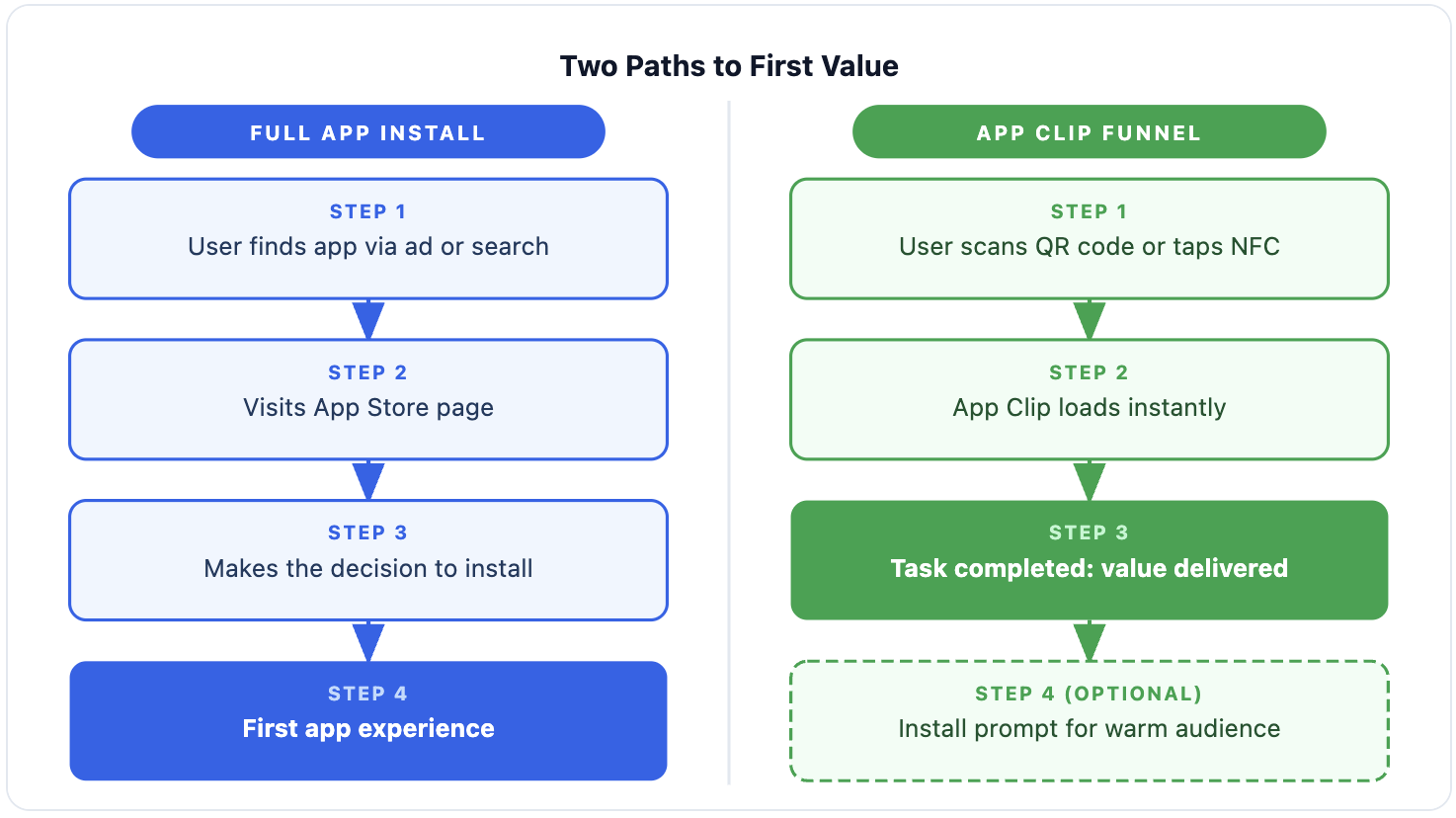
A hybrid strategy is the strongest play for most apps. Use an App Clip to remove the install barrier at first touch, then earn the full install from a position of demonstrated value.
What Is an App Clip? A Quick Technical Overview
1. How App Clips are triggered and delivered
An App Clip is a lightweight version of your iOS app built for a single, focused task. It is not a standalone app. It lives as a separate build target inside your existing Xcode project, sharing code and assets with the full app.
Size limits by iOS version and trigger type:
| Trigger Type | Max Size | iOS Requirement |
|---|---|---|
| Physical: QR code, NFC, App Clip code | 15 MB | iOS 16 or later |
| Digital: Safari, iMessage, Spotlight (digital-only, requires reliable connection) | 100 MB | iOS 17 or later |
Source: Apple Developer Documentation
Important: App Clips require iOS 14 or later and have no Android equivalent.
The five ways an App Clip can be triggered:
-
QR codes or App Clip codes at a physical location
-
NFC tags on products or surfaces
-
Safari Smart App Banners on a website
-
Links shared via iMessage
-
Place cards in Apple Maps
2. What App Clips support (and what they don't)
Not all app functionality is available inside a clip. Understanding the boundaries upfront saves engineering time.
App Clips can:
-
Process payments via Apple Pay
-
Sign users in with Sign in with Apple
-
Access device location
-
Write data to a shared App Clip group container, which the full app can read after install
App Clips cannot:
-
Send push notifications without an explicit opt-in during the active clip session
-
Run background processes
-
Access most Keychain data from the full app prior to install
-
Persist on device: iOS automatically deletes App Clips after 30 days of inactivity
3. How users move from the clip into the full app
When a user finishes a task inside an App Clip, iOS shows a native prompt to install the full app. Data written to the shared App Clip group container carries forward, so the user resumes exactly where they left off without starting from scratch.
Users who complete a clip task are a warmer audience for that install prompt than cold App Store visitors, because they have already experienced the product before being asked to commit to it.
App Clips vs Full App Install: Full Comparison
| Factor | App Clip | Full App Install |
|---|---|---|
| Best for | One-time physical transaction, feature preview | Subscription, lifecycle, habit-forming engagement |
| Platform | iOS 14 or later only | iOS and Android |
| Conversion strength | High for immediate task completion | High when onboarding and paywall are optimized |
| Retention | None: auto-deleted after 30 days of inactivity | Full lifecycle marketing, push, re-engagement |
| Engineering scope | Xcode target, 15 to 100 MB ceiling | Standard iOS development |
| Attribution | IDFA unavailable; SKAdNetwork inactive inside clip | Standard iOS attribution flow |
| Lifecycle marketing | Not possible after clip session ends | Full push, email, and in-app messaging available |
When App Clips Win: 2 Core Use Cases
1. One-time, high-intent physical transactions
App Clips are purpose-built for moments where a user needs to complete one action immediately, with no prior relationship with your app.
Strong use cases:
-
Paying for parking by scanning a QR code on the meter
-
Ordering at a restaurant table without needing a loyalty account
-
Checking in at a venue, hotel, or event
-
Renting a shared vehicle, bike, or device
At these touchpoints, requiring a full install is a conversion blocker. The user needs to act now, not browse the App Store. An App Clip removes that friction entirely.
A customer who ordered through your App Clip is already a motivated prospect for the loyalty program and repeat engagement that the full app enables.
2. Capturing customers who skip the install step
77.9% of users abandoned a transaction because an install was required (Heady.io Market Study, 2021). Among 18 to 34 year olds, that climbs to over 80%.
Physical retail, hospitality, and packaged goods brands have historically been unable to close this gap:
-
Mobile web offers no native push notifications, no home-screen presence, and no lifecycle marketing channel, even when Apple Pay is available at checkout
-
App Store redirect loses the majority of users at the friction point
-
App Clips deliver a native, Apple Pay-ready experience without requiring an install, with a clear path to a full-app relationship after the transaction
Want to see how App clips vs full app install works with your data?
Get hands-on with Airbridge and see real results.
Try It Free →When Full App Install Outperforms App Clips: 3 Scenarios
1. Subscription apps that need recurring sessions
Subscription revenue depends on retention. Retention depends on the type of engagement only a fully installed app can sustain.
What a full install enables that an App Clip cannot:
-
Push notifications for re-engagement and habit reinforcement
-
Home screen presence as a daily habit trigger
-
Widgets and Live Activities for passive visibility
-
Session-level personalization that builds over time
Among more than 75,000 subscription apps analyzed, the median 12-month retention rate for annual subscribers is 44.1% (RevenueCat State of Subscription Apps 2025). That retention is built through repeated, habitual use across dozens of sessions. An App Clip session cannot build that habit.
If your business model requires users to return 20, 30, or 50 times per year, the full install is the only vehicle for that relationship.
2. Apps where paywall conversion happens in the first session
82% of trial starts happen on Day 0 (RevenueCat State of Subscription Apps 2025). The very first session determines most subscription conversion outcomes.
Top-performing subscription apps drive that conversion through:
-
Multi-screen, goal-driven personalization before the paywall
-
Micro-commitment steps that build emotional investment early
-
Paywall timing, copy, and social proof optimization
-
Hard or soft paywall placement at peak intent moments
A 15 MB App Clip cannot support that depth of experience. The first-session onboarding that produces a trial start requires the full app environment.
3. Apps that rely on lifecycle marketing to retain and win back subscribers
Push notifications, in-app messages, triggered emails, and lifecycle offers all require the app to be installed. An App Clip session that does not lead to a full install leaves no durable marketing channel open.
A concrete data point: among monthly subscribers who cancel, 13.7% reactivate within their first year (RevenueCat State of Subscription Apps 2025). That reactivation only happens if the app is installed and a re-engagement mechanism exists.
Should You Build an App Clip? 5 Questions to Answer First
Deciding when to use app clips instead of focusing on full app installs comes down to five checks. Work through each one before committing engineering time.
Question 1: Is the entry point physical?
App Clips perform best when triggered by a real-world object: a QR code on a table, an NFC tag on packaging, a place card in Apple Maps.
-
If your acquisition runs primarily through paid social, organic search, or email, the App Store is the standard endpoint
-
Adding an App Clip to a digital-first funnel adds build complexity without a clear conversion benefit
Question 2: Is your core value deliverable in one session and within size limits?
App Clips are designed for single-task flows: pay, scan, check in. If delivering real value requires any of the following, a clip cannot do that job:
-
Account history or data from prior sessions
-
Multi-step personalization before value is clear
-
Heavy assets, frameworks, or media beyond the 15 MB physical limit
Question 3: Are your users primarily on iOS?
App Clips are iOS-only. Before allocating engineering resources to an iOS-exclusive feature, verify that iOS represents the majority of your audience and revenue. Check your own analytics, not industry averages.
Question 4: Can you absorb the attribution gap?
Inside an App Clip, IDFA is unavailable and SKAdNetwork calls return empty values or do not fire (Apple Developer Documentation). The downstream full-app install can be attributed through deep linking">deferred deep linking, but the clip session itself resists standard precision measurement.
If your team makes budget decisions based on channel-level LTV data, build the measurement plan before launching App Clips at scale, not after.
Question 5: Do you have capacity to maintain two surfaces?
An App Clip is a separate build target with its own requirements:
-
Must stay within size limits (15 MB for physical invocations, 100 MB for digital)
-
Requires its own App Store review and approval
-
Needs updates whenever relevant main app functionality changes
For teams of 1 to 5 engineers, that is a real and ongoing maintenance cost. The tradeoff is worth it at high transaction volume. It is rarely worth it for an early-stage app still finding product-market fit.
App Clip or Full App: Make the Right Call
App Clips solve a specific problem: reducing the friction cost of the install barrier at a moment of high physical intent. They are not a shortcut to a better subscription product, and they are not a replacement for the onboarding funnel that drives trial starts and conversions.
The decision simplifies to two scenarios:
-
Build an App Clip if: you have physical touchpoints, an iOS-first audience, and a single-task flow that benefits from zero-install access
-
Prioritize the full install funnel if: your app depends on subscription revenue, session-by-session personalization, or lifecycle marketing to retain users
The hybrid approach works best for businesses that operate at both ends. Use the App Clip to capture the first transaction and earn trust. Use the full app to build the recurring revenue relationship that follows.
Ready to transform your mobile growth?
Learn how Airbridge helps leading brands measure and optimize every touchpoint.