Why you need postbacks and how to set them up
In the competitive realm of mobile advertising, advertisers and ad channels share a common objective: to reach the right users at the right moment with their ads. However, despite the shared agenda, advertisers and ad channels often find themselves out of sync - because they are looking at different user sets based on different data points. Advertisers focus on events that occur within the app, while ad channels collect information related to ad creatives and placement.
To solve this discrepancy in data collection, Mobile Measurement Partners (MMPs) play a crucial role. Serving as a bridge between advertisers and ad channels, an MMP consolidates data from various ad channels and seamlessly transfers it to advertisers. Subsequently, marketers can access this data through MMP's reports or as raw data.
However, what about the reverse flow of data? Do ad channels have access to the advertiser's data? This is where 'postback' comes into play.
❗️ Postbacks occur at various points on different platforms. This blog is based on Airbridge.
Why do you need a postback?
A postback is the name given to the process of sending ad performance and user behavior data from the advertiser's app to the ad channel.
Here are three reasons why you need postbacks for mobile advertising:
1. Billing
The first reason you need postbacks is for billing. If you pay for ads based on cost per action (CPA) or cost per install (CPI), you must provide the ad channel with data - this data should include information about events like installs or purchases and whether the channel was attributed - via postbacks.
2. Ad Optimization
The second reason you need postbacks is for ad optimization. Rich data supplied through postbacks can improve your ad performance significantly. Ad channels, armed with postback data, gain insights into user interactions, identifying those who clicked on ads and triggered install or purchase events. This data helps determine the channel's contribution to these actions, creating a more refined target audience. By strategically displaying ads to more responsive users, you can anticipate higher conversion rates, benefiting both the ad channel and the advertiser.
3. Retargeting
The third reason you need postbacks is for retargeting. Postback data serves an integral role in forming audiences for retargeting campaigns. Postback data is especially valuable when running retargeting campaigns toward users who have installed your app or have a purchase history. The data provided by postbacks can define such an audience since you need to know whether an event actually occurred to determine who performed a specific event.
Want to see how Postback works with your data?
Get hands-on with Airbridge and see real results.
Try It Free →How should you set up your postback for each purpose?
The data within a postback serves multiple purposes, and it's crucial to send postbacks with specific settings tailored to each purpose rather than a blanket approach. For example, suppose you're sending postbacks to calculate ad spend on a cost-per-install basis and transmit all events, including both attributed and non-attributed ones. In that case, the ad channel is burdened with extra work to filter and process only the attributed install events. Configuring the channel to send attributed install events exclusively can save resources for both parties and ensure accurate calculations.
Conversely, additional considerations come into play with retargeting. Channels running retargeting campaigns towards users with prior purchases should transmit all purchase event data, regardless of the channel's contribution, to guarantee a big enough audience size. If not all events are sent, the retargeting audience may be insufficient in size, potentially resulting in a less-than-ideal campaign performance.
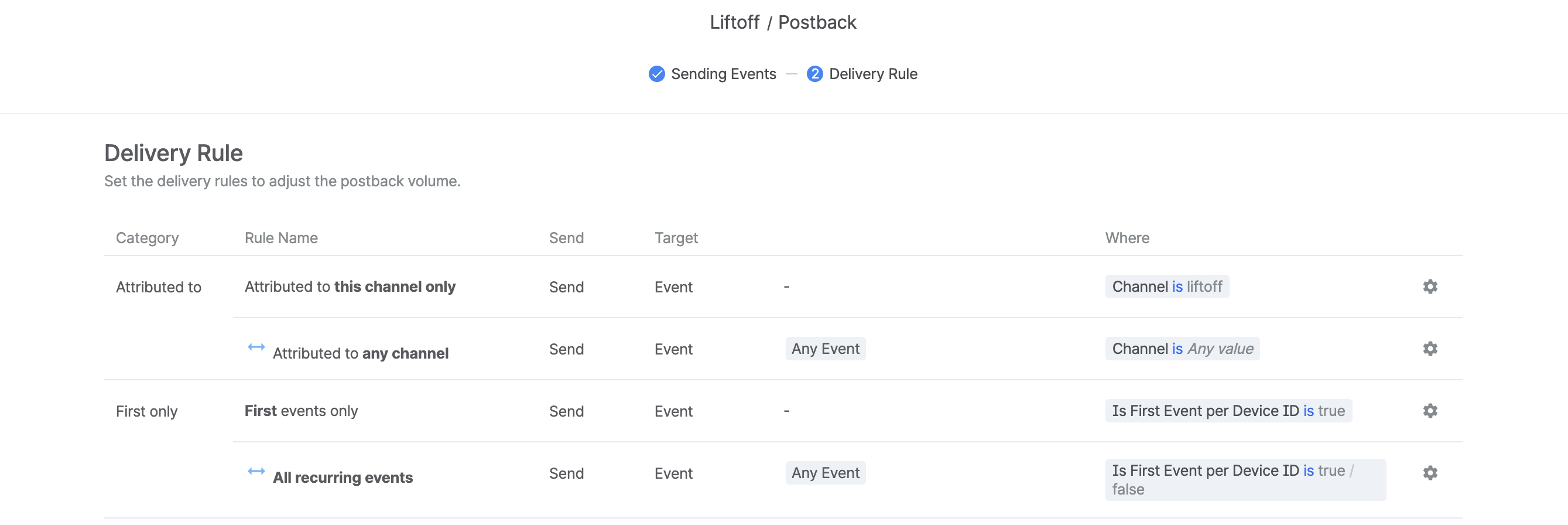
Airbridge offers flexible postback configurations for ad channels
Different ad channels have different methods for sending postbacks. Self-attributing networks (SANs) determine which events to send as postbacks during integration. The SANs leverage the data sent via postbacks to optimize campaigns and enhance the precision of retargeting advertisements.
Airbridge offers several options to send desired information to the non-SAN ad channel through postbacks. Once you set up the data to be sent - including event timing, channel attribution, and device details - you select a delivery rule, and you're done.
Airbridge provides two postback-sending rules to ensure only the intended data is sent via postbacks.
💡Airbridge’s postback delivery rule
- Attributed to: allows you to decide whether to send only the events attributed to the specific ad channel or send all events regardless of the attribution results.
- First only: allows you to decide whether to send only the events that occurred for the first time on a particular device or send all recurring events to the ad channel.
Now, how should you set up a retargeting campaign for users with prior purchases? For retargeting campaigns, it is important to ensure that your ad channel has as much data as possible on users who completed purchase events. Therefore, using a postback delivery rule to send all events, regardless of whether they were attributed or not, will enhance the performance of your retargeting campaign.
Send postbacks to any ad channels you want
You can send postbacks to any ad channel integrated with Airbridge. If the ad channel you intend to send postbacks to is currently unavailable in Airbridge, please ask the ad channel to complete an integration request.

Ready to transform your mobile growth?
Learn how Airbridge helps leading brands measure and optimize every touchpoint.