Email Deeplinks: How to Make Email Links Open Your App

Your marketing email lands. The subscriber taps a link. A browser window opens. The app you spent months building never appeared. This is the email deeplink gap: a configuration problem that routes users into a browser instead of the app where they convert.
Apps convert at 3 to 4 times the rate of equivalent mobile web sessions (Criteo Mobile Commerce Report — the canonical benchmark; cross-industry studies consistently show a 2 to 4x conversion advantage for app over browser). Routing users into the browser is not small friction. It is a measurable revenue leak caused by a missing configuration on your domain and in your app. This guide explains how to fix it.
Key Takeaways
-
Email links open browsers by default. Without an OS-level app link configuration, every link in every email routes to the browser, even on a phone with your app already installed.
-
iOS and Android use different standards. Universal Links (iOS) and App Links (Android) are HTTP-based links the operating system routes directly into your app once the domain-to-app association is verified.
-
Email platforms break deeplinks. Klaviyo, Mailchimp, HubSpot, and most email platforms wrap every link through a redirect domain for click tracking. That redirect breaks OS domain trust and the link falls back to the browser.
-
Deferred deeplinks preserve context through install. When the app is not installed, a deferred deeplink carries the destination through the App Store install, so the user lands on the right screen on first open.
-
Three components are required: a hosted configuration file on your domain, updated app code, and an email-platform-aware routing solution.
Why Email Links Open in a Browser Even When the App Is Installed
1. Why Your App Does Not Open When Users Tap Email Links
When a user taps a link in an email, the operating system follows a simple rule: find a registered handler for that URL scheme and open it. Standard https:// links have a default handler: the mobile browser. Unless you explicitly declare that your app owns a specific domain, the browser opens every time.
Custom URL schemes such as myapp://product/123 do not solve this reliably. Gmail does not support them in email links. Microsoft Outlook wraps all links through its SafeLink system, which breaks custom schemes. Even where they work, they require the app to be installed and provide no fallback if it is not. Universal Links on iOS and App Links on Android are the only reliable approach for email.
2. The Conversion Cost of Sending Email Clicks to a Browser
At 3 to 4 times the conversion rate of mobile web, your app is a meaningfully better destination for every email click. When a user who already has your app installed still lands in a browser, you are paying the full cost of re-engaging a loyal subscriber for an experience that requires them to log in again on a smaller screen.
For lifecycle marketing, the loss compounds. Among subscription apps analyzed across more than 75,000 apps, nearly 30% of annual subscribers cancel within their first month (RevenueCat, State of Subscription Apps 2025). The re-engagement window is narrow. A win-back email that routes an existing subscriber into a browser login screen reintroduces exactly the friction the user was hoping to avoid by tapping the link in the first place.
3. The Root of the Problem: Domain Association
The underlying cause is not the link itself. It is the absence of a verified association between your domain and your app binary. Until you host the right configuration files on your domain and declare the matching capability in your app, the OS has no basis for routing links there.
If you are asking how to make email links open the app instead of the browser, the answer requires changes at three levels: your web server, your app code, and your email platform.
What Is an Email Deeplink? How iOS and Android Route Links to Apps
An email deeplink is a standard https:// URL that the mobile operating system routes directly into a native app instead of a browser, based on a verified file hosted on the link's domain.
The two platforms handle this differently but share the same underlying logic: the OS checks a configuration file on your domain at install time, and when the user taps a matching link, it opens the app directly instead of the browser.
1. Universal Links: Apple's System for Opening Apps From Email
Apple's Universal Links work by hosting an apple-app-site-association (AASA) file on your domain. When your app is installed, iOS fetches and caches this file. When the user taps a matching URL, iOS opens the app and passes the full URL for your code to handle. If the app is not installed, iOS falls back to the browser or a web fallback page.
2. App Links: Google's System for Opening Apps From Email
Android's App Links work by hosting an assetlinks.json file on your domain. When your app installs, Android verifies domain ownership using this file, completing the process in under 20 seconds. A verified app with a matching intent-filter in its manifest opens automatically when the user taps the URL, with no disambiguation dialog.
3. Standard Deeplinks vs Deferred Deeplinks: Which Do You Need?
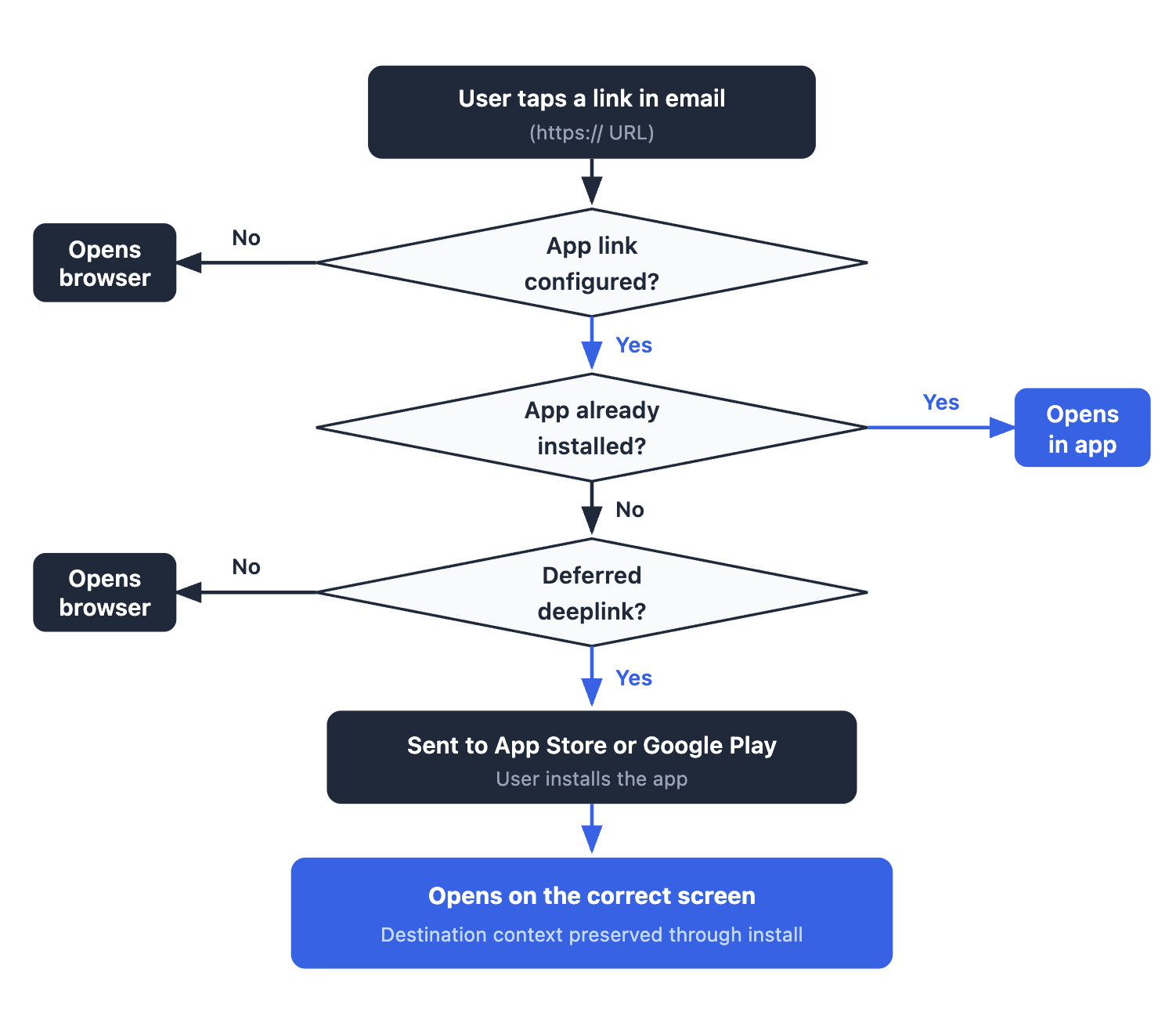
A standard deeplink routes a user into the app only if the app is already installed. If the app is absent, the link falls back to the browser.
A deferred deeplink adds a layer that preserves the destination through the install process. The user taps the link, is directed to the App Store or Google Play, installs the app, and on first open lands on the screen the email was pointing to, not the generic home screen.
For re-engagement and win-back emails, where the recipient may have uninstalled the app, deferred deeplinks are the right choice. See Airbridge's comparison of standard and deferred deeplinks for a full breakdown.
Here is how a link click gets routed:
Start measuring what matters — for free
Airbridge Core Plan gives growing teams real attribution, deep linking, and audience tools at no cost.
Start Free for 30 Days →How to Set Up Email Deeplinks on iOS and Android
1. iOS: Setting Up Universal Links
1) Create and host the AASA file
Host your apple-app-site-association file at the path below, served over HTTPS with a Content-Type: application/json response header and no file extension. The file has a 128 KB size limit (Apple Developer documentation):
https://yourdomain.com/.well-known/apple-app-site-association
A minimal AASA configuration:
{
  "applinks": {
    "apps": [],
    "details": [
      {
        "appID": "TEAMID.com.yourcompany.yourapp",
        "paths": ["/app/*", "/offer/*", "/product/*"]
      }
    ]
  }
}
Replace TEAMID with your Apple Developer Team ID and com.yourcompany.yourapp with your bundle identifier. The paths array defines which URL patterns trigger app routing. Any URL path not listed opens in the browser.
2) Configure Associated Domains in Xcode
In Xcode, open your app target, go to Signing and Capabilities, and add the Associated Domains capability. Add an entry in the format applinks:yourdomain.com. iOS fetches and caches your AASA file at install time using this entitlement. Without it, Universal Links will not work even if the file is correctly hosted.
3) Handle the incoming URL in app code
Implement application(_:continue:restorationHandler:) in your AppDelegate and read userActivity.webpageURL. Parse the path components and route the user to the correct in-app screen.
Test only on physical devices using a real email tap. Pasting a Universal Link into the Safari address bar does not trigger app routing by design.
2. Android: Setting Up App Links
1) Create and host assetlinks.json
Host your Digital Asset Links file at the path below, served over HTTPS returning HTTP 200 with no redirects (Android Developer documentation):
https://yourdomain.com/.well-known/assetlinks.json
[{
  "relation": ["delegate_permission/common.handle_all_urls"],
  "target": {
    "namespace": "android_app",
    "package_name": "com.yourcompany.yourapp",
    "sha256_cert_fingerprints": ["YOUR_SHA256_FINGERPRINT"]
  }
}]
Get your SHA-256 fingerprint with keytool -list -v -keystore your.keystore. Any redirect on this URL silently breaks domain verification.
2) Add the intent filter to AndroidManifest.xml
<intent-filter android:autoVerify="true">
  <action android:name="android.intent.action.VIEW" />
  <category android:name="android.intent.category.DEFAULT" />
  <category android:name="android.intent.category.BROWSABLE" />
  <data
    android:scheme="https"
    android:host="yourdomain.com"
    android:pathPrefix="/app" />
</intent-filter>
The android:autoVerify="true" attribute tells Android to verify domain ownership at install time, completing verification in under 20 seconds. Without it, tapping the link shows an "Open with" disambiguation dialog.
3) Verify your configuration
Use the Google Digital Asset Links testing tool to confirm your assetlinks.json is reachable, correctly formatted, and associated with the correct signing certificate before any send.
For a full technical reference covering both platforms, see Airbridge's guide to understanding deeplinks, including URL scheme fallback options and platform-specific edge cases.
Why Your Email Platform Breaks Deeplinks and How to Fix It
1. How Click Tracking Wrappers Prevent Deeplinks from Working
Every major email platform wraps outgoing links through its own tracking domain to measure clicks. When you place https://yourdomain.com/offer/123 in a Klaviyo email, the URL that actually goes out looks like this:
https://trk.yoursendingdomain.com/track/redirect?url=https%3A%2F%2Fyourdomain.com%2Foffer%2F123
The OS-level deeplink system only works when the URL the user taps matches a domain your app has claimed in its entitlements. The OS sees the tracking domain, finds no app claiming it, and opens the browser. Your AASA file and assetlinks.json are irrelevant here because they live on your domain, not the tracking domain.
| ESP | Default tracking domain | Deeplink support method | Source |
|---|---|---|---|
| Klaviyo | Klaviyo subdomain (trk.*) | Upload AASA and assetlinks.json via Klaviyo Settings > Push notifications > Universal & App Links | Klaviyo docs |
| Mailchimp Marketing | list-manage.com | Limited for standard campaigns; Mailchimp Transactional (Mandrill) supports full custom tracking domain | Mailchimp Transactional docs |
| HubSpot | HubSpot-controlled domain | Custom click-tracking domain available in Marketing Hub settings | HubSpot docs |
| SendGrid | SendGrid link branding domain | Branded link domain + host AASA and assetlinks.json on that subdomain; must manually flag links with universal="true" in HTML | SendGrid docs |
2. Three Ways to Solve the ESP Link Wrapping Problem
Option 1: Use a custom tracking subdomain. Most platforms let you point their click-tracking wrapper to a subdomain you own, such as email.yourdomain.com. Host your AASA and assetlinks.json files on that subdomain. The OS recognizes your domain and routes the link to the app. This requires ongoing file maintenance whenever your app's bundle ID or signing certificate changes.
Option 2: Disable link tracking for specific URLs. Some campaigns can turn off click wrapping for individual links. You lose click-level analytics for those links, but the deeplink works. This trade-off is acceptable for transactional or re-engagement emails where downstream in-app events provide a more meaningful attribution signal.
Option 3: Use a dedicated deep link management platform. A purpose-built tool handles hosting your configuration files on a trusted tracking domain, managing custom subdomain routing, and connecting click data to downstream in-app events. For a detailed platform comparison of Universal Links and App Links behavior, see Airbridge's cross-platform deep linking guide.
3. The Microsoft Outlook SafeLink Complication
Outlook adds a second layer: Microsoft Defender's Safe Links feature rewrites all URLs through safelinks.protection.outlook.com before delivery. This cannot be disabled from the sender side. Enterprise users on Outlook will not receive working deeplinks regardless of how correctly you have configured your own domain.
Design every deeplink fallback page with a visible "Open in app" button. iOS Smart App Banners surface this automatically for Safari users who land on the web fallback.
Email Deeplink Best Practices for Re-engagement Campaigns
1. Always Include a Working Web Fallback
Every deeplink URL must have a real destination page on the web. If the app is not installed, if the OS routes incorrectly, or if the email client breaks the URL, the user needs a page that makes sense. A 404 on the fallback means every non-app user hits a dead end.
2. Use Deferred Deeplinks for Win-Back Emails
For subscribers who may have uninstalled your app, standard deeplinks are not enough. The data backs this up: 13.7% of monthly subscribers who lapse do reactivate within 12 months (RevenueCat, State of Subscription Apps 2025). That is a meaningful revenue recovery pool — but only if the re-engagement experience lands them inside the app, not on a browser login screen.
A deferred deeplink gives lapsed users the best possible first experience after reinstalling: they land on the screen the email pointed to, not a generic home screen. Use deferred deeplinks for win-back campaigns, referral emails to non-app users, and any segment that has not opened the app in 30 or more days.
3. Test on Real Devices Before Every Send
iOS Simulator and Android Emulator do not replicate email client behavior accurately. Before any campaign send, test the link on physical devices in Apple Mail (iOS and iPadOS), Gmail (iOS and Android), and Outlook. Confirm the app opens on the correct screen and the fallback works when the app is uninstalled.
4. Track Deeplink Performance Separately from Email Click Rate
Your email platform's click rate shows how many taps happened. It does not show how many taps resulted in an in-app session or a downstream conversion. Track app open source, target screen reached, and conversion events as separate funnel steps. Without this, you cannot distinguish between a deeplink configuration that works and one that quietly falls back to the browser on every send.
Stop Losing Conversions to the Browser
Setting up email deeplinks is a one-time technical investment: two configuration files, an app entitlement, and a resolved tracking domain. Most apps complete this in a few days of engineering time.
The downstream gap most teams discover next is attribution. Your email platform shows click count. Your app shows sessions. Nothing connects those email clicks to subscription renewals. The routing works, but the revenue measurement does not.
Airbridge's deep linking platform handles both the routing infrastructure (AASA hosting, custom tracking domains, deferred deeplinks) and the downstream measurement that connects the email click to the subscription event in your app.


Ready to see what Core Plan can do?
Free attribution, deep linking, and audience tools — built for teams that are ready to grow.