How Much Should a Subscription App Spend on UA?

There is no universal UA budget percentage for subscription apps. The right number depends on your lifetime value (LTV), your cost per subscription (CPS), and how fast you need to learn. A useful starting point: back into your budget from a 3:1 LTV-to-CAC ratio, then allocate $500-$1,000 per channel per two-week test window.
The median subscription app converts 1.9% of downloads to paying subscribers within 35 days. Only 6.2% of downloads even start a trial. The gap between apps that grow and apps that stall maps directly to how teams allocate their first dollars.
The question how much should a subscription app spend on user acquisition has no standard answer. because the right budget is an output of your unit economics, not a benchmark to copy. Most early-stage teams pick a number based on what they can afford, not what the math supports.
They spend $3K/month across three channels, get installs, and have no idea which channel. if any. produces subscribers.
Key Takeaways
-
Your UA budget should be derived from LTV, not revenue. A 3:1 LTV-to-CAC ratio is the baseline for sustainable growth.
-
The minimum useful budget is $500-$1,000 per channel per two-week sprint. Below that, you are buying noise, not signal.
-
Cost per subscription runs 4-5x higher than cost per install. Plan for $23-$29 CPS if your median CPI is ~$5.78.
-
Concentrate your first budget on one channel. Spreading $5K across four channels teaches you nothing.
-
Measure at three cadences: D7, D30, D90. Each serves a different decision. campaign tweaks, budget allocation, and LTV modeling.
The Short Answer: Size Your Budget Around LTV, Not Revenue
Percentage-of-revenue budgeting. "spend 20% of revenue on marketing". breaks down for early-stage subscription apps. If your app earns $8K/month in subscription revenue, 20% gives you $1,600. That is not enough to run a statistically meaningful test on even one ad channel.
1. Why percentage-of-revenue rules fail for early-stage apps
Revenue-based rules assume you already have scale. A subscription app doing $8K MRR is still in learning mode. The budget needs to fund experimentation. not mirror what a $2M ARR app does.
2. The LTV-to-CAC formula that replaces arbitrary budget rules
The golden rule: LTV must exceed customer acquisition cost (CAC) by 3x or more. If your 12-month LTV per subscriber is $90, your maximum sustainable CPS is $30. Everything flows from that number.
Median annual subscription retention sits at 44%, with monthly churn running 5-7% after the first renewal. That retention curve defines your LTV ceiling. If you do not know your LTV yet, that is fine. but it means your first UA budget is a learning budget, not a scaling budget.
What Is the Minimum UA Budget to Generate Real Data?
If you are still figuring out what paid user acquisition means for your app, the minimum investment question comes first.
1. The minimum spend that produces real signal
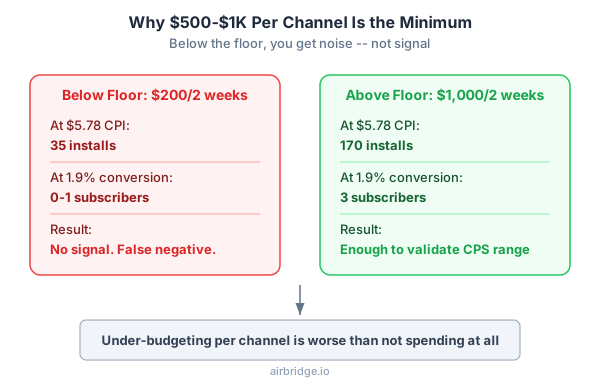
A two-week test window on a single channel requires $500-$1,000 to produce enough installs for meaningful conversion data. At a $5.78 CPI, $1,000 buys roughly 170 installs. At 1.9% download-to-paid, that yields ~3 subscribers. barely enough signal, but enough to validate your CPS range.
2. Why spending below the floor produces noise, not signal
Spend $200 on Meta over two weeks and you get 35 installs. Zero or one subscriber. You cannot tell if the channel works or if you got unlucky. Below-floor budgets create false negatives. teams abandon channels that could have worked because they never gave them a fair test.
How to Set Your UA Budget Based on Your App's Unit Economics
If you are new to app marketing metrics, start here.
1. Calculate your current LTV
Pull your D30 or D60 revenue per install (RPI) from your subscription management tool. Hard paywall apps generate $3.09 D60 RPI in Health & Fitness. roughly 8x more than freemium apps at $0.63. Your paywall model directly determines how much you can afford to spend.
If you are pre-launch, use industry medians as placeholders and plan to update monthly.
2. Determine your max sustainable CPS
Divide your projected 12-month LTV by 3. That is your CPS ceiling.
| Scenario | 12-Month LTV | Max CPS (3:1) | Max CPI (at 1.9% conversion) |
|---|---|---|---|
| Low-tier monthly | $36 | $12 | ~$0.23 |
| Mid-tier annual | $90 | $30 | ~$0.57 |
| High-tier weekly | $187 | $62 | ~$1.18 |
High-tier weekly subscription plans generate 5.2x more revenue per install than low-tier plans. Your pricing model is a UA budget lever. not just a monetization decision.
Notice that low-tier and mid-tier apps cannot sustain paid UA at median conversion rates. the max CPI is below what any ad channel can deliver at $5.78 market CPI. This is why improving trial-to-paid conversion or raising your price point comes before scaling ad spend.
3. Estimate installs needed and set channel budget
Here is the math for a real scenario. A fitness app charging $9.99/month. accounting for ~50% first-renewal churn and 5% monthly churn thereafter. has a 12-month LTV of roughly $54. At 3:1, max CPS is $18. With a 1.9% conversion rate and $5.78 CPI, acquiring 100 subscribers requires 5,263 installs at a cost of $30,400.
That is the real number. not $3K or $5K. If the budget feels too high, you have two options: improve conversion rate or raise your price point. You do not have the option of pretending the math works at a lower budget.
Start measuring what matters — for free
Airbridge Core Plan gives growing teams real attribution, deep linking, and audience tools at no cost.
Start Free for 30 Days →How to Split Your UA Budget Across Channels
Once you have a total budget, the next question is allocation. If you are choosing your first ad channel, the answer is simpler than you think.
1. For your first $5K: concentrate, do not diversify
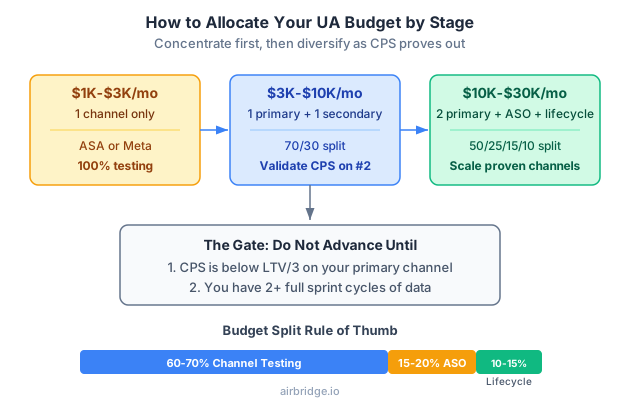
Split 60-70% into one active channel for testing. Reserve 15-20% for ASO support and 10-15% for lifecycle and retention. Running four channels at $1,250 each means none gets enough budget to generate a clear signal.
Apple Search Ads delivers the highest-intent users among the four major channels. Meta, Google, TikTok, and ASA. For subscription apps, starting with ASA often produces the cleanest conversion data because users are already searching for what you offer.
2. Channel allocation guide by budget level
| Monthly Budget | Recommended Channels | Split |
|---|---|---|
| $1K-$3K | 1 channel (ASA or Meta) | 100% active testing |
| $3K-$10K | 1 primary + 1 secondary | 70/30 |
| $10K-$30K | 2 primary + ASO + lifecycle | 50/25/15/10 |
| $30K+ | 3 channels + ASO + lifecycle | Per CPS performance |
Do not add a second channel until the first one has either proven profitable or been ruled out with at least two full sprint cycles.
How to Know When Your UA Budget Is Working
Spending is not the hard part. Knowing whether the spend is working. that is where most teams stall. Understanding your cost per trial and cost per subscription per channel is the minimum bar.
1. The three-cadence measurement framework
| Cadence | Decision It Informs | What to Measure |
|---|---|---|
| D7 | Campaign optimization | CPI, trial start rate, creative performance |
| D30 | Budget allocation across channels | CPS, trial-to-paid conversion |
| D90 | LTV modeling and scale decisions | Cohort ROAS, retention curve |
D7 tells you if a creative is working. D30 tells you if a channel is worth your budget. D90 tells you if the business model is viable.
2. The two metrics that tell you if a channel is profitable
CPS per channel and D30 cohort ROAS. If a channel's CPS exceeds your LTV/3 ceiling, pause it. If D30 cohort ROAS is below 0.3x, the channel likely will not pay back at D90 either.
Example decision: Your fitness app has a $54 LTV and $18 max CPS. After 4 weeks, Meta D30 CPS is $15 and Google D30 CPS is $45. Meta is below your ceiling. move 70% of budget there and test scaling. Google is 2.5x over your ceiling. test two new creative sets, and if CPS stays above $30 after a full sprint, cut it. This is the kind of decision D30 data makes possible.
If you are just beginning to market a subscription app, focus on CPS first. ROAS becomes meaningful once you have 60+ days of cohort data. For subscription apps with annual plans, expect breakeven at D90-D180. the first payment is delayed, so patience is part of the model.
Build Your Measurement Stack Before Scaling Spend
The first dollar of UA budget should buy data, not downloads. Allocate 10-15% of your UA budget to measurement infrastructure before you scale. Without a measurement loop connecting ad spend to subscription revenue by channel, every dollar above that is a guess.
1. What measurement infrastructure means for a small team
At minimum: a subscription management tool (RevenueCat, Qonversion), an analytics layer that ties installs to subscription events, and a way to see which ads actually make money. You do not need a data warehouse on day one. You need one dashboard that shows CPS by channel.
2. Connecting ad spend to subscription revenue
The gap most teams hit: ad platforms report installs, subscription tools report revenue, and nothing connects the two. You need infrastructure that maps an install from a specific campaign to its downstream subscription event. trial start, conversion, renewal.
If you are at this stage, Airbridge Core Plan connects ad spend data to subscription events at no cost for your first 15K installs. It is built for exactly this gap. small teams that need to see CPS by channel before they scale.
Common UA Budget Questions for Subscription Apps
Q1. Should I pause all UA during a product overhaul?
Not entirely. Drop to a maintenance budget. $500-$1,000/month on your best-performing channel. to keep baseline data flowing. A full pause creates a data gap that makes it harder to distinguish product changes from channel performance changes when you restart.
Q2. Is it ever too early to spend on paid UA?
Yes. If your onboarding flow is not finalized or your paywall is untested, paid installs will churn at rates that make CPS calculations meaningless. Get organic or incentivized installs to validate your funnel first. 200-500 installs is usually enough to establish a baseline conversion rate.
The reason is simple: paid UA amplifies whatever your funnel currently does. If your trial-to-paid conversion is 0.5% because the paywall copy is untested, scaling spend at a $5.78 CPI means you are paying $1,156 per subscriber. a number no LTV can support. Fix the funnel with cheap traffic first, then apply paid budget once you know the conversion baseline.
Q3. How much of my UA budget should go to retargeting?
For subscription apps under $10K/month ad spend, zero. Retargeting works at scale. you need a large enough lapsed-user pool to build meaningful segments. Below 50K monthly installs, every retargeting dollar is better spent on prospecting.
The math behind this: retargeting audiences for subscription apps typically consist of trial expirers and lapsed subscribers. At 1,000 monthly installs with a 6.2% trial start rate, your retargetable pool is ~62 users per month. No ad platform can optimize delivery to a 62-person audience. Save retargeting budget until your install volume crosses 50K/month. at that point, your lapsed pool becomes large enough to segment by behavior and bid meaningfully.
Q4. Should I budget differently for iOS vs Android?
Yes. In Health & Fitness, iOS CPI averages $5.78 versus $3.06 on Android. nearly 2x. But iOS subscribers typically have higher LTV and lower churn, so the higher CPI often pays for itself. Calculate separate CPS ceilings for each platform. Many early-stage apps start iOS-only because the higher LTV supports the higher acquisition cost.
Your Budget Is a Hypothesis, Not a Commitment
Every number in this framework is a starting point. The real answer to "how much should I spend" reveals itself after two to three sprint cycles of data. The teams that grow are the ones that treat budget as a testable hypothesis. not a line item they set once and forget.
Start with your LTV. Work backwards to your CPS ceiling. Fund one channel at the minimum floor. Measure at D7, D30, D90. Adjust.

Ready to see what Core Plan can do?
Free attribution, deep linking, and audience tools — built for teams that are ready to grow.