Social Proof for Apps: When and Where to Place Reviews, Ratings, and Trust Signals


Most subscription apps lose users between download and the paywall, not because the product is weak, but because trust hasn't been established yet. The average app converts just 1.9% of downloads to paying subscribers within 35 days. Apps in the upper quartile hit 4.3%+. The gap between those two outcomes is rarely pricing or features. It's almost always trust.
Social proof for app conversion closes that gap, but placement matters more than presence. A testimonial on the wrong screen, at the wrong moment in the user journey, adds noise rather than credibility. This guide covers exactly when and where to place reviews, ratings, and trust signals to improve social proof for app conversion at every stage of the onboarding-to-paywall flow.
Key Takeaways
-
82% of trial decisions happen on Day 0. The screens between download and your first paywall are your highest-leverage conversion window.
-
Goal-matched testimonials outperform generic ones. A review that mirrors what the user just said they want ("I lost 18 lbs in 8 weeks") creates far more trust than "I love this app."
-
Trial-inclusive paywalls convert at 64.5% vs 44.4% for text-only paywalls. Reviews and user counts embedded in the paywall are direct conversion levers, not just design choices.
-
Products with 5+ reviews are 270% more likely to be purchased. App Store rating and review volume build trust before users ever open your app.
-
Purchase likelihood peaks at 4.2 to 4.5 stars, not 5.0. A perfect rating reads as curated. A 4.3 with 10,000+ reviews reads as genuine.
The Three Trust Moments That Drive App Conversion
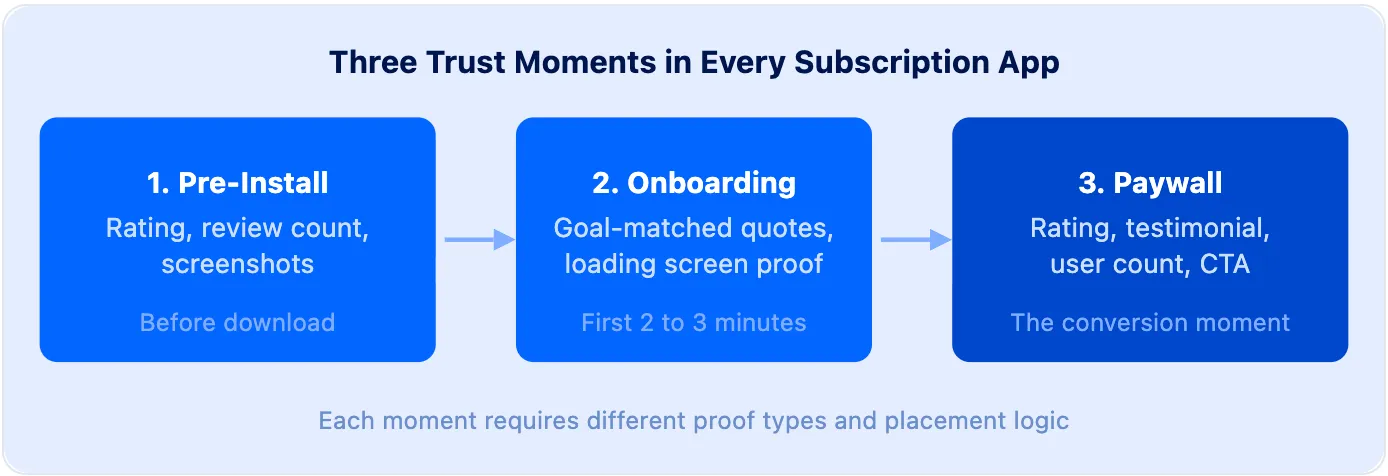
Social proof is any signal from other users, including ratings, reviews, testimonials, or user counts, that helps a new user trust the product enough to subscribe. In the context of social proof and app conversion, it is not a single design element but a layered strategy built around three distinct moments in the user journey.
-
Pre-install trust happens on your App Store listing, before the download. Users evaluate your rating, review count, and screenshots to decide whether the app is worth trying.
-
Onboarding trust happens in the first two to three minutes after download. The user has committed enough to install but hasn't committed to paying. This is where personalized testimonials and user count signals do their most important work.
-
Paywall trust happens at the conversion moment itself. The user has seen your product and is deciding whether to start a trial or pay. The social proof on this screen must directly answer the objection standing between them and subscribing.
A key principle from StartApp School's paywall optimization curriculum (Lesson 02) captures the underlying logic: users convert when Motivation, Trust, and Friction all align. "Great monetization doesn't convince people to want something. It catches them at a moment they already do." Timing matters more than the quality of the testimonial copy.
Onboarding: Where to Place Social Proof Before the Paywall
82% of trial decisions happen on Day 0, which means the onboarding sequence is your highest-leverage app conversion window, and where social proof does its most important work. The paywall is the destination, but the journey leading to it either builds or destroys the trust that determines whether users convert.
The most common mistake is placing social proof before the user has invested anything in the experience. A splash screen testimonial on the very first screen reads as a brand claim, not peer validation. Moved to the right moment, the same quote becomes a genuine trust signal.
1. Collect a goal first, then show a matching testimonial
The best onboarding flows ask users what they are trying to achieve before displaying any social proof. The moment a user selects their goal, you know exactly which testimonial will resonate.
A fitness app user who picks "lose weight" should see a quote from someone who lost weight, not a generic star rating and not a muscle-building success story. A specific, outcome-matched quote like "Down 22 lbs in 10 weeks, after three failed attempts with other apps" transforms social proof from generic marketing into personalized confirmation. The user reads it as: other people with my exact goal used this and got results.
2. Use loading screens as a pre-paywall trust layer
Pre-paywall loading screens, such as the "Analyzing your goals" or "Building your plan" animations that appear before the paywall, are the most underused real estate in mobile onboarding. Most teams treat them as neutral wait states. High-converting apps treat them as a final trust layer.
Effective loading screen social proof includes:
-
Specific user counts, such as "Used by 247,382 people this month" rather than "Used by thousands"
-
Average outcome claims with a time frame, such as "Users report first results in 21 days on average"
-
Rating signals placed in the flow, such as "4.8 stars from 41,000+ reviews"
The timing is nearly optimal. Motivation is at its highest because the user just invested effort stating their goal. The loading screen creates no friction. Trust signals here prime the user to evaluate the paywall as a confirmation rather than a cold ask.
3. Match the number format to the claim
Precision builds credibility. "Join 47,392 users" outperforms "Join thousands of users" because the specific number feels verifiable. Vague social signals read as unsubstantiated marketing. Concrete numbers read as data. For teams learning how to add reviews to app onboarding for the first time, this specificity principle is the highest-leverage place to start.
Paywall Social Proof That Converts
The paywall is where social proof carries its most direct app conversion impact. Trial-inclusive paywalls convert at 64.5%, compared to 44.4% for visual or text-only paywalls. The difference is not design quality. It is trust density.
OMENA redesigned their paywall into a scrollable screen with testimonials, a founding story, user photos, and a FAQ. It doubled their trial start rate (Botsi x Retention.Blog, 48 Laws of Subscription App Success, Law 16). The content wasn't new. The placement and density of trust signals was.
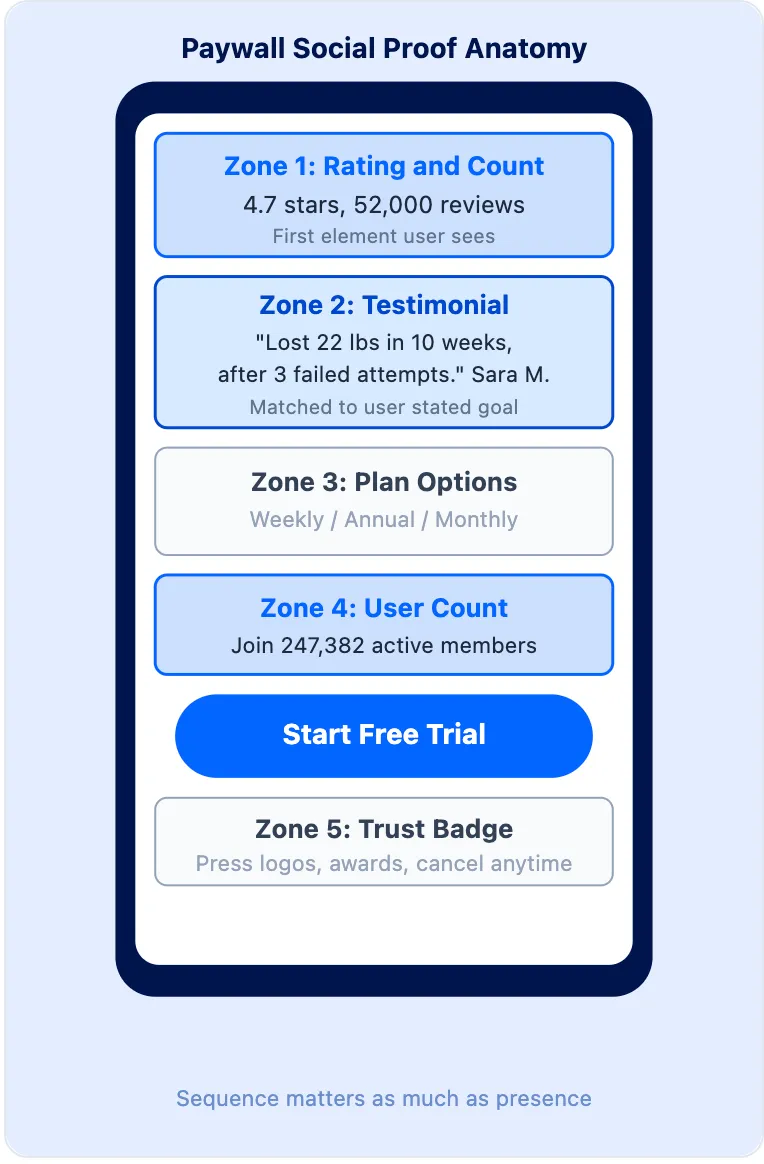
The optimal paywall social proof sequence:
| Paywall Element | Recommended Position | What It Communicates |
|---|---|---|
| Star rating + review count | Top, near headline | Scale and credibility |
| Goal-matched testimonial | Middle, below plan options | Outcome proof |
| User count ("Join X members") | Below headline or near CTA | Community validation |
| Trust badge or media mention | Footer | Authority and legitimacy |
1. Lead with the rating, not the price
The first visible element shapes how users interpret everything that follows. If a user sees a price first, they evaluate cost. If they see "4.7 stars from 52,000 reviews" first, they evaluate trustworthiness and then assess the price within that trusted context.
This sequencing change is low-effort and frequently produces measurable lift in paywall optimization experiments. The rating frames the price as reasonable given what users say, rather than expensive at face value.
2. Show the right rating, not a perfect one
Purchase likelihood peaks at around 4.2 to 4.5 stars (Spiegel Research Center / PowerReviews, 2017). A perfect 5.0 activates skepticism, especially when accompanied by a low review count. Consumers recognize that authentic, at-scale products accumulate some critical feedback. A 4.3 with 18,000 reviews signals a real product with a statistically valid sample, and that signal converts.
If your rating is currently 3.8 or below, don't feature it prominently on the paywall. Lead with user counts, outcome statistics, or press mentions instead, and prioritize improving the rating before making it a conversion lever.
3. Answer the purchase objection with the testimonial
Every category has a predictable paywall objection. For fitness apps: "Will this actually work for my specific situation?" For productivity apps: "Is this worth a monthly fee if I get busy?" The most effective paywall testimonial directly answers that objection.
Not "This app changed my life," but "I've tried four other apps. This is the only one I've actually stuck with past week two." Specificity is the trust mechanism. Vague praise creates no resonance. The testimonial that addresses the exact fear the user is feeling at the paywall moment is the one that converts.
Read more: Top 3 paywall builder solutions for subscription apps
Want to see how Social proof works with your data?
Get hands-on with Airbridge and see real results.
Try It Free →App Store Ratings and Pre-Install Trust
App conversion starts before the app is downloaded, which is why your App Store presence is a growth lever, not just a maintenance task. 93% of consumers say online reviews influence their purchase decisions (PowerReviews, 2023). Products with 5 or more reviews are 270% more likely to be purchased than those with zero (Northwestern University Spiegel Research Center).
For subscription apps, the App Store listing is the first trust gate in the funnel. Three variables determine how much conversion lift it generates:
-
Rating score. Aim for 4.2 or higher. Below 4.0 in a competitive category, the rating becomes a liability before users even open the app. Don't surface a low rating prominently. Lead with user count or press mentions instead while you work to improve it.
-
Review freshness. 64% of consumers prefer a smaller number of recent reviews over a large volume of old ones (PowerReviews). A 4.8 rating built on 18-month-old reviews performs below a 4.4 with reviews from this month. The best trigger for a review prompt is immediately after a user achieves a meaningful outcome, not on a fixed timer or after a set number of app opens.
-
Review volume. "4.6 stars (2,300 ratings)" and "4.6 stars (47 ratings)" carry very different trust signals. Review volume is a marketing metric, not just a product metric. For more on how App Store signals connect to lifetime value, top-performing apps treat ASO as a top-of-funnel conversion lever that compounds with onboarding and paywall optimization.
Common Mistakes and Early-Stage Solutions
Generic testimonials that don't match user goals. "This app is incredible" says nothing about what the user is trying to accomplish. It registers as a brand claim. The fix is a small library of goal-segmented quotes matched to the goal-selection screen at the start of onboarding. For a fitness app with five goal options, five sets of testimonials is the minimum viable starting point.
Showing social proof before any user investment. A testimonial on the first screen, before personalization, reads as marketing. Moved to the post-goal-survey or loading screen, the same testimonial reads as peer validation. The user's emotional state at the moment of exposure determines how the signal is interpreted. Getting the sequence right matters more than improving the testimonial copy.
High ratings with low review volume. A 5.0 rating on 11 reviews triggers skepticism, not confidence. As volume grows past 50 to 100 reviews, the rating signal becomes credible enough to feature on the paywall. Until then, deprioritize the rating display and lead with user count or outcome statistics.
For teams just launching, the path forward is to use what is available rather than wait for scale. Here are four trust signals you can build from day one:
-
Lead with user count, not review count. If you have 2,000 users but only 20 reviews, "Trusted by 2,000 people" is a more credible signal than surfacing those 20 reviews on your paywall.
-
Gather targeted testimonials from beta users. Reach out to 10 to 15 early users who got results. Ask specifically: "What did you set out to accomplish, and what actually happened?" A handful of specific, goal-outcome quotes outperforms hundreds of generic ratings.
-
Use outcome-based product data. "63% of users who reach Day 7 are still active at Day 30" is a compelling trust signal derived entirely from your own analytics, with no external reviews needed.
-
Cite press or partner mentions. Any publication, newsletter, or app store editorial feature counts. "Featured in [publication]" signals external credibility, especially for users who don't find peer reviews sufficient on their own.
For more on building the lifecycle signals that reinforce retention over time, see how leading apps structure subscription lifecycle messaging.
Trust Is Built Screen by Screen
Social proof that converts is not a single well-placed testimonial. It is a sequence of trust signals, each calibrated to where the user is in the journey: goal-matched quotes after the intake survey, specific user counts on the pre-paywall loading screen, a rating and outcome testimonial at the top of the paywall, and fresh App Store reviews that build confidence before anyone even installs.
82% of trial decisions happen on the day of install. The onboarding-to-paywall window is where most of your social proof app conversion opportunity lives, and where most teams leave trust gaps unfilled.
Start with one change: segment your testimonials by the goal the user selects at onboarding. Measure the impact on your trial start rate. Then layer in the loading screen signal, then the paywall sequence. Each layer compounds the one before it.
See Which Channels Actually Convert Through Your Paywall
Once your social proof placement is optimized, a follow-up question becomes urgent: which acquisition channels are bringing users who actually respond to your onboarding and convert to paid, and which ones aren't?
A user from a Meta fitness ad might convert through your goal-matched paywall at 45%. A user from a broad-audience campaign might convert at 12%. Same paywall, same social proof, very different users. Without subscription-level data broken down by channel, you're averaging those two numbers together and calling it your "conversion rate." You can't tell whether your social proof app conversion optimization is working for the users it's meant to reach, or just inflating trial starts from users who churn before the first renewal.
The goal isn't just a higher trial start rate. It's more paying subscribers from the channels you're spending on. Those are two different metrics, and only one of them tells you if your social proof is actually working.
This is where connecting ad spend to subscription revenue becomes essential. Tools like Airbridge Core Plan link your paid acquisition channels to your subscription events, including trial starts, paid conversions, and renewals. You can see which campaigns drive users who actually subscribe, not just which ones drive installs. It's free to start, with 15,000 attributed installs included in the base plan.


Ready to transform your mobile growth?
Learn how Airbridge helps leading brands measure and optimize every touchpoint.