ROAS for Subscription Apps: How to Read D7, D30, and D60 Numbers


For subscription apps, ROAS is never a single, final figure. It grows every month as subscribers renew, and the time window you choose to measure it (D7, D30, or D60) changes everything.
If you have seen a figure in your Meta or Google dashboard and had no idea whether it was good or bad for your subscription model, this guide explains exactly what you are looking at and how to act on it.
Key Takeaways
-
Time windows define the number. D7, D30, and D60 tell different stories about the same campaign. Choosing the wrong window leads to cutting campaigns that are actually working.
-
D30 is the standard decision metric. Most subscription app marketers use 30-day cohort data as their primary signal, with D7 as an early indicator only.
-
A result below 1.0 is not automatically bad. If subscribers renew at healthy rates, you may recover your customer acquisition cost by month 3 or 6 and still be profitable.
-
Blended numbers hide the real story. A Meta campaign at 0.8x and a TikTok campaign at 0.15x average to 0.45x, hiding your best opportunity.
-
ROAS makes most sense alongside LTV. With a median Year 1 LTV of $27.21 in Health and Fitness, a D30 result of 0.3x can still be profitable.
Why ROAS Works Differently in Subscription Apps
When an e-commerce brand tracks this metric, revenue is immediate. A user clicks an ad, buys a $60 product, and that revenue is counted the same day.
Subscription apps do not work that way.
1. Revenue arrives in monthly installments
A user who installs your app after clicking a Meta ad might start a free trial on Day 0, convert to a paid plan on Day 7, and then pay $9.99 per month for the next 12 months. From the campaign perspective, that user generates $119.88 in total revenue, but it arrives over a full year.
On Day 1, the revenue from that install is zero. By Day 30, it might be $9.99. By Day 365, it might be $119.88, or zero if they churned after month two.
This is why the metric is always a moving number for subscription apps. The question is never "what is my ROAS." It is "what is my D30 result" or "what is my D60 result."
2. The time window changes what you are measuring
Two marketers can look at the same campaign and reach opposite conclusions depending on which window they choose.
| Time Window | Revenue Counted | What It Tells You |
|---|---|---|
| D1 | Revenue through Day 1 (install day plus the next day) | Trial starts, intro offers, and annual plans paid upfront. Refunds and cancellations have not been processed yet. Never a decision metric |
| D7 | First 7 days of subscription revenue | Early signal only. Too short to capture trial-to-paid conversion for most apps |
| D30 | First 30 days of subscription revenue | Core decision metric for monthly plan apps |
| D60 | First 60 days of subscription revenue | Captures early renewals. More meaningful for longer trial periods |
| D90+ | First 90+ days of subscription revenue | Reflects true payback for high-LTV categories |
For apps with monthly plans, D30 is typically the first window that means something actionable. For apps with annual plans, even D30 understates long-term value significantly, since most revenue from an annual subscriber comes from the renewal in month 12, not the first payment.
Why Does ROAS Look Great on Day 1 and Terrible by Day 30?
This is the most common question subscription teams ask when they move from ad-platform dashboards to cohort reports. The pattern is almost always the same: for example, a Day 1 ROAS above 1.5x in the Meta or Google dashboard, then a D30 cohort ROAS below 0.5x. Neither number is wrong. They measure different things, and only one of them should drive budget.
| Cause | What you see | Why it happens | What to measure instead |
|---|---|---|---|
| Calendar-window revenue instead of cohort revenue | "Yesterday's ROAS" looks high | Ad platforms and most dashboards divide all revenue booked in the period by spend in the period. Renewals from subscribers you acquired months ago land in today's numerator | Cohort ROAS: only revenue from users who installed in the cohort window, tracked by day since install |
| Refunds, trial cancellations, and failed renewals arrive after Day 1 | Annual plans and intro offers are booked on Day 0 or Day 1, then part of that revenue disappears | App Store and Play refunds, trial cancellations, and involuntary churn are processed days or weeks later. Day 1 counts the gross booking | Day-N cumulative revenue that updates as billing events arrive, and a refund rate you track separately |
| Retargeting and self-attributed renewals | Retargeting campaigns show ROAS far above prospecting, often 2x or more | Self-attributing networks claim renewal revenue from existing subscribers who saw a retargeting ad. That revenue was arriving anyway. The number is inflated by attribution overlap, not by new subscribers | Split prospecting from retargeting. Judge acquisition campaigns on new-subscriber revenue only |
One rule catches most of it: cumulative cohort ROAS can only fall between Day 1 and Day 30 if refunds or chargebacks are netted out. If your D30 is lower than your D1 and refunds do not explain the gap, you are not looking at cohort numbers.
How to read D1, D7, and D30 together
| Metric | Formula | Use it for |
|---|---|---|
| D1 ROAS (cumulative) | Cumulative revenue from the cohort through Day 1 ÷ spend on that cohort | Creative and landing page sanity check. Read cost per trial start instead of revenue here |
| D7 ROAS (cumulative) | Cumulative revenue through Day 7 ÷ spend | Early signal for apps with trials of 7 days or shorter |
| D30 ROAS (cumulative) | Cumulative revenue through Day 30 ÷ spend | Budget decisions for monthly plans |
| D60 and D90 ROAS (cumulative) | Cumulative revenue through Day 60 or 90 ÷ spend | Payback checks for annual plans and long trials |
In the Airbridge Revenue Report, set the Start Event to Install, choose ROAS with the Cumulative aggregation, and read Day 1, Day 7, and Day 30 on the same row. The report supports daily granularity from Day 0 through Day 180. Send subscription events through the RevenueCat, Adapty, or Superwall integration so Subscribe and renewal revenue lands in the same cohort. If you need refunds netted out, confirm which billing events your integration sends before treating Day-N revenue as net.
Want to see how ROAS for subscription apps works with your data?
Get hands-on with Airbridge and see real results.
Try It Free →How to Calculate ROAS for Your Subscription App
ROAS (Return on Ad Spend) = Revenue from ad-attributed subscribers divided by Ad Spend.
If you spent $2,000 on Meta ads in January, and the subscribers acquired from that campaign generated $800 in subscription revenue within 30 days, your D30 ROAS is 0.4 (40%). You spent $2,000 and recovered $800 by day 30.
That sounds low. But if those same subscribers generate $1,500 by day 60, your D60 ROAS is 0.75, and you are approaching breakeven. Whether that pace works depends on your cash runway and predicted LTV.
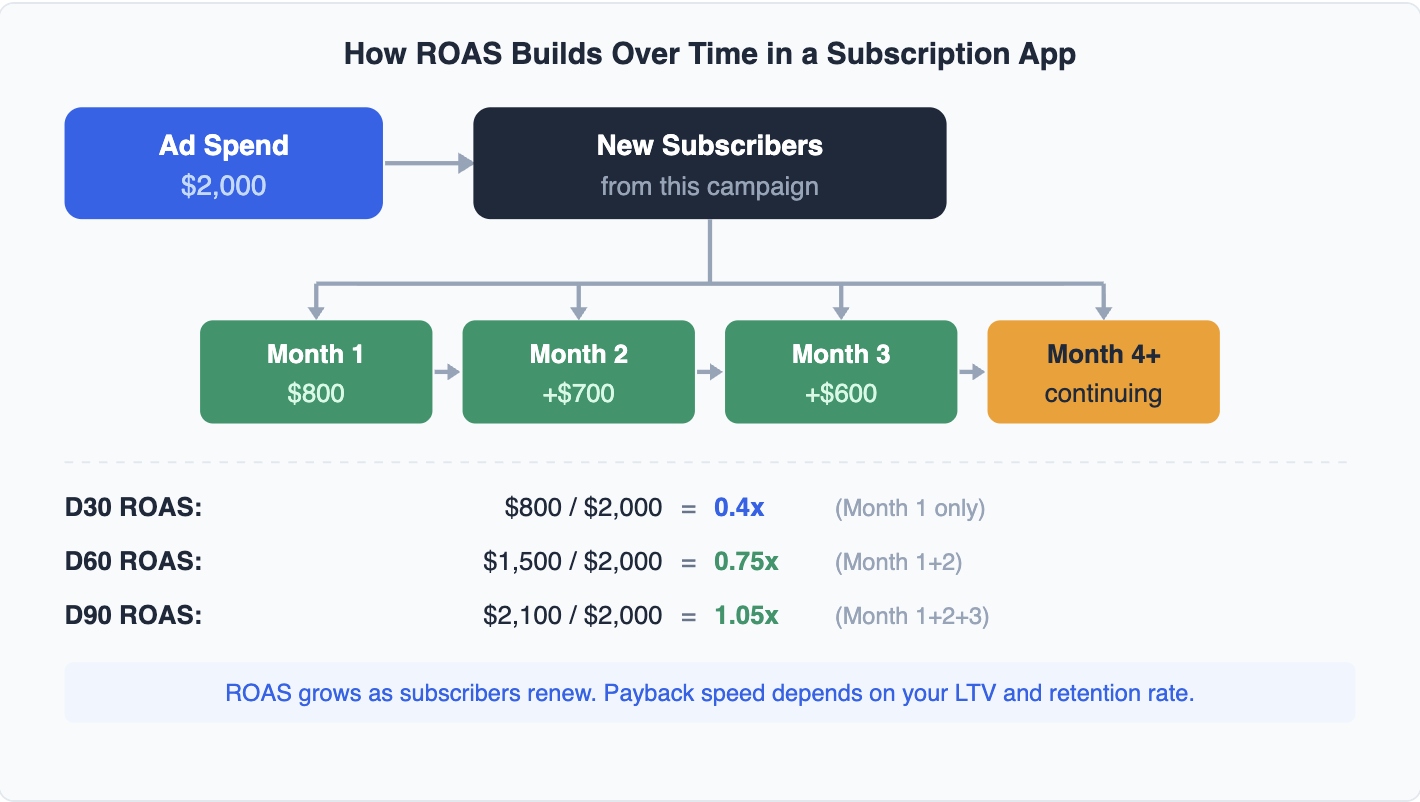
Illustrative example. Revenue figures are hypothetical to demonstrate how D30, D60, and D90 ROAS change as subscribers renew.
1. Use cohort revenue, not total app revenue
One of the most common mistakes is dividing total app revenue by total ad spend. This produces a blended number that mixes organic users, returning subscribers, and newly acquired paid installs.
To get accurate cohort-level data, you need revenue generated specifically by users acquired from a specific campaign, measured over a specific time window. Actuals tell you cash flow. Cohorts tell you marketing performance. For optimizing ad spend, always use cohorts.
2. Count subscription revenue only
If your app includes both subscriptions and one-time purchases, separate them. A subscriber who pays $9.99/month looks very different from a user who makes a $1.99 in-app purchase and never returns. Subscription-only data tells you whether your campaigns are generating paying subscribers. Mixing in consumables distorts the signal.
3. Account for platform commissions
These calculations use gross subscription revenue. Apple takes 30% in Year 1 (dropping to 15% from Year 2 onward), so net ROAS is lower. A D30 gross ROAS of 0.4x is a net ROAS of roughly 0.28x on iOS. Google Play charges 15% from Year 1. When comparing iOS and Android ROAS performance, always use the same revenue basis (gross or net) to avoid misleading comparisons.
ROAS Benchmarks: What the Data Actually Shows
There is no universal target because this metric depends on both revenue per install and cost per install, and CPI varies sharply across categories and platforms.
What you can benchmark directly is revenue per install (RPI) at each time window. Analyzing 75,000+ subscription apps, the data shows:
| Time Window | Median RPI (All Categories) | Health and Fitness Median | Health and Fitness P90 |
|---|---|---|---|
| Day 14 RPI | $0.20 | — | — |
| Day 60 RPI | $0.31 | $0.63 | $4.19 |
| Year 1 LTV per Payer | $16.27 | $27.21 | $86.35 |
Platform and geography matter significantly. App Store D60 RPI averages $0.38 globally vs $0.14 on Google Play, a 2.7x gap. In North America, D60 RPI reaches $0.57 at the median, compared to $0.10 in India and Southeast Asia.
Your result at any window = RPI divided by CPI.
For Health and Fitness apps on iOS globally, the median CPI is $5.78. Using median figures, D60 ROAS = $0.63 / $5.78 = 0.11x. You have recovered 11 cents per ad dollar by Day 60. On Android in North America, where the median Health and Fitness CPI is $3.06, the same D60 RPI gives 0.21x.
These numbers show why reading the metric at only one window without knowing your CPI is hard to interpret. An app spending $0.80 per install with $0.31 D60 RPI has D60 ROAS of 0.39x. An app spending $5 per install with the same RPI has D60 ROAS of 0.06x. Both might be healthy or struggling, depending on their LTV trajectory.
One more number to anchor your expectations: the cost per paying user (CPPU) runs 4-5x higher than cost per install. If your CPI is $5, plan to spend $20-25 to acquire one paying subscriber. Your calculations need to account for that full funnel cost, not just the install.
For a deeper look at the metrics that connect to this calculation, see our subscription app metrics guide.
How to Read ROAS by Channel
Your app-level number is an average. It blends your strongest campaigns with your weakest. The actionable work is breaking the data down by channel, campaign, and creative.
A Meta campaign might show D30 ROAS of 0.8x while your Google campaign shows 0.3x. Same app. Same time period. Opposite conclusions about where to increase budget. Self-Attributing Networks like Meta, Google, and TikTok each report their own attribution, so the number in each platform dashboard does not add up to a unified view of your subscription revenue.
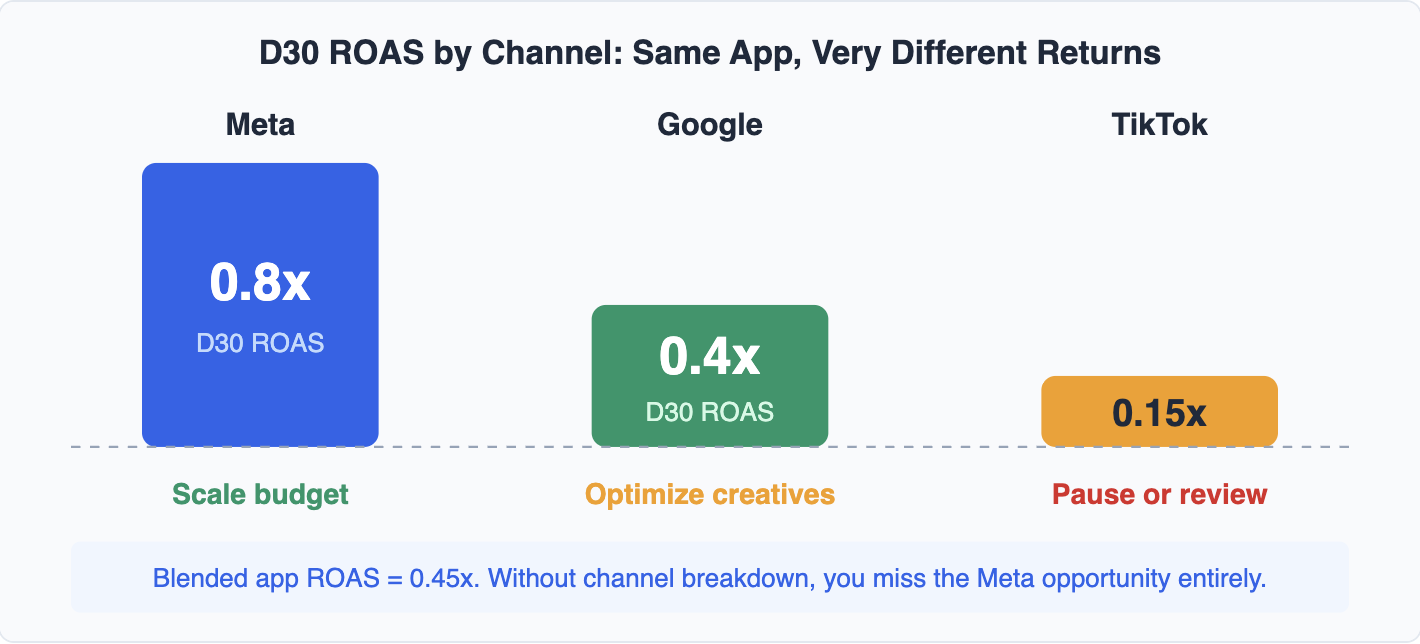
This pattern is common for Health and Fitness apps running Meta prospecting alongside Google App campaigns. The gap between top and bottom channels often exceeds 2x.
Connecting ad spend data to actual billing events like trial start, subscription, and renewal requires linking your campaign data to your revenue data. Without that connection, you are making budget decisions based on platform-reported numbers that each platform inflates in its own favor.
If you are running paid campaigns on Meta, Google, or TikTok and want to see which channels are actually driving paying subscribers, Airbridge Core Plan connects your ad spend to subscription revenue by source. You can see the full path from install to renewal, broken down by channel, campaign, and, where the network provides creative-level cost, ad creative. Airbridge Core Plan starts at $40+/mo after a 30-day free trial, with 500K data points a month included, $0.0001 per additional data point, and no annual contract. Attribution events and tracking link clicks do not count as data points.
For more on scaling paid spend once you can read channel-level data, see our guide on how to improve D30 ROAS for subscription apps.
Frequently Asked Questions
Our ROAS looks great on day one and terrible by day thirty. What should I be measuring instead?
Measure cumulative cohort ROAS at D7 and D30, net of refunds where your billing integration sends refund events, with prospecting and retargeting campaigns separated. A high day-one number in an ad platform dashboard is usually calendar-window revenue that includes renewals from older cohorts, plus bookings that are later refunded or cancelled. Cohort ROAS by day since install removes both effects.
What is a good D30 ROAS for a subscription app?
There is no universal target. D30 ROAS equals revenue per install divided by cost per install, and both vary by category, platform, and country. Using RevenueCat's 2025 benchmark data, a Health and Fitness app with median CPI on iOS sits near 0.11x at D60, and it can still be profitable if Year 1 LTV per payer is near the category median of $27.21. Compare your D30 against your own LTV and payback target, not against a single industry number.
Should I use D1 ROAS at all?
Use Day 1 as a signal for trial starts and cost per trial, not for revenue. Subscription revenue on Day 1 is mostly intro offers and annual plans paid upfront, and refunds have not been processed yet. Budget decisions belong to D30 for monthly plans and D60 or later for annual plans.
How do I get D-N cohort ROAS when Meta and Google only report their own numbers?
Connect ad spend from each channel and subscription revenue from your billing platform in one cohort report. Airbridge Core Plan pulls cost from Meta, Google, TikTok, and Apple Search Ads, receives subscription events from RevenueCat, Adapty, or Superwall, and shows cumulative ROAS by day since install in the Revenue Report.
ROAS Is Just the Starting Point
The metric tells you whether an ad campaign is generating subscription revenue relative to what you spent. It does not tell you whether those subscribers will stay for three months or three years. It does not tell you whether the channel you are scaling is actually responsible for the lift, or whether those users would have found you anyway.
That is why the teams who use this data well always read it alongside LTV and cohort retention data. The early number is a signal. Unit economics are the verdict.



Ready to transform your mobile growth?
Learn how Airbridge helps leading brands measure and optimize every touchpoint.