Which MMP SDK Supports Your Framework? React Native, Expo, Flutter, iOS & Cordova Compared


You picked a cross-platform framework and shipped your app. Now you need to connect a mobile measurement partner, and the first question is: does the MMP you want actually have an official SDK plugin for your framework?
Most developers discover this gap after committing to a framework. A Flutter app cannot drop in a React Native npm package. Expo Go blocks native modules entirely. The right time to check MMP SDK compatibility is before you commit to a framework, not after your first failed integration attempt.
This guide answers which MMP SDK supports React Native, Expo, Flutter, iOS, and Cordova. For each framework, you will find which major MMPs offer official support, how the integration model works, and what limitations to expect.
Key Takeaways
-
All major MMPs support iOS native, Android native, React Native, and Flutter with official SDKs. Coverage is consistent across AppsFlyer, Adjust, Airbridge, Singular, and Branch for these four frameworks.
-
Expo is the most common source of SDK integration confusion. Expo Go does not support native modules. MMP SDKs require EAS Build or Expo prebuild to work.
-
React Native leads subscription revenue performance. Across 75,000+ subscription apps, React Native generates a median Y1 LTV of $22.80 per payer, versus Flutter's $13.81 and native's $16.15 (RevenueCat, State of Subscription Apps 2025).
-
Cordova plugins typically receive less active maintenance than native, React Native, or Flutter plugins. Verify the last release date before committing.
-
S2S (server-to-server) integration is a framework-agnostic fallback. If subscription events live on your backend, S2S bypasses the client SDK entirely.
Why Your Framework Determines MMP SDK Compatibility
A mobile measurement partner (MMP) SDK is, at its core, a native iOS or Android library. It relies on OS-level APIs for device identification (IDFA on iOS, GAID on Android), app lifecycle events, and network calls. None of these can be made from a pure JavaScript or Dart runtime.
That is why each framework needs a different integration approach, and why not all frameworks behave the same when you try to add an MMP SDK.
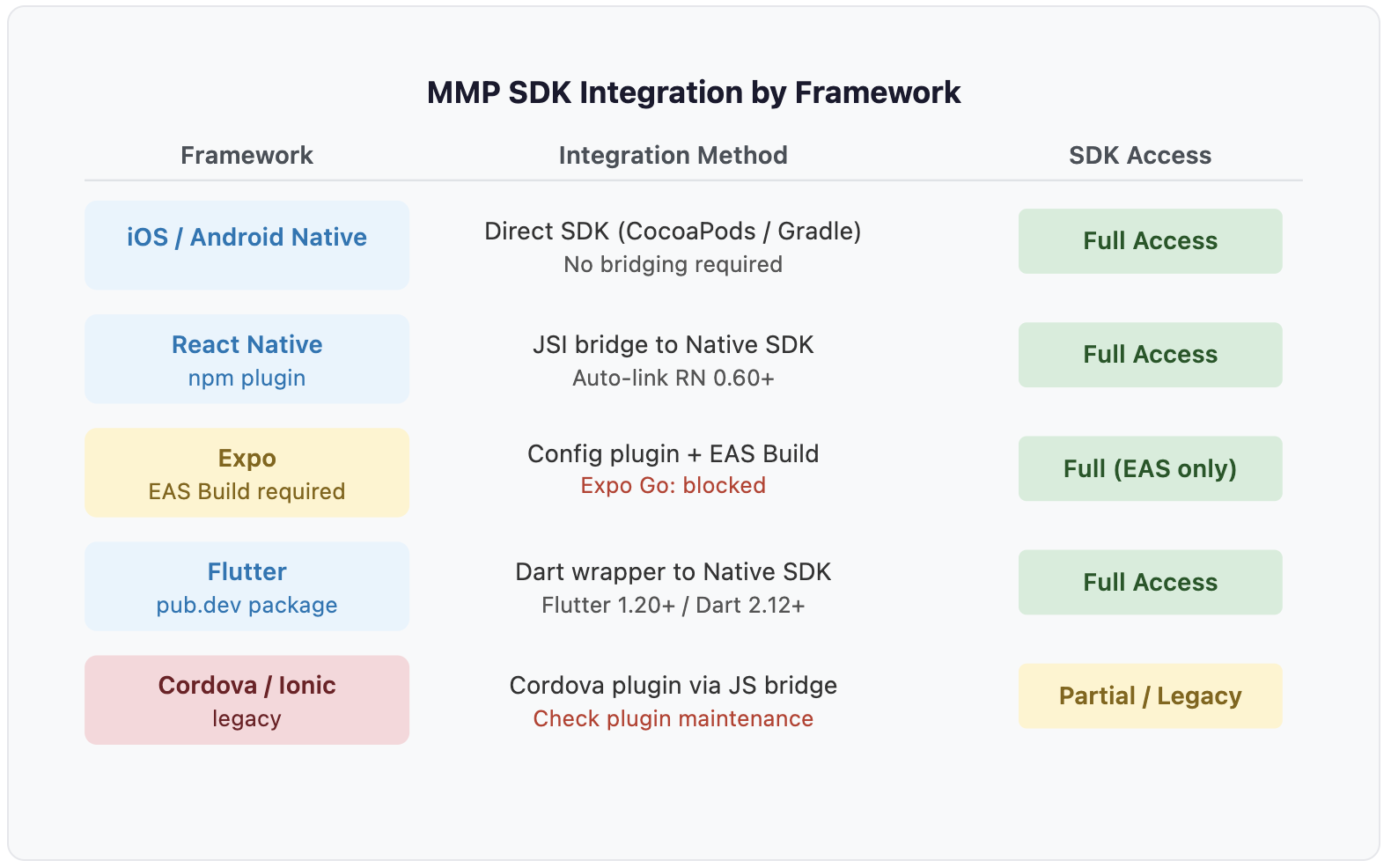
| Framework | Language | How It Reaches Native Code | MMP SDK Method |
|---|---|---|---|
| iOS / Android Native | Swift / Kotlin | Direct OS access | Native library (CocoaPods / Gradle) |
| React Native | JavaScript | JSI bridge | npm plugin |
| Expo | JavaScript | JSI bridge (EAS Build only) | Config plugin + EAS Build |
| Flutter | Dart | Platform channels | pub.dev package |
| Cordova / Ionic | HTML + JS | WebView JS bridge | Cordova plugin |
The key rule: if your framework compiles to native code (React Native via EAS, Flutter), the SDK wrapper can call native methods and you get full feature access. If it runs in a managed sandbox (Expo Go, some Cordova setups), the native module layer is missing and the SDK will fail silently or throw an error.
How Each Framework Integrates an MMP SDK
1. iOS and Android Native: Direct SDK Integration, No Bridging Needed
Native apps connect to MMP SDKs directly through the platform's standard package managers.
-
iOS: CocoaPods or Swift Package Manager
-
Android: Gradle dependency
-
Auto-linking: Not needed; direct library integration
-
SDK access: Full feature set, earliest access to new SDK releases
This is the baseline all other frameworks abstract on top of.
2. React Native: npm Plugins via the JSI Bridge
React Native communicates with native iOS and Android code through the JavaScript Interface (JSI). MMP providers ship React Native plugins as npm packages that wrap their native SDKs.
-
Install command:
npm install [plugin], thennpx pod-install(iOS) -
Auto-linking: Enabled by default in React Native 0.60+
-
SDK access: Full feature set on both iOS and Android
-
All 5 major MMPs: Official npm plugins maintained and versioned
3. Expo: Full SDK Support Requires EAS Build, Not Expo Go
Expo is the officially recommended starting point for new React Native projects. It adds managed build tooling and OTA updates. The critical limitation: Expo Go is a pre-built runtime that does not include arbitrary native modules. Any attempt to initialize an MMP SDK in Expo Go results in a "native module not found" error.
To use an MMP SDK in an Expo project, you have two paths:
-
EAS Build: Configure the MMP config plugin in your
app.jsonfile. EAS then compiles a custom development client with the native SDK bundled in. -
Expo prebuild: Run
npx expo prebuildto generate the nativeios/andandroid/directories locally, then integrate the MMP SDK as you would in a bare React Native project.
Most major MMP providers have dedicated Expo config plugins. See the provider's Expo SDK documentation for setup steps.
4. Flutter: Clean pub.dev Integration with a Version Requirement
Flutter compiles Dart to native ARM code. MMP providers publish Flutter plugins on pub.dev that expose native SDK methods through Dart APIs.
-
Install command:
flutter pub add [plugin_name] -
SDK access: Full feature set on iOS and Android
-
Key requirement: Most current plugins require Flutter 1.20+ and Dart 2.12+ (null safety)
-
All 5 major MMPs: Official pub.dev packages, actively maintained
Legacy Flutter projects running older Dart versions need to migrate before they can use current MMP plugin versions.
5. Cordova and Ionic: Official Plugins with Active Maintenance Caveats
Cordova wraps a web app in a native WebView with JavaScript bridges to device APIs. MMP providers publish plugins installable via cordova plugin add [plugin]. All five major providers have official Cordova plugins, but these tend to receive fewer updates than their React Native and Flutter counterparts.
-
SDK access: Functional, but check version compatibility with current native SDKs
-
Key risk: Plugins that have not been updated in 12 to 18 months may not support newer iOS attribution APIs such as SKAdNetwork 4.0
-
Ionic users: Verify the plugin's last release date before integrating
MMP SDK Compatibility Matrix: All Major Providers by Framework
The table below covers the five major mobile measurement partners (MMPs) and is based on each provider's official developer documentation (reviewed 2026).
| Framework | AppsFlyer | Adjust | Airbridge | Singular | Branch |
|---|---|---|---|---|---|
| iOS Native | Official | Official | Official | Official | Official |
| Android Native | Official | Official | Official | Official | Official |
| React Native | Official npm | Official npm | Official npm (v4) | Official npm | Official npm |
| Expo | Via RN + config plugin | EAS Build config plugin | Official Expo SDK (v4) | Via RN + config | Official Expo guide |
| Flutter | Official pub.dev | Official pub.dev | Official pub.dev (v4) | Official pub.dev | Official pub.dev |
| Cordova / Ionic | Official plugin | Official plugin | Official Cordova-Ionic SDK | Official (v1.8+) | Official plugin |
Note on Expo integration approach: Airbridge publishes a dedicated airbridge-expo-sdk npm package, but it requires airbridge-react-native-sdk as a mandatory peer dependency and uses a config plugin architecture: the same mechanism as "Via RN + config plugin." For other providers, "Via RN + config plugin" means they use their React Native package with an Expo config plugin wrapper. The underlying approach and EAS Build / prebuild flow is equivalent across all providers; the difference is packaging convenience, not architecture.
Want to see how MMP SDK framework works with your data?
Get hands-on with Airbridge and see real results.
Try It Free →Common MMP SDK Integration Mistakes to Avoid
1. Initializing an MMP SDK Inside Expo Go
What you see: A "native module not found" error at SDK initialization, or silent failure with no events tracked.
Why it happens: Expo Go is a sandboxed environment. It does not compile arbitrary native modules. The MMP SDK relies on native code that simply is not there.
Fix:
-
Run
npx expo prebuildto generate native project directories, or set up EAS Build in your project. -
Configure the MMP config plugin in your
app.json. -
Build and install a custom development client that includes the native SDK.
Budget time for this: initial EAS Build setup typically takes 2 to 4 hours for teams unfamiliar with it, covering Apple/Google credentials, EAS profile configuration, and a first successful preview build.
2. Ignoring Flutter Null Safety Version Requirements
What you see: Package resolution errors or compilation failures when running flutter pub get.
Why it happens: Most current Flutter MMP plugins require Dart 2.12+ for sound null safety. Pre-null-safety projects (built before 2021 and not yet migrated) are incompatible with current plugin versions.
Fix: Migrate your project to null safety before integrating. If migration is not immediately feasible, ask your MMP provider whether they maintain a legacy-compatible branch.
3. Committing to a Stale Cordova Plugin
What you see: Attribution events fail silently on iOS, especially for newer installs that go through SKAdNetwork 4.0.
Why it happens: A Cordova plugin that has not been updated in 12 to 18 months may not support newer native attribution APIs, even if it initializes without error.
Fix: Before integrating, check the plugin's GitHub repository for three signals: the last commit within the past 6 months, open issues receiving responses within 30 days, and a named maintainer in the README. If the plugin fails any of these, contact your MMP provider to confirm active support or ask whether S2S is the recommended path.
4. When to Use S2S Instead of a Client SDK
S2S (server-to-server) integration sends subscription events directly from your backend to the MMP's API, bypassing the client SDK layer. This is relevant when:
-
Subscription state is managed server-side (e.g., via RevenueCat or Adapty)
-
Your client framework has a SDK compatibility gap
-
You want subscription events to fire regardless of whether the user has the app open
You still need the client SDK for install attribution on the device. But the subscription event pipeline (Start Trial, Subscribe, Unsubscribe) can route through S2S independent of framework.
Subscription Revenue by Framework: React Native vs Flutter vs Native
SDK compatibility is a developer concern. Framework selection also has a business dimension.
According to the RevenueCat State of Subscription Apps 2025 report (75,000+ apps analyzed), subscription revenue performance differs measurably across frameworks:
| Framework | D35 Conversion (Median) | D60 Revenue per Install | Y1 LTV per Payer (Median) |
|---|---|---|---|
| React Native | 2.2% | $0.44 | $22.80 |
| Native iOS/Android | 1.9% | $0.27 | $16.15 |
| Flutter | 1.8% | $0.26 | $13.81 |
| Other (incl. Cordova/Ionic) | 1.4% | $0.29 | $16.38 |
Note: The native iOS/Android D35 median (1.9%) matches the SOSA 2025 global median because native apps form the majority reference population. The per-framework cut confirms this is a real framework-level result, not a rounding artifact.
React Native leads across every metric. At the 90th percentile, the gap is sharper still: React Native apps reach a D60 revenue per install of $3.54, compared to $1.53 for native iOS/Android apps. The "Other" bucket, where most Cordova and Ionic apps land, trails on all three metrics, reinforcing the recommendation to avoid Cordova for new subscription apps in 2026.
One structural factor behind React Native's lead: the combination of Expo and AI-assisted coding tools has driven a sharp increase in React Native adoption since 2025, attracting more product-focused development teams to the ecosystem (RevenueCat, State of Subscription Apps 2025, §7).
These figures reflect the full population on each framework and include differences in product quality and marketing spend, not just framework effects. If you are choosing between React Native and Flutter for a subscription app and the decision is otherwise close, the revenue data gives React Native a further edge.
How to Choose the Right Framework for Your MMP SDK
If You Have Not Chosen a Framework Yet
| Your Situation | Best Choice | Reason |
|---|---|---|
| JavaScript/React team, new project | React Native + Expo (EAS Build) | Broadest MMP plugin ecosystem, strongest revenue benchmarks |
| Dart team or pixel-perfect UI needed | Flutter | Official pub.dev support from all 5 major MMPs, clean integration |
| Single-platform, native-experienced team | iOS or Android native | No bridging overhead, earliest access to new SDK features |
| Web-first team, new project in 2026 | Capacitor (not Cordova) | Capacitor, by the Ionic team, is the spiritual successor to Cordova. It uses native iOS/Android projects directly instead of the WebView bridge, giving it better native module access and a more actively maintained MMP plugin ecosystem than Cordova. |
If You Are Already on a Framework
-
On Expo without EAS Build configured: Set this up before starting MMP integration. It is the single most common blocker.
-
On React Native: Check that your MMP provider's npm plugin version is compatible with your React Native version.
-
On Flutter: Confirm your Dart version is 2.12+ before running
flutter pub add. -
On Cordova: Check the MMP plugin's last GitHub commit and open issues. Ask your provider if S2S is available as a fallback.
-
Already integrated and seeing missing events: Verify the SDK is initialized after native code is compiled, not in a managed sandbox.
Start Measuring Subscriptions Across Any Framework
Once your SDK is integrated and subscription events are flowing, the next question is which MMP to use for subscription app revenue measurement specifically.
Airbridge Core Plan has official SDK support for every framework covered in this guide:
| Framework | Airbridge SDK | Version |
|---|---|---|
| iOS Native | Official | v4 |
| Android Native | Official | v4 |
| React Native | Official npm | v4 |
| Expo | Official Expo SDK | v4 (EAS / prebuild) |
| Flutter | Official pub.dev | v4 (Flutter 1.20+, Dart 2.12+) |
| Cordova / Ionic | Official Cordova-Ionic SDK | Latest |
Core Plan includes Airbridge's full library of 25 standard events, covering e-commerce, subscriptions, gaming, and user lifecycle. App installs are automatically tracked by the SDK. Key events relevant to subscription apps include Start Trial, Subscribe, Unsubscribe, and Order Complete.
Attribution covers Meta, Google, Apple Search Ads, and TikTok for Business, the four major self-attributing networks (SANs) supported by Airbridge Core Plan and the dominant paid UA channels across most app categories.
Core Plan supports a maximum of two third-party integrations and does not include raw data export or advanced reporting features, to reduce setup complexity for early-stage teams.

Ready to transform your mobile growth?
Learn how Airbridge helps leading brands measure and optimize every touchpoint.