How to Migrate to Airbridge: Channel Integration Checklist


You've made the call to migrate to Airbridge. The contract with your current mobile measurement partner is expiring, the pricing crossed a line, or the subscription analytics gap finally got too wide. The decision is done.
The SDK swap isn't where migrations break. Channel integrations are. Leave one SAN setting pointing to your old MMP, skip converting your tracking links, or miss TikTok's mandatory SAN migration step, and you'll spend weeks diagnosing data gaps that could have been prevented in an afternoon.
This checklist covers the exact failure points, the right order to address them, and what to verify before you restore full campaign spend.
Key Takeaways
-
SAN integrations don't auto-switch. Meta, Google, Apple Search Ads, and TikTok each require manual disconnection from your old MMP and reconnection to Airbridge. Skipping this step causes double-attribution or creates silent data gaps.
-
Dual SDK overlap is intentional, but time-bounded. Running both SDKs in parallel for at least 14 days protects data for users who haven't updated to the new app version. Running them indefinitely causes event duplication and double charges from Meta and TikTok.
-
TikTok requires a full SAN migration, not just a link swap. Apps on legacy integration cannot create new campaigns or share in-app events (TikTok For Business).
-
SKAN postbacks route to one MMP only. The SKAN data gap starts on your app release date and cannot be recovered retroactively. Plan your release date with this in mind.
-
Start channel cutover from your lowest-spend network. This limits exposure if something breaks during the link transition window.
Why Channel Integrations Break When You Switch MMPs
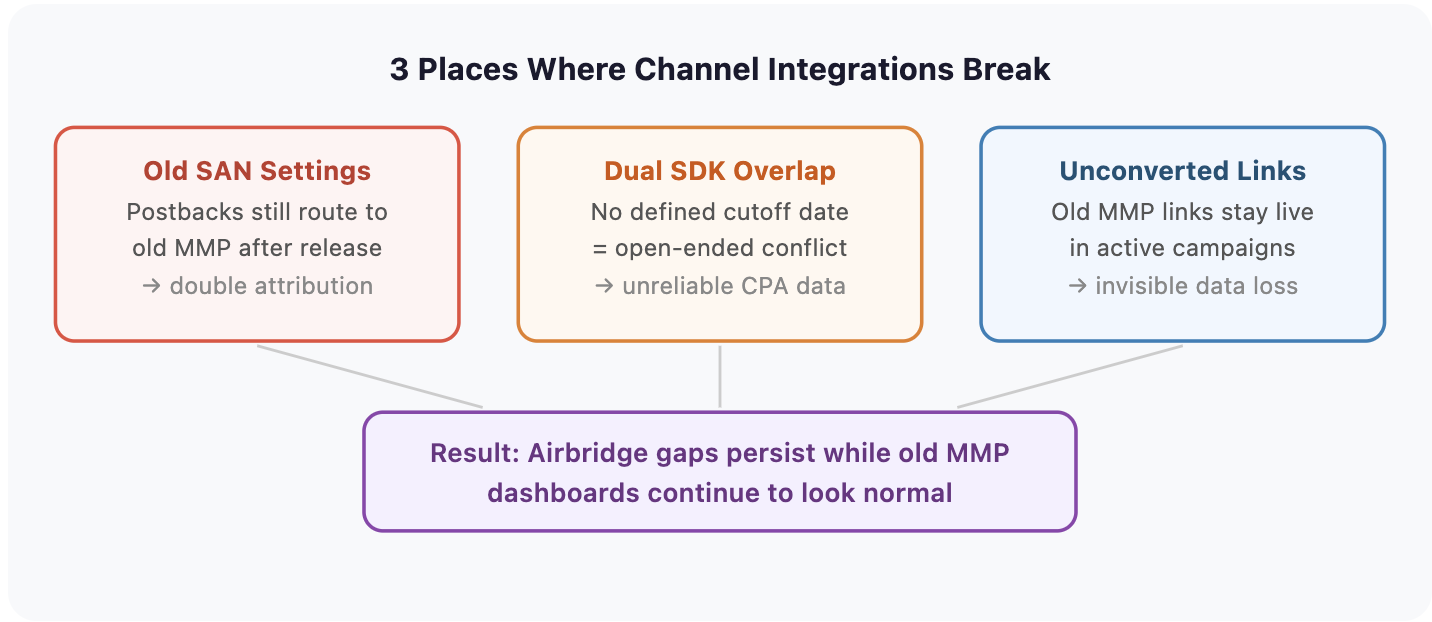
The real failure patterns appear at the channel level, after the new SDK is integrated and tested.
Your Old SAN Settings Stay Live After You Switch MMPs
When you first set up Meta, Google Ads, Apple Search Ads, or TikTok inside AppsFlyer, Adjust, or Branch, you configured those channels to route postback events to your old MMP. That setting doesn't expire when your contract does.
If you release the new app with the Airbridge SDK installed but leave the old MMP's SAN configuration active, three things happen at once. Postback events fire to both tools. Ad platform optimization keeps reading signals from the old MMP, not Airbridge. The new MMP shows gaps while the old MMP dashboard looks completely normal.
Your team assumes the migration is working because the old tool looks fine. Attribution is incomplete for weeks.
Running Both MMP SDKs Without a Cutoff Date Causes Double Attribution
The failure mode is an open-ended overlap. When both SDKs are active and both MMP postback rules are live, the same install event gets attributed by two systems. Ad platforms receive duplicate optimization signals. CPA calculations become unreliable because both cost and conversion data are inflated.
Define the dual-SDK window before release. Fourteen days covers the majority of users who update to a new app version. After that window, remove the old SDK.
Old Tracking Links Keep Sending Data to Your Previous MMP After Launch
For ad networks outside the SAN ecosystem, and any campaigns using custom tracking links generated by your old MMP, those links continue routing attribution data to your old tool after migration. You're paying Airbridge while feeding your old MMP.
This issue is easy to miss. Campaigns keep running. The links don't return errors. Old MMP dashboards continue showing active traffic. The data loss is invisible until you compare attribution totals.
Pre-Migration Setup: 3 Steps to Complete Before Going Live With Airbridge
Complete these three steps before your developer releases the app update. Steps 1 and 2 can run in parallel. Step 3 (identifier upload) runs immediately before release.
Step 1: Register Your App and Set Up Your Airbridge Event Taxonomy
Register your app in the Airbridge dashboard. Under Settings > Tokens, you'll find the SDK credentials and API keys. Share these with your developer along with the SDK Quickstart.
Before any SDK code is written, finalize your event taxonomy. This is the event naming structure Airbridge uses to collect behavior. Airbridge's 29 standard events cover the core funnel, including subscription events like Start Trial, Subscribe, and Unsubscribe. They eliminate the custom schema design work that delays migrations from general-purpose setups.
If you're migrating to Core Plan, it covers Google, Meta, Apple Search Ads, and TikTok integrations plus up to two additional third-party integrations (Core Plan). Confirm your current integration stack fits that limit before setup.
Review the Airbridge attribution model at this stage. Attribution windows and click-priority rules differ across MMPs. Configure your attribution rules before live data flows in. Changes after campaigns are running are harder to interpret cleanly.
Step 2: Remove Old MMP Postbacks and SAN Settings Before App Release
| Action | Where |
|---|---|
| Remove old MMP as attribution partner | Inside each SAN channel dashboard (Meta, Google, ASA, TikTok) |
| Delete postback rules pointing to old MMP | Old MMP's channel integration settings |
| Pause campaigns using old tracking links | Ad platform campaign manager |
If postback settings and SAN integrations aren't disabled before the new app releases, events get counted in both tools. Ad platforms receive conflicting optimization signals during the overlap window.
Step 3: Upload Device IDs to Prevent False First-Install Spikes in Airbridge
When the new MMP first onboards your app, it has no record of which device IDs or user IDs have already been attributed. This creates a temporary spike in "first events": it counts returning users as new installs, with no record of their previous attribution.
Upload device IDs and user IDs from your old MMP before releasing the new app. These identifiers let it recognize returning users and exclude them from new-install counts, producing a cleaner CPA baseline during the transition window.
This step is strongly recommended when active campaigns are running, and effectively mandatory if significant spend is live.
Want to see how Migrate to Airbridge works with your data?
Get hands-on with Airbridge and see real results.
Try It Free →Channel Reconnection Checklist: TikTok, Apple, Meta, and Google
Work through channels from highest-risk to lowest. TikTok carries the most migration complexity and should not be last.
| Priority | Channel | Key Risk |
|---|---|---|
| 1 | TikTok for Business | SAN migration mandatory; legacy integration defunct since March 31, 2025 |
| 2 | Apple Search Ads | SKAN postbacks route to one MMP; gap is not retroactively recoverable |
| 3 | Meta Ads | Dual postback creates conflicting optimization signals |
| 4 | Google Ads | Attribution window mismatch skews first-cycle ROAS comparisons |
Channel 1: TikTok for Business (Mandatory SAN Migration)
TikTok carries the most migration complexity. Handle it first.
TikTok's legacy tracking-link-based MMP integration was formally discontinued on March 31, 2025. If your app was on legacy integration with AppsFlyer, Adjust, or Branch, the SAN migration is not optional. Remaining on legacy integration blocks new campaign creation and disables in-app event sharing.
Steps:
-
In Airbridge dashboard: Integration > Ad Channel Integration > TikTok For Business
-
Enable the channel integration toggle and register your TikTok App ID
-
Enable In-app Event Postback and configure event mapping (Subscribe, Start Trial, Order Complete)
-
In TikTok Ads Manager: navigate to Tools > Events, find your app, and select "Migrate to SAN"
-
Remove the old MMP as the attribution partner in TikTok Ads Manager
What can break: If you plan to use Value-Based Optimization (VBO), check TikTok's current VBO eligibility criteria before launching. VBO requires a sustained volume of purchase-with-value postbacks before it unlocks. App Event Optimization (AEO) activates after a single qualifying event. Budget for a ramp-up window before either feature stabilizes.
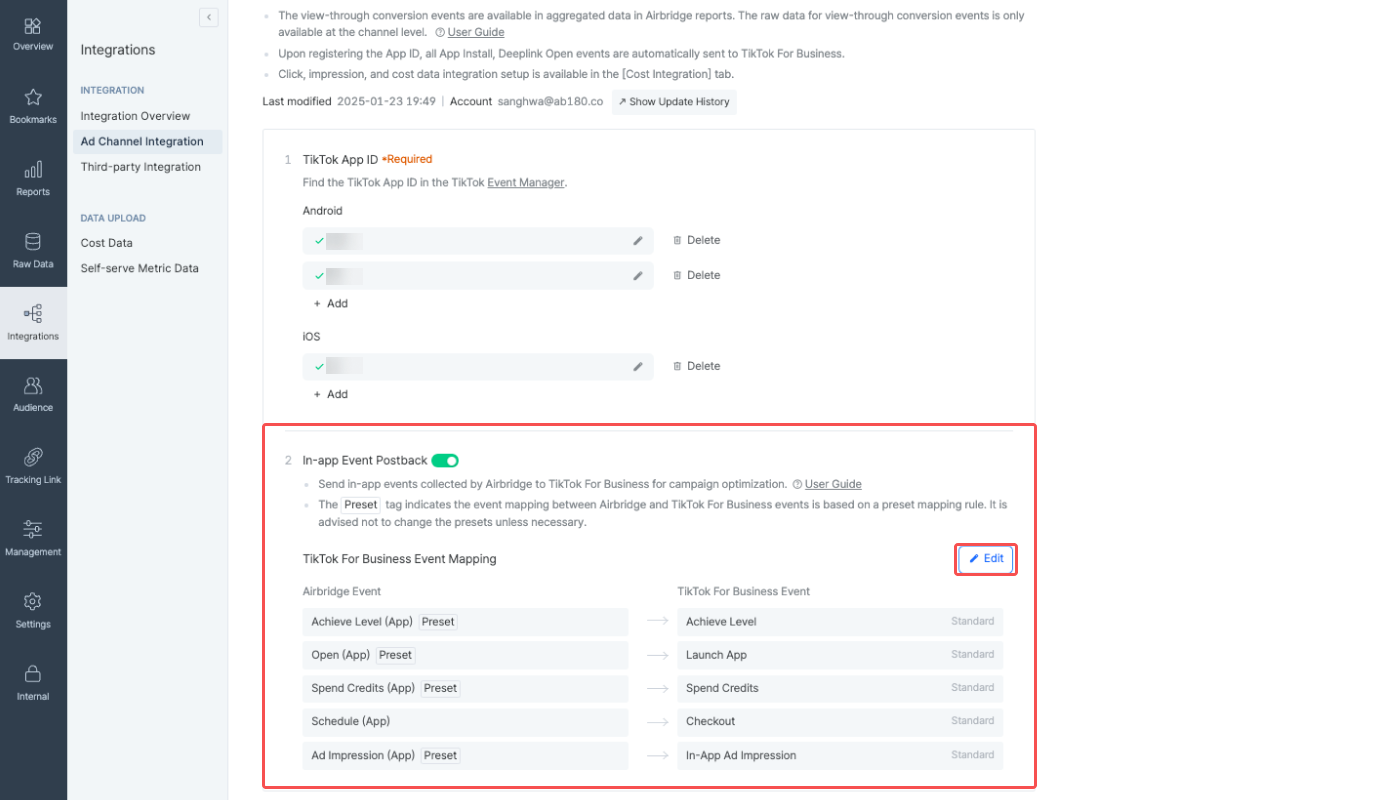
Airbridge dashboard: TikTok For Business channel integration with In-app Event Postback and event mapping
Channel 2: Apple Search Ads (SKAN Data Gap Risk)
Steps:
-
Confirm your Airbridge iOS SDK is version 1.15.3 or later, required for the AdServices framework
-
Enable the AdServices framework in your iOS app build
-
Connect Apple Search Ads in Airbridge: Integrations > Ad Channel Integration > Apple Search Ads
-
Configure SKAdNetwork (SKAN) authentication and map your conversion value schema to Airbridge's subscription events
What can break: SKAN postbacks route to exactly one MMP. Until you release the app version containing the Airbridge SDK, your old MMP receives all SKAN conversion data. That data cannot be retroactively migrated to Airbridge. The gap in SKAN data starts exactly on your app release date and cannot be recovered. Plan release timing with this in mind.

Airbridge dashboard: Apple Search Ads channel integration setup
Channel 3: Meta Ads (Dual Postback Conflict)
Steps:
-
In Airbridge dashboard: Integrations > Ad Channel Integration > Meta Ads
-
Enable the channel integration toggle in the Channel Integration tab
-
Enable In-app Event Postback
-
Verify event mapping: confirm Airbridge's Subscribe and Start Trial events are mapped to the Meta events your campaigns use for optimization
What can break: Meta's ad algorithm continues reading signals from your old MMP until you complete the Airbridge SAN setup and remove the old integration. If both are active simultaneously, Meta receives duplicate postback signals, which distorts conversion counts and campaign optimization.
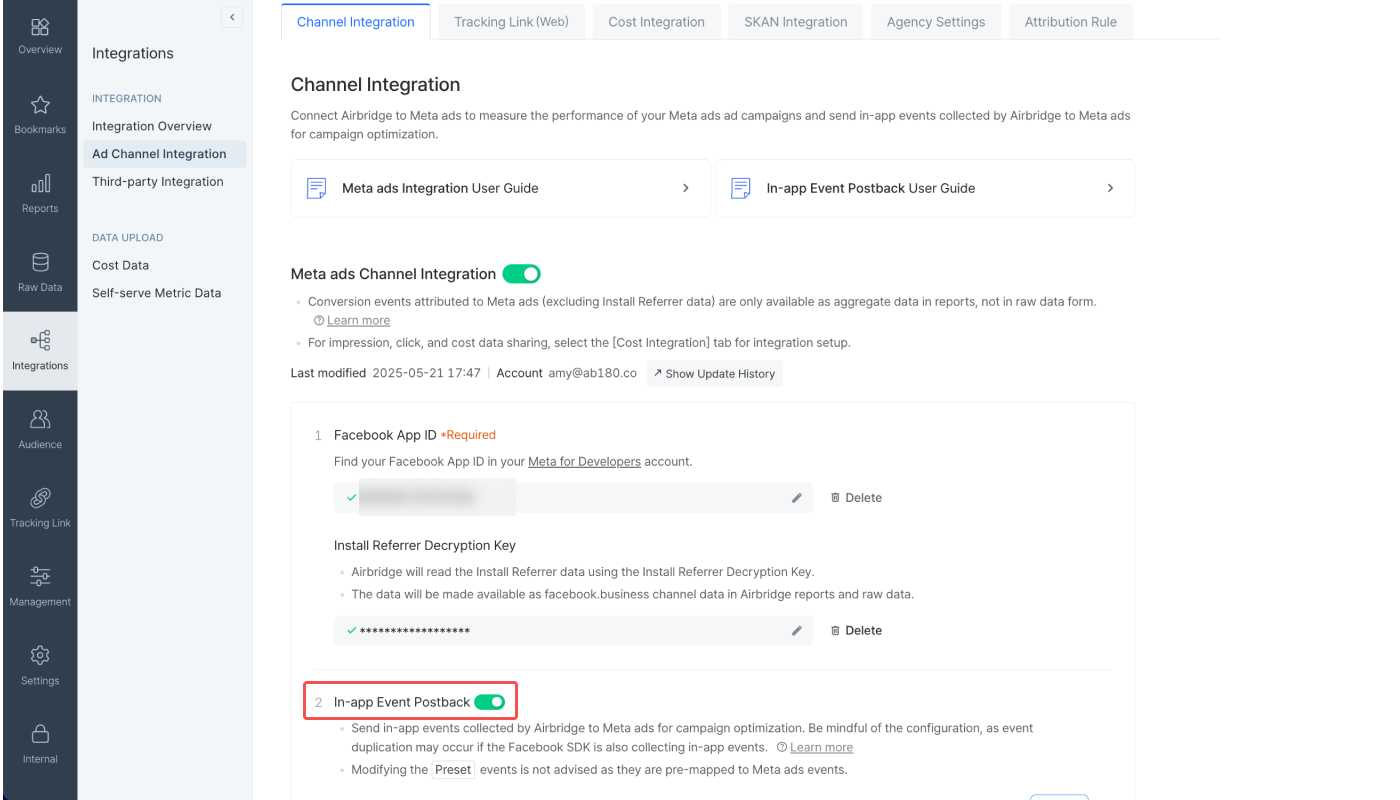
Airbridge dashboard: Meta Ads channel integration with In-app Event Postback enabled
Channel 4: Google Ads (Attribution Window Mismatch)
Steps:
-
Connect Google Ads in Airbridge under SAN integrations and authorize the account link
-
Map in-app conversion events to Google Ads conversion goals
-
In Google Ads: verify conversion goals reflect Airbridge's event names
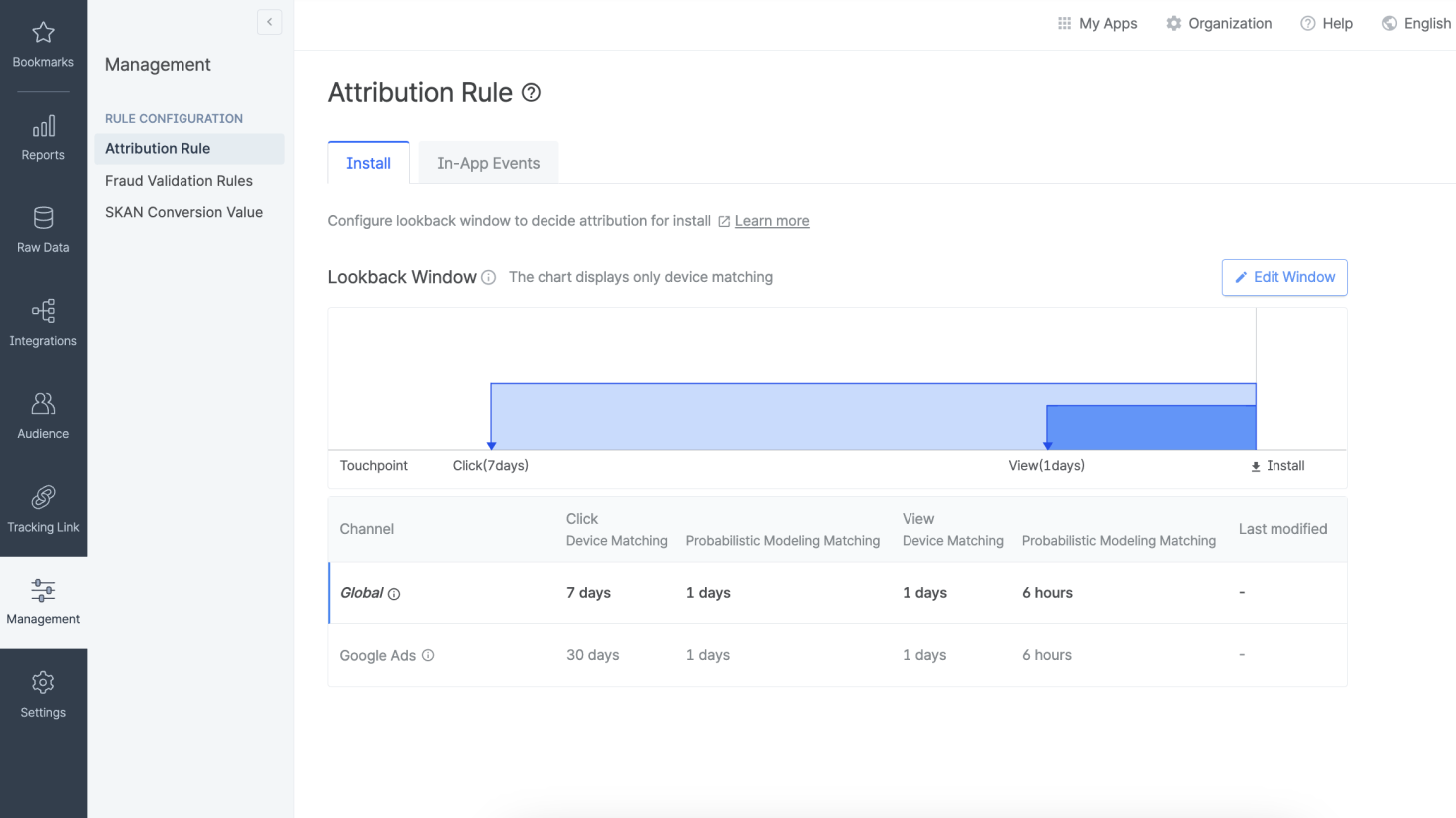
What can break: Google Ads' default click-through conversion window is 30 days. A tighter Airbridge window versus Google's 30-day default typically understates first-cycle ROAS. Align these settings before your first reporting cycle closes.
 lookback window set to 30 days">
Airbridge Attribution Rule: Google Ads click lookback window default (30 days) versus global setting
Post-Migration Verification: How to Confirm Airbridge Is Receiving Clean Data
After releasing the updated app, run these checks before restoring campaign budgets.
Confirm All Four Channels Are Sending Live Postbacks
Typically within 24-48 hours of the new app version going live, event data should appear under each channel integration:
-
Meta: installs and subscription events appear with correct channel attribution
-
Google: conversion data imports typically reflect in Google Ads within 24 hours
-
Apple Search Ads: installs from ASA campaigns appear with correct source attribution
-
TikTok: Order Complete and event postbacks appear under TikTok channel reporting
If any channel shows zero attributed events after 48 hours of active traffic, the SAN setup is likely incomplete or the old MMP is still active as the attribution partner.
Why Your Airbridge and Ad Platform Numbers Won't Match Exactly
Discrepancies between Airbridge and ad platform dashboards are common and expected (TikTok For Business). Self-attributing networks apply their own attribution logic. Each platform uses different lookback windows by default. The numbers will not match exactly.
A discrepancy that's unusually large signals a specific problem: a broken postback, an unconverted tracking link, or an old MMP integration that's still active.
Remove the Old MMP SDK After 14 Days
After 14 days post-release (rationale in the dual-SDK section above), remove the old SDK, revoke remaining API connections in your old MMP dashboard, confirm no live campaigns are still running on old tracking links, and export any historical data before closing the account.
Migrate Without the Data Gaps
Channel integrations are where most MMP migrations lose data, not the SDK. The Airbridge migration guide covers the full 7-step process from app registration through performance reporting. The checklist above maps the integration order that minimizes attribution loss: event taxonomy and old MMP cleanup first, identifier upload before release, then SAN channels in order of migration risk.


Ready to transform your mobile growth?
Learn how Airbridge helps leading brands measure and optimize every touchpoint.