UGC Handbook / Lesson 03 of 14 / Chapter I: Before you post
Set up tracking before anything goes live
1.8 million views. 47,000 likes. A screenshot of the app right in the video, and a pinned comment pointing to it.
Asked on Superwall's channel how many downloads that video produced, the founder (Jack Friks, who has shipped four apps) answered: "Honestly, I wish I had like any clue, but I just don't." With a few videos a week hitting a million or two views across two pages, "it's really like impossible to track."
This lesson is how you avoid ever having to say that.
Why a link straight to the App Store tells you nothing
The App Store is a wall. Whatever you know about a user before it, you lose on the other side.
UTM parameters do not survive the download. UTMs are the tags on a web link that say where a visitor came from, and Jacob Eiting, RevenueCat's CEO, said it on the Sub Club podcast with the weariness of someone who has said it 20 times: Apple does not allow them to flow through the App Store download. On the web the tags bucket every inbound. In the app stores, that bucket disappears at install.
Nathan Hudson of Perceptycs, on the same episode: "If I'm working with influencers and creators and I want them to push my product, it's hard to attribute when it's mobile. On web, I can just take them to a dedicated landing page, UTM parameters, perfect."
The old workarounds leak. Joseph Choi of Consumer Club described the classic influencer setup on the Superwall podcast: a promo code in the video, a link in bio, "use this code at checkout for 20% off." His verdict is that people do not really click links in bios anymore. Many close TikTok, open the App Store, and search the app name, which no code will catch.
David Barnard, host of Sub Club, noted in the WWDC 2025 episode that Apple lets you create only 10 different offer codes, "so you can't spin up 100 different affiliates, each with their own offer code and track them seamlessly."
"We'll see the spike" only works for monsters. Zack Hargett of Coconote told Sub Club that at 20 or 30 million views you know exactly when a video is going viral and can measure the down-funnel impact over those days. For the rest of the batch you are back to Friks: a few videos a week popping to a million or two, and no way to tell them apart.
And the count itself changes your decisions. A RevenueCat blog post on "How did you hear about us?" surveys ran the arithmetic in a worked example on paid campaigns: $10K spent, 200 purchases visible in ad-network data, so a $50 customer acquisition cost. Counting the survey answers too, the same spend showed 350 subscriptions and a CAC of roughly $29, and payback moved from day 90 to day 60.
The post is about paid ads, but the lesson transfers: if a creator's subscribers are invisible to you, you will price that creator wrong.
One link per creator, per angle, per video
The fix is a tracking link: it records the click, sends the user to the right store, and matches the later install and in-app events back to that click. The decision left to you is what you name things.
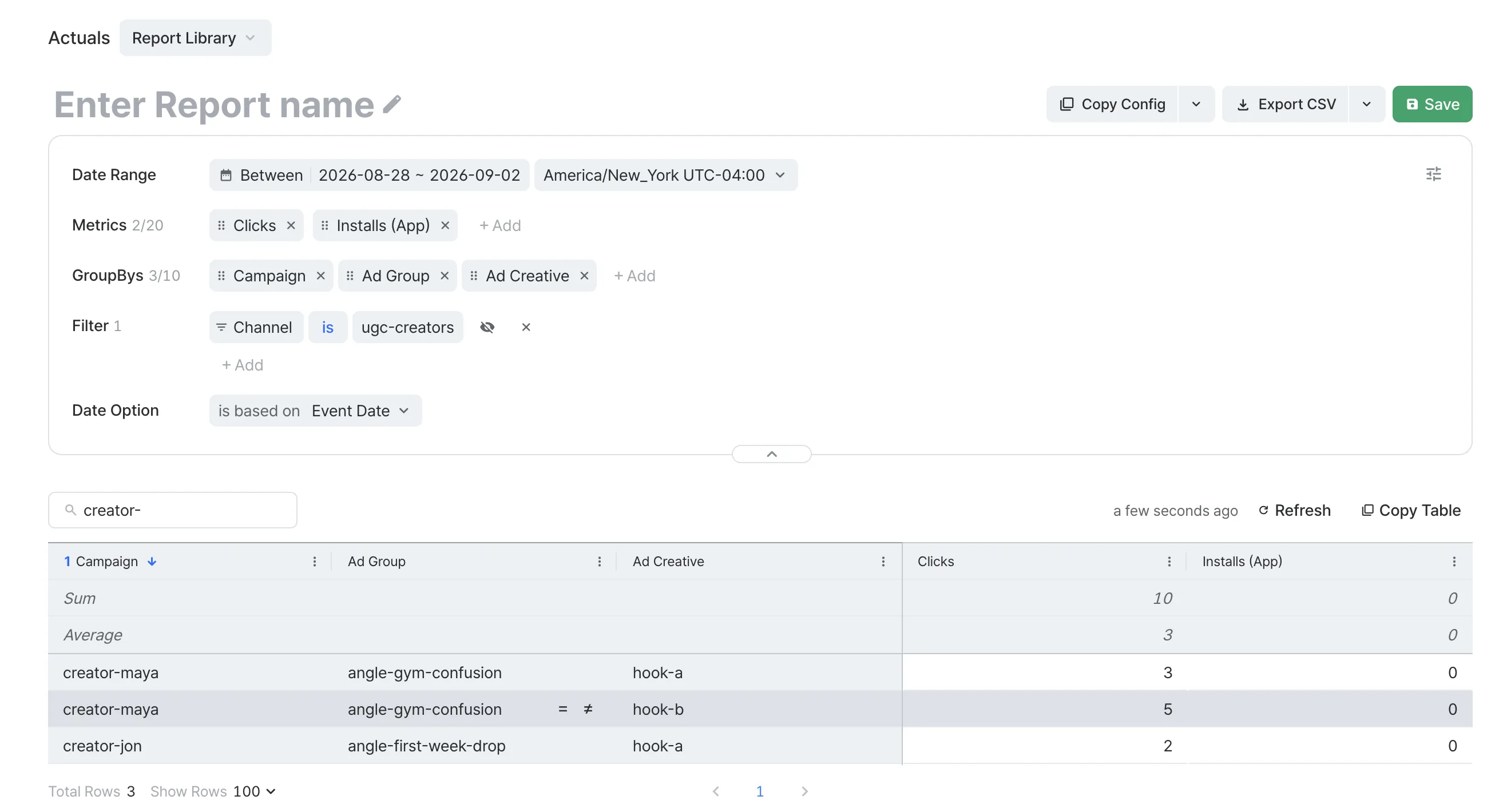
This handbook's recommended naming uses three parameters, each answering one question:
| Question | Parameter | Example value |
|---|---|---|
| Who delivered it? | Campaign (= creator) | creator-maya |
| What idea is it selling? | Ad Group (= angle) | angle-gym-confusion |
| Which version is this? | Ad Creative (= individual video or hook variant) | hook-b |
Put the whole UGC (user-generated content) program under one Custom Channel (for example ugc-creators) so it sits apart from paid channels and app-store organic traffic.
Keep the three separate. Do not build one long string like gym-confusion_maya_hook-b. Each parameter becomes its own column in reporting, so you can compare angles across creators or creators inside one angle. The creator is already in Campaign, so do not repeat it in Ad Creative.
One link per video, not per creator. One link across five videos gives you a creator score and nothing else. A link per video gives you both.
Name before you film. The link goes in the brief, not the post-production checklist. If the creator gets it a day after posting, day one is untracked.
Fill this in for your first video:
Connect the events that mean money
Clicks and installs are the top of the funnel. The bottom does not report itself.
Airbridge tracks subscriptions with three standard events: Start Trial, Subscribe, and Unsubscribe. Revenue is a value those events carry: send the amount, the currency, and the revenue flag with the event. Two ways to send them:
- Directly from your app's SDK, firing Start Trial when the trial begins and Subscribe when the purchase, trial conversion, or renewal completes.
- Through the RevenueCat integration. If RevenueCat already handles your subscriptions, its events map across: trial started → Start Trial, initial purchase / trial converted / renewal → Subscribe, cancellation → Unsubscribe. Send events one way, not both, or subscribers double-count.
Either way, the events land on the same user the tracking link tagged. That turns, say, "this creator drove 330 installs" into "this creator drove 17 paid subscribers." In-app purchases only: subscriptions sold through a web checkout are not covered here.
Why this changes what you can offer creators. One founder who took a peptide-tracking app to $100K in revenue in 70 days told Superwall that almost every creator he works with has an affiliate deal, usually a one-time 20% commission on subscription sales, "since we can see all that." His creators post more than he asks because they earn from it.
Where the link actually goes
The link only counts clicks it receives. Put it where the viewer is already looking.
- Link in bio for the whole run. The peptide-app founder above has creators keep it there for the month.
- Pinned comment on every video. Jack Friks pins his early, before the comment thread buries it.
- Comment-to-DM automation. The founders of Pushcroll, on Superwall, ask viewers to comment "app" and reply by DM with a direct store link. They said it "increased conversions like crazy," and the host added that unlike saying the name and hoping viewers search, this path is measurable.
One caveat to say out loud: some viewers will search your name in the store instead, and those installs will not tie back to a creator. A tracking link measures the users who clicked it, and that is the population you compare creators on.
Creator cost is your calculation. Airbridge does not know what you paid the creator. Cost per paid subscriber is arithmetic you do by hand: your creator spend ÷ paid subscribers from Airbridge. Cost-based metrics inside Airbridge appear once you connect an ad account (Lesson 13).
Do this before anything goes live
- Create the Custom Channel for your UGC program, for example
ugc-creators. - Write the naming sheet (worksheet below): one row per planned video with Campaign (= creator), Ad Group (= angle), and Ad Creative (= video). Lowercase, hyphens, no spaces.
- Create one tracking link per row, with Campaign, Ad Group, and Ad Creative set exactly as written.
- Send each creator their links with the brief. Bio link for the run, pinned-comment link per video.
- Connect Start Trial, Subscribe, and Unsubscribe via your SDK or the RevenueCat integration. Confirm one test purchase shows up before anyone posts.
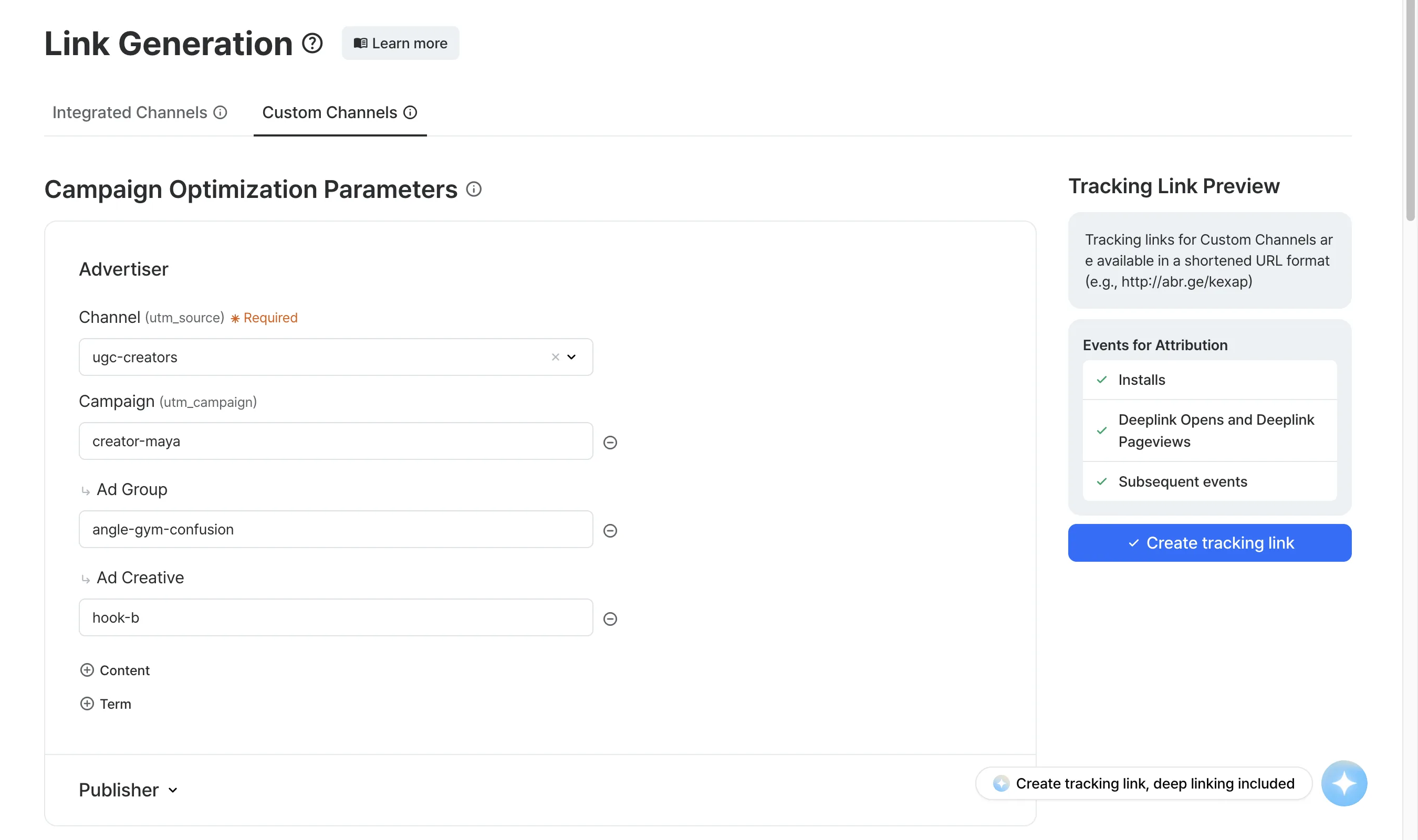
- Open Reports → Actuals once, before launch. Group by Campaign, then Ad Creative. If your test click and install sit in the right row, you are done.
WorksheetLink Naming Sheet
| Creator (Campaign) | Angle (Ad Group) | Video (Ad Creative) | Link created? | In bio / pinned? | Go-live date |
|---|---|---|---|---|---|
creator- |
angle- |
hook-a |
[ ] | [ ] / [ ] | |
creator- |
angle- |
hook-b |
[ ] | [ ] / [ ] | |
creator- |
angle- |
hook-a |
[ ] | [ ] / [ ] |
One video and one link per row, creator name only in the first column, no empty checkbox at go-live.
In short
- A link straight to the App Store cannot tell your creators apart. UTMs stop at the download, and viewers who search your name are invisible either way.
- One tracking link per video, named Campaign (= creator) / Ad Group (= angle) / Ad Creative (= video), created before the creator films. The creator's name lives in Campaign and nowhere else.
- Connect Start Trial and Subscribe before launch, via SDK or the RevenueCat integration, so each link reads clicks → installs → trials → paid subscribers.
Ready to see which of your videos actually pays?
Start a 30-day free trial → No sales call.