Jetpack Compose Navigation With Deep Links and Attribution
Learn how to configure Android intent filters, handle warm starts, route Airbridge callback URIs in Compose, and preserve attribution with deferred deep links.
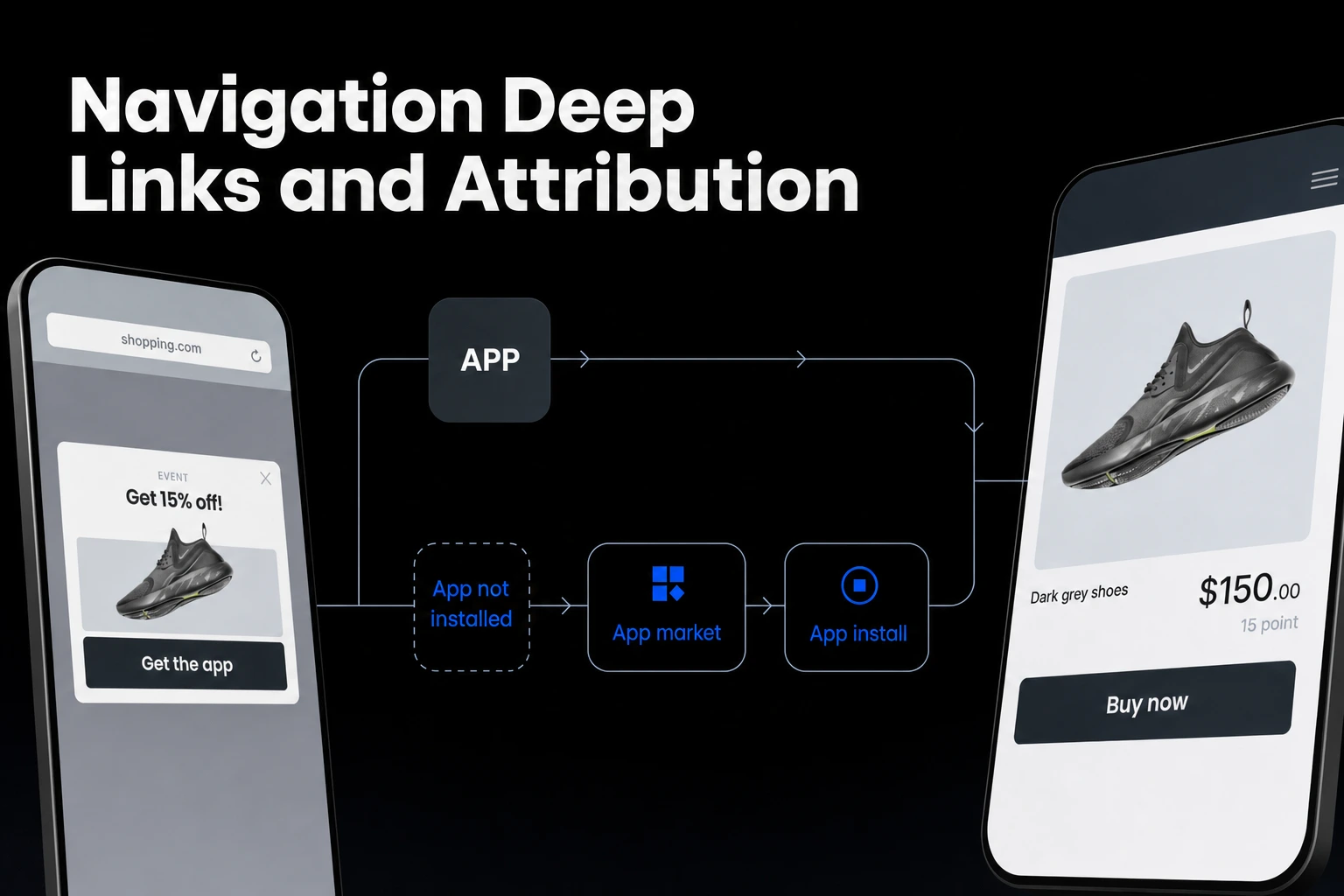
Key Takeaway
- Separate your
<intent-filter>blocks in the Android manifest and match your scheme so deep links open the app properly. - Update the Activity intent on warm starts and route your
NavHostusing the URI returned in the SDK'sonSuccesscallback. - Call
handleDeferredDeeplinkat an appropriate moment after install and launch to preserve campaign context and redirect users to the intended screen.
Deep links in a Jetpack Compose app usually fail in one of three ways: the link opens in the browser, NavHost drops the user on the home screen, or the campaign data is gone before the paywall. Each failure points to a different layer, from the manifest intent filters to how the Activity passes the intent to the SDK and the resolved URI to your NavController.
Manifest and NavHost Setup
When you configure your AndroidManifest.xml for the Activity that hosts your Compose NavHost, the scheme in your scheme deep link <intent-filter> must match the Android URI scheme entered in the Airbridge dashboard, excluding :// in the manifest value (DeepLink - Android SDK). For the App Links setup, you also add an intent filter under that deep-link-handling Activity in AndroidManifest.xml.
A common mistake in Android manifest configuration is grouping multiple <data> tags—such as custom schemes and HTTPS App Links—inside one filter block. You should use separate <intent-filter> tags instead, because adding all <data> tags to a single intent filter may prevent deep links from opening the app properly.
If your App Links still open in the browser rather than triggering your Compose Activity during production testing, the issue often lies in certificate signing rather than your Kotlin code. When an app uses Play App Signing, the servers re-sign the uploaded APK and change its Android sha256_cert_fingerprints, so App Links require registering the final signing value from the console rather than your local keystore value (Android SDK).
Once the manifest lets the OS route the intent into your Activity, your Jetpack Compose NavHost needs matching navDeepLink definitions on each target composable destination. Define the uriPattern in your Compose graph to mirror the paths and query parameters you expect, so the NavController knows which screen to render once it receives the URI.
Warm Start Intent Handling
Deep links often work when the app is cold-started from a closed state, but fail silently when a user already has your app running in the background and taps a promotional link. In a standard single-Activity Jetpack Compose architecture, bringing an existing Activity instance to the foreground triggers onNewIntent rather than re-running onCreate. If the Activity keeps holding onto the original launch intent, your Compose navigation graph will not see the new link.
In the DeepLink - SDK Quickstart Java example, onNewIntent(Intent intent) calls super.onNewIntent(intent) and then calls setIntent(intent). The same example calls Airbridge.handleDeeplink in onResume, so the updated intent is handled when the Activity resumes.
Routing With Callback URIs
Calling Airbridge.handleDeeplink alone will not move the user to the target Compose screen, because Airbridge.handleDeeplink does not support user redirection. Instead, redirection must be implemented using the URI passed to its onSuccess callback.
This design gives you full control over how and when your Jetpack Compose NavHost navigates. If your Compose UI is still initializing or checking user authentication state, you can hold that resolved URI in a ViewModel state flow and navigate as soon as the NavHost is ready.
Deferred Deep Links on Install
When a user clicks an ad for your subscription app but does not have the app installed yet, standard Android App Links cannot carry them straight into a Compose screen because the app is not on the device at the time of the click. Direct and deferred deep links route users to specific in-app content (Mobile Attribution Pricing), and deferred deep linking preserves context across the app store install step.
After the user installs and launches the app, you can call handleDeferredDeeplink at an appropriate moment to obtain the deep link set in the tracking link, and use that obtained link to redirect the user to the intended in-app location.
You do not need to write custom local storage flags to prevent this redirect from firing on every subsequent app launch. The first call to handleDeferredDeeplink after app installation returns true and passes the tracking-link deep link to the callback, or null if no deep link is stored, while a later call returns false and does not invoke the callback.
For teams running paid acquisition on a budget, Airbridge Core Plan includes deep linking with deferred links and custom domains. As of November 2026, the Core Plan offers a 30-day free trial and then costs $40+/mo with no annual lock-in, including 500,000 data points per month and charging $0.0001 per extra data point.
Testing Links With ADB
Before you spend ad budget, test both cold and warm deep link states locally using the Android Debug Bridge (adb). Running adb shell am start -W -a android.intent.action.VIEW -d "your-scheme://path?campaign=test" com.yourapp.package from your terminal simulates an external link click and tests your manifest and NavHost routing. This URI is not an Airbridge deep link, so handleDeeplink returns false and its callback does not run; use a real tracking link to test the callback.
Test two specific states during your local check:
- Force-stop the app first, then run the
adbcommand to verify that youronCreateflow resolves the URI and routes theNavHostto the destination screen on a cold start. - Navigate back to your app's home screen, leave the app running in the foreground or background, and run the
adbcommand with a different parameter to test how your Activity handles a warm start.
FAQS
FAQ
Does handleDeferredDeeplink trigger the redirect every time the user opens the app?
No, only the first call to handleDeferredDeeplink after app installation returns true and passes the tracking-link deep link to the callback, or null if no deep link is stored. Any later call returns false and does not invoke the callback.
What does the Core Plan cost for a small subscription app team?
As of November 2026, the Core Plan starts with a 30-day free trial and is then $40+/mo with no annual contract, allowing you to cancel anytime. It includes 500,000 data points per month, with extra data points billed at $0.0001 each.



Route every ad click
Set up deferred deep links and custom domains on the Core Plan.